
Comprehensive Guide to Downloading Files from HDFS Using Python
Efficient methods and best practices for interacting with Hadoop Distributed File System
Key Takeaways
- Multiple Approaches Available: You can choose between using the HDFS CLI with subprocess, the hdfs Python package, or PyArrow based on your project needs.
- Authentication and Permissions: Ensure proper authentication and permissions are set up to access HDFS seamlessly.
- Error Handling is Crucial: Implement robust error handling to manage potential issues during file downloads.
Introduction
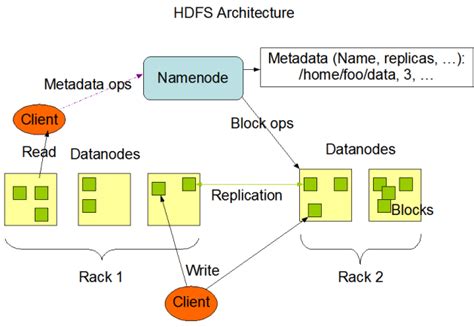
Hadoop Distributed File System (HDFS) is a cornerstone of the Hadoop ecosystem, designed to store large volumes of data across multiple machines. Accessing and manipulating data within HDFS is a common task for data engineers and developers working with big data. This guide provides a comprehensive overview of various methods to download files from HDFS using Python, integrating best practices and detailed explanations to ensure you can effectively manage your data workflows.
Approaches to Downloading Files from HDFS
1. Using the hdfs Python Package
The hdfs Python package offers a native API to interact with HDFS, making it a recommended approach for programmatic access without relying on external CLI commands.
Step 1: Installation
First, install the hdfs package using pip:
pip install hdfsStep 2: Initializing the HDFS Client
Initialize the HDFS client by specifying the NameNode's URL and your username:
from hdfs import InsecureClient

hdfs_url = 'http://namenode_host:50070'  # Replace with your NameNode's URL
username = 'your_username'              # Replace with your HDFS username
client = InsecureClient(hdfs_url, user=username)
Step 3: Defining File Paths
Specify the path of the file in HDFS and the local destination path:
hdfs_file_path = '/path/to/your/file_in_hdfs.txt'    # HDFS file path
local_file_path = '/path/to/save/file_locally.txt'           # Local destination path
Step 4: Downloading the File
Use the download method to transfer the file from HDFS to your local machine:
client.download(hdfs_file_path, local_file_path, overwrite=True)
print(f"File downloaded successfully to {local_file_path}")
Complete Script
from hdfs import InsecureClient

def download_file_from_hdfs(hdfs_url, username, hdfs_path, local_path):
    try:
        client = InsecureClient(hdfs_url, user=username)
        client.download(hdfs_path, local_path, overwrite=True)
        print(f"File downloaded successfully to {local_path}")
    except Exception as e:
        print(f"An error occurred: {e}")

# Example usage
hdfs_url = 'http://namenode_host:50070'         # Replace with your NameNode's URL
username = 'your_username'                     # Replace with your HDFS username
hdfs_path = '/path/to/your/file_in_hdfs.txt'   # HDFS file path
local_path = '/path/to/save/file_locally.txt'  # Local destination path

download_file_from_hdfs(hdfs_url, username, hdfs_path, local_path)
2. Using the subprocess Module with HDFS CLI
This method involves executing HDFS CLI commands directly from Python using the subprocess module. It is straightforward but requires the Hadoop CLI to be installed and properly configured.
Step 1: Ensure HDFS CLI is Installed
Before using this approach, verify that the Hadoop CLI is installed and accessible in your system's PATH.
Step 2: Writing the Python Script
Use the subprocess module to execute the hdfs dfs -get command:
import subprocess

def download_file_from_hdfs_cli(hdfs_filepath, local_filepath):
    """
    Downloads a file from HDFS using the HDFS CLI command.

    Parameters:
        hdfs_filepath (str): Path of the file in HDFS (e.g., hdfs://namenode:8020/path/to/file.txt).
        local_filepath (str): Path where the file should be saved locally.
    """
    try:
        command = ["hdfs", "dfs", "-get", hdfs_filepath, local_filepath]
        subprocess.run(command, check=True)
        print(f"File downloaded successfully from {hdfs_filepath} to {local_filepath}")
    except subprocess.CalledProcessError as e:
        print(f"Error downloading file: {e}")
    except FileNotFoundError:
        print("The HDFS CLI is not installed or not found in PATH.")

# Example usage
hdfs_filepath = "/path/to/file/on/hdfs.txt"
local_filepath = "path/to/save/locally/file.txt"
download_file_from_hdfs_cli(hdfs_filepath, local_filepath)
3. Using PyArrow for Large Files and DataFrames
PyArrow is suitable for handling large files and DataFrames, providing efficient data processing capabilities when interacting with HDFS.
Step 1: Installation
Install PyArrow using pip:
pip install pyarrowStep 2: Initializing the HDFS Filesystem
Set up the HDFS filesystem by specifying the NameNode's host, port, and your username:
from pyarrow import fs

hdfs = fs.HadoopFileSystem(
    host="namenode_host",   # Replace with your NameNode's host
    port=9870,              # Replace with your NameNode's port
    user="hadoop_user"      # Replace with your HDFS username
)
Step 3: Defining File Paths
Specify the source path in HDFS and the destination path on your local machine:
hdfs_path = "/path/in/hdfs/file.txt"
local_path = "/path/on/local/file.txt"
Step 4: Downloading the File
Use PyArrow's filesystem interface to read from HDFS and write to the local file system:
with hdfs.open_input_file(hdfs_path) as hdfs_file:
    with open(local_path, 'wb') as local_file:
        local_file.write(hdfs_file.read())

print(f"File downloaded successfully to {local_path}")
Complete Script
from pyarrow import fs

def download_file_with_pyarrow(namenode_host, namenode_port, hadoop_user, hdfs_path, local_path):
    try:
        hdfs = fs.HadoopFileSystem(
            host=namenode_host,
            port=namenode_port,
            user=hadoop_user
        )
        with hdfs.open_input_file(hdfs_path) as hdfs_file:
            with open(local_path, 'wb') as local_file:
                local_file.write(hdfs_file.read())
        print(f"File downloaded successfully to {local_path}")
    except Exception as e:
        print(f"An error occurred: {e}")

# Example usage
namenode_host = "namenode_host"          # Replace with your NameNode's host
namenode_port = 9870                     # Replace with your NameNode's port
hadoop_user = "hadoop_user"             # Replace with your HDFS username
hdfs_path = "/path/in/hdfs/file.txt"    # HDFS file path
local_path = "/path/on/local/file.txt"  # Local destination path

download_file_with_pyarrow(namenode_host, namenode_port, hadoop_user, hdfs_path, local_path)
Comparative Analysis of Approaches
| Approach | Pros | Cons | Best Suited For |
|---|---|---|---|
| hdfs Python Package | Native Python API, easy integration, supports various HDFS configurations. | Requires installation of the hdfs library, may need additional authentication setup for secure clusters. | Programmatic access without external dependencies, handling multiple HDFS interactions. |
| subprocess with HDFS CLI | No additional Python dependencies, leverages existing Hadoop CLI tools. | Requires Hadoop CLI to be installed and configured, less Pythonic. | Simple and quick scripts where Hadoop CLI is already set up. |
| PyArrow | Efficient for large files and DataFrames, integrates well with data processing pipelines. | Requires knowledge of PyArrow, additional installation steps. | Data-centric applications requiring high performance and integration with other data tools. |
Best Practices
1. Ensure Proper Authentication
Depending on your HDFS configuration, you might be using Kerberos or other authentication mechanisms. Ensure that your Python script handles authentication appropriately, whether through configuration files or programmatic authentication methods.
2. Handle Exceptions Gracefully
Implement robust error handling to catch and manage exceptions that may occur during the download process, such as network issues, permission errors, or file not found errors.
3. Validate File Paths
Before attempting to download, validate that the specified HDFS path exists and that the local path is writable. This can prevent runtime errors and ensure a smoother execution.
4. Use Overwrite Options Judiciously
When downloading files, decide whether to overwrite existing files based on your application's requirements. Providing options for the user to choose can add flexibility to your script.
5. Optimize for Large Files
For large files, consider using buffered reads and writes to manage memory usage effectively. Libraries like PyArrow are optimized for such scenarios and can enhance performance.
Common Pitfalls and Troubleshooting
1. HDFS CLI Not Found
If using the subprocess method, ensure that the HDFS CLI is installed and accessible in your system's PATH. You can verify this by running hdfs dfs -ls / in your terminal.
2. Authentication Failures
Authentication issues can arise if the HDFS cluster uses security features like Kerberos. Ensure that your script handles authentication correctly, potentially using configuration files or environment variables.
3. Permission Denied Errors
Make sure that the user specified in your script has the necessary permissions to read the file from HDFS and write to the local directory.
4. Network Connectivity Issues
Ensure that your machine can reach the HDFS NameNode over the network. Network issues can prevent successful file downloads.
5. Incorrect File Paths
Double-check the HDFS file path and the local destination path to ensure they are correct. Misconfigured paths can lead to file not found errors or files being downloaded to unintended locations.
Advanced Tips
1. Automate with Scripts
Create reusable scripts or modules that can handle file downloads, making it easier to integrate HDFS interactions into larger data processing workflows.
2. Logging Mechanisms
Implement logging within your scripts to monitor download processes, track successes and failures, and facilitate debugging.
3. Parallel Downloads
For scenarios requiring multiple file downloads, consider implementing parallel processing to improve efficiency and reduce download times.
4. Integration with Data Pipelines
Integrate HDFS file downloads into broader data pipelines using orchestration tools like Apache Airflow or Luigi, enabling automated and scalable data workflows.
Recap and Conclusion
Downloading files from HDFS using Python can be accomplished through various approaches, each suited to different use cases and environments. Whether you opt for the native hdfs Python package, leverage the HDFS CLI with the subprocess module, or utilize PyArrow for large-scale data handling, understanding the strengths and limitations of each method is crucial. Adhering to best practices, such as ensuring proper authentication, implementing robust error handling, and optimizing for performance, will enable you to manage your HDFS data effectively and integrate it seamlessly into your data processing workflows.
References
Last updated January 18, 2025