
Unlocking Drive Secrets: Pinpointing the Location of Drive 1.2.3.L1
A deep dive into enterprise storage drive identifiers to find its true shelf and bay.
Understanding the physical location of a specific drive within a complex storage system is crucial for maintenance, troubleshooting, and overall system management. Drive identifiers like "1.2.3.L1" are not arbitrary; they follow specific conventions, often set by the hardware manufacturer. This guide will help decipher the meaning behind "1.2.3.L1" to determine its precise location.
Key Insights at a Glance
- The drive 1.2.3.L1 is located in shelf 2. This is determined by the second component of the identifier in many common storage system nomenclatures.
- The drive 1.2.3.L1 is located in bay 3. This is indicated by the third component of the identifier.
- Context is crucial: Drive naming conventions, particularly for enterprise systems like NetApp, interpret these numbers hierarchically, often as System/Enclosure.Shelf.Bay.LogicalUnit.
Deconstructing the Drive Identifier: 1.2.3.L1
Enterprise storage systems, such as those from NetApp, utilize structured naming conventions to pinpoint hardware components. The identifier "1.2.3.L1" is a common format. While exact interpretations can vary slightly between manufacturers or even product lines, a prevalent scheme breaks it down as follows:
- The first number (1) often refers to a higher-level component, such as the overall system ID, a controller, or an enclosure ID.
- The second number (2) typically designates the shelf ID. A shelf is a chassis or drawer within the storage array that houses multiple drives.
- The third number (3) usually specifies the bay ID or slot number within that particular shelf where the drive is physically installed.
- The suffix (L1) commonly denotes a logical aspect, such as a logical disk number, a port designator, or part of a World Wide Name (WWN) suffix. This part generally does not indicate the physical shelf or bay.
Based on analyses of storage system documentation, particularly within the NetApp ecosystem and related certification materials (like for the NS0-093 exam), the drive "1.2.3.L1" is interpreted as:
- System/Enclosure ID: 1
- Shelf ID: 2
- Bay ID: 3
- Logical Suffix: L1
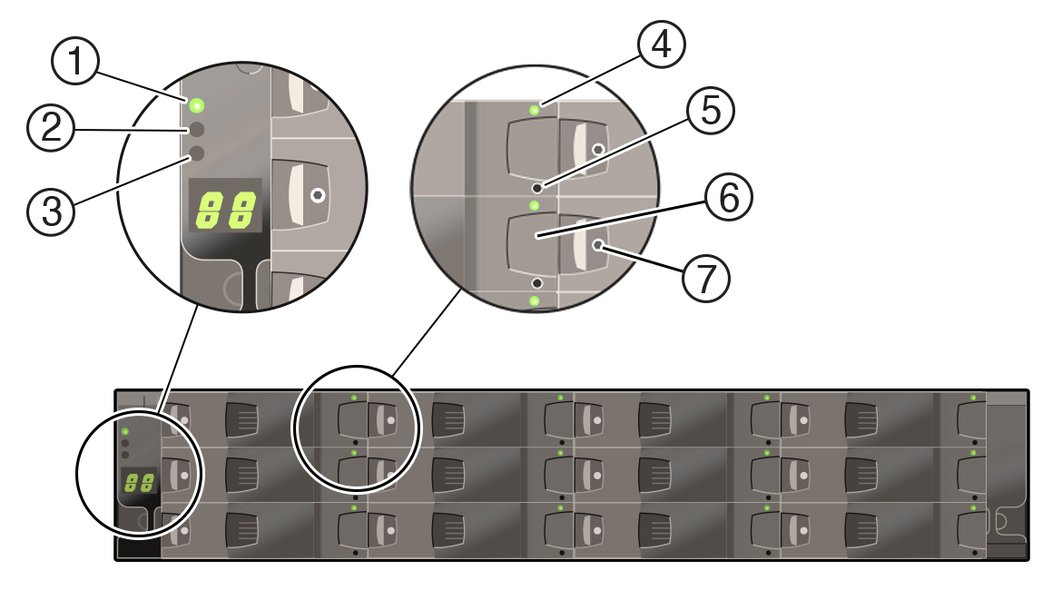
An example of a storage drive enclosure (Oracle DE3-12C) with clearly visible drive bays. The identifier "1.2.3.L1" helps locate a specific drive within such an array.
Evaluating the Statements
Given the interpretation that the drive identifier "1.2.3.L1" corresponds to Shelf 2 and Bay 3, let's evaluate the provided statements:
Option A: The drive is in shelf 2.
This statement is TRUE. According to the common convention where the second numerical component (2) represents the shelf ID, drive 1.2.3.L1 is located in shelf 2.
Option B: The drive is in bay 3.
This statement is TRUE. Following the convention, the third numerical component (3) represents the bay ID within the shelf. Therefore, drive 1.2.3.L1 is located in bay 3 of shelf 2.
Option C: The drive is in bay 2.
This statement is FALSE. The bay ID is indicated by the third number, which is 3, not 2.
Option D: The drive is in shelf 1.
This statement is FALSE. The shelf ID is indicated by the second number, which is 2, not 1. The first number (1) typically refers to a system or enclosure ID, not the shelf itself in this hierarchical naming scheme.
Therefore, the two true statements regarding drive 1.2.3.L1 are A and B.
Tabular Breakdown of Identifier 1.2.3.L1
To further clarify, the components of the drive identifier "1.2.3.L1" and their roles in determining the physical location within many enterprise storage systems (particularly those following NetApp-like conventions) are summarized below:
| Component Position | Value in "1.2.3.L1" | Typical Interpretation | Relevance to Physical Location |
|---|---|---|---|
| First | 1 | System ID, Controller ID, or Enclosure ID | Identifies the broader system or enclosure housing the shelves. |
| Second | 2 | Shelf ID | Directly indicates the physical shelf (Shelf 2). |
| Third | 3 | Bay ID / Slot Number | Directly indicates the physical bay within the shelf (Bay 3). |
| Suffix | L1 | Logical Unit Identifier, Port Label, or other suffix | Generally not relevant to the physical shelf or bay location; pertains to logical configuration or specific drive characteristics. |
Visualizing Storage Identification Hierarchy
A mindmap can help illustrate the hierarchical nature of storage component identification within a typical enterprise storage array. The identifier "1.2.3.L1" fits into this structure by providing a path to the specific drive.
This mindmap highlights how each part of the identifier contributes to narrowing down the drive's location, emphasizing the physical aspects (shelf and bay) and the logical nature of the suffix.
Key Considerations in Drive Identifier Interpretation
Interpreting drive identifiers correctly requires attention to several factors. The radar chart below visualizes the importance of these considerations when dealing with an identifier like "1.2.3.L1" in a specific context (e.g., a NetApp system) versus a more generic or poorly documented scenario.
This chart illustrates that for an identifier like "1.2.3.L1", especially when assumed to be within a known system context (like NetApp, as suggested by exam materials), reliance on vendor documentation and the established positional convention is high, leading to lower ambiguity. Conversely, a generic identifier without such context would score lower on clarity and higher on potential for misinterpretation.
The Significance of "L1"
What does the "L1" Suffix Imply?
The "L1" part of the "1.2.3.L1" identifier is generally a logical designator rather than a physical one. Its meaning can vary but often relates to:
- Logical Unit Number (LUN): In some systems, it might indicate the first logical unit on that physical disk, especially if the disk is partitioned or presented as multiple logical drives.
- Port or Path Identifier: It could refer to a specific port or path through which the drive is accessed, particularly in multi-path I/O (MPIO) configurations.
- Firmware or Feature Level: Less commonly, it might denote a specific firmware revision or a feature set of the drive.
- Internal Tracking: Some systems use such suffixes for internal tracking or management purposes.
For the purpose of identifying the physical shelf and bay, the "L1" is typically not the primary component to consider. The numerical parts preceding it are key to locating the hardware slot.
Frequently Asked Questions (FAQ)
What does "L1" in "1.2.3.L1" typically mean?
"L1" usually serves as a logical identifier. It does not typically denote a physical shelf or bay. Common interpretations include a logical unit number (LUN) suffix, a port identifier (e.g., for Fibre Channel or SAS connections), a specific slice or partition of the drive, or an internal system label. Its exact meaning is highly dependent on the specific storage system's conventions.
Are these drive naming conventions universal across all storage systems?
No, they are not universally standardized. While the hierarchical structure (Enclosure/System -> Shelf -> Bay) is common, the exact syntax, the order of elements, and what each number or letter signifies can vary significantly between different storage vendors (e.g., NetApp, Dell EMC, HPE, IBM, Oracle) and even between different product families from the same vendor. Always consult the official documentation for your specific storage system.
Why is the first number '1' not the shelf number in this case?
In many enterprise storage identifier schemes, particularly those like NetApp's, the numbering is hierarchical. The first number often denotes a larger grouping, such as the overall system ID, a specific controller node in a cluster, or the main enclosure that contains multiple shelves. The subsequent numbers then drill down to more specific locations: the shelf within that enclosure/system, and then the bay within that shelf. So, '1' is a parent level to '2' (the shelf).
How can I find the specific naming convention for my storage system?
The most reliable source is the official vendor documentation for your specific storage array model. This can usually be found on the manufacturer's support website. Look for hardware guides, maintenance manuals, or CLI reference guides. Sometimes, system management interfaces or diagnostic tools will also display or help interpret these identifiers. If you are studying for a certification, the exam preparation materials often cover these conventions.
Recommended Further Exploration
- Explore detailed NetApp disk drive naming conventions and syntax.
- What are common troubleshooting procedures for physical drive failures in enterprise storage arrays?
- Learn about the architectural differences between various enterprise storage systems.
- How do Logical Unit Numbers (LUNs) map to physical disk locations in SAN environments?
References
 static.ixsystems.co
Last updated May 12, 2025