
Unlocking Drupal 7 Email Secrets: How to Reliably Track Every drupal_mail() Outcome
Discover the most effective techniques to capture email sending status across your entire Drupal 7 application without overhauling existing code.
When working with Drupal 7, the drupal_mail() function is the standard way to send emails. However, if this function is used extensively throughout your codebase, trying to determine the success or failure of each email dispatch can be a significant challenge. Modifying every single call to drupal_mail() is often impractical. This guide explores the best strategies to globally capture the return status of drupal_mail().
Key Highlights: Tracking Email Success in Drupal 7
- Understanding the Return: The
drupal_mail()function populates a'result'key within its returned$messagearray, indicating if the email was successfully handed off to the mail system (when$send = TRUE). - The Core Challenge: Accessing this
'result'consistently across numerous, scattered function calls without altering each one requires a centralized approach. - The Premier Solution: Implementing a custom mail system class is the most robust and non-intrusive method to intercept and log the outcome of every email sent via
drupal_mail().
Deconstructing drupal_mail() and Its Return Value
The drupal_mail() function in Drupal 7 is responsible for composing and, optionally, sending an email. Its signature is typically:
$message = drupal_mail($module, $key, $to, $language, $params, $from, $send);When the $send parameter is set to TRUE, Drupal attempts to send the email. The function itself returns an array, commonly referred to as the $message array. This array contains all the details of the email, including headers, body, recipient, and, crucially, a 'result' key.
The $message['result'] key will hold a boolean value:
TRUE: Indicates that the mail system successfully accepted the email for delivery (e.g., passed it to PHP'smail()function or an SMTP server).FALSE: Indicates that there was an issue during the handoff to the mail system.
It's important to understand that TRUE does not guarantee final delivery to the recipient's inbox, as that depends on many external factors like spam filters and recipient server status. It only confirms that Drupal's part in initiating the send was successful.
If $send is FALSE, the email is composed but not sent, and the 'result' key may not be set or relevant in terms of sending success.
The Challenge: Ubiquitous drupal_mail() Calls
Your situation, where drupal_mail() is invoked in numerous locations, is common in large Drupal sites or applications with many custom or contributed modules. Manually altering each call to check the $message['result'] is error-prone, time-consuming, and difficult to maintain. Therefore, a global interception strategy is needed.
Solution 1: Implementing a Custom Mail System (Recommended)
The most comprehensive and clean way to capture the return status of every drupal_mail() call site-wide is by implementing a custom mail system. Drupal 7's mail system is pluggable, allowing you to define your own class to handle email sending.
Why a Custom Mail System?
This approach allows you to create a wrapper around the default mail sending mechanism. Your custom class will receive the $message array, pass it to the original mail system, capture the result, perform any logging or actions you need, and then return the result. This is done centrally, without modifying any of the existing drupal_mail() calls.
Step 1: Create Your Custom Mail System Class
You'll define a PHP class that implements MailSystemInterface. Typically, this class will extend DefaultMailSystem and override its mail() method.
Create a file, for example, within your custom module (e.g., mymodule/mymodule_mail.inc):
<?php // mymodule/mymodule_mail.inc class MyCustomMailSystem extends DefaultMailSystem { /** * Overrides DefaultMailSystem::mail(). * * Sends the mail, then logs the result. */ public function mail(array $message) { // Delegate the actual sending to the parent class (DefaultMailSystem). $result = parent::mail($message); // Now, $result contains TRUE or FALSE. // You can log this result or perform other actions. if ($result) { watchdog( 'mymodule_mail_log', 'Email to %to (Subject: %subject) sent successfully.', array( '%to' => $message['to'], '%subject' => $message['subject'], ), WATCHDOG_INFO ); } else { // Prepare details for logging failure. // The $message array might contain error information from the mailer. $error_details = 'Headers: ' . print_r($message['headers'], TRUE) . '; Params: ' . print_r($message['params'], TRUE); if (isset($message['error'])) { $error_details .= '; Error: ' . print_r($message['error'], TRUE); } watchdog( 'mymodule_mail_log', 'Failed to send email to %to (Subject: %subject). Details: %details', array( '%to' => $message['to'], '%subject' => $message['subject'], '%details' => $error_details, ), WATCHDOG_ERROR ); // You might also want to store $message['result'] = FALSE explicitly if not already done. // However, the parent::mail method should have set $message['result']. } // Ensure the original $message array (potentially modified with the result) is returned. // The <code>mailmethod ofMailSystemInterfaceis expected to return a boolean indicating // whether the mail was successfully accepted for delivery. // The$message['result']key is set by the mail system. return $result; } } ?>
Ensure this file is included, for example, in your module's .module file:
// mymodule.module
module_load_include('inc', 'mymodule', 'mymodule_mail');
Step 2: Configure Drupal to Use Your Custom Mail System
You need to tell Drupal to use your new mail system class. This is done by setting a Drupal variable, typically in your settings.php file or programmatically (e.g., in an hook_enable() or hook_init() if appropriate, though settings.php is often preferred for persistence).
Add this to your settings.php file:
$conf['mail_system'] = array(
  'default-system' => 'MyCustomMailSystem',
);
Alternatively, you can set this using variable_set() in a module's .install file (on module enable) or via Drush:
// In mymodule.install
function mymodule_enable() {
  variable_set('mail_system', array('default-system' => 'MyCustomMailSystem'));
}

function mymodule_disable() {
  variable_del('mail_system'); // Revert to default on disable
}
After this configuration and clearing Drupal's caches, all calls to drupal_mail() will be routed through your MyCustomMailSystem::mail() method, allowing you to capture and log the result every time.
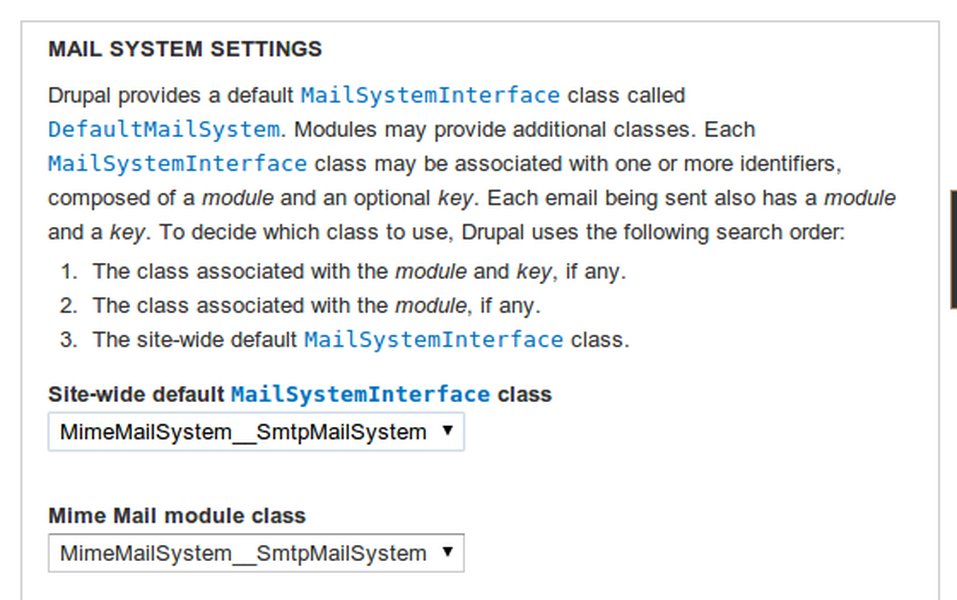
Visual example of mail system configuration options in Drupal.
Advantages of This Approach:
- Centralized Control: All email sending logic passes through your custom class.
- Non-Intrusive: No modification is needed for existing
drupal_mail()calls throughout the codebase. - Comprehensive: Captures results from core, contrib, and custom modules alike.
- Flexible: Allows for complex logging, notifications, or conditional logic based on send success/failure.
Considerations:
- Testing: Thoroughly test your custom mail system to ensure it behaves as expected and doesn't break email functionality.
- Class Naming and Placement: Ensure your class name is unique and the file is correctly included.
- Cache Clearing: Drupal caches variable settings, so clear caches after changing
$conf['mail_system']or usingvariable_set().
Visualizing the Mail Flow with a Custom Mail System
The following mindmap illustrates how a custom mail system intercepts and processes email sending in Drupal 7, allowing you to capture the result of each drupal_mail() call.
(Module/Core/Custom Code)"] id2["Mail System Selection
(drupal_mail_system() determines handler)"] id3["Your Custom MailSystem Class
(e.g., MyCustomMailSystem)"] id4["Implements MailSystemInterface"] id5["Overrides mail() Method"] id5a["1. Calls original mailer's mail() method
(e.g., parent::mail() or new DefaultMailSystem()->mail())"] id5b["2. Captures the 'result'
(boolean TRUE/FALSE from original mailer)"] id5c["3. Logs/Processes the 'result'
(e.g., watchdog(), custom database log)"] id5d["4. Returns the 'result'"] id6["Original Mail System
(e.g., DefaultMailSystem, SMTP module's system)"] id7["Handles actual sending
(e.g., via PHP mail(), SMTP server)"] id8["Returns TRUE/FALSE to your Custom MailSystem"] id9["Configuration via variable_set()
or settings.php"] id10["'mail_system' => array('default-system' => 'MyCustomMailSystem')"]
This mindmap shows that when drupal_mail() is called, Drupal consults the mail_system configuration. If your custom system is set as the default, its mail() method is invoked. This method then typically calls the underlying (e.g., default) mail system to perform the actual sending, captures its success/failure result, logs it, and then returns the result, ensuring you have a record for every email attempt.
Solution 2: Custom Wrapper Function (Limited Scope)
If you only need to track emails sent from your own custom code and don't want to implement a full mail system, a wrapper function can be a simpler, albeit limited, solution.
<?php
// In your custom module (e.g., mymodule.module)

/**
 * Wrapper function for drupal_mail() to log results.
 */
function mymodule_send_mail_and_log($module, $key, $to, $language, $params = array(), $from = NULL, $send = TRUE) {
  $message = drupal_mail($module, $key, $to, $language, $params, $from, $send);

  if ($send) { // Only log if an attempt to send was made
    if (!empty($message['result']) && $message['result'] === TRUE) {
      watchdog(
        'mymodule_wrapper',
        'Wrapper: Email to %to sent successfully (Module: %mod, Key: %k).',
        array('%to' => $to, '%mod' => $module, '%k' => $key),
        WATCHDOG_INFO
      );
    } else {
      watchdog(
        'mymodule_wrapper',
        'Wrapper: Failed to send email to %to (Module: %mod, Key: %k). Result: %res',
        array('%to' => $to, '%mod' => $module, '%k' => $key, '%res' => print_r($message, TRUE)),
        WATCHDOG_ERROR
      );
    }
  }
  return $message; // Return the original message array
}

// Example usage:
// $my_params = array('subject' => 'Test via Wrapper', 'body' => array('This is a test.'));
// mymodule_send_mail_and_log('mymodule', 'test_email', 'test@example.com', language_default(), $my_params);
?>
Limitations:
- This only captures results for emails sent *using your wrapper function*.
- It will not intercept calls to
drupal_mail()made directly by Drupal core or other contributed modules. - Requires you to find and replace existing
drupal_mail()calls in your custom code with your wrapper, which might be what you are trying to avoid if "there is too much use of this function".
Solution 3: Using hook_mail_alter() (Indirect and Not Ideal for Result Capture)
Drupal provides hook_mail_alter(&$message), which allows modules to modify email messages before they are passed to the mail system for sending. While you can inspect the $message array here, this hook is executed *before* the actual sending attempt by the mail system's mail() method. Therefore, $message['result'] will not typically be populated with the send status at this stage.
<?php
// In your custom module (e.g., mymodule.module)

/**
 * Implements hook_mail_alter().
 */
function mymodule_mail_alter(&$message) {
  // You can log the intent to send an email here.
  watchdog(
    'mymodule_alter',
    'Preparing to send email to %to (Module: %mod, Key: %k).',
    array('%to' => $message['to'], '%mod' => $message['module'], '%k' => $message['key']),
    WATCHDOG_DEBUG
  );

  // IMPORTANT: The $message['result'] is NOT reliably set here with the outcome of sending.
  // This hook runs BEFORE the mail system's mail() method that performs the sending.
  // Some complex workarounds might attempt to call the mailer here, but it's not clean
  // and can lead to issues like duplicate sending if not handled with extreme care.
  // For capturing the actual send *result*, a custom mail system is preferred.
}
?>
While hook_mail_alter() is powerful for modifying email content or headers, it's not the appropriate mechanism for reliably capturing the final send status from the mail system.
Comparing Email Tracking Approaches
The following chart provides a visual comparison of the discussed methods based on key criteria relevant to your goal of capturing drupal_mail() return statuses globally.
As illustrated, the Custom Mail System scores highest on global capture, reliability of result, and minimal code intrusion for existing calls, making it the most suitable solution for your stated problem. While its ease of implementation is moderate, the benefits for comprehensive tracking are significant.
Summary Table: Method Comparison
This table summarizes the key characteristics of each approach for tracking drupal_mail() outcomes:
| Feature | Custom Mail System | Wrapper Function | hook_mail_alter() |
|---|---|---|---|
Global Capture (All drupal_mail calls) |
Yes | No (only for calls made via the wrapper) | Yes (intercepts composition of all mails) |
| Reliably Captures Send Result | Yes, directly from the mail system's attempt. | Yes, for calls made through it. | No, hook runs before sending result is known. Indirect/unreliable for this purpose. |
Modification to Existing drupal_mail() Calls |
None required. | Required (replace direct calls with wrapper). | None required. |
| Implementation Complexity | Moderate (PHP class, configuration). | Simple (PHP function). | Simple (hook implementation). |
| Recommended for Your Goal | Strongly Recommended | Limited Usefulness (if extensive changes are undesirable). | Not Recommended (for capturing send result). |
Understanding Drupal Mail with Video Guidance
For a deeper understanding of how Drupal 7 handles mail and module integration, the following video discusses cron jobs and sending email using drupal_mail, providing context on the underlying mechanisms.
Drupal 7 Module Development: Cron and sending email. This video offers insights into the drupal_mail function and related Drupal concepts.
Important Final Considerations
- Meaning of 'Result': Remember that a
TRUEresult from the mail system signifies successful *acceptance* for sending, not guaranteed *delivery* to the recipient's inbox. - Impact of
$send = FALSE: Ifdrupal_mail()is called with$send = FALSE, the email is only composed, not sent. In such cases, the'result'key related to sending status will not be set by the mail system, and your custom mail system'smail()method might not even be invoked if the system defers sending. Your logging should account for this if necessary. - Drupal Logging: Utilize Drupal's
watchdog()function within your custom mail system for robust logging. This allows you to record detailed information about successes and failures, which can be invaluable for debugging. - Server Mail Configuration: Email deliverability issues can often stem from server-side mail configurations (e.g., PHP's
mail()setup, Sendmail, or Postfix) or issues with external SMTP services, rather than Drupal itself. Your captured results indicate Drupal's handoff success.
Frequently Asked Questions (FAQ)
What does a TRUE result from the mail system really mean?
A TRUE result (typically found in $message['result'] after a send attempt) indicates that the email message was successfully accepted by the configured mail sending agent (like PHP's built-in mail() function or an SMTP server via a module like SMTP Authentication Support). It does not guarantee that the email was delivered to the recipient's inbox or even that it left your server. It simply means Drupal successfully handed off the email to the next step in the sending chain.
Can I reliably use `hook_mail_alter()` to get the send result?
No, hook_mail_alter() is not the ideal place to get the final send result. This hook is invoked before the mail system's mail() method (which performs the actual sending and determines success/failure) is called. While you can see the email's content and headers, the $message['result'] key reflecting the send status will not yet be populated by the mail system. For capturing the outcome, a custom mail system implementation is the correct approach.
What happens if `drupal_mail()` is called with the `$send` parameter set to `FALSE`?
If drupal_mail() is called with $send = FALSE, the function will only compose the email (prepare headers, body, etc.) and return the $message array. It will not attempt to send the email. Consequently, your custom mail system's mail() method will not be invoked for this particular call, and no send 'result' will be generated or logged by it. This is typically used when emails are to be queued or processed in a batch later.
Is it safe to modify `settings.php` to configure the custom mail system?
Yes, modifying settings.php to set the $conf['mail_system'] variable is a standard and safe way to configure the mail system in Drupal 7. This file is specifically designed for site-specific configurations. However, always ensure you have a backup of settings.php before making changes, and be careful with PHP syntax. Alternatively, you can manage this variable programmatically using variable_set() and variable_del() within a custom module's install/uninstall hooks, which can be cleaner for deployment across different environments.
Recommended Further Exploration
- How can I further debug email sending failures in Drupal 7 even after capturing the `drupal_mail` result?
- What are the best practices for integrating Drupal 7 with external SMTP services for improved deliverability?
- Are there advanced logging techniques or modules for Drupal 7 that can complement a custom mail system?
- How does queued email sending work in Drupal 7, and how can I track results for queued mails?
References
Last updated May 9, 2025