
Exploring DuckDuckGo: Your Gateway to Enhanced Online Privacy
A Comprehensive Look at DuckDuckGo's Privacy Features, Services, and Functionality
DuckDuckGo has established itself as a prominent player in the online world, primarily recognized for its strong stance on user privacy. Unlike many mainstream search engines that track user data for targeted advertising, DuckDuckGo explicitly states that it does not track your searches or browsing history. This commitment to privacy is a core principle that attracts millions of users seeking to minimize their digital footprint.
Beyond its privacy-focused search engine, DuckDuckGo has expanded its offerings to include a dedicated web browser and a premium subscription service called DuckDuckGo Privacy Pro. These additional tools aim to provide users with a more comprehensive suite of privacy protections across their online activities.
Key Insights into DuckDuckGo
- Core Privacy Focus: DuckDuckGo's fundamental principle is its commitment to not track users' search or browsing history, offering a significant contrast to data-collecting search engines.
- Expanded Privacy Tools: In addition to its search engine, DuckDuckGo provides a dedicated privacy browser and a subscription service, Privacy Pro, which includes a VPN, personal information removal, and identity theft restoration.
- Search Functionality and "Bangs": While prioritizing privacy, DuckDuckGo offers a functional search experience, often leveraging results from other sources like Bing. Its unique "bangs" feature allows for quick searches on specific websites.
Understanding DuckDuckGo's Privacy Philosophy
At the heart of DuckDuckGo is the belief that users should have control over their personal information online. The company's approach to privacy is built on the principle of not collecting or storing personally identifiable information. This means that when you use the DuckDuckGo search engine, your searches are not linked to you individually, and no user profiles are created based on your search patterns.
How DuckDuckGo Protects Your Data
DuckDuckGo employs several methods to protect user privacy:
- No Search History Tracking: Your search queries are not saved or associated with your identity.
- No Cookies for Tracking: While anonymous cookies may be used for settings storage, they are not used to track your activity across sites.
- Blocking Trackers: The DuckDuckGo browser and extensions are designed to block various types of online trackers that follow you around the web.
- Encrypted Connections: DuckDuckGo prioritizes encrypted connections (HTTPS) to the websites it links to, helping to secure your connection.
This commitment to privacy has been a driving factor in DuckDuckGo's growing popularity, particularly among individuals concerned about online surveillance and data collection by large tech companies.
The DuckDuckGo Search Experience
Despite its focus on privacy, DuckDuckGo provides a functional and effective search engine. It aggregates results from various sources, including Bing, Yahoo! Search BOSS, Wolfram Alpha, and its own crawler, to deliver comprehensive search results. The interface is generally clean and user-friendly, offering a familiar search experience similar to other popular search engines.
Search Functionality and Customization
Users can customize their search settings on DuckDuckGo, adjusting preferences for how results are displayed and other visual elements. These settings can be saved to the cloud, allowing for a consistent experience across multiple devices.
Exploring "Bangs" for Direct Searches
One unique and powerful feature of the DuckDuckGo search engine is its "bangs." Bangs are shortcuts that allow you to search directly on thousands of other websites from the DuckDuckGo search bar. For example, typing "!a your search query" will take you directly to the search results for "your search query" on Amazon.
| Bang | Website | Example Usage |
|---|---|---|
!a |
Amazon | !a external hard drive |
!w |
Wikipedia | !w artificial intelligence |
!yt |
YouTube | !yt cat videos |
!r |
!r privacy |
This feature enhances the efficiency of searching by allowing users to bypass the initial DuckDuckGo results page and go directly to the desired platform. However, it's important to remember that once you navigate to another website using a bang, your privacy on that site is subject to the policies of that specific website.
Beyond Search: The DuckDuckGo Browser and Privacy Pro
Recognizing that online privacy extends beyond just search, DuckDuckGo has developed a dedicated web browser and a premium subscription service to offer more robust protection.
The DuckDuckGo Privacy Browser
The DuckDuckGo Privacy Browser is designed with built-in privacy protections that go beyond the search engine. It automatically blocks ad trackers, enhances encryption, and includes a "Fire Button" feature that allows users to instantly clear all browsing data and close tabs.
The browser aims to provide a more private browsing experience by default, mitigating tracking that occurs when you visit websites. It includes features like App Tracking Protection on mobile and Pop Up Banner Protection.
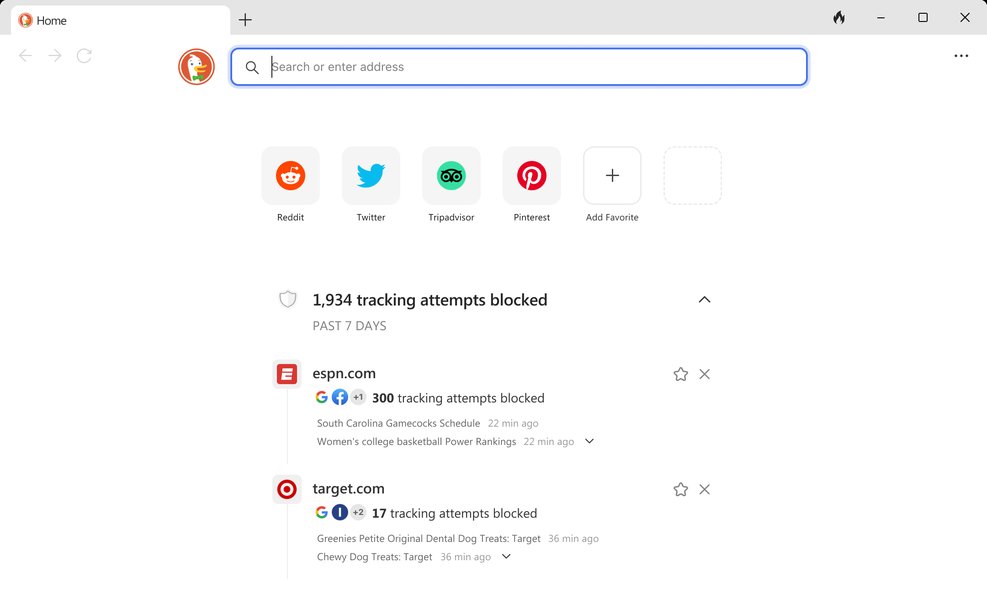
A view of the DuckDuckGo Privacy Browser interface.
DuckDuckGo Privacy Pro
For users seeking an even higher level of privacy and security, DuckDuckGo offers Privacy Pro, a paid subscription service. This bundle provides three key protections:
- VPN (Virtual Private Network): A fast and simple VPN to encrypt your internet connection and mask your IP address.
- Personal Information Removal: A service that helps remove your personal information from data broker websites.
- Identity Theft Restoration: Assistance in restoring your identity if it is compromised.
Privacy Pro is presented as a comprehensive solution for individuals who want to actively protect their personal data and online identity.
Is DuckDuckGo the Right Choice for You?
DuckDuckGo is widely regarded as a trustworthy search engine that prioritizes user privacy. Its commitment to not tracking users and blocking trackers offers a significant advantage over many mainstream alternatives. For users who are concerned about their online privacy and want to reduce the amount of data collected about them, DuckDuckGo is a compelling option.

An image symbolizing online privacy and protection.
Considerations and Limitations
While DuckDuckGo excels in privacy, it's important to consider a few points:
-
Search Result Sources: DuckDuckGo's reliance on other search engines like Bing for some results means that the quality and relevance of results can sometimes be influenced by those sources.
-
Beyond the Search Engine: While the search engine is private, achieving comprehensive online privacy requires more than just a private search engine. Using the DuckDuckGo browser or other privacy tools in conjunction with the search engine is recommended for broader protection.
-
Trust and Transparency: The company's transparency regarding its privacy practices and data handling is a key factor in building user trust. However, like any online service, users should be aware of its policies and limitations.
Ultimately, the decision to use DuckDuckGo depends on your individual privacy needs and preferences. For many, the privacy benefits it offers make it a worthwhile alternative to data-hungry search engines.
Setting DuckDuckGo as Your Homepage or Default Search Engine
Making DuckDuckGo your default search engine or homepage is a common step for users who want to integrate its privacy features into their daily browsing. The process varies slightly depending on the browser you are using.
Making DuckDuckGo Your Default Search Engine
In most web browsers, you can set DuckDuckGo as your default search engine through the browser's settings. This typically involves navigating to the search engine settings and selecting DuckDuckGo from the list of available options.
This video provides a tutorial on setting a custom homepage on the DuckDuckGo Web Browser.
This embedded video demonstrates how to set a custom homepage specifically within the DuckDuckGo web browser, offering a visual guide for users of that particular application.
Setting DuckDuckGo as Your Homepage
Setting DuckDuckGo as your homepage means that the DuckDuckGo search page will load every time you open your browser or click the home button. This can usually be configured within your browser's general settings or appearance settings.
Frequently Asked Questions about DuckDuckGo
What is the main advantage of using DuckDuckGo?
The primary advantage of using DuckDuckGo is its strong commitment to user privacy. It does not track your searches or browsing history, which helps to prevent the creation of detailed user profiles used for targeted advertising.
Does DuckDuckGo collect any personal information?
DuckDuckGo's core principle is to not collect or share personal information. While some optional features might require limited information to function, this is explicitly stated and the information is only used for that specific purpose.
How does DuckDuckGo make money if it doesn't track users for ads?
DuckDuckGo generates revenue through advertising that appears alongside search results. However, these ads are based on the keywords in your current search query, not on your past search history or personal information. They also have affiliate partnerships, such as with Amazon and eBay, where they earn a small commission on purchases made through their links.
Is the DuckDuckGo browser different from the search engine?
Yes, the DuckDuckGo browser is a separate application that includes the DuckDuckGo search engine as its default, but also provides additional built-in privacy protections for browsing websites, such as tracker blocking and encrypted connections.
What is DuckDuckGo Privacy Pro?
DuckDuckGo Privacy Pro is a paid subscription service offering enhanced privacy tools. It includes a VPN, a personal information removal service to help get your data off data broker sites, and identity theft restoration assistance.
Can DuckDuckGo protect me from all online threats?
While DuckDuckGo significantly enhances online privacy by not tracking you and blocking many trackers, it cannot provide complete protection against all online threats. It's still important to practice safe browsing habits, use strong passwords, and consider other security measures like antivirus software.
References
Last updated May 11, 2025