
Unlocking Interactive AI: Dynamic User Feedback with Adaptive Cards in Agentic Frameworks
Discover how to seamlessly integrate contextual human input into your LangGraph, CrewAI, and Semantic Kernel agents using Microsoft Adaptive Cards.
In the evolving landscape of artificial intelligence, creating agents that can intelligently interact with humans is paramount. A key aspect of this interaction is the ability to gather feedback dynamically, allowing the agent to refine its understanding, make better decisions, and personalize its responses. Microsoft Adaptive Cards offer a powerful and flexible way to achieve this, especially within sophisticated agentic frameworks. This guide explores how you can leverage Adaptive Cards to request user feedback based on chat context, enabling a more responsive and effective agentic flow.
Key Highlights for Integrating Adaptive Feedback
- Contextual Feedback Collection: Learn to generate Microsoft Adaptive Cards that dynamically adapt to the ongoing conversation, presenting users with relevant input options such as dropdown lists or text fields to gather specific feedback.
- Agentic Framework Integration: Explore practical methods for incorporating this human-in-the-loop (HITL) mechanism within prominent agentic frameworks like Semantic Kernel and LangGraph. Discover how tools such as Microsoft Copilot Studio and Power Automate can facilitate this integration.
- Seamless Workflow Continuation: Understand the mechanisms by which AI agents can receive, process, and act upon user feedback obtained through Adaptive Cards, allowing them to intelligently continue their tasks and decision-making processes without disrupting the conversational flow.
Understanding Microsoft Adaptive Cards for Human Input
Microsoft Adaptive Cards are platform-agnostic snippets of UI, authored in JSON, that apps and services can openly exchange. When delivered to a specific app, the JSON is transformed into native UI that automatically adapts to its surroundings. This makes them an ideal choice for embedding rich, interactive content directly within conversational interfaces like Microsoft Teams, Outlook, or custom AI agent frontends.
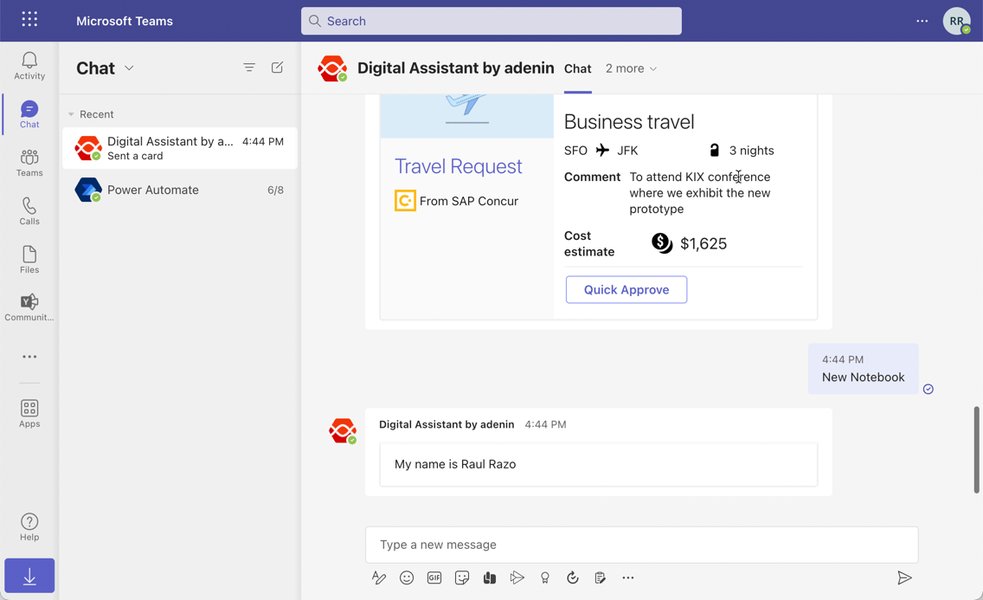
An Adaptive Card displaying dynamic information within a chat application.
Core Features Benefiting Agentic Feedback
- Rich Content & Interactivity: Support for text, images, buttons, and various input controls like text boxes, date pickers, and choice sets (dropdowns or radio buttons).
- Dynamic Data Population: Cards can be populated with data from the chat context, agent variables, or external sources, making each feedback request relevant.
- Action-Oriented: Users can submit data through actions (e.g.,
Action.Submit), which then sends the collected information back to the agent or a connected service for processing. - Platform Agnostic: Design once in JSON and render consistently across multiple host applications.
Integrating Dynamic Adaptive Cards in Agentic Frameworks
The method for integrating dynamic Adaptive Cards varies depending on the chosen agentic framework. Below, we explore approaches for Semantic Kernel, LangGraph, and the often-paired Microsoft Copilot Studio with Power Automate.
Semantic Kernel: Programmatic & Flexible Integration
Semantic Kernel, an open-source SDK from Microsoft, is designed for building AI agents that can orchestrate AI models with existing code. Its modularity and extensibility make it well-suited for incorporating human-in-the-loop (HITL) scenarios, including dynamic Adaptive Card feedback.
Dynamic Card Generation and Feedback
Within Semantic Kernel, you can create "skills" or "plugins" that programmatically generate the JSON payload for an Adaptive Card. This JSON can be constructed based on the current conversation context, agent state, or specific data points you want user input on. For example, after an agent provides a complex answer, it could trigger a skill to generate an Adaptive Card asking for feedback on clarity, with a dropdown for "Very Clear," "Somewhat Clear," or "Not Clear."
// Conceptual C# example for generating dynamic card JSON in Semantic Kernel
public class FeedbackSkill {
    [SKFunction, Description("Generates an Adaptive Card for feedback.")]
    public string GenerateFeedbackCard([SKName("context")] string chatContext) {
        // Logic to analyze chatContext and build dynamic elements
        string dynamicPrompt = $"Based on our discussion about '{chatContext}', how would you rate the information?";
        var card = new {
            type = "AdaptiveCard",
            version = "1.5",
            body = new[] {
                new { type = "TextBlock", text = dynamicPrompt, wrap = true },
                new {
                    type = "Input.ChoiceSet",
                    id = "userFeedbackRating",
                    style = "compact",
                    choices = new[] {
                        new { title = "Excellent", value = "5" },
                        new { title = "Good", value = "4" },
                        new { title = "Fair", value = "3" },
                        new { title = "Poor", value = "2" }
                    }
                },
                new { type = "Input.Text", id = "userFeedbackComment", placeholder = "Any additional comments?", isMultiline = true }
            },
            actions = new[] {
                new { type = "Action.Submit", title = "Submit Feedback", data = new { action = "submitFeedback" } }
            }
        };
        return System.Text.Json.JsonSerializer.Serialize(card);
    }
}
Once the JSON is generated, Semantic Kernel can use a connector (e.g., to Microsoft Teams or a custom chat interface) to send the card to the user. Upon submission, the feedback data is returned, which the agent can then process to influence its next steps, update its memory, or log for analysis.
Microsoft Copilot Studio & Power Automate: Low-Code Powerhouse
For a more low-code/no-code approach, Microsoft Copilot Studio (formerly Power Virtual Agents) combined with Power Automate offers robust capabilities for dynamic Adaptive Card feedback.
Visual Design and Dynamic Content
Copilot Studio allows you to add "Ask with Adaptive Card" nodes directly into your conversation topics. You can use the built-in designer or paste JSON created with the online Adaptive Cards designer. Crucially, Copilot Studio supports Power Fx formulas to dynamically populate card content using topic or global variables. This means the questions, options in a dropdown, or pre-filled text can be tailored to the immediate chat context.
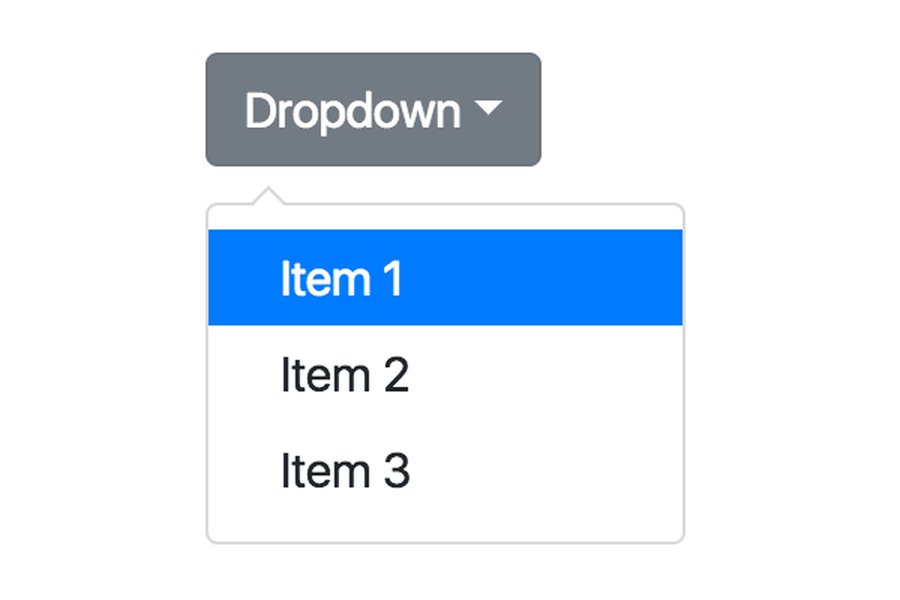
An Adaptive Card with a dropdown (Input.ChoiceSet) for structured user feedback.
Processing Feedback with Power Automate
When a user submits an Adaptive Card in Copilot Studio, the output (e.g., the selected dropdown value, text input) is stored in variables. These variables can then be passed to a Power Automate flow. Power Automate can then perform various actions, such as:
- Storing the feedback in a database (e.g., Dataverse, SharePoint list).
- Sending an email or Teams notification to a human agent.
- Calling other APIs or services.
- Returning data back to Copilot Studio to continue the conversation based on the feedback.
Actions like "Post an Adaptive Card to a Teams user and wait for a response" in Power Automate are particularly useful for scenarios where the agent needs to pause and await user input before proceeding.
This video demonstrates how Adaptive Cards can be used within Microsoft Copilot Studio to ask questions and collect user input, a core aspect of the dynamic feedback mechanism discussed.
LangGraph: Orchestrating HITL with External Card Services
LangGraph, an extension of LangChain, is designed for building stateful, multi-actor applications with LLMs. It excels at creating cyclical graphs and explicitly managing agent state, including human-in-the-loop interactions.
Integrating Adaptive Cards
While LangGraph doesn't natively render UIs like Adaptive Cards, its architecture is well-suited for integrating them. A LangGraph agent can reach a state where human input is required. At this point, it can:
- Prepare data (derived from chat context and agent state) to be included in an Adaptive Card.
- Make an API call to an external service (e.g., a custom microservice, a Power Automate flow, or a bot framework connector) responsible for generating and rendering the Adaptive Card to the user on a specific platform (like Microsoft Teams).
- The LangGraph flow would then pause or enter a "wait" state.
- Once the user submits the card, the external service processes the submission and sends the feedback data back to the LangGraph agent, typically via a webhook or by updating a shared state that the agent polls.
- The agent ingests this feedback and continues its graph execution.
This approach leverages LangGraph's strength in flow control and HITL while delegating the UI aspects to specialized services.
CrewAI: Tool-Based Integration Potential
CrewAI focuses on orchestrating collaborative autonomous AI agents. While the provided information doesn't detail specific, direct integrations for Microsoft Adaptive Cards in CrewAI for dynamic feedback based on chat context, its general design principles suggest that such functionality would be implemented via custom tools.
Custom Tools for Feedback
In CrewAI, an agent could be equipped with a custom tool that, when invoked:
- Takes the current chat context as input.
- Interacts with an external API or service (similar to the LangGraph approach) to generate and display an Adaptive Card to the user.
- Waits for the user's response from that service.
- Returns the collected feedback to the CrewAI agent.
This maintains CrewAI's agent and tool-based architecture, abstracting the Adaptive Card interaction into a reusable component.
Comparative Analysis of Approaches
To help visualize how these different frameworks and tools might suit your needs for implementing dynamic Adaptive Card feedback, the following radar chart offers a qualitative comparison across key dimensions. These are opinion-based interpretations derived from their general capabilities and the provided information.
Radar chart comparing Semantic Kernel, Copilot Studio + Power Automate, and LangGraph (with external integration) for dynamic Adaptive Card feedback.
General Workflow for Dynamic Adaptive Card Feedback
Regardless of the specific framework, the overall process for implementing dynamic Adaptive Card feedback typically follows these steps. The mindmap below illustrates this cyclical flow:
(e.g., after a response, ambiguity detection)"] id1.2["Frameworks:
Semantic Kernel, LangGraph (HITL), Copilot Studio"] id2["Chat Context Analysis"] id2.1["Extract Relevant Information
(user query, prior turns, agent state)"] id2.2["Personalize Card Content & Options"] id3["Adaptive Card Generation (Dynamic)"] id3.1["Construct JSON Payload Programmatically or via Template"] id3.2["Embed Input Controls (e.g., Input.ChoiceSet for dropdown)"] id3.3["Inject Contextual Data (Variables, Power Fx, Agent Memory)"] id4["Card Delivery & User Interaction"] id4.1["Send Card to User via Chat Interface (e.g., Teams, Web Chat)"] id4.2["User Views Card"] id4.3["User Provides Feedback (e.g., Selects from Dropdown, Enters Text)"] id4.4["User Submits Feedback (Action.Submit)"] id5["Feedback Processing by Agent/System"] id5.1["Capture Submitted Data from Card"] id5.2["Validate Input (Optional)"] id5.3["Update Agent State, Memory, or Log Feedback"] id6["Agent Continues Flow Based on Feedback"] id6.1["Adjust Subsequent Actions or Decisions"] id6.2["Modify Responses or Refine Information"] id6.3["Continue Towards Goal with User Input Incorporated"]
Mindmap illustrating the process flow for dynamic Adaptive Card feedback in an agentic system.
Feature Comparison Table
The following table provides a side-by-side comparison of the discussed approaches for implementing dynamic Adaptive Card feedback:
| Feature | Semantic Kernel | Microsoft Copilot Studio + Power Automate | LangGraph (with external integration) |
|---|---|---|---|
| Card Generation Method | Programmatic JSON creation via code/plugins (C#, Python, Java) | Visual designer & Power Fx for dynamic content in Copilot Studio | API call to an external service or bot framework for generation |
| Dynamic Content Source | Chat context variables, agent state, function outputs | Topic/agent variables within Copilot Studio, Power Fx formulas | Context data passed from LangGraph to the external card service |
| Feedback Handling | Custom code in skills/plugins, event listeners, processing function outputs | Power Automate flows triggered by card submission to capture/process data | Webhook/callback to LangGraph agent, or polling updated state |
| Primary Integration | Deeply with Microsoft ecosystem (Azure AI, etc.), programmatic SDK | Seamlessly within Microsoft ecosystem (Teams, Dataverse, etc.), low-code | Via APIs, custom connectors, explicit Human-in-the-Loop nodes |
| Typical Complexity | Moderate to High (requires development effort in C#, Python, or Java) | Low to Moderate (visual tools, some Power Fx scripting) | Moderate to High (involves setting up integrations and API management) |
| Human-in-the-Loop (HITL) Support | Strong, integral to agent design and plugin architecture | Strong, core feature of conversational AI and Copilot Studio flows | Core design principle, explicitly managed through graph states and nodes |
Frequently Asked Questions (FAQ)
What are Microsoft Adaptive Cards and why are they useful for user feedback?
How can I make an Adaptive Card's content dynamic based on chat context?
- Templating: Using an Adaptive Card template and populating it with data at runtime.
- Data Binding: Some platforms support binding card elements directly to data sources.
- Programmatic Generation: Constructing the JSON payload of the card using code, injecting variables derived from the chat context or agent's state.
- Power Fx (in Copilot Studio): Using Power Fx formulas within Copilot Studio to insert dynamic values from topic or agent variables directly into the card's JSON.
Which agentic framework offers the most direct support for integrating dynamic Adaptive Cards?
How is feedback from an Adaptive Card typically processed by an agent?
Action.Submit button), the data entered or selected by the user (like a dropdown choice or text input) is sent back to the application or service that presented the card. The agent (or an intermediary like Power Automate) then captures this data. This data can be used to:
- Update the agent's internal state or memory.
- Guide the agent's next actions or decisions in the conversational flow.
- Be logged for analysis or human review.
- Trigger other processes or workflows.
Conclusion
Integrating dynamic user feedback via Microsoft Adaptive Cards significantly enhances the capabilities of agentic frameworks. By tailoring feedback requests to the specific chat context, agents can gather more relevant information, leading to improved performance, user satisfaction, and more natural interactions. While Semantic Kernel and Microsoft Copilot Studio (with Power Automate) offer more direct pathways within the Microsoft ecosystem, frameworks like LangGraph and CrewAI can also achieve this through well-designed integrations and custom tooling. The key is to choose the approach that best aligns with your technical stack, development resources, and the specific requirements of your AI agent.
Recommended Further Exploration
- Explore advanced templating techniques for Microsoft Adaptive Cards.
- Investigate specific API integrations for sending and receiving Adaptive Card data with LangGraph.
- Learn about handling complex user input scenarios and error states with Adaptive Cards in Semantic Kernel.
- Discover best practices for designing user-friendly feedback forms using Adaptive Cards.