
Seamless Network Integration: Dynamic Routing with WireGuard and BGP
Enhancing Network Flexibility and Security Through Dynamic Routing Protocols
Dynamic routing, particularly when implemented with WireGuard and Border Gateway Protocol (BGP), offers a robust solution for creating flexible, secure, and efficient network connections. This combination allows for the automatic exchange of routing information, ensuring optimal paths for data transmission across multiple sites. WireGuard provides a modern VPN protocol that's easy to set up and secure, while BGP facilitates dynamic routing, enabling networks to adapt to changes and maintain connectivity without manual intervention.
Key Highlights of Dynamic Routing with WireGuard and BGP
- Enhanced Security: WireGuard's state-of-the-art cryptography ensures secure VPN connections.
- Improved Flexibility: Dynamic routing automatically adjusts to network changes, adding new networks or modifying existing ones with ease.
- Optimized Performance: WireGuard is designed for speed and efficiency, providing low latency and high throughput.
Understanding the Basics
To fully appreciate the benefits of dynamic routing with WireGuard and BGP, it's essential to understand the fundamental concepts behind each technology.
What is WireGuard?
WireGuard is a modern VPN protocol designed to be faster, simpler, and more secure than older protocols like IPSec. It uses state-of-the-art cryptography and is integrated directly into the Linux kernel, making it highly efficient. WireGuard operates on the principle of "Cryptokey Routing," which associates public keys with a list of tunnel IP addresses that are allowed inside the tunnel. Each network interface has a private key and a list of peers, with each peer possessing a public key.
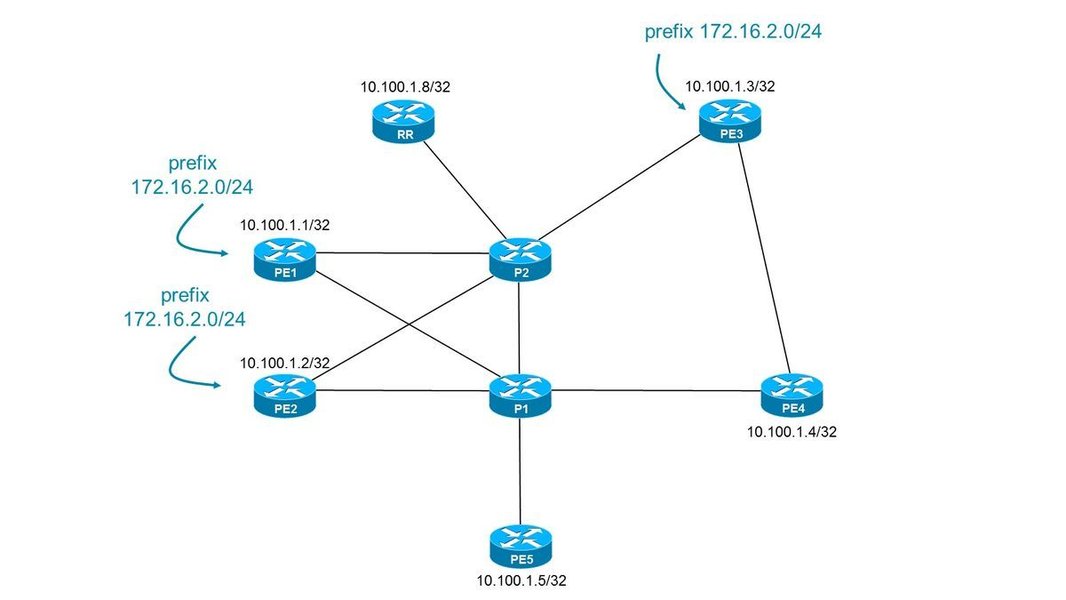 BGP Optimal Route Reflection
What is BGP?
BGP (Border Gateway Protocol) is a standardized exterior gateway protocol designed to exchange routing and reachability information between autonomous systems (AS) on the Internet. It makes routing decisions based on path, network policies, and/or rule sets configured by a network administrator. BGP is crucial for the scalability and stability of the Internet, allowing different networks to interconnect and exchange routing information dynamically.
Setting Up WireGuard with BGP for Dynamic Routing
Configuring WireGuard with BGP involves several key steps to ensure seamless dynamic routing between networks.
Prerequisites
Before starting, ensure that you have:
- A working WireGuard setup.
- FRR (Free Range Routing) or another BGP routing daemon installed on your systems.
- A basic understanding of networking concepts and routing protocols.
Configuring WireGuard Tunnels
The first step is to set up WireGuard tunnels between the sites you want to connect. This involves creating a WireGuard interface on each router and configuring peers to establish secure connections.
Creating the WireGuard Interface
Create a WireGuard interface on each router. Configuration files are typically located in the /etc/wireguard/ directory. For example, a configuration file might look like this:
[Interface]
PrivateKey = [Your_PrivateKey]
Address = 10.6.0.1/24
ListenPort = 51820

[Peer]
PublicKey = [Peer_PublicKey]
AllowedIPs = 10.6.0.2/32
Endpoint = [Peer_Public_IP]:51820
Configuring Peers
Configure each peer with the public key of the other and an allowed IP range. When using dynamic routing, it's often best to allow all IPs (0.0.0.0/0) to ensure that all traffic is routed through the tunnel. The AllowedIPs setting tells WireGuard where to send specific networks.
Configuring FRR for BGP
FRR (Free Range Routing) is a popular routing suite that provides BGP and other routing protocols. It needs to be configured to peer over the WireGuard interfaces.
Installing FRR
Install FRR on each router. The installation process varies depending on the operating system. For example, on Debian/Ubuntu, you can use apt-get:
sudo apt-get update
sudo apt-get install frr frr-pythontools
Configuring BGP in FRR
Configure BGP in FRR to exchange routes between the connected networks. The configuration file is typically located at /etc/frr/frr.conf. Here’s a basic example:
router bgp 65000
  neighbor 10.6.0.2 remote-as 65001
  neighbor 10.6.0.2 update-source 10.6.0.1
  network 192.168.1.0/24
In this configuration:
router bgp 65000defines the local Autonomous System Number (ASN).neighbor 10.6.0.2 remote-as 65001specifies the BGP neighbor's IP address (the WireGuard interface IP of the peer) and its ASN.neighbor 10.6.0.2 update-source 10.6.0.1sets the source IP address for BGP updates to the local WireGuard interface IP.network 192.168.1.0/24advertises the local network to the BGP neighbor.
Adjusting Allowed IPs
Ensure your WireGuard configuration is set to allow dynamic routing. The AllowedIPs setting in your WireGuard peer configuration should be set to 0.0.0.0/0. This allows WireGuard to send any traffic it needs across the interface, including arbitrary networks learned via BGP.
Benefits of Dynamic Routing
Dynamic routing offers several advantages over static routing, especially in complex network environments.
Automatic Route Exchange
BGP automatically exchanges routing information between networks. This means that when a new network is added or an existing one changes, the routing tables are updated automatically without manual intervention.
Optimal Path Selection
BGP selects the best path for data transmission based on various factors, such as path length, network policies, and traffic conditions. This ensures that data is always routed through the most efficient path.
Scalability
Dynamic routing is highly scalable, making it suitable for networks of all sizes. As the network grows, dynamic routing can adapt to the changes without requiring significant manual configuration.
Redundancy and High Availability
Dynamic routing provides redundancy by automatically rerouting traffic if a link fails. This ensures high availability and minimizes downtime.
Troubleshooting
When setting up dynamic routing with WireGuard and BGP, you may encounter some common issues.
Connectivity Issues
If you are experiencing connectivity issues, check the following:
- Ensure that the WireGuard tunnel is up and running. You can use the
wg showcommand to check the status of the interface. - Verify that the BGP neighbor is established. Use the
show bgp neighborscommand in FRR to check the status of the BGP connection. - Check the firewall rules to ensure that traffic is allowed between the WireGuard interfaces and the BGP ports (179).
Routing Table Issues
If routes are not being learned or advertised correctly, check the following:
-
Verify that the
networkstatements in the FRR configuration are correct and that the networks you want to advertise are included. -
Ensure that the
AllowedIPssetting in the WireGuard configuration is set to0.0.0.0/0. -
Check the BGP routing table using the
show bgpcommand in FRR to see if the routes are being learned from the neighbor.
MTU Issues
Sometimes, the Maximum Transmission Unit (MTU) can cause issues with packet fragmentation. If you suspect MTU issues, try reducing the MTU size on the WireGuard interface.
Advanced Configurations
For more complex network setups, you may need to consider advanced configurations.
Multiple Peers
While WireGuard generally works best with one peer per tunnel for dynamic routing, you can still manage multiple peers with careful configuration. Ensure that the AllowedIPs are correctly configured to direct traffic to the appropriate peers.
Network Namespaces
WireGuard integrates with Linux network namespaces, allowing you to isolate network traffic for different applications or containers. This can be useful for creating more secure and isolated network environments.
High Availability
To ensure high availability, you can set up multiple WireGuard routers at each site for redundancy. This involves configuring multiple BGP sessions between the routers to ensure that traffic is automatically rerouted if one router fails. Configure multiple protocol bgp blocks if you have multiple iBGP servers with which the WireGuard routers need to exchange routes; include one block for each iBGP.
Practical Applications
Understanding where dynamic routing with WireGuard and BGP shines can help in designing efficient network solutions.
Site-to-Site VPNs
Dynamic routing is ideal for site-to-site VPNs, where multiple offices or locations need to be securely connected. It simplifies the management of routes between these sites, especially when the network topology changes frequently.
Cloud Networking
When connecting on-premises networks to cloud environments like AWS or GCP, dynamic routing can automate the exchange of routes, making it easier to manage hybrid cloud infrastructures.
Service Provider Networks
Service providers can use dynamic routing to manage complex network topologies and ensure optimal routing of traffic across their infrastructure.
Alternative Routing Protocols
While BGP is commonly used with WireGuard for dynamic routing, other routing protocols can also be used, each with its own advantages and disadvantages.
OSPF (Open Shortest Path First)
OSPF is an interior gateway protocol that is often used in smaller networks. It is simpler to configure than BGP but does not scale as well. OSPF requires special configuration steps to work with WireGuard. If a routing protocol relies on broadcast or multicast traffic, it is unlikely to work.
RIP (Routing Information Protocol)
RIP is another interior gateway protocol that is even simpler than OSPF. However, it has limited scalability and is not suitable for large networks.
Summary Table: Comparing Routing Protocols
The following table summarizes the key differences between BGP, OSPF, and RIP.
| Feature | BGP | OSPF | RIP |
|---|---|---|---|
| Type | Exterior Gateway Protocol | Interior Gateway Protocol | Interior Gateway Protocol |
| Scalability | Excellent | Good | Poor |
| Complexity | High | Medium | Low |
| Configuration | Complex | Relatively Simple | Very Simple |
| Use Cases | Large networks, Internet routing | Medium-sized networks | Small networks |
FAQ
Can I use WireGuard with dynamic IPs?
Yes, WireGuard can be used with dynamic IPs. You may need to use a dynamic DNS service to keep track of the changing IP addresses.
Is it necessary to set AllowedIPs to 0.0.0.0/0 when using BGP with WireGuard?
Setting AllowedIPs to 0.0.0.0/0 is generally recommended for dynamic routing with WireGuard, as it allows WireGuard to route any traffic learned via BGP. However, ensure that your firewall rules are correctly configured to protect your network.
What are the advantages of using WireGuard over other VPN protocols?
WireGuard is faster, simpler, and more secure than many other VPN protocols. It uses state-of-the-art cryptography and has a smaller code base, making it easier to audit and maintain.
How do I secure my WireGuard setup?
To secure your WireGuard setup, use strong keys, keep your software up to date, and configure firewall rules to allow only necessary traffic. Also, regularly monitor your network for any suspicious activity.
References
 markliversedge.blogspot.com
Last updated April 14, 2025