
Advanced Integration of Dynatrace with BMC Helix
Unlocking Enhanced Observability and IT Service Management
Key Integration Highlights
- Comprehensive Data Flow: Integrate alerts, events, metrics, and topology data from Dynatrace into BMC Helix for a unified view of your IT environment.
- Automated Workflows: Leverage the integration to automate the creation and synchronization of incidents, change requests, and other workflows between Dynatrace and BMC Helix ITSM.
- Actionable Insights: Process Dynatrace data within BMC Helix AIOps to gain advanced analytics and machine learning-driven insights for faster issue detection, diagnosis, and resolution.
Integrating Dynatrace with BMC Helix provides a powerful synergy for modern IT operations. By combining Dynatrace's robust application performance monitoring and observability capabilities with BMC Helix's comprehensive IT service management and AIOps functionalities, organizations can achieve enhanced visibility, streamline workflows, and accelerate problem resolution.
This advanced integration allows for a seamless flow of critical data, including alerts, events, metrics, and topology information, from Dynatrace into various BMC Helix components such as BMC Helix Operations Management, BMC Helix Discovery, and BMC Helix AIOps. This consolidated view enables IT teams to move from reactive troubleshooting to proactive issue management, leveraging intelligent insights to understand the root cause of problems and automate remediation actions.
Understanding the Integration Architecture
Connecting Dynatrace Data Streams to BMC Helix
The integration between Dynatrace and BMC Helix is typically facilitated through BMC Helix Intelligent Integrations. This platform acts as a bridge, enabling the collection and processing of data from Dynatrace and its subsequent distribution to relevant BMC Helix modules.
There are primary methods for integrating Dynatrace with BMC Helix Intelligent Integrations:
API-Based Integration
The API-based integration method involves configuring a connector within BMC Helix Intelligent Integrations to pull data directly from the Dynatrace API. This requires generating an API token in Dynatrace with the necessary scopes to access the desired data streams, such as alerts, metrics, and topology.
Key steps for API integration often include:
- Logging on to BMC Helix Portal and launching BMC Helix Intelligent Integrations.
- Adding a new source connector and selecting the Dynatrace connector tile.
- Configuring the connection parameters, including the Dynatrace environment URL and the generated API token.
- Specifying the types of data to be collected (alerts, metrics, topology).
- Configuring advanced settings based on the specific entity types being monitored.
Webhook-Based Integration
Webhook integration provides an alternative or supplementary method where Dynatrace pushes alert and event data to a specified webhook URL provided by BMC Helix Intelligent Integrations. This is particularly useful for near real-time ingestion of alerts and problem notifications from Dynatrace.
Steps for webhook integration typically involve:
- Configuring the Dynatrace connector in BMC Helix Intelligent Integrations to use the webhook method.
- Obtaining the webhook collector URL from BMC Helix Intelligent Integrations.
- In Dynatrace settings, configuring a problem notification to send data to the BMC Helix webhook URL.
Both API and webhook methods can be used concurrently to ensure comprehensive data collection from Dynatrace.
Visualizing the Integration Flow
Data Movement and Processing
The integration facilitates a continuous flow of information that empowers various IT operations functions within the BMC Helix platform. The following visual representation illustrates the typical data flow:
This radar chart conceptually represents the flow and utilization of different data types between Dynatrace and BMC Helix. Dynatrace excels at generating detailed monitoring data (Alerts, Metrics, Topology, Events), while BMC Helix leverages this data extensively for ITSM processes (Incidents, CMDB CIs) and advanced analysis.
Benefits of Advanced Integration
Transforming IT Operations
The advanced integration of Dynatrace with BMC Helix offers numerous benefits, significantly improving IT operations efficiency and effectiveness:
Unified Observability and Service Management
By bringing Dynatrace's performance and topology data into BMC Helix, IT teams gain a single pane of glass for monitoring application health, infrastructure status, and service dependencies alongside ITSM processes. This eliminates silos and provides a holistic view of the IT landscape.
Accelerated Incident Resolution
Dynatrace alerts and events are automatically ingested into BMC Helix Operations Management, where they can be correlated with other data sources and analyzed by BMC Helix AIOps. This enables faster root cause identification and automated incident creation in BMC Helix ITSM, reducing mean time to resolution (MTTR).
Proactive Problem Management
The integration of metrics and topology data allows BMC Helix AIOps to perform predictive analysis and identify potential issues before they impact services. This shift from reactive to proactive problem management minimizes downtime and improves service availability.
Automated Workflows and Efficiency
Integration platforms like ZigiOps and Workato can further enhance the integration by automating complex workflows between Dynatrace and BMC Helix ITSM. This can include automatically creating change requests based on performance anomalies or synchronizing configuration item (CI) data in the BMC Helix CMDB based on Dynatrace discovery.
The table below summarizes some key integration capabilities and their impact:
| Integration Capability | Dynatrace Data Source | BMC Helix Destination | Benefit |
|---|---|---|---|
| Event and Alert Management | Alerts, Events | BMC Helix Operations Management, BMC Helix AIOps | Centralized event correlation, faster incident detection |
| Performance Monitoring Insights | Metrics | BMC Helix Operations Management, BMC Helix AIOps | Performance trend analysis, proactive issue identification |
| Topology and Dependency Mapping | Topology | BMC Helix Discovery, BMC Helix Operations Management, BMC Helix AIOps | Understanding service dependencies, impact analysis |
| Automated Incident Creation | Alerts, Events | BMC Helix ITSM | Reduced manual effort, accelerated resolution |
| CMDB Synchronization | Topology (discovered CIs) | BMC Helix Discovery (feeding CMDB) | Accurate and up-to-date configuration data |
Configuration and Implementation Considerations
Ensuring a Successful Integration
Implementing an advanced integration between Dynatrace and BMC Helix requires careful planning and configuration. Several factors need to be considered to ensure a smooth and effective integration:
API Token Management and Security
When using API-based integration, secure management of Dynatrace API tokens is crucial. Ensure tokens have only the necessary permissions and follow best practices for API security.
Network Connectivity and Firewall Rules
Ensure proper network connectivity between your BMC Helix environment and the Dynatrace environment. This may involve configuring firewall rules to allow traffic on the necessary ports, typically 443 for API communication.
Data Mapping and Transformation
Intelligent Integrations platforms provide capabilities for mapping and transforming data from Dynatrace to align with the data models in BMC Helix applications. Careful planning is required to ensure data consistency and accuracy.
Monitoring and Validation
After configuring the integration, it is essential to monitor the data streams to ensure data is flowing correctly. Validate that alerts, events, metrics, and topology data are appearing as expected in the respective BMC Helix modules.
On-Premises Gateway Considerations
If your BMC Helix environment is on-premises or requires connection to on-premises Dynatrace deployments, you may need to deploy and configure the BMC Helix Intelligent Integrations on-premises gateway.
Here is a video that provides a visual guide on configuring the Dynatrace connector for streaming events:
Configuring the Dynatrace connector on BMC Helix Intelligent Integration for streaming events.
Integration Platforms and Solutions
Leveraging iPaaS and Connectors
Several platforms and solutions facilitate the integration between Dynatrace and BMC Helix, offering varying levels of capability and flexibility:
BMC Helix Intelligent Integrations
This is BMC's native cloud-based integration solution designed to connect BMC Helix with various third-party applications, including Dynatrace. It provides pre-built connectors and a framework for configuring data collection and flow.
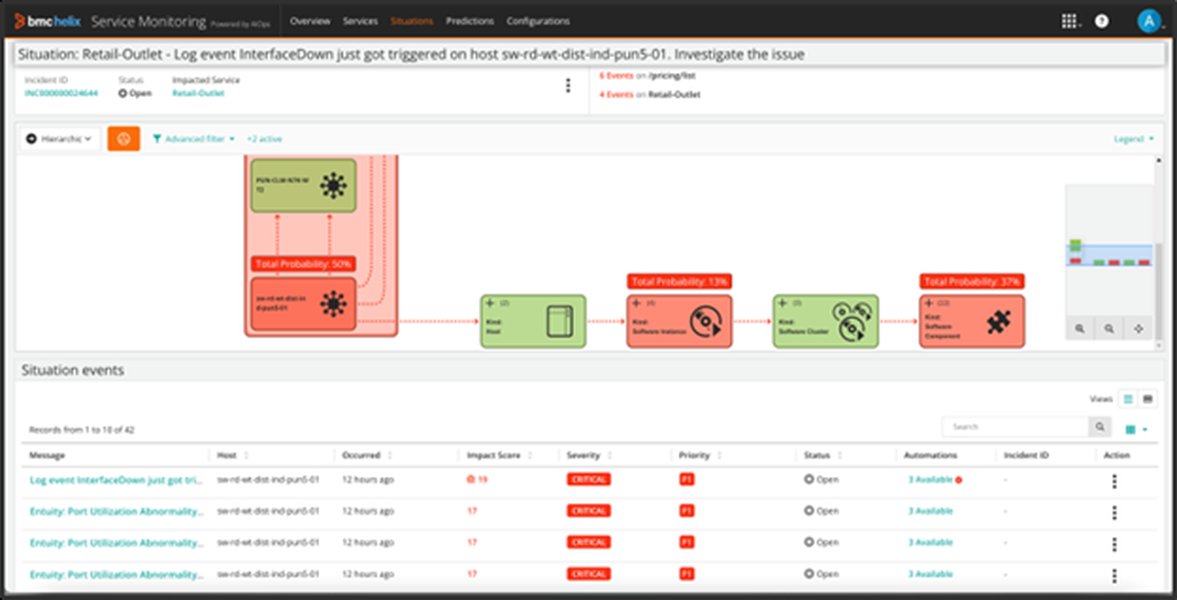
Root cause isolation leveraging BMC Helix Intelligent Integrations.
Third-Party Integration Platforms (iPaaS)
Integration Platform as a Service (iPaaS) solutions like Workato and ZigiOps offer more extensive integration capabilities and pre-built recipes or connectors for both Dynatrace and BMC Helix ITSM. These platforms often provide low-code or no-code interfaces for designing complex integration workflows, such as automating incident and change request synchronization.
Custom Integrations via APIs
For highly specific integration requirements, organizations can also build custom integrations utilizing the APIs provided by both Dynatrace and BMC Helix. This approach requires development effort but offers maximum flexibility to tailor the integration to unique needs.
The choice of integration platform depends on factors such as the complexity of required workflows, existing integration infrastructure, and technical expertise.
Integration with Specific BMC Helix Modules
Enhancing Capabilities Across the Platform
The integration with Dynatrace enhances the capabilities of various BMC Helix modules:
BMC Helix Operations Management
Dynatrace alerts and events are displayed as events in BMC Helix Operations Management, providing operators with a centralized view of monitoring issues. Metric data from Dynatrace can also be consumed for performance analysis and visualization.
BMC Helix Discovery
Topology data from Dynatrace can be integrated into BMC Helix Discovery, enriching the understanding of service dependencies and populating the BMC Helix CMDB with accurate configuration item information.

Exploring the IT environment with BMC Helix Discovery.
BMC Helix AIOps
The wealth of data from Dynatrace serves as a critical input for BMC Helix AIOps, enabling advanced analytics, anomaly detection, root cause analysis, and intelligent automation of remediation actions.
BMC Helix ITSM
Integrated workflows can automate the creation and update of incidents, problems, and change requests in BMC Helix ITSM based on alerts and insights from Dynatrace and BMC Helix AIOps. This streamlines the incident and problem management processes.
FAQ
Addressing Common Questions
Recommended Further Exploration
- How to configure the Dynatrace connector in BMC Helix Intelligent Integrations?
- Explore automating incident creation from Dynatrace alerts to BMC Helix ITSM.
- Learn how BMC Helix AIOps leverages Dynatrace data for actionable insights.
- Discover the process of synchronizing CMDB data between Dynatrace and BMC Helix Discovery.
References
Last updated May 20, 2025