
Mastering Your Earbuds: A Complete Instruction Manual
Unlock all features and troubleshoot like a pro with our comprehensive guide.
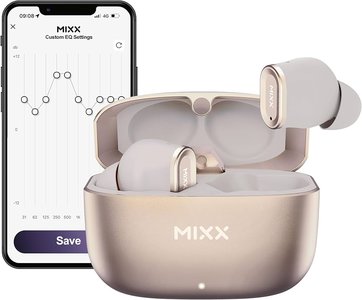
Key Highlights
- Setup and Pairing: Learn unboxing, charging, and effortless Bluetooth pairing.
- Core Functionalities: Discover music controls, call management, and voice assistant usage.
- Maintenance and Troubleshooting: Understand cleaning, storage, battery care, and common troubleshooting tips.
Understanding Your Earbud Instruction Manual
Earbud instruction manuals are essential guides designed to help you get the most out of your wireless earbud experience. Whether you're a new user or looking to troubleshoot common issues, these manuals provide comprehensive details on everything from setup and pairing to maintenance and advanced functionalities. This guide integrates information from various reputable sources to ensure you have a clear, consolidated reference to follow.
Getting Started: Unboxing and Initial Setup
Unboxing and Package Contents
When you first purchase your wireless earbuds, the unboxing experience sets the stage for proper usage:
- Essentials in the Package: Your earbuds, a charging case, a USB Type-C or micro-USB cable (depending on the model), and the user manual or quick start guide.
- Protective Measures: Remove any seals or protective films from the earbuds; this step is crucial before beginning the setup process.
Initial Setup and Configuration
With the earbuds unboxed, follow these initial steps to get started:
- Power and Charge: Before first use, place the earbuds in the charging case to ensure they have sufficient power. Connect the case to a power source using the supplied cable. Charging indicators, usually in the form of LED lights, display the status where a red or blinking light typically indicates charging, and a steady or off light signals a full charge.
- First-Time Pairing: Remove the earbuds from the case; they should automatically power on and enter pairing mode. Activate your device’s Bluetooth setting and select the specific model name (e.g., “AirPods,” “Galaxy Buds,” “Sentry”) to pair.
- Confirmation: Once paired, a sound or voice prompt confirms that the connection has been successfully established. This cue is essential for ensuring that your device is ready for use.
Mastering Basic Functionalities
Music Control and Playback
Modern earbuds come with intuitive controls enabling hands-free operation:
- Play/Pause: Most devices support a simple tap on the multifunctional button to toggle playback.
- Skipping Tracks: A double-tap on the right earbud typically advances to the next track, while a similar action on the left goes back to the previous track.
- Voice Prompts: Some earbuds provide audio cues to help you identify the functions in use, ensuring a seamless entertainment experience.
Managing Calls and Voice Assistants
Earbuds enable smooth call management as well as integration with voice assistants:
- Answering Calls: A single tap on either earbud can answer an incoming call.
- Ending or Rejecting Calls: Tap once again to end a call, or hold the button for a couple of seconds to reject an incoming call.
- Activating Voice Assistants: Press and hold the button for about 3 seconds to activate built-in voice assistants like Siri, Google Assistant, or Alexa. This feature provides hands-free operation for tasks such as setting reminders, checking the weather, or navigating your device.
Advanced Features and Customizations
Touch Controls and Additional Functions
Some earbuds include advanced features such as touch controls or customizable sound profiles. Here are a few aspects to consider:
- Customizable Touch Controls: Certain models allow you to configure touch gestures via an accompanying app. This enables you to adjust the sensitivity or assign different functions to specific gestures.
- Custom Sound Profiles: Some premium earbuds provide settings for EQ (equalization) adjustments to customize the sound according to your preferences. Detailed instructions are usually provided in the user manual or the mobile application.
- Accessory Integration: Newer models may provide integration with external voice assistants or fitness trackers, enhancing the overall usability of your device.
Maintenance, Safety, and Troubleshooting
Proper Care and Storage
Keeping your earbuds in optimal condition ensures longevity and reliable performance:
- Cleaning: Use a soft, lint-free cloth to clean the outer surface. For the speaker mesh or finer parts, a dry cotton swab can help remove debris. Avoid using liquids or harsh chemicals.
- Storage: Always store your earbuds in the provided charging case to protect them from dust and damage. Ensure the case is kept in a cool, dry place away from direct sunlight.
- Battery Care: To prolong battery life, avoid exposing the earbuds to extreme temperatures while charging. Follow the manufacturer's recommendations on charging cycles and storage practices.
Troubleshooting Common Issues
Despite careful handling, you might encounter issues that prevent your earbuds from working correctly. Here are several troubleshooting steps:
- Pairing difficulties: Ensure both the earbuds and your connected device have sufficient battery. If pairing fails, reset the earbuds by placing them back in the case, waiting a moment, and removing them to begin the process anew.
- Sound Quality Issues: If the sound seems distorted or muffled, verify the earbuds fit snugly in your ears. Poor fit can cause acoustic leakage, affecting sound quality. Additionally, check if the device’s volume settings or equalizer adjustments need tweaking.
- Intermittent Connectivity: In case the connection drops frequently, make sure no other Bluetooth devices are interfering. Restart both your earbuds and the device you are connecting to. Also, updating the firmware via the manufacturer's official app or website might fix known connectivity issues.
- Reverting to Default: Some earbuds allow you to perform a factory reset, which may clear communication errors or glitches with firmware. Follow the reset instructions exactly as described in your manual.
Feature Comparison Table
The table below summarizes common features across popular wireless earbud brands, providing a quick reference for understanding similarities and differences.
| Feature | Apple AirPods | Samsung Galaxy Buds | Bose QuietComfort Ultra | Sentry Bluetooth Earbuds |
|---|---|---|---|---|
| Pairing Process | Automatic with device; manual reset option if needed | One-touch pairing; supports quick re-pairing | Step-by-step instructions with audible confirmations | Automatic connection; manual troubleshooting provided |
| Charging Method | Charging case with LED indicators; wireless charging available | Charging case; USB Type-C cable; LED indicators | Proprietary case; cable charging; LED charge state signals | Standard charging case; USB cable; indicator lights for battery status |
| Control Capabilities | Touch controls for play/pause and track skipping | Tap controls for music and calls | Physical button and touch controls | Tap and hold functions for calls and playback |
| Voice Assistant Support | Siri integration; voice activation enabled | Google Assistant, Bixby support | Multiple voice assistants; customizable controls | Compatible with major voice assistants following manual instructions |
| Maintenance Guidelines | Cleaning recommendations; battery care tips | Regular cleaning; storage in provided case advised | Comprehensive maintenance and care guide | Tips provided for cleaning, battery care, and storage |
Online Resources for Additional Assistance
Manufacturers often provide downloadable PDF manuals and online support pages to help you resolve specific issues or explore advanced features. These resources can be invaluable if you lose your printed manual or need step-by-step guidance on new functionalities.
- ManualsLib: A comprehensive repository containing downloadable user manuals for numerous wireless earbuds.
- Manufacturer Support Pages: Visit official websites like Apple, Samsung, Bose, or Sentry to access exact product manuals and FAQs.
- ItsManual: An excellent source for user guides, especially for lesser-known brands or older models.
Practical Tips When Using Your Earbuds
Maximizing Battery Longevity
To ensure your earbuds serve you well over time, pay close attention to charging practices:
- Always use the manufacturer-specified cable and charging adapter when available.
- Avoid overcharging by disconnecting once fully charged, if possible.
- Store the earbuds in a temperature-controlled environment to reduce battery degradation.
Enhancing Sound Quality
Sound performance is influenced by both the earbuds’ condition and proper fit:
- Select earbud tips that match your ear canal for optimal fit and noise isolation.
- Use any available companion app to adjust the equalizer settings to suit your listening environment.
- Periodically check for firmware updates through the manufacturer’s support page or mobile application.
Safety and Usage Guidelines
Following safety guidelines while using earbuds not only protects your device but also your hearing:
- Avoid prolonged exposure to very high volume levels to prevent hearing damage.
- Clean the earbuds regularly to remove any accumulated debris that might affect sound quality.
- Be cautious of moisture and water exposure, particularly if your earbuds are not rated for water resistance.
References
For further details and official guidance, refer to the following resources:
- AirPods User Guide - Apple Support
- BOSE QUIETCOMFORT ULTRA EARBUDS MANUAL - ManualsLib
- Galaxy Buds - Samsung Support CA
- Sentry Bluetooth Earbuds BT969 Manual - ItsManual
- Bluetooth Earbuds Manuals - ManualsLib
Recommended Searches
For further reading and to satisfy your curiosity, consider exploring these related searches:
 images-eu.ssl-images-amazon.com
 s3-ap-southeast-2.amazonaws.com
 m.media-amazon.com
Last updated March 27, 2025