
Mastering Your Earbuds: A Detailed User Manual Guide
Unlocking the full potential of your earbuds efficiently
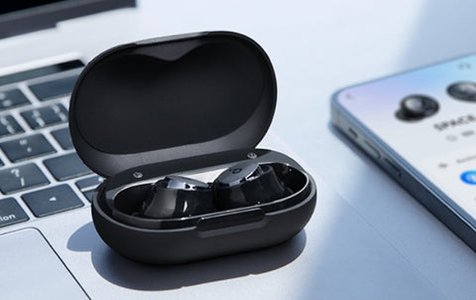
Highlights
- Activation & Pairing: Detailed steps to power on/off and pair your earbuds seamlessly.
- Controls & Features: Comprehensive instructions covering play/pause, track navigation, volume management, and call handling.
- Maintenance & Safety: Charging guidelines, safety precautions, and additional functionalities like voice control and EQ modes.
Introduction
The following manual provides a thorough guide on how to use, troubleshoot, and maintain your earbuds. Whether you are just starting or require a refresher, this guide covers everything from initial power-on procedures to complex functionalities such as voice assistance and equalizer (EQ) modes. The instructions consolidated here are sourced from multiple credible manuals and support pages, ensuring you have a reliable overview of best practices and features available on modern earbuds.
Getting Started
Power On & Auto Activation
Your earbuds come with smart features designed to enhance user convenience. When you remove earbuds from their charging case, they typically power on automatically. If your earbuds require a manual start, press and hold the multifunction button on both earbuds for about 3 seconds. Listen for a prompt indicating “power on.” This process also ensures that the earbuds pair with each other instantly, preparing them for Bluetooth connectivity.
Pairing Your Earbuds
Once the earbuds are powered on, they enter pairing mode automatically. For pairing to your device:
- Enable Bluetooth on your mobile device or computer.
- Search for available devices. The earbuds will typically appear under a model-specific name (e.g., “AirPods,” “Galaxy Buds,” or similar).
- Select the device from the list. Some models might prompt a pairing code, often “0000”, which you should enter as instructed.
If problems occur, ensure that your device's Bluetooth is active and within the effective range of the earbuds. Removing and reinserting the earbuds into the charging case and then repeating the process often resolves connectivity issues.
Comprehensive Controls and Features
Music Playback Controls
Modern earbuds are equipped with multifunction buttons that allow you to manage your music and media effortlessly. Here are the basic controls:
Basic Functions
- Play/Pause: A single press on either earbud’s multifunction button toggles between play and pause.
- Next Track: On many models, a double or triple press on the right earbud skips to the next track.
- Previous Track: Similarly, using the left earbud’s multifunction button may revert to the previous track.
- Volume Adjustment: Some earbuds offer volume adjustment via designated touch-sensitive areas or specific button sequences (e.g., pressing one earbud increases volume and the other decreases it).
Call Management
Handling calls with earbuds increases convenience, especially when on the move. Common call functionalities include:
- Answering Calls: Press the multifunction button once when receiving an incoming call.
- Ending Calls: During an active call, a single press on the multifunction button terminates the call.
- Rejecting Calls: In some models, pressing and holding the multifunction button for around 3 seconds during an incoming call rejects the call.
Additional Features
Many earbuds come loaded with extra functionalities designed to enhance your user experience:
- Voice Assistant Activation: For accessing services like Siri or Google Assistant, press and hold the multifunction button on either earbud for approximately 3 seconds.
- Pre-set EQ Modes: Some modern earbuds provide different equalizer settings like Music, Bass, Podcast, and Treble. These modes, switchable by using specific tap sequences on one of the earbuds (often the right one), tailor the audio output to different listening preferences.
Charging and Maintenance
Charging Your Earbuds
A fully charged set of earbuds enhances performance and usability. To ensure optimal battery life:
- Charging the Earbuds: After use, place the earbuds back into the charging case. LED indicators on the earbuds will light up—typically red during charging and then turn off or change color when fully charged.
- Charging the Case: The charging case itself must be plugged into a power source using a USB cable. The case will indicate charging progress through a visible LED, often flashing green during charging and turning off when the battery is full.
- Battery Tips: Regularly charging the case helps maintain the earbuds’ readiness. Avoid leaving them in extreme temperatures or exposing them to moisture, as these conditions can degrade the battery performance over time.
Safety and Maintenance
Follow these precautions to extend the longevity and safe operation of your earbuds:
- Do not use the earbuds in direct sunlight or extremely hot/cold conditions.
- Avoid immersion in water or exposing the earbuds to excessive moisture unless they are specifically designed for it.
- Clean your earbuds periodically with a soft, dry cloth to remove debris and dust.
- Ensure the charging port on the case is free of obstructions to maintain efficient charging.
Instructional Summary Table
| Function | Action | Notes |
|---|---|---|
| Power On |
|
Earbuds auto-sync when turned on |
| Pairing |
|
Ensure earbuds within range |
| Music Control |
|
Commands may vary by model |
| Call Management |
|
Consistent feature across models |
| Charging |
|
LED indicators show status |
Troubleshooting and Advanced Tips
Troubleshooting Connectivity
If you experience difficulties with connecting your earbuds, consider the following steps:
- Ensure the earbuds are not already connected to another device.
- Toggle the Bluetooth off and then back on your device.
- If the pairing is unsuccessful, place the earbuds back in the charging case, wait for a few seconds, then remove them to re-initiate pairing mode.
- Consult the user manual specific to your brand by visiting the manufacturer’s support page.
Enhancing Your Experience
To fully benefit from your earbuds, keep the following advanced tips in mind:
- Regularly update your device’s firmware if applicable to ensure compatibility with your earbuds.
- Utilize voice assistant features to manage tasks hands-free.
- Experiment with preset EQ modes if available, adapting sound output to suit different audio content such as music, podcasts, or calls.
- Watch online tutorials and review manufacturer guides available on their support pages for model-specific features and troubleshooting.
References
- AirPods User Guide - Apple Support
- Galaxy Buds Support - Samsung Support CA
- Everyday Earbuds User Manual - Raycon
- Bluetooth Earbuds Manuals - ManualsLib
- Sentry Bluetooth Earbuds Manual - ITS Manual
Recommended Topics for Further Exploration
 s3-ap-southeast-2.amazonaws.com
 m.media-amazon.com
 images-eu.ssl-images-amazon.com
 images-na.ssl-images-amazon.com
 assets.bose.com
Last updated March 27, 2025