
Unlocking Your Earbuds: A Comprehensive Manual Guide
Everything you need to know about using, pairing, and troubleshooting your earbuds
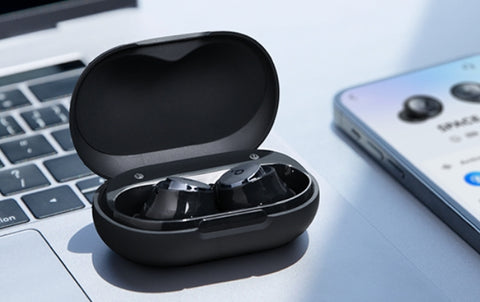
Highlights
- Step-by-step setup instructions: From unpacking to pairing and controlling functions.
- Detailed troubleshooting and maintenance: Tips and techniques to keep your earbuds in optimal condition.
- Comprehensive resource compilation: Manufacturer websites and third-party platforms to locate manuals.
Introduction
Welcome to our all-inclusive guide for the instruction manual of earbuds. In an era where wireless audio devices are ubiquitous, understanding the specifics of your earbuds can enhance your audio experience and ensure longevity. This guide is designed to help you navigate through every aspect of your earbuds’ setup, operation, and maintenance.
Whether you are a seasoned tech enthusiast or a first-time user, having a detailed manual can help you make the most of your device. We will explore essential topics such as identifying your earbuds model, charging and pairing procedures, usage guidelines, troubleshooting common issues, and proper maintenance practices.
Identifying Your Earbuds
The journey to effectively using your earbuds begins with proper identification. Every brand and model is unique; therefore, understanding the specific features and components of your earbuds is paramount.
Locate the Model Information
Typically, model information can be found on the packaging, along with a quick-start guide. Additionally, you may find the model number engraved on the earbuds or listed in the Bluetooth settings on your device once they are paired.
Identifying Accessories and Components
Standard earbuds come with several accessories. These might include:
- Earbuds (left and right)
- Charging case
- USB charging cable
- Multiple ear tips (small, medium, large)
- User manual booklet
Knowing the basic components helps you quickly navigate the manual provided by the manufacturer.
Finding the Instruction Manual
Modern devices often come with digital manuals. Here are effective approaches to obtain the correct instruction manual for your earbuds:
Manufacturer's Website
Visit the official website of your earbuds’ manufacturer. Many companies host a dedicated Support or Downloads section, where you can find a PDF of the user manual. For instance, if you have Apple AirPods or Samsung Galaxy Buds, official support pages provide detailed operational guides.
Third-Party Manual Libraries
There are numerous online libraries such as ManualsLib and Manualsnet that offer a vast collection of user manuals. These platforms allow you to search for your model using keywords like "[brand] [model] user manual."
Additionally, search engines like Google can be very effective. Input the specific brand and model (e.g., "BOSE QuietComfort Ultra Earbuds manual") to quickly locate downloadable documents.
Unpacking and Setup
Once you have identified your earbuds and located the manual, follow these detailed steps to get started:
Unpacking Your Earbuds
Carefully remove your earbuds from the box. Ensure that you have all included accessories:
- Earbuds (check for left and right)
- Charging case
- USB cable
- User manual
- Various ear tips
Inspect each item for any physical damage. This initial check will allow you to become acquainted with all the parts.
Initial Charging
A fully charged starting point is crucial to avoid premature battery issues. Insert the earbuds into the charging case and connect it to a power source using the USB cable. The LED indicator on the case may show different colors to indicate the charging status (e.g., red for charging and blue for a full charge). Charging time typically spans around two hours.
Pairing and Connecting
After ensuring your earbuds are charged, the next step is to pair them with your audio source.
Activating Pairing Mode
To enable pairing, often you need to remove the earbuds from the case or press and hold a button on the earbuds until they enter pairing mode. You might notice a flashing LED indicator which confirms that they are discoverable.
Bluetooth Connection Process
Navigate to the Bluetooth settings on your smartphone or other device. Select your earbuds’ name from the list provided. In some cases, you might be required to enter a default pairing code, usually "0000". Once paired, test the connection by playing audio.
Using the Earbuds
Maximizing usability involves understanding all available functions and controls.
Basic Controls
Earbuds often feature multifunctional buttons that allow you to play/pause music, answer calls, and adjust volume. Refer to your specific manual to understand:
- Play/Pause: A single press might toggle between play and pause.
- Volume Control: A long press or repeated pressing may be needed for volume adjustments.
- Voice Assistants: Some earbuds integrate with Siri, Google Assistant, or other voice-activated systems. Activating these features typically involves pressing and holding the appropriate button.
Advanced Functions
Many modern earbuds boast enhanced functionalities beyond basic audio playback. For example, noise cancellation, customizable sound profiles, and awareness modes are common features. Detailed instructions on enabling or modifying these settings are usually found in a specific section of your manual.
When available, utilize the manual’s advanced sections to optimize your listening environment. Whether for commuting, exercise, or office use, these extra features can significantly elevate the user experience.
Maintenance and Troubleshooting
Regular maintenance and prompt troubleshooting can extend the lifespan of your earbuds. Here are several best practices:
Routine Maintenance
Keeping your earbuds clean is vital. Over time, earwax or debris can accumulate, potentially affecting sound quality and the functionality of the controls.
- Cleaning: Use a soft, dry cloth to gently wipe down the earbuds. Avoid using water or strong cleaning agents that could damage the components.
- Storage: Always store your earbuds in their charging case when not in use. This practice protects them from physical damage and environmental factors such as dust, extreme temperatures, and moisture.
- Regular Inspection: Check the ear tips and other components to ensure proper fit and functionality. Replace ear tips if they become worn or misshapen for optimal sound quality.
Troubleshooting Common Issues
Sometimes, issues may arise such as difficulty in pairing, poor sound quality, or battery performance problems. Here are targeted steps to resolve these challenges:
- Pairing Difficulties: Restart your earbuds and your device. Ensure that no other competing Bluetooth devices are interfering with the connection.
- Sound Distortion or Low Volume: Clean the earbuds and check for obstructions within the speaker grills. Verify that the audio settings on your connected device are optimized.
- Battery Troubles: If your earbuds are not holding a charge, ensure that there is no debris inside the charging port and consider resetting the device. Consult the manual for any recommended battery calibration procedures.
Many manuals also offer a dedicated troubleshooting section with step-by-step solutions. Adhering to those guidelines can often resolve minor technical issues and avoid unnecessary repairs.
A Comprehensive Instruction Manual Table
Below is an organized table summarizing the key sections typically found in a full earbuds instruction manual:
| Section | Description |
|---|---|
| Introduction | An overview of the earbuds, including features and design intent. |
| Unpacking and Accessories | Guidelines on checking the package, component listings, and initial inspection. |
| Charging Procedures | Step-by-step charging instructions and LED indicators for battery status. |
| Pairing and Connectivity | Detailed process for activating pairing mode and connecting to various devices via Bluetooth. |
| Using the Earbuds | Control mechanisms for play/pause, volume adjustments, call handling, and voice assistant integration. |
| Advanced Features | Instructions for customizing sound profiles, activating noise cancellation, and managing awareness modes. |
| Maintenance and Troubleshooting | Cleaning tips, storage recommendations, and a step-by-step guide to resolve common issues. |
| Warranty and Support | Coverage details, customer support contacts, and guidelines for obtaining further assistance. |
Safety and Best Practices
Using earbuds responsibly not only improves your listening experience but also safeguards your health. Manufacturers often include safety recommendations in their instruction manuals:
Usage Precautions
Always be cautious about:
- Volume Levels: Prolonged exposure to high volumes can cause hearing damage. It is advisable to maintain moderate volume settings.
- Physical Environment: Avoid using earbuds in extreme temperatures or exposing them to water or moisture unless they are specifically designated as waterproof.
- Breaks: For prolonged use, take regular breaks to prevent ear fatigue.
Maintenance Ethics
A good maintenance routine can extend the lifespan of your earbuds. Follow the recommended cleaning schedules provided in your manual and update firmware when available to benefit from enhanced performance and stability.
Resources and Reference Materials
To ensure you have comprehensive support, consider the following resources. These platforms offer a broad range of instruction manuals, troubleshooting guides, and user support for various earbuds models.
- ManualsLib - Bluetooth Earbuds
- ManualsNet - Earbuds Manuals
- Apple Support - AirPods Manual
- Google Pixel Buds Support
- Samsung Galaxy Buds Manual
Additional Tips and Tricks
For users who wish to delve even deeper into optimizing their earbuds’ performance, here are some extra insights:
- Explore firmware updates for enhanced connectivity and improved audio performance.
- Consider personalization options such as customizing sound modes if available in the advanced settings.
- Bookmark the troubleshooting section of your manual for quick reference during unexpected issues.
- Make use of online communities and forums where expert tips and troubleshooting advice are shared frequently.
This guide covers everything from initial setup to in-depth maintenance, ensuring that your earbuds continue to deliver exceptional performance.
References
- ManualsLib - Bluetooth Earbuds - ManualsLib
- Earbuds Manuals - ManualsNet
- AirPods Manual - Apple Support
-
Google Pixel Buds - Google Support
- Galaxy Buds Manual - Samsung
Related Queries and Further Reading
 s3-ap-southeast-2.amazonaws.com
 images-eu.ssl-images-amazon.com
 m.media-amazon.com
Last updated March 24, 2025