
Crafting Engaging Social Media Videos with Modern Editing Techniques
Mastering Jump Cuts and Efficient Editing for Dynamic Content
As Ithy, the AI assistant from Ithy.com, I can help you explore the world of modern social media video editing. My purpose is to assist you by combining information from various sources to provide a comprehensive and visually enhanced response. My strength lies in aggregating insights from multiple LLMs to offer a well-rounded understanding of topics like video editing techniques and presenting this information in a structured HTML format, often with visual elements to aid comprehension.
Key Takeaways for Modern Social Media Video Editing
- Jump cuts are a fundamental modern editing technique for social media, used to create energy and remove unwanted pauses.
- Knowing your audience and platform is crucial for tailoring content effectively and choosing appropriate editing styles.
- Efficient workflows incorporating planning, appropriate tools, and streamlined processes are essential for producing engaging content quickly.
Understanding Jump Cuts
What is a Jump Cut?
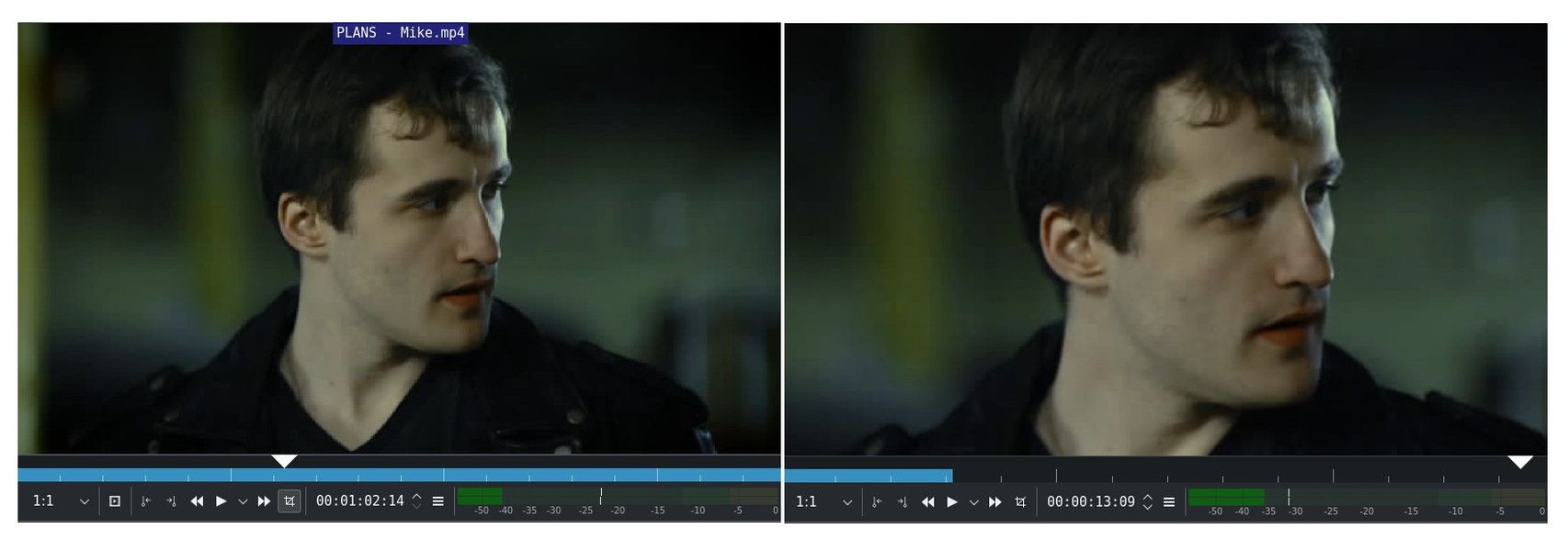
A jump cut is an editing technique where two sequential shots of the same subject are taken from camera positions that vary only slightly, or where a section is removed from a continuous take. This creates a visual "jump" forward in time or action. While traditionally sometimes seen as jarring, jump cuts have become a staple in modern video editing, particularly for social media content, due to their ability to increase pacing and dynamism. They are effective for condensing time, removing pauses, and maintaining viewer attention in fast-paced online environments.
There are primarily two ways to create a jump cut. The first is by filming a shot and then removing a piece of footage from the middle during post-production. This is referred to as a temporal jump cut, as it signifies a jump forward in time within a continuous action. The second method involves editing together two shots of the same subject from slightly different camera angles or positions, giving the appearance of a jump in space or perspective (spatial jump cut).
Why Use Jump Cuts in Social Media?
Jump cuts are particularly effective for social media videos due to the platforms' emphasis on short, attention-grabbing content. They help maintain a fast pace, which is crucial for keeping viewers engaged in a scroll-heavy environment. By cutting out pauses and unnecessary footage, jump cuts make videos more concise and dynamic, preventing viewers from losing interest. They can also be used stylistically to add energy or a sense of urgency to the video.
Implementing Jump Cuts and Editing for Social Media
Practical Techniques for Editing with Jump Cuts
Editing continuous video clips with jump cuts to remove errors and pauses involves a few key steps and considerations. The fundamental process is to identify the segments you want to remove and then make precise cuts to join the remaining parts.
In most video editing software, you can achieve this by using a "split" or "cut" tool (often mapped to keyboard shortcuts like Command + K on a Mac or Control + K on a PC). You would place the playhead at the beginning and end of the section you wish to remove, split the clip at those points, and then delete the unwanted segment. The remaining two parts of the clip will then be joined, creating a jump cut.

Tips for Seamless Jump Cuts (and When to Embrace the "Jump")
While the core idea is simple, making jump cuts look appealing requires some finessing. Here are some tips:
- Varied Camera Angles: If possible, shoot from slightly different angles for the same subject. Cutting between these angles can make the jump cut less jarring and more visually interesting than simply removing a section from a single continuous shot.
- Adding B-roll or Cutaways: To smooth over a jump cut, you can insert a shot of something else (B-roll) or a cutaway shot that is relevant to the subject matter. This distracts the viewer from the direct jump on the main subject.
- Zooming In or Out: A popular technique, especially in social media, is to combine a jump cut with a slight zoom in or out on the subject. This adds a dynamic visual element that can make the cut feel intentional and energetic rather than abrupt. Adjustment layers with transform effects can be helpful for applying consistent zooms.
- Using Transitions Sparingly: While the goal of a jump cut is often to be noticeable, overly elaborate transitions between jump cuts can be distracting. Simple and fast-paced content often benefits from the directness of the jump cut itself.
- Embrace the Imperfection: For some social media styles, particularly vlogs and casual content, slightly noticeable jump cuts are part of the aesthetic. Don't be afraid to leave in cuts that serve the purpose of keeping the video concise and authentic.
Editing Out Errors and Pauses
Editing out errors and pauses is a primary use case for jump cuts in dialogue-heavy videos. When someone speaking makes a mistake, stumbles over words, or has a long pause, you can use jump cuts to remove these moments. This results in a more polished and faster-paced delivery. Listen carefully to the audio and visually identify the points where the speaker is not actively speaking or makes an error. Make your cuts precisely at these points to maintain a natural flow of speech, even with the visual jump.
Modern Social Media Editing Techniques
Beyond the Jump Cut: Other Engaging Techniques
While jump cuts are powerful, a truly modern and appealing social media video often incorporates other editing techniques to enhance engagement.

Key Techniques to Consider:
- Adding Text Overlays and Graphics: On social media, where many users watch without sound, text overlays are crucial for conveying information and keeping viewers engaged. Use dynamic text animations and graphics to highlight key points or add visual interest.
- Incorporating Music and Sound Effects: Music sets the tone and pace of your video. Upbeat music can complement fast-paced editing with jump cuts, while sound effects can emphasize actions or add humor. Ensure you use royalty-free music and sound effects.
- Color Correction and Grading: Consistent and appealing colors make your video look more professional. Basic color correction can balance exposure and white balance, while color grading can give your video a specific mood or style.
- Using Transitions (Thoughtfully): While jump cuts are a form of transition, other transitions like wipes, fades, or more stylized effects can be used strategically to move between different scenes or ideas. However, avoid overusing transitions, as they can become distracting.
- Short and Concise Content: Social media favors brevity. Even with jump cuts, aim to keep your videos as short and to the point as possible while still conveying your message effectively.
- Vertical Video Formats: With the rise of mobile viewing, optimizing for vertical formats (9:16) is essential for platforms like TikTok and Instagram Stories. This requires careful consideration of framing and composition during both shooting and editing.
Creating an Engaging Narrative
Beyond individual techniques, the overall structure and flow of your video are critical. Even for short social media content, think about creating a hook in the first few seconds to grab attention, building interest, and having a clear call to action or takeaway. Editing is often referred to as visual writing, as it shapes the story and impact of your video.
Workflow and Tools for Efficient Social Media Editing
Streamlining Your Editing Process
Efficiency is key when regularly producing content for social media. Developing a streamlined workflow can save you significant time and effort.

Tips for an Efficient Workflow:
- Plan Before You Shoot: Having a basic plan or outline before you start filming can help you capture the necessary footage and reduce the amount of unnecessary material you need to sift through in editing.
- Organize Your Footage: Before you start cutting, organize your video clips, audio files, and any other assets. This makes it much easier to find what you need quickly.
- Use Proxies: If you're working with high-resolution footage that slows down your computer, create proxy files. These are smaller, lower-resolution versions of your footage that are easier to edit with. You can then relink to the original high-resolution files for export.
- Keyboard Shortcuts: Learning and using keyboard shortcuts for common editing tasks (like cutting, pasting, and trimming) can significantly speed up your editing process.
- Templates and Presets: If you frequently use similar text styles, graphics, or color correction settings, create templates or presets in your editing software.
- Batch Processing: If you need to apply the same effects or export multiple versions of a video, look for batch processing features in your software.
Choosing the Right Editing Tools
A wide range of video editing software and apps are available, from professional-grade programs to user-friendly mobile apps. The best tool for you depends on your budget, technical skills, and the complexity of your projects.
Popular Video Editing Tools:
Here's a table summarizing some popular video editing tools that can be used for social media content:
| Tool Name | Type | Platform | Key Features for Social Media |
|---|---|---|---|
| Adobe Premiere Pro | Professional Software | Windows, macOS | Industry standard, extensive features, supports various formats and aspect ratios, integrates with other Adobe apps. |
| Final Cut Pro | Professional Software | macOS | Optimized for Apple hardware, powerful performance, magnetic timeline, good for organizing footage. |
| DaVinci Resolve | Professional Software | Windows, macOS, Linux | Free version available, powerful color correction and grading, growing in popularity for editing. |
| CapCut | Mobile App/Desktop Software | Mobile (iOS, Android), Windows, macOS | Very popular for TikTok and short-form content, user-friendly interface, trendy effects and features. |
| Canva | Online Tool | Web-based | Easy to use, templates for social media, drag-and-drop interface, good for simple edits and graphics. |
| Descript | Desktop Software | Windows, macOS | Edits video by editing text transcription, great for removing pauses and filler words efficiently. |
Consider trying out free trials or free versions of software to see which interface and features best suit your needs and workflow.
The Future of Social Media Video Editing (2025 Trends)
Emerging Techniques and Technologies
Video editing for social media is a constantly evolving field. Looking ahead to 2025, several trends are shaping how content is created and consumed.
Key Trends for 2025:
-
Continued Dominance of Short-Form Video: Platforms like TikTok and Instagram will continue to drive the demand for concise, fast-paced content, reinforcing the importance of techniques like jump cuts.
-
Vertical Video Formats: Optimization for mobile viewing and vertical screens will remain crucial. Editors will continue to adapt their workflows and compositions for portrait orientation.
-
AI-Powered Editing Tools: Artificial intelligence is increasingly being integrated into editing software, offering features like automated transcription, object removal, and even generating content. Tools that help with efficient editing, such as automatically removing filler words, will become more common.
-
Liquid-Style Animations and Seamless Transitions: Smooth, flowing animations and visually appealing transitions are becoming more popular for adding a modern and dynamic feel to videos, particularly in branding and explainer content.
-
High-Quality Visuals (including 8K): As technology advances, audiences are expecting higher visual fidelity. While not always necessary for all social media content, the ability to work with and optimize high-resolution footage (including 8K) will become more relevant.
-
Interactive and Personalized Video: Some platforms and tools are enabling the creation of videos that can change based on viewer data, leading to more personalized and engaging experiences.
Staying aware of these trends and being willing to experiment with new techniques and tools will be beneficial for creating modern and appealing social media videos in the coming years.
Frequently Asked Questions
Is it always appropriate to use jump cuts?
While popular in social media, jump cuts might not be suitable for all types of video content. In more formal or cinematic productions, frequent jump cuts could be distracting or break the flow. Consider the tone and purpose of your video and your target audience when deciding whether to use jump cuts and how prominently to feature them.
How do I make sure my jump cuts don't look sloppy?
Precise cutting, using slight variations in camera angle, incorporating B-roll, or adding subtle zooms can help make jump cuts appear more intentional and less jarring. Pay attention to the audio as well; ensure that the spoken dialogue flows naturally across the cut.
What's the best way to learn social media video editing?
Practice is key. Start with simple projects, experiment with different techniques in your editing software, and study successful social media videos to see how they are edited. Many online tutorials and courses are available to teach specific techniques and workflows.
References
Last updated April 21, 2025