
Enhancing Your Email Communication: Professionalizing Attachment Notifications
Master the Art of Crafting Polished and Effective Emails with Attachments
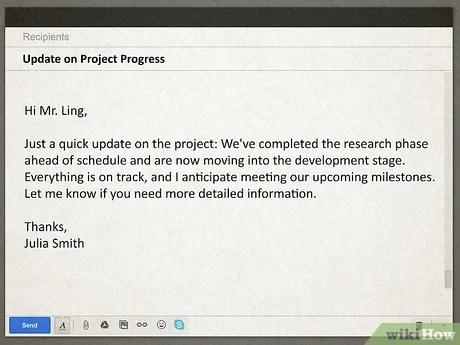
Key Takeaways
- Use Clear and Direct Language: Clearly reference and describe your attachments to ensure the recipient understands their purpose.
- Adopt Professional Greetings and Closings: Choose appropriate salutations and sign-offs to convey professionalism and respect.
- Ensure Email Accuracy and Completeness: Double-check attachments, avoid errors, and adhere to best practices for formatting and file types.
Introduction
In the realm of professional communication, emails are the cornerstone of daily interactions. Whether you're coordinating with colleagues, reaching out to clients, or submitting important documents, the way you compose your emails can significantly impact the effectiveness of your message and the impression you leave on the recipient. One common area that often requires attention is the language used when mentioning attachments. Phrases like "Dear sir, kindly find attached" are not only outdated but can also be perceived as unprofessional or unclear. This comprehensive guide delves into best practices for crafting emails with attachments, helping you enhance clarity, professionalism, and overall communication efficacy.
Common Mistakes in Email Attachment Notifications
1. Outdated and Gendered Greetings
Starting an email with "Dear sir" is problematic for several reasons:
- Assumption of Gender: Using "sir" assumes the recipient's gender, which can be both incorrect and exclusionary.
- Overly Formal and Outdated: Modern business communication favors more neutral and updated greetings that are both respectful and inclusive.
- Grammatical Inaccuracy: The phrase lacks proper punctuation and structure, making it appear unprofessional.
2. Vague and Abrupt Attachment References
The phrase "kindly find attached" falls short in conveying essential information:
- Lacks Specificity: It doesn't specify what the attachment is, leaving the recipient uncertain about its content and purpose.
- Abrupt Tone: The brevity of the phrase can come across as curt and may not provide the necessary context.
- Spelling Errors: Mistakes like "attched" instead of "attached" undermine the professionalism of the email.
Proper Greeting Alternatives
1. Use Personalized and Inclusive Salutations
Choosing the right greeting sets the tone for your email. Here are some professional alternatives:
- “Hello [Name],” – A friendly yet professional greeting that addresses the recipient directly.
- “Dear [Name],” – A formal and respectful salutation suitable for various professional contexts.
- “Hi [Name],” – A more casual option for less formal communications.
- “Greetings,” – A neutral option when the recipient's name is unknown.
2. Avoid Gendered Terms
Using gender-neutral language fosters inclusivity and avoids potential discomfort:
- Avoid: “Dear sir/madam,”
- Use: “Dear [First Name Last Name],” or simply “Hello [Name],”
Effective Attachment Mentioning
1. Clearly Reference the Attachment
Ensure the recipient knows exactly what to expect by clearly mentioning the attachment:
- Specify the Document: Mention the name and type of the file (e.g., "Please see the attached Q1 Sales Report for your review.")
- Explain Its Purpose: Provide context about why the attachment is included (e.g., "I've attached the presentation slides from our meeting.")
2. Choose Appropriate File Formats
Select file formats that are widely accessible and maintain the integrity of your documents:
- Use Universal Formats: PDFs or DOCX files are generally preferred for compatibility.
- Avoid Proprietary Formats: Unless you're certain the recipient can open them, avoid formats like Pages or specialized software files.
3. Respect Size Limitations
Large attachments can cause delivery issues or burden the recipient's inbox:
- Compress Files: Reduce file size without compromising quality.
- Use Cloud Services: For large files, consider uploading to platforms like Google Drive or Dropbox and sharing the link.
Email Etiquette Best Practices
1. Craft a Clear and Relevant Subject Line
Your email's subject line should succinctly convey its purpose, making it easier for the recipient to prioritize:
- Be Specific: Instead of "Document," use "Q1 Financial Report Attached."
- Avoid Vague Phrases: Refrain from using "Hello" or "Important" without context.
2. Structure Your Email Logically
Organize your email content for clarity and ease of reading:
- Introduction: Briefly state the purpose of your email.
- Body: Provide detailed information or context.
- Conclusion: Summarize key points and specify any required actions.
3. Proofread Before Sending
Ensure your email is free from grammatical errors and typos:
- Check for Accuracy: Verify all names, dates, and facts.
- Review Attached Files: Confirm that the correct files are attached and accessible.
4. Use Professional Tone and Language
Maintain a respectful and courteous tone throughout your email:
- Avoid Slang or Informal Phrases: Use complete sentences and proper grammar.
- Be Concise: Communicate your message clearly without unnecessary verbosity.
Examples of Corrected Phrases
1. From Outdated to Professional Greetings
| Outdated Greeting | Professional Greeting |
|---|---|
| Dear sir, | Hello Mr. Smith, |
| Dear Madam, | Dear Ms. Johnson, |
| To whom it may concern, | Greetings, |
2. From Vague to Specific Attachment References
| Vague Phrase | Specific Phrase |
|---|---|
| Kindly find attached the document. | Please see the attached Project Proposal for Q2 for your review. |
| Find attached file. | I've attached the updated marketing strategy as requested. |
| Attached is the file. | Attached is the financial report for April 2025 with detailed analytics. |
3. Comprehensive Email Example
<!-- Properly Structured Email with Attachment -->
Subject: Q4 Sales Report - PDF Attached

Hello Jane,

I hope this message finds you well.

Please find attached the <strong>Q4 Sales Report</strong> detailing our performance metrics and regional breakdowns. This report aligns with the objectives we set in our last meeting and highlights key areas for improvement.

Feel free to reach out if you have any questions or require further clarification on any of the sections.

Best regards,
John Doe
Sales Manager
john.doe@example.com
Additional Tips for Professional Emails
1. Use a Consistent and Professional Signature
Your email signature is a crucial element of your professional identity:
- Include Essential Information: Name, position, company, and contact details.
- Keep It Simple: Avoid excessive graphics or quotes that may not render properly across all email clients.
2. Be Mindful of Email Length
While it's important to be thorough, excessively long emails can overwhelm the recipient:
- Stay Focused: Address one main topic per email when possible.
- Use Bullet Points: Break down information into digestible parts.
3. Utilize Read Receipts and Acknowledgments Wisely
While features like read receipts can be useful, overusing them can be intrusive:
-
Use When Necessary: Only request read receipts for important or time-sensitive communications.
-
Respect Privacy: Be considerate of the recipient's preferences regarding email tracking.
Conclusion
Effective email communication is a blend of clarity, professionalism, and attention to detail. By refining how you reference attachments, adopting appropriate greetings, and adhering to best practices, you can enhance the impact of your emails and foster better professional relationships. Remember to personalize your messages, ensure accuracy, and maintain a respectful tone to make your communication both efficient and commendable.
References
Last updated January 31, 2025