
Developing an English Language Learning App: A Comprehensive Systems Analysis and Design Approach
Structured Planning, In-Depth Analysis, and Innovative Design for Effective Language Learning
Key Takeaways
- Strategic Planning: Establishing clear objectives, feasibility assessments, and resource allocations is crucial for the successful initiation of the app development.
- Comprehensive Analysis: Detailed requirements gathering and stakeholder engagement ensure the app meets user needs and operates efficiently.
- Innovative Design: Combining user-centric UI/UX design with robust technical architecture fosters an engaging and scalable learning platform.
Introduction
The digital revolution has transformed the landscape of education, particularly in language learning. Developing an effective English language learning app requires a meticulous approach grounded in Systems Analysis and Design (SAD) principles. This comprehensive guide delves into the Planning, Analysis, and Design phases, providing a structured roadmap to create a robust, user-centric application that facilitates effective English language acquisition.
Importance of Systems Analysis and Design in App Development
Systems Analysis and Design is a methodological framework that ensures the systematic development of information systems. By adhering to SAD principles, developers can systematically address user requirements, optimize resource utilization, and enhance the overall functionality and usability of the app. This structured approach minimizes risks, ensures alignment with user needs, and fosters the creation of a scalable and maintainable application.
Planning Phase
Project Initiation
Defining Project Objectives
The initial step in the Planning Phase involves clearly defining the project objectives. For an English language learning app, objectives may include providing comprehensive language modules, interactive exercises, personalized learning paths, and progress tracking features. Establishing these objectives sets the foundation for subsequent phases and ensures that all stakeholders have a unified vision of the project's goals.
Identifying the Target User Group
Understanding the target audience is paramount. For this app, the primary users might range from beginners to intermediate English learners seeking to improve their language skills for academic, personal, or professional purposes. Developing detailed user personas helps in tailoring the app's features to meet diverse user needs effectively.
Preliminary Market Research
Conducting market research provides insights into existing language learning solutions, identifies gaps in the market, and informs feature prioritization. Analyzing competitors such as Duolingo or Rosetta Stone can reveal strengths to emulate and weaknesses to address, ensuring the app offers unique value propositions.
Feasibility Study
Technical Feasibility
Assessing technical feasibility involves evaluating whether the current technology stack can support the app's requirements. This includes mobile platforms (iOS and Android), backend infrastructure, integration of AI-driven adaptive learning algorithms, and support for multimedia content. Identifying potential technical challenges early allows for timely mitigation strategies.
Economic Feasibility
Economic feasibility analyzes the cost-benefit ratio of the project. This includes estimating development costs, ongoing maintenance expenses, and potential revenue streams such as subscription models, in-app purchases, or advertisements. Ensuring financial viability is crucial for securing investment and sustaining long-term operations.
Operational Feasibility
Operational feasibility examines whether the organization has the necessary resources and capabilities to support the app post-launch. This includes human resources, technical support, and customer service infrastructure. Assessing operational aspects ensures the app can be maintained and updated effectively.
Ethical Feasibility
Addressing ethical considerations involves ensuring user data privacy, compliance with regulations such as GDPR, and fostering an inclusive and unbiased learning environment. Ethical feasibility ensures that the app not only meets legal standards but also builds trust with its user base.
Project Scope and Objectives
Defining Project Scope
Clearly outlining what the app will and will not include helps in maintaining focus and preventing scope creep. For instance, deciding to focus on specific language skills (reading, writing, listening, speaking) or incorporating particular features like gamification and social interaction tools defines the app's boundaries.
Setting Clear Objectives
Establishing specific, measurable, achievable, relevant, and time-bound (SMART) objectives ensures that the project remains on track. Objectives such as "Develop interactive grammar modules by Q3" or "Achieve 10,000 active users within six months of launch" provide clear milestones for the project team.
Resource Allocation
Identifying and allocating the necessary resources is essential for the project's success. This includes human resources (developers, designers, linguists), financial resources (budget allocation for development, marketing, and maintenance), and technical resources (software tools, servers). Proper resource allocation ensures that the project progresses smoothly and efficiently.
Timeline and Milestones
Developing a detailed project timeline with key milestones helps in tracking progress and ensuring timely delivery. A typical timeline might include phases such as requirements gathering (2-3 months), design and prototyping (2-3 months), development (4-6 months), testing and feedback iterations (2-3 months), and deployment (ongoing support).
Project Risk Management
Identifying potential risks and developing mitigation strategies ensures that unforeseen challenges do not derail the project. Common risks might include scope creep, technological limitations, data privacy concerns, and budget overruns. Strategies such as iterative development, regular stakeholder meetings, and thorough documentation can help manage these risks effectively.
Analysis Phase
Overview of the Analysis Phase
The Analysis Phase involves a deep dive into the app's requirements, ensuring that all user needs and system functionalities are thoroughly understood and documented. This phase bridges the gap between initial planning and detailed design, providing a clear blueprint for the development team.
Requirements Gathering
User Interviews and Focus Groups
Conducting interviews and focus groups with potential users, educators, and linguists helps in understanding the specific needs, preferences, and challenges faced by learners. This qualitative data is invaluable in shaping the app's features and functionalities.
Surveys and Questionnaires
Deploying surveys enables the collection of quantitative data on desired features, learning preferences, and user expectations. Analyzing survey results provides insights into the most demanded functionalities and helps prioritize development efforts.
Workshops and Brainstorming Sessions
Organizing workshops with cross-functional teams, including developers, designers, and educators, fosters collaborative idea generation and helps in defining comprehensive system requirements. These sessions ensure that all perspectives are considered in the app's design.
Functional and Non-Functional Requirements
Functional Requirements
Functional requirements specify what the app must do. Key functionalities for an English language learning app include:
- User Registration and Profile Management
- Interactive Lessons and Modules
- Adaptive Learning Algorithms
- Progress Tracking and Reporting
- Gamification Elements
- Social and Collaborative Features
- Content Management for Educators
Non-Functional Requirements
Non-functional requirements define the app's operational attributes. Important non-functional requirements include:
- Scalability: Ability to handle increasing numbers of users and content.
- Performance: Fast response times and minimal downtime.
- Security: Data encryption, secure authentication, and compliance with privacy standards.
- Usability: Intuitive and user-friendly interface.
- Compatibility: Support for multiple platforms (iOS, Android, Web).
- Maintainability: Ease of updating and maintaining the app.
Data Modeling and Process Flow
Data Flow Diagrams (DFDs)
DFDs visually represent how data moves through the app, from user inputs to the system's processing and outputs. They help in identifying data sources, destinations, and storage points, ensuring that all data interactions are accounted for in the system design.
Entity-Relationship Diagrams (ERDs)
ERDs illustrate the relationships between different data entities within the app. For example, entities such as Users, Lessons, Assessments, and Feedback can be mapped to show their interactions and dependencies, facilitating accurate database design.
Process Flowcharts
Process flowcharts outline the step-by-step processes within the app, such as user registration, lesson completion, and progress assessment. They provide a clear understanding of the workflow and help in identifying potential bottlenecks or inefficiencies.
Use Case Diagrams and User Stories
Use Case Diagrams
Use case diagrams depict the interactions between users and the system, highlighting the various actions users can perform. For instance, a learner might engage in activities such as selecting a lesson, taking a quiz, or viewing progress reports.
User Stories
User stories capture the narrative of user interactions with the app. An example of a user story is: "As a learner, I want to receive real-time feedback on my pronunciation so that I can improve my speaking skills effectively."
Requirement Validation
Validating requirements ensures that the app's functionalities align with user needs and project objectives. Techniques such as prototyping, user testing, stakeholder reviews, and traceability matrices help in verifying and refining the requirements before moving to the design phase.
Design Phase
Architectural Design
System Architecture
Designing a robust system architecture involves defining the app's structural components and their interactions. A layered architecture is recommended, comprising the Presentation Layer (UI/UX), Business Logic Layer (application logic and algorithms), Data Access Layer (database interactions), and Integration Layer (third-party services).
Technology Stack Selection
Choosing the appropriate technology stack is critical for the app's performance and scalability. Common choices include:
- Frontend: React Native or Flutter for cross-platform mobile development.
- Backend: Node.js or Django for server-side processing.
- Database: PostgreSQL or MongoDB for data storage.
- Cloud Services: AWS or Google Cloud for hosting and scalability.
- AI Integration: TensorFlow or PyTorch for adaptive learning algorithms.
User Interface (UI) and User Experience (UX) Design
UI/UX Design Principles
Creating an intuitive and engaging user interface is vital for user retention and satisfaction. Key design principles include:
- Consistency: Maintain uniform color schemes, fonts, and iconography across the app.
- Simplicity: Design streamlined navigation menus and clear call-to-actions to enhance user experience.
- Accessibility: Ensure the app is accessible to users with disabilities by adhering to accessibility standards (e.g., WCAG).
- Responsive Design: Adapt the UI to various screen sizes and orientations for a seamless experience on all devices.
- Gamification: Incorporate elements such as leaderboards, badges, and rewards to motivate users and enhance engagement.
Wireframes and Mockups
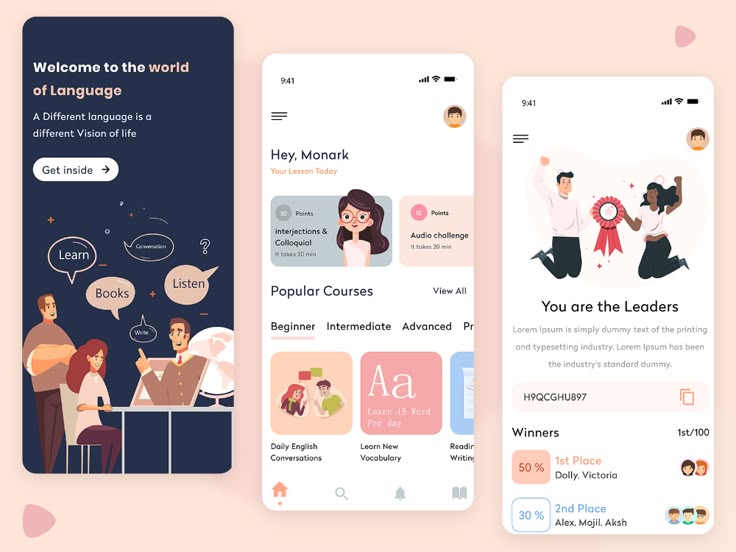
Developing wireframes and mockups provides a visual representation of the app's layout and functionalities. Tools like Figma or Sketch can be used to create detailed prototypes that illustrate the user journey through the app, including key screens such as:
- Home Screen: Featuring quick access to lessons, progress summaries, and personalized recommendations.
- Lesson Interface: Interactive display of learning materials, multimedia content, and exercises.
- Quiz and Assessment: Dynamic interfaces for testing and providing immediate feedback.
- Profile and Progress Tracking: Visual charts and statistics showcasing user progress and achievements.
Database Design
Data Storage Infrastructure
Designing an efficient database structure is crucial for data integrity and performance. Key considerations include:
- Defining Key Tables: Users, Lessons, Assessments, Feedback, Progress Tracking, and Content Management.
- Normalization: Ensuring data redundancy is minimized and data dependencies are appropriately managed.
- Security Measures: Implementing encryption for sensitive data, role-based access controls, and regular security audits to safeguard user information.
Entity-Relationship Modeling
Creating ER models helps in visualizing the relationships between different data entities. For example:
| Entity | Attributes | Relationships |
|---|---|---|
| Users | UserID, Name, Email, Password, Profile | Enrolls in Lessons, Takes Assessments |
| Lessons | LessonID, Title, Content, Multimedia | Contains Assessments, Belongs to Modules |
| Assessments | AssessmentID, Type, Questions, Answers | Linked to Lessons, Evaluates Users |
| Feedback | FeedbackID, UserID, AssessmentID, Comments | Provided to Users, Related to Assessments |
Algorithm Design
Adaptive Learning Algorithms
Implementing adaptive learning algorithms enhances the personalized learning experience by adjusting lesson difficulty and content based on user performance. These algorithms analyze user interactions, assess strengths and weaknesses, and tailor the learning path accordingly to maximize efficiency and engagement.
Gamification Algorithms
Gamification algorithms introduce game-like elements such as points, badges, and leaderboards to motivate users. These algorithms track user achievements and progress, rewarding consistent participation and milestones achieved, thereby fostering a competitive and engaging learning environment.
Prototyping and Simulation
Developing Interactive Prototypes
Creating interactive prototypes allows for early testing and feedback on the app's design and functionalities. Tools like InVision or Adobe XD can be used to simulate user interactions, enabling the team to identify and address usability issues before full-scale development.
User Testing and Feedback Integration
Conducting user testing sessions with prototypes helps gather valuable feedback on the app's design, functionality, and user experience. Incorporating this feedback into iterative design refinements ensures that the final product aligns with user expectations and provides a seamless learning experience.
Security and Compliance by Design
Implementing Security Protocols
Security is paramount in app development. Implementing SSL/TLS encryption, secure authentication mechanisms, and regular security audits protect user data and maintain trust. Ensuring compliance with data protection regulations like GDPR and COPPA is essential for legal adherence and user privacy.
Role-Based Access Control
Establishing role-based access control (RBAC) ensures that users have access only to the functionalities pertinent to their roles. For instance, learners, educators, and administrators will have distinct access privileges, enhancing both security and usability.
Testing Strategy Design
Comprehensive Testing Phases
Designing a robust testing strategy involves multiple phases to ensure the app's reliability and performance:
-
Unit Testing: Testing individual components for functionality.
-
Integration Testing: Ensuring that different modules interact seamlessly.
-
System Testing: Verifying the complete and integrated application.
-
User Acceptance Testing (UAT): Gathering feedback from end-users to validate the app's effectiveness and usability.
Automated Testing Tools
Utilizing automated testing tools like Selenium or Appium can streamline the testing process, increase efficiency, and ensure consistent test coverage across different platforms and devices.
Deployment Architecture
Cloud-Based Hosting Solutions
Choosing scalable cloud platforms such as AWS, Google Cloud, or Azure ensures that the app can handle varying loads and provides reliable performance. Cloud services offer robust infrastructure, automatic scaling, and comprehensive security features.
Continuous Integration and Continuous Deployment (CI/CD)
Implementing CI/CD pipelines automates the testing and deployment processes, enabling rapid iterations and quicker release cycles. Tools like Jenkins, GitHub Actions, or GitLab CI/CD facilitate seamless integration, testing, and deployment, enhancing development efficiency.
Monitoring and Maintenance
Post-deployment, continuous monitoring using tools like New Relic or Datadog ensures that the app performs optimally. Regular maintenance, automated backups, and prompt issue resolution are critical for sustaining app performance and user satisfaction.
Conclusion
Developing an English language learning app through the structured framework of Systems Analysis and Design ensures a methodical and user-centric approach. By meticulously planning, comprehensively analyzing requirements, and innovatively designing the app, developers can create a robust, scalable, and engaging platform that effectively facilitates language learning. This structured approach not only minimizes risks but also aligns the app's functionalities with user needs, fostering both user satisfaction and long-term success.
Future Directions
Post-launch, the app should undergo continuous improvement based on user feedback and evolving educational trends. Future enhancements may include expanding language support, integrating advanced AI features for personalized learning, and incorporating virtual or augmented reality elements to enrich the learning experience. Regular updates and feature expansions will ensure that the app remains relevant and continues to meet the diverse needs of its user base.
References
Last updated February 16, 2025