
Enhancing Your Digital File Organization System
Strategies and Suggestions for a More Efficient Folder Structure
Organizing digital files is crucial for productivity and easy access to information. A well-structured folder system can save significant time and reduce stress. Let's explore how to optimize your current folder setup and consider additional categories to enhance your digital organization.
Key Insights for Effective File Management
- Hierarchical Structure: Implement a clear and logical hierarchy for your folders, starting with broad categories and becoming more specific with subfolders.
- Consistent Naming Conventions: Adopt a standardized approach to naming both your folders and files to ensure clarity and simplify searching.
- Regular Review and Archiving: Periodically clean up your folders by deleting unnecessary files and archiving older or less frequently accessed data.
Analyzing Your Current Folder Structure and Potential Enhancements
Your existing folder structure provides a solid foundation for organizing various aspects of your life. Let's examine each category and suggest potential modifications, additions, or removals to create a more comprehensive and efficient system.
Refining Existing Categories
Personal Projects
This is a good starting point. To make it more effective, consider creating subfolders within "Personal Projects" for individual projects. For example:
- Personal Projects
- Project X - [Year]
- Hobby Y - [Month/Year]
- Creative Writing
Adding dates to project folders can help with chronological sorting and archiving later on.
Personal Development
This folder can encompass a wide range of activities. To provide better structure, break it down into specific areas:
- Personal Development
- Courses & Workshops
- Reading Notes
- Skill Building - [Skill Name]
- Goal Setting & Planning
Professional Matters
This is essential for work-related files. Consider organizing this by employer, project, or client:
- Professional Matters
- [Employer Name]
- Projects - [Project Name]
- Administration
- Performance Reviews
- Freelance Clients - [Client Name]
- Job Search
- [Employer Name]
Financial Matters
Financial organization is critical. A common approach is to organize by year, then by category:
- Financial Matters
- [Year]
- Income
- Expenses - [Category, e.g., Bills, Shopping]
- Taxes
- Investments
- [Year]
Learning
Similar to Personal Development, refining "Learning" can make it more useful. Consider structuring by subject or institution:
- Learning
- [Subject Area]
- [Institution Name]
- Tutorials & Guides
Home & Auto
This category can be organized by asset:
- Home & Auto
- Home
- Mortgage & Property Taxes
- Maintenance & Repairs
- Utilities
- Auto - [Vehicle Make/Model]
- Insurance
- Maintenance Records
- Loan Documents
- Home
Media
This is a broad category. Consider breaking it down by type:
- Media
- Photos
- [Year] - [Event/Location]
- Videos
- Music
- Documents (can be a subfolder if not part of other categories)
- Photos
For photos, organizing by year and then by event or location is a popular and effective method.
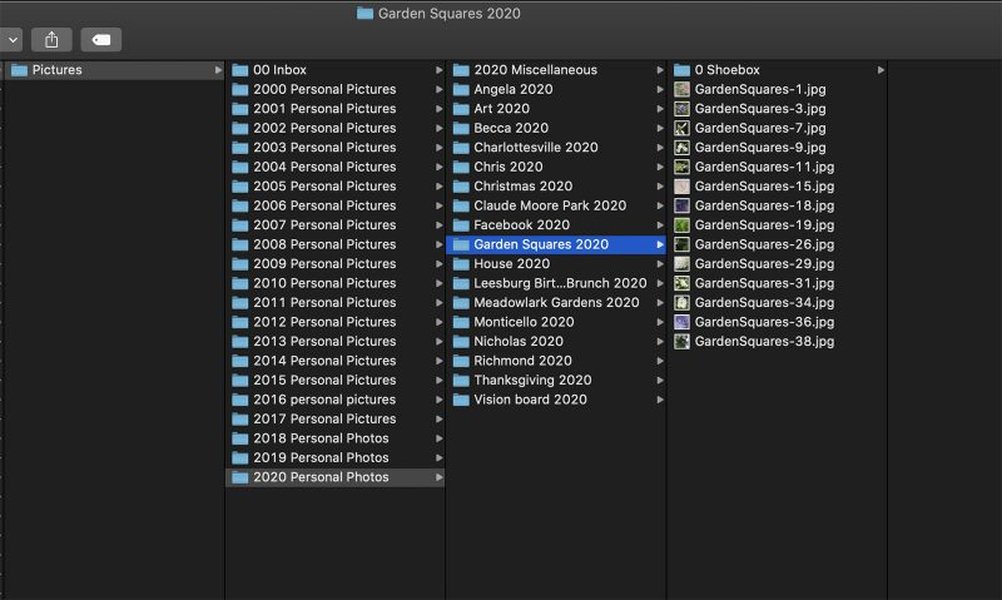
An example of organizing photos by year and event.
Health Matters
Organization by individual and then by type of document is recommended:
- Health Matters
- [Your Name]
- Medical Records
- Insurance
- Appointments
- [Family Member Name]
- [Your Name]
Business Affairs
Similar to Professional Matters, structure this based on the nature of your business activities:
- Business Affairs
- [Business Name]
- Client Management
- Marketing
- Finances
- [Business Name]
Family Matters
This can be organized by family member or by topic:
- Family Matters
- [Family Member Name]
- Family History
- Important Family Documents
Kid's School
Organizing by child and then by academic year is a common and effective approach:
- Kid's School
- [Child's Name]
- [Academic Year]
- Assignments
- Reports
- Communication
- [Academic Year]
- [Child's Name]
Legal Matters
This should be organized by case or type of legal document:
- Legal Matters
- [Case Name/Description]
- Estate Planning
- Contracts
Politics
Depending on your level of engagement, this could be organized by topic, election cycle, or organizations:
- Politics
- [Topic]
- [Election Year]
- [Organization Name]
Suggestions for Additional Folders
Consider adding the following folders to cover other important areas of your digital life:
- Inbox/To Process: A temporary holding place for new downloads and files that need to be sorted. Regularly processing this folder is key to maintaining organization.
- Archives: For files that are no longer actively used but may be needed for future reference. Organizing archives by year or project can be helpful.
- Templates: If you frequently use certain document formats, having a dedicated folder for templates can save time.
- Software & Licenses: Keep track of software installers, license keys, and registration information.
- Travel: Organize travel plans, booking confirmations, and related documents by trip.
- Receipts: A dedicated folder for digital receipts, potentially organized by year or category.
- Utilities & Manuals: For digital copies of appliance manuals, software guides, and utility information.
Potential Removals or Consolidations
Review your current folders and consider if any are redundant or can be merged. For example, if "Business Affairs" is very limited, perhaps it can be a subfolder under "Professional Matters." The goal is to create a system that is intuitive and easy for *you* to navigate.
Best Practices for File and Folder Organization
Beyond the specific folder names, implementing consistent practices is vital for long-term organization. These best practices apply across all your folders:
Consistent Naming Conventions
Use clear and descriptive names for both folders and files. Avoid generic names like "Document1" or "New Folder." Consider including dates in your file names, especially for documents that are updated or have versions.
[YYYY-MM-DD] - [Document Description] - [Version]Hierarchical Structure
Limit the depth of your subfolders to avoid excessive clicking and making it difficult to find files. Aim for a maximum of 3-4 levels deep.

An illustration of a hierarchical folder structure.
Utilize Tags
Many operating systems and cloud storage services allow you to tag files. Tags can provide an additional layer of organization, allowing you to categorize files across different folders. For example, you could tag files related to a specific project even if they are stored in different primary folders.
Regularly Clean Up and Archive
Schedule regular time to go through your files. Delete duplicates and unnecessary documents. Move older files that you don't access frequently to an archive folder.
Leverage Search Functionality
Even with a great organizational system, sometimes the fastest way to find a file is to use your computer's search function. Consistent naming and tagging can significantly improve search results.
Learn more tips for organizing files and folders from this video.
Example Folder Structure Table
Here's a table summarizing your initial folders with suggested additions and examples of subfolders:
| Original Folder | Suggested Status | Example Subfolders |
|---|---|---|
| Personal Projects | Refine with subcategories | Project Name, Hobby, Creative |
| Personal Development | Refine with subcategories | Courses, Reading Notes, Skill Building |
| Professional Matters | Refine by Employer/Project | [Employer Name], Freelance Clients, Job Search |
| Financial Matters | Refine by Year/Category | [Year], Income, Expenses, Taxes |
| Learning | Refine by Subject/Institution | [Subject Area], Tutorials, Institutions |
| Home & Auto | Refine by Asset | Home, Auto - [Vehicle] |
| Media | Refine by Type | Photos, Videos, Music |
| Health Matters | Refine by Individual/Type | [Your Name], [Family Member Name], Medical Records |
| Business Affairs | Refine by Business/Client | [Business Name], Client Management |
| Family Matters | Refine by Member/Topic | [Family Member Name], Family History |
| Kid's School | Refine by Child/Year | [Child's Name], [Academic Year], Assignments |
| Legal Matters | Refine by Case/Type | [Case Name], Estate Planning, Contracts |
| Politics | Refine by Topic/Election | [Topic], [Election Year], Organizations |
| (New) Inbox/To Process | Add | (Temporary holding) |
| (New) Archives | Add | [Year], [Project] |
| (New) Templates | Add | (Common document types) |
| (New) Software & Licenses | Add | Software Installers, License Keys |
| (New) Travel | Add | [Trip Name/Year] |
| (New) Receipts | Add | [Year], [Category] |
| (New) Utilities & Manuals | Add | Manuals, Utility Information |
Implementing Your New Structure
Changing your file organization system takes time and effort. Here are some tips for a smooth transition:
-
Start Small: Don't feel the need to reorganize everything at once. Begin with new files and gradually work through your existing ones.
-
Process Your "Inbox": Make a habit of sorting files from your download folder or inbox into their designated places regularly.
-
Be Consistent: The key to a successful system is consistent application. Stick to your naming conventions and folder structure.
-
Adapt as Needed: Your organizational needs may change over time. Be open to adjusting your folder structure as your life and work evolve.
Organizing important life documents is a key aspect of file management.
Frequently Asked Questions
How do I decide on the best folder structure for me?
The best folder structure is one that makes the most sense to you and aligns with how you think and work. Consider the types of files you deal with most often and how you would naturally look for them.
Is it better to organize by file type or by topic?
Generally, organizing by topic or purpose is more effective than by file type. For example, keeping all documents related to a specific project together, regardless of whether they are text files, spreadsheets, or images, is usually more efficient.
How often should I clean up my files?
Regular cleanups are recommended. This could be weekly, monthly, or quarterly, depending on the volume of files you handle. The important thing is to make it a routine.
What should I do with old files I might need in the future?
Create an "Archives" folder for these files. You can organize the archives chronologically or by project to make them easier to search if needed.
References
 sorrythatusernameistaken.wordpress.com
Last updated April 29, 2025