
Unlocking Peak ESP32-S3 Bluetooth Performance for Crystal-Clear Real-Time Audio
Dive into advanced strategies to optimize your ESP32-S3 for seamless, low-latency audio streaming over Bluetooth.
The ESP32-S3, a powerful microcontroller with dual-mode Bluetooth 5.0 (BR/EDR + BLE) capabilities, offers exciting possibilities for real-time audio applications. However, achieving optimal performance—characterized by low latency, high throughput, and stable connections—requires careful consideration of hardware, software, and Bluetooth configurations. This guide provides a comprehensive approach to fine-tuning your ESP32-S3 for demanding audio streaming tasks.
Key Optimization Highlights
- Prioritize Bluetooth Classic (A2DP): For high-quality, real-time audio streaming, the Advanced Audio Distribution Profile (A2DP) over Bluetooth Classic (BR/EDR) is generally superior to BLE due to its higher throughput capabilities. Ensure your ESP32-S3 setup leverages this profile.
- Efficient Data Handling with I2S & DMA: Utilize the I2S (Inter-IC Sound) peripheral for direct audio data transfer and Direct Memory Access (DMA) to offload CPU, minimizing jitter and processing overhead.
- Strategic Firmware & SDK Configuration: Fine-tune the ESP-IDF (Espressif IoT Development Framework) settings, including the Bluetooth stack, CPU frequency, and cache, to maximize performance.
Understanding ESP32-S3 Bluetooth Capabilities for Audio
The ESP32-S3 supports Bluetooth 5.0, encompassing both Bluetooth Classic (BR/EDR) and Bluetooth Low Energy (BLE). While BLE is excellent for low-power data transmission, real-time audio streaming, especially for music or high-quality voice, traditionally relies on Bluetooth Classic and the A2DP profile. A2DP is designed to stream stereo audio wirelessly.
While the ESP32-S3 hardware supports Bluetooth Classic, the maturity and out-of-the-box ease of A2DP implementation can sometimes require specific firmware versions or community-supported libraries. BLE audio is an emerging standard, but current BLE specifications on ESP32-S3 can have limitations in payload size (typically around 244 bytes per packet), making it less suitable for high-bandwidth, low-latency audio compared to A2DP over Classic Bluetooth.
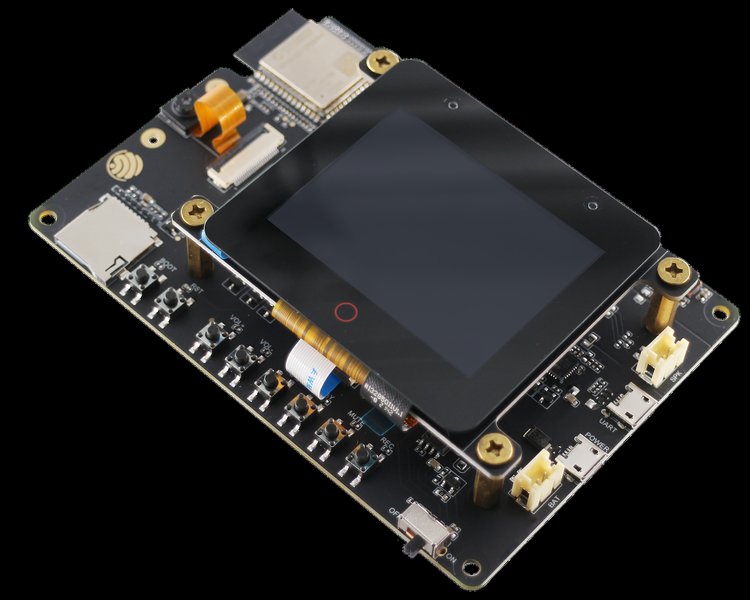
The ESP32-S3-Korvo-2, an audio development kit, showcases the ESP32-S3's suitability for audio applications.
Software Stack and Firmware Choices
Choosing the Right Bluetooth Stack
The ESP-IDF provides two main Bluetooth stacks:
- Bluedroid: This is the default stack and supports both Bluetooth Classic (including A2DP) and BLE. For real-time audio streaming requiring A2DP, Bluedroid is the recommended choice.
- NimBLE: A lighter-weight stack primarily focused on BLE. While efficient for BLE-only applications, it is not suitable for A2DP-based audio streaming.
Ensure your project is configured to use the Bluedroid stack if you intend to implement A2DP for audio.
Firmware and Library Updates
Keeping your ESP-IDF version, Arduino core (if applicable), and relevant Bluetooth audio libraries up-to-date is crucial. Espressif and the community continuously release updates that can include performance improvements, bug fixes, and enhanced support for audio profiles.
Optimizing Bluetooth PHY and Connection Parameters
Leveraging Bluetooth 5.0 Features
For applications where BLE might be used for lower-bitrate audio or control signals alongside audio:
- LE 2M PHY: If using BLE, enabling the 2 Mbps Physical Layer (2M PHY) can double the data rate compared to the standard 1M PHY, potentially improving throughput for audio data packets. This can be configured in the
sdkconfigfile (e.g.,CONFIG_BTDM_CTRL_LE_2M_PHY).
For Bluetooth Classic (A2DP):
- Connection Parameters: While A2DP has its own mechanisms, ensuring stable underlying Bluetooth Classic connections is important. Parameters like connection interval and slave latency are more pertinent to BLE, but overall radio performance benefits from careful configuration.
- High Power Mode: The ESP32-S3 often defaults to a +9dBm TX power. While specific API calls to drastically increase this further might have limitations due to regulatory and hardware constraints, ensuring the radio is operating at its optimal configured power level is beneficial for range and signal stability.
SDK Configuration (sdkconfig)
Carefully review and adjust settings within the sdkconfig file (accessible via idf.py menuconfig in ESP-IDF projects). Key areas include:
- Bluetooth controller options (e.g., enabling specific PHY modes).
- CPU frequency (setting to 240 MHz for demanding tasks).
- Cache size and performance optimizations.
Efficient Audio Data Handling and Processing
Utilizing I2S for Audio Data
The I2S peripheral is designed for handling digital audio data. It allows for efficient communication between the ESP32-S3 and audio codecs (DACs/ADCs) or other audio processing chips. Using I2S minimizes CPU involvement in the raw data transfer process.
Direct Memory Access (DMA)
DMA allows peripherals like I2S to transfer data to and from memory without continuous CPU intervention. For real-time audio, configuring DMA for your audio buffers is essential. This frees up the CPU to handle other tasks, such as Bluetooth communication, audio decoding, and application logic, reducing the likelihood of audio dropouts or glitches.
Buffer Management
Proper audio buffer management is critical:
- Circular Buffers: Implement circular DMA buffers for both incoming (from Bluetooth) and outgoing (to I2S) audio data.
- Buffer Sizing: The size of these buffers is a trade-off. Larger buffers can absorb more jitter and prevent underruns/overruns but increase latency. Smaller buffers reduce latency but are more susceptible to network or processing delays. Tune buffer sizes based on your specific application requirements and testing.
Firmware Optimizations and Coding Practices
- CPU Frequency: Ensure the ESP32-S3 is running at its maximum supported frequency (typically 240 MHz) for audio processing tasks. This can be set in
sdkconfig. - Cache Optimization: Larger instruction and data caches can improve performance by reducing memory access latency. Refer to ESP-IDF performance guides for cache configuration.
- Task Priorities (FreeRTOS): If using FreeRTOS (common with ESP-IDF), assign appropriate priorities to tasks. Audio processing and Bluetooth communication tasks should generally have higher priorities to ensure timely execution.
- Avoid Blocking Operations: In critical audio paths, avoid lengthy or blocking operations, including excessive serial printing for debugging, which can introduce latency.
- Optimized Codecs: Use efficient audio codecs like SBC (Subband Coding), which is standard for A2DP. Ensure the decoding process is optimized.
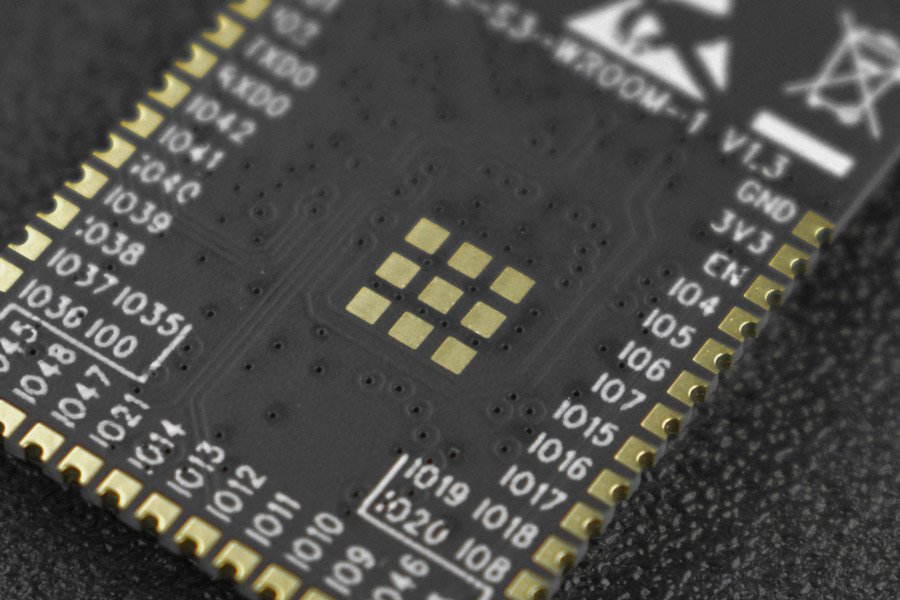
The core ESP32-S3-WROOM module, which powers many development boards.
Leveraging Existing Libraries and Projects
The ESP32 community has produced valuable resources for Bluetooth audio:
- pschatzmann/ESP32-A2DP: This is a popular Arduino library that provides A2DP source (sending audio) and sink (receiving audio) functionalities for ESP32 microcontrollers, including support for ESP32-S3. It simplifies the implementation of Bluetooth Classic audio streaming. (GitHub: pschatzmann/ESP32-A2DP)
- sle118/squeezelite-esp32: A more comprehensive project implementing a network audio player (Squeezebox client) that also supports Bluetooth audio streaming capabilities on ESP32 platforms. (GitHub: sle118/squeezelite-esp32)
Always check the latest documentation and compatibility notes for these libraries with your specific ESP32-S3 variant and ESP-IDF/Arduino core version.
Hardware Design Considerations
Antenna Design and Placement
RF performance is paramount for reliable Bluetooth communication:
- Antenna Choice: Use a well-designed PCB trace antenna or an external antenna if your module supports it.
- Keepout Zones: Respect the antenna keepout zones specified in the ESP32-S3 datasheet. Avoid placing ground planes, metal enclosures, or other components near the antenna.
- Orientation: The orientation of the device and its antenna relative to the paired device can significantly impact signal strength.
Power Supply and Decoupling
- Stable Power: Provide a clean and stable power supply to the ESP32-S3. Noise on the power lines can affect RF performance.
- Decoupling Capacitors: Use appropriate decoupling capacitors close to the ESP32-S3 power pins to filter out noise.
External Components
If using external audio codecs, microphones, or amplifiers, ensure they are high quality and properly interfaced with the ESP32-S3. Good grounding practices are essential to minimize noise in the audio path.
Visualizing Optimization Impacts: A Comparative Radar Chart
The following radar chart illustrates the potential impact of various optimization techniques on different aspects of real-time audio performance. Scores are on a scale where higher values indicate greater positive impact or ease. This is a qualitative assessment to guide your focus.
This chart helps visualize that focusing on A2DP, efficient buffering with DMA/I2S, and using optimized codecs generally yields the highest gains in audio quality and latency for typical real-time audio scenarios.
Conceptual Mindmap of Optimization Strategies
This mindmap provides a hierarchical overview of the key areas to focus on when optimizing ESP32-S3 Bluetooth performance for real-time audio. It connects various hardware, software, and Bluetooth-specific considerations.
This mindmap shows the interconnectedness of various factors, from low-level hardware choices to high-level application software design, all contributing to the final audio performance.
Summary Table of Optimization Techniques
Here's a table summarizing key optimization areas, actions, and their expected impact on real-time Bluetooth audio performance with the ESP32-S3.
| Optimization Area | Action/Setting | Primary Expected Impact | Notes |
|---|---|---|---|
| Bluetooth Profile | Use A2DP (Advanced Audio Distribution Profile) over Bluetooth Classic | Higher throughput, better audio quality for stereo | Requires Bluedroid stack. Libraries like ESP32-A2DP simplify this. |
| Bluetooth Stack | Select Bluedroid in ESP-IDF | Enables Bluetooth Classic and A2DP support | NimBLE is BLE-only. |
| Audio Data Interface | Utilize I2S peripheral with DMA | Reduced CPU load, efficient audio data transfer | Essential for minimizing jitter. |
| Buffering | Implement optimized circular DMA buffers | Improved stability, prevents audio dropouts | Balance buffer size for latency vs. stability. |
| CPU & Cache | Set CPU to 240 MHz, optimize cache settings | Faster processing of audio codecs and Bluetooth stack | Configurable in sdkconfig. |
| Bluetooth PHY (for BLE) | Enable LE 2M PHY if using BLE for audio/control | Increased data rate for BLE communication | Less critical if A2DP Classic is primary. |
| TX Power | Ensure optimal TX power settings (e.g., default +9dBm) | Improved range and signal reliability | Further increases might be limited. |
| Antenna Design | Optimize PCB antenna layout or use external antenna; respect keepout zones | Stronger and more stable Bluetooth signal | Crucial for overall wireless performance. |
| Firmware Libraries | Use latest stable versions of ESP-IDF, Arduino core, and audio libraries | Access to performance improvements and bug fixes | Check compatibility. |
| Task Management (RTOS) | Assign high priorities to audio and Bluetooth tasks | Ensures timely processing of critical operations | Prevents preemption by lower-priority tasks. |
Practical Demonstration: ESP32 Bluetooth Audio Receiver
Understanding how these optimizations come together can be aided by observing practical projects. The video below provides a tutorial on building an ESP32-based Bluetooth audio receiver. While it may use a standard ESP32, the principles of A2DP, I2S, and audio handling are highly relevant for an ESP32-S3 project aiming for similar functionality. It demonstrates the core concepts of receiving Bluetooth audio and outputting it via a DAC.
This type of project highlights the importance of selecting the correct Bluetooth profile (A2DP for receiving audio), interfacing with an audio DAC (often via I2S), and managing the audio data stream. The ESP32-S3, with its enhanced processing power and Bluetooth 5.0 capabilities, can build upon these foundations for even more robust performance, provided the optimizations discussed are implemented.
Frequently Asked Questions (FAQ)
Is BLE suitable for high-quality real-time audio on ESP32-S3?
While BLE 5.0 on the ESP32-S3 offers features like 2M PHY for higher data rates, it's generally less suited for high-quality, low-latency stereo audio streaming compared to Bluetooth Classic with A2DP. BLE has smaller packet sizes (MTU typically around 247 bytes, payload even smaller), which can limit throughput and increase overhead for continuous audio streams. LE Audio is an emerging standard that aims to address this for BLE, but its full implementation and widespread support (including on ESP32-S3) should be verified. For applications like simple voice commands or low-bitrate mono audio, BLE might be feasible with careful optimization, but A2DP over Bluetooth Classic remains the preferred choice for music and high-fidelity audio.
What is A2DP, and why is it important for ESP32-S3 audio?
A2DP stands for Advanced Audio Distribution Profile. It's a Bluetooth Classic profile designed specifically for streaming high-quality stereo audio wirelessly from one device (source, e.g., a smartphone) to another (sink, e.g., Bluetooth speaker or headphones). For the ESP32-S3, implementing A2DP (usually as an audio sink) is crucial for applications like building a wireless speaker or headset because A2DP handles audio compression (typically SBC codec), packetization, and streaming suitable for music and rich audio content. It provides significantly higher bandwidth than standard BLE data channels.
Where can I find libraries for ESP32-S3 Bluetooth audio?
Several community-driven libraries are available, primarily for the Arduino framework, which builds upon the ESP-IDF. One of the most popular is Phil Schatzmann's "ESP32-A2DP" library (https://github.com/pschatzmann/ESP32-A2DP), which supports A2DP sink and source modes. For more complex applications, projects like "squeezelite-esp32" (https://github.com/sle118/squeezelite-esp32) also incorporate Bluetooth audio functionalities. Always check the library's documentation for ESP32-S3 compatibility and any specific setup instructions. For ESP-IDF native development, you would work more directly with the Bluedroid stack APIs.
What are common pitfalls when optimizing ESP32-S3 for real-time audio?
Common pitfalls include:
- Poor Antenna Design/Placement: Leading to weak signals, dropouts, and reduced range.
- Inadequate Buffer Management: Buffers too small can cause audio glitches (underruns/overruns); too large can introduce noticeable latency.
- CPU Overload: Not offloading tasks to DMA or running too many intensive processes concurrently can starve the audio pipeline. Ensure audio processing and Bluetooth tasks have high priority in an RTOS environment.
- Incorrect Bluetooth Stack/Profile: Attempting high-quality audio over generic BLE GATT services instead of A2DP.
- Ignoring Wi-Fi Coexistence: If Wi-Fi is also active, interference between Wi-Fi and Bluetooth (both operating in the 2.4 GHz band) can degrade performance. ESP-IDF has coexistence mechanisms, but they need to be managed.
- Power Supply Noise: Unstable or noisy power can affect both RF performance and analog audio quality if external DACs/amps are used.
- Outdated Firmware/Libraries: Using older versions that may have known bugs or lack performance optimizations.
Recommended Further Exploration
- How can I implement an A2DP audio sink on the ESP32-S3 using the ESP-IDF framework?
- What are advanced techniques for minimizing audio latency in ESP32 Bluetooth projects?
- How can I manage Wi-Fi and Bluetooth coexistence on the ESP32-S3 to ensure stable audio streaming?
- What are the detailed trade-offs between using Bluedroid versus NimBLE for various ESP32 audio application scenarios?
References
Last updated May 7, 2025