
Unlock a Voice-Activated World: Programming Your ESP32-S3 with ESP-IDF for Bluetooth Audio Interaction
A deep dive into creating a sophisticated voice assistant using the ESP32-S3, ESP-IDF, and Bluetooth peripherals for seamless audio input and output.
Developing a voice assistant on the ESP32-S3 microcontroller using the Espressif IoT Development Framework (ESP-IDF) involves integrating several key technologies. This guide will walk you through the essential steps, from setting up your environment to handling Bluetooth audio for both microphone input and speaker output, and incorporating voice processing capabilities. By leveraging the power of the ESP32-S3 and ESP-IDF, you can build a responsive and intelligent voice-controlled application.
Essential Insights: Key Takeaways
- Bluetooth Integration is Key: Successfully creating a voice assistant hinges on robust Bluetooth Classic integration, utilizing profiles like Hands-Free Profile (HFP) for microphone input and Advanced Audio Distribution Profile (A2DP) for speaker output.
- ESP-IDF Provides the Foundation: The ESP-IDF offers comprehensive libraries and tools for low-level hardware control, Bluetooth stack management, and audio stream processing, which are crucial for this project.
- Voice Processing Pipeline: A complete voice assistant requires a multi-stage pipeline, including wake word detection, speech-to-text (STT) conversion, intent recognition, and text-to-speech (TTS) synthesis, often leveraging libraries like ESP-SR.
Understanding the ESP32-S3 Voice Assistant Architecture
The ESP32-S3 is a powerful dual-core microcontroller well-suited for voice assistant applications due to its processing capabilities, ample memory, and built-in Wi-Fi and Bluetooth support. When building a voice assistant, you'll be orchestrating several software and hardware components.
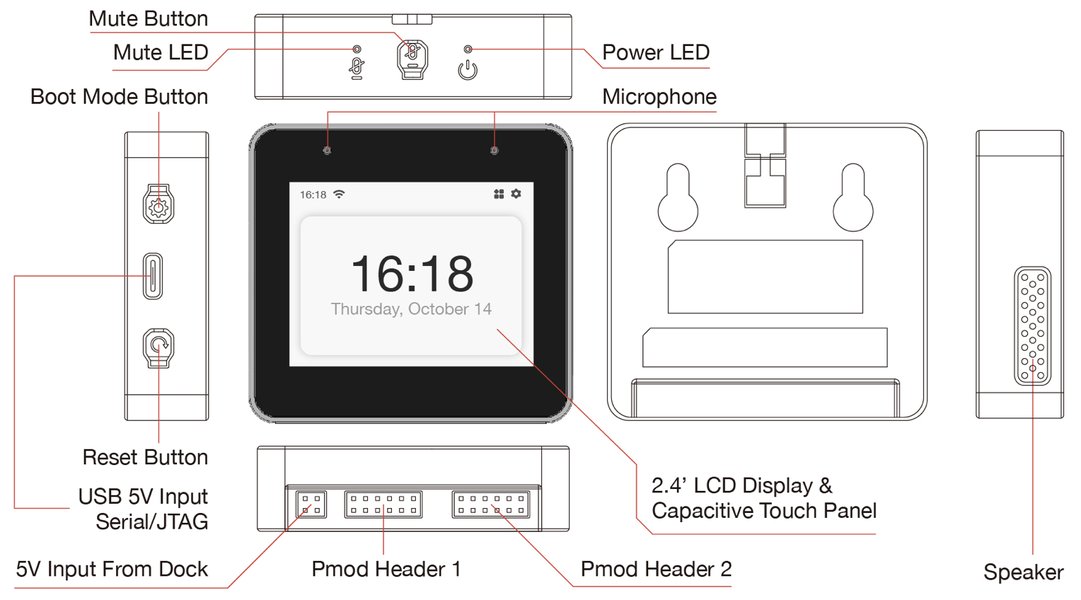
The ESP32-S3-BOX, an AI voice development kit from Espressif, showcasing the ESP32-S3's capabilities.
Core Components Involved
A typical voice assistant built on the ESP32-S3 involves the following stages:
- Audio Input: Capturing audio data from an external Bluetooth microphone.
- Wake Word Detection: Continuously listening for a specific phrase (e.g., "Hey ESP") to activate the assistant. Espressif's ESP-SR library can be used for on-device wake word detection.
- Speech-to-Text (STT): Converting the captured spoken commands into text. This can be done locally using models like those in ESP-SR or via cloud-based services.
- Natural Language Understanding (NLU) / Intent Recognition: Processing the text to understand the user's command or query.
- Action Execution: Performing the requested task, which could range from controlling smart home devices to fetching information.
- Text-to-Speech (TTS): Converting the assistant's textual response back into audible speech. This can also be local or cloud-based.
- Audio Output: Playing the synthesized speech or other audio feedback through a Bluetooth speaker.
The Role of ESP-IDF
ESP-IDF is the official development framework for ESP32 SoCs. It provides:
- Low-level drivers for peripherals (I2S, GPIO, etc.).
- Bluetooth stack (Classic and BLE) for managing connections and profiles.
- Wi-Fi libraries for network connectivity (if using cloud services).
- FreeRTOS for task management and real-time operations.
- Support for various libraries and components, including audio codecs and speech processing tools like ESP-SR.
Setting Up Your ESP-IDF Environment
Before you begin coding, ensure your ESP-IDF environment is correctly set up. This typically involves:
- Installing ESP-IDF: Clone the ESP-IDF repository from GitHub and run the install script.
git clone --recursive https://github.com/espressif/esp-idf.git cd esp-idf ./install.sh esp32s3 # or ./install.sh all - Setting up Environment Variables: Source the
export.sh(orexport.baton Windows) script.. ./export.sh - Verifying Installation: Create a sample project (e.g.,
get-started/hello_world), build, and flash it to your ESP32-S3 board to confirm the toolchain is working.
It's recommended to use a recent stable version of ESP-IDF (e.g., v5.0 or later) for the best ESP32-S3 support and features.
Bluetooth Configuration for Microphone and Speaker
The ESP32-S3's Bluetooth capabilities are central to this project. You'll primarily use Bluetooth Classic profiles:
Key Bluetooth Profiles
- Hands-Free Profile (HFP) Client: For receiving audio input from a Bluetooth microphone. The ESP32-S3 acts as the HFP Client (or Audio Gateway in some contexts), connecting to an HFP Hands-Free Unit (the microphone).
- Advanced Audio Distribution Profile (A2DP) Sink: For sending audio output to a Bluetooth speaker. The ESP32-S3 acts as the A2DP Source, streaming audio to an A2DP Sink (the speaker).
Configuring these profiles involves initializing the Bluetooth controller, enabling the Bluedroid stack (ESP-IDF's Bluetooth Classic stack), and registering callbacks to handle Bluetooth events and audio data.
Bluetooth Profile Comparison
Understanding the roles of different Bluetooth profiles is crucial for integrating audio peripherals. Below is a table summarizing the key profiles used in this voice assistant setup.
| Profile | Full Name | Primary Use Case | Direction (from ESP32-S3 perspective) | Typical Device |
|---|---|---|---|---|
| HFP (Client Role) | Hands-Free Profile | Voice calls, microphone input | Input (Audio from Mic) | Bluetooth Microphone, Headset |
| A2DP (Source Role) | Advanced Audio Distribution Profile | High-quality stereo audio streaming | Output (Audio to Speaker) | Bluetooth Speaker, Headphones |
| HSP (Client Role) | Headset Profile | Basic mono audio, older headsets | Input/Output (Simpler than HFP) | Older Bluetooth Headsets |
For this project, HFP Client is preferred for microphone input due to its more robust call control and audio features, while A2DP Source is standard for high-quality speaker output.
Visualizing the Voice Assistant Architecture
A mindmap can help visualize the interconnected components of the ESP32-S3 voice assistant. This includes hardware, software layers, and the core functionalities.
(e.g., ESP-SR)"] Audio_Capture["Audio Capture (from BT Mic)"] Speech_to_Text["Speech-to-Text (STT)
(Local/Cloud)"] Intent_Recognition["Intent Recognition/NLU"] Command_Execution["Command Execution"] Text_to_Speech["Text-to-Speech (TTS)
(Local/Cloud)"] Audio_Playback["Audio Playback (to BT Speaker)"] Key_Features Connectivity["Bluetooth & Wi-Fi"] Low_Power_Modes["Low Power Optimization"] Customizability["Customizable Commands & Responses"] On_Device_Processing["Potential for On-Device Processing"]
This mindmap illustrates the main hardware elements like the ESP32-S3 itself and the Bluetooth peripherals. It then details the software stack, primarily ESP-IDF and its components, followed by the stages of the voice processing pipeline and key features of such a system.
Core ESP-IDF Code Structure for Voice Assistant
Below is a conceptual C code structure using ESP-IDF to initialize Bluetooth for HFP client (microphone) and A2DP sink (speaker functionality, although we'll primarily use A2DP source for output). This example focuses on initialization and callback registration.
#include "esp_log.h"
#include "nvs_flash.h"
#include "esp_bt.h"
#include "esp_bt_main.h"
#include "esp_bt_device.h"
#include "esp_gap_bt_api.h" // For GAP events
#include "esp_a2dp_api.h"   // For A2DP (speaker output)
#include "esp_hf_client_api.h" // For HFP Client (microphone input)
// Potentially include ESP-SR headers for wake word, STT, etc.
// #include "esp_sr_iface.h"
// #include "esp_sr_models.h"

static const char *TAG = "VOICE_ASSISTANT";

// --- Callback Functions ---
// A2DP Sink related callbacks (for playing audio TO the ESP32 - here we want A2DP Source)
// For simplicity, we will focus on HFP Client for input and A2DP Source for output.
// The standard A2DP API for source mode involves esp_a2d_source_init() and esp_a2d_media_ctrl(ESP_A2D_MEDIA_CTRL_START) etc.

// HFP Client callback
static void bt_app_hf_client_cb(esp_hf_client_cb_event_t event, esp_hf_client_cb_param_t *param) {
    ESP_LOGI(TAG, "HFP Client Event: %d", event);
    switch (event) {
        case ESP_HF_CLIENT_CONNECTION_STATE_EVT:
            ESP_LOGI(TAG, "HFP Client Connection State: %d, PEER BDA: %02x:%02x:%02x:%02x:%02x:%02x",
                     param->conn_stat.state,
                     param->conn_stat.remote_bda[0], param->conn_stat.remote_bda[1],
                     param->conn_stat.remote_bda[2], param->conn_stat.remote_bda[3],
                     param->conn_stat.remote_bda[4], param->conn_stat.remote_bda[5]);
            if (param->conn_stat.state == ESP_HF_CLIENT_CONNECTION_STATE_CONNECTED) {
                // Successfully connected to Bluetooth Microphone
                // You might initiate service level connection here or wait for auto-initiation
            } else if (param->conn_stat.state == ESP_HF_CLIENT_CONNECTION_STATE_DISCONNECTED) {
                // Disconnected from Bluetooth Microphone
            }
            break;
        case ESP_HF_CLIENT_AUDIO_STATE_EVT:
            ESP_LOGI(TAG, "HFP Client Audio State: %d", param->audio_stat.state);
            if (param->audio_stat.state == ESP_HF_CLIENT_AUDIO_STATE_CONNECTED) {
                ESP_LOGI(TAG, "HFP Audio SCO link connected. Ready to receive audio.");
                // Start audio processing / wake word detection here
            } else if (param->audio_stat.state == ESP_HF_CLIENT_AUDIO_STATE_DISCONNECTED) {
                ESP_LOGI(TAG, "HFP Audio SCO link disconnected.");
            }
            break;
        case ESP_HF_CLIENT_BVRA_EVT: // Voice Recognition Activation
            ESP_LOGI(TAG, "HFP Voice Recognition: %s", param->vra.value == 1 ? "activated" : "deactivated");
            break;
        // Handle other HFP client events like incoming call, etc.
        // ESP_HF_CLIENT_IN_BAND_RING_TONE_EVT, ESP_HF_CLIENT_BSIR_EVT, etc.
        case ESP_HF_CLIENT_VOLUME_CONTROL_EVT:
            ESP_LOGI(TAG, "HFP Volume Control: type %d, volume %d", param->volume_control.type, param->volume_control.volume);
            break;
        default:
            ESP_LOGI(TAG, "HFP Client Unhandled Event: %d", event);
            break;
    }
}

// A2DP Source callback (for sending audio TO a Bluetooth speaker)
static void bt_app_a2d_source_cb(esp_a2d_cb_event_t event, esp_a2d_cb_param_t *param) {
    ESP_LOGI(TAG, "A2DP Source Event: %d", event);
    switch (event) {
        case ESP_A2D_CONNECTION_STATE_EVT:
            ESP_LOGI(TAG, "A2DP Source Connection State: %s, PEER BDA: %02x:%02x:%02x:%02x:%02x:%02x",
                     param->conn_stat.state == ESP_A2D_CONNECTION_STATE_CONNECTED ? "Connected" : "Disconnected",
                     param->conn_stat.remote_bda[0], param->conn_stat.remote_bda[1],
                     param->conn_stat.remote_bda[2], param->conn_stat.remote_bda[3],
                     param->conn_stat.remote_bda[4], param->conn_stat.remote_bda[5]);
            if (param->conn_stat.state == ESP_A2D_CONNECTION_STATE_CONNECTED) {
                ESP_LOGI(TAG, "Connected to Bluetooth Speaker. Ready to stream audio.");
                // You can start streaming audio now if TTS output is ready
                // esp_a2d_media_ctrl(ESP_A2D_MEDIA_CTRL_START);
            } else if (param->conn_stat.state == ESP_A2D_CONNECTION_STATE_DISCONNECTED) {
                // Disconnected from Bluetooth Speaker
            }
            break;
        case ESP_A2D_AUDIO_STATE_EVT:
            ESP_LOGI(TAG, "A2DP Source Audio State: %s",
                     param->audio_stat.state == ESP_A2D_AUDIO_STATE_STARTED ? "Started" : "Stopped");
            if (param->audio_stat.state == ESP_A2D_AUDIO_STATE_REMOTE_SUSPEND || param->audio_stat.state == ESP_A2D_AUDIO_STATE_STOPPED) {
                // Audio streaming stopped or suspended
            }
            break;
        // Handle other A2DP source events
        default:
            ESP_LOGI(TAG, "A2DP Source Unhandled Event: %d", event);
            break;
    }
}

// Callback for handling audio data from HFP (microphone)
// This is a conceptual function. Actual audio data comes via SCO link events/data handling within HFP.
// You would typically register esp_hf_client_register_data_callback() if available,
// or handle audio buffers when ESP_HF_CLIENT_AUDIO_STATE_EVT indicates connection.
// The HFP API directly provides audio through esp_hf_client_outgoing_data_cb_t and esp_hf_client_incoming_data_cb_t
// which are set during esp_hf_client_media_pkts_send() etc for specific implementations.
// For simplicity, this example focuses on event callbacks. Audio data handling from HFP
// would be managed after ESP_HF_CLIENT_AUDIO_STATE_EVT signals an active SCO link.

// Callback for providing audio data to A2DP Source (speaker)
// This function is called by the A2DP stack when it needs more audio data to send.
int32_t bt_app_a2d_source_data_cb(uint8_t *data, int32_t len) {
    // This is where you'd provide your TTS output or other audio data.
    // 'data' is the buffer to fill, 'len' is the requested length.
    // Return the number of bytes written.
    // For now, let's imagine we have some silence or a simple tone.
    if (len < 0) {
        return 0;
    }
    // Example: Fill with silence
    // memset(data, 0, len);
    // return len;

    // Placeholder: In a real app, get data from your TTS engine's buffer.
    ESP_LOGD(TAG, "A2DP Source requests %d bytes of audio data", len);
    // Return 0 if no data is available to prevent blocking.
    return 0;
}


void app_main(void) {
    esp_err_t ret;

    // Initialize NVS (Non-Volatile Storage) - required for Bluetooth
    ret = nvs_flash_init();
    if (ret == ESP_ERR_NVS_NO_FREE_PAGES || ret == ESP_ERR_NVS_NEW_VERSION_FOUND) {
        ESP_ERROR_CHECK(nvs_flash_erase());
        ret = nvs_flash_init();
    }
    ESP_ERROR_CHECK(ret);

    ESP_LOGI(TAG, "Initializing Bluetooth Controller");
    // Release BLE memory if not used, to save RAM for Classic BT
    ESP_ERROR_CHECK(esp_bt_controller_mem_release(ESP_BT_MODE_BLE));

    esp_bt_controller_config_t bt_cfg = BT_CONTROLLER_INIT_CONFIG_DEFAULT();
    ret = esp_bt_controller_init(&bt_cfg);
    if (ret) {
        ESP_LOGE(TAG, "Initialize controller failed: %s", esp_err_to_name(ret));
        return;
    }

    ret = esp_bt_controller_enable(ESP_BT_MODE_CLASSIC_BT);
    if (ret) {
        ESP_LOGE(TAG, "Enable controller failed: %s", esp_err_to_name(ret));
        return;
    }

    ESP_LOGI(TAG, "Initializing Bluedroid Stack");
    ret = esp_bluedroid_init();
    if (ret) {
        ESP_LOGE(TAG, "Initialize Bluedroid failed: %s", esp_err_to_name(ret));
        return;
    }

    ret = esp_bluedroid_enable();
    if (ret) {
        ESP_LOGE(TAG, "Enable Bluedroid failed: %s", esp_err_to_name(ret));
        return;
    }
    ESP_LOGI(TAG, "Bluedroid Stack Initialized and Enabled");

    // --- Initialize HFP Client (for Bluetooth Microphone) ---
    ESP_LOGI(TAG, "Registering HFP Client Callbacks");
    ret = esp_hf_client_register_callback(bt_app_hf_client_cb);
    if (ret) {
        ESP_LOGE(TAG, "HFP Client register callback failed: %s", esp_err_to_name(ret));
        return;
    }
    ESP_LOGI(TAG, "Initializing HFP Client");
    ret = esp_hf_client_init();
    if (ret) {
        ESP_LOGE(TAG, "HFP Client init failed: %s", esp_err_to_name(ret));
        return;
    }
    ESP_LOGI(TAG, "HFP Client Initialized");

    // --- Initialize A2DP Source (for Bluetooth Speaker) ---
    ESP_LOGI(TAG, "Registering A2DP Source Callbacks");
    ret = esp_a2d_register_callback(bt_app_a2d_source_cb);
     if (ret) {
        ESP_LOGE(TAG, "A2DP Source register callback failed: %s", esp_err_to_name(ret));
        return;
    }
    ret = esp_a2d_source_register_data_callback(bt_app_a2d_source_data_cb);
     if (ret) {
        ESP_LOGE(TAG, "A2DP Source register data callback failed: %s", esp_err_to_name(ret));
        return;
    }
    ESP_LOGI(TAG, "Initializing A2DP Source");
    ret = esp_a2d_source_init();
    if (ret) {
        ESP_LOGE(TAG, "A2DP Source init failed: %s", esp_err_to_name(ret));
        return;
    }
    ESP_LOGI(TAG, "A2DP Source Initialized");

    // Set device name
    esp_bt_dev_set_device_name("ESP32_S3_Voice_Assistant");

    // Set discoverable and connectable mode (GAP)
    esp_bt_gap_set_scan_mode(ESP_BT_CONNECTABLE, ESP_BT_GENERAL_DISCOVERABLE);

    ESP_LOGI(TAG, "Bluetooth initialization complete. Ready to connect to BT Mic & Speaker.");
    ESP_LOGI(TAG, "Start scanning for devices or wait for pairing requests.");
    // Add logic here to scan for and connect to your specific Bluetooth mic and speaker
    // e.g., esp_hf_client_connect(mic_bda); esp_a2d_source_connect(speaker_bda);
    // This often involves device discovery (esp_bt_gap_start_discovery) and then connecting using MAC addresses.

    // Main application loop would go here, handling voice processing pipeline
    // (wake word, STT, NLU, TTS integration)
    // For example, after HFP audio is connected, feed audio data to ESP-SR wake word engine.
}
Explanation of the Code:
- Includes: Necessary headers for logging, NVS, and Bluetooth functionalities (general BT, GAP, A2DP, HFP Client).
- NVS Initialization: Non-Volatile Storage is crucial for storing Bluetooth bonding information and other persistent data.
- Bluetooth Controller and Bluedroid: Standard initialization sequence for the ESP32's Bluetooth stack.
esp_bt_controller_mem_release(ESP_BT_MODE_BLE)is used to free up memory allocated for BLE if only Classic Bluetooth is needed, which can be beneficial for resource-intensive applications. - HFP Client Setup:
esp_hf_client_register_callback(): Registers a function (bt_app_hf_client_cb) to handle HFP client events like connection status, audio state changes (SCO link connected/disconnected), and voice recognition activation.esp_hf_client_init(): Initializes the HFP client profile.- Once an HFP audio connection (SCO link) is established (indicated by
ESP_HF_CLIENT_AUDIO_STATE_EVTwith stateESP_HF_CLIENT_AUDIO_STATE_CONNECTED), audio data from the Bluetooth microphone starts streaming to the ESP32-S3. This raw audio data would then be fed into your wake word detection engine.
- A2DP Source Setup:
esp_a2d_register_callback(): Registers a function (bt_app_a2d_source_cb) to handle A2DP source events such as connection state and audio streaming state.esp_a2d_source_register_data_callback(): Registers a function (bt_app_a2d_source_data_cb) that the A2DP stack will call when it needs audio data to send to the connected Bluetooth speaker.esp_a2d_source_init(): Initializes the A2DP source profile.- In
bt_app_a2d_source_data_cb, you would provide PCM audio data from your TTS engine or any other audio source. The function should fill the provided buffer and return the number of bytes written.
- Device Discovery and Connection: The provided code sets up the ESP32-S3 to be discoverable. You would need to add logic to scan for your specific Bluetooth microphone and speaker and initiate connections to their MAC addresses using functions like
esp_hf_client_connect()andesp_a2d_source_connect(). - Main Loop: The
app_mainfunction completes initialization. A real application would have a main loop or tasks managing the voice assistant's state machine, processing audio data, and interacting with speech services.
This code forms the backbone. Actual voice processing (wake word, STT, TTS) using libraries like ESP-SR would be integrated into the callbacks and main application logic.
Audio Data Handling and Voice Processing
Capturing Audio from Bluetooth Microphone (HFP)
Once the HFP audio connection (SCO link) is established, the ESP32-S3 receives PCM audio data from the Bluetooth microphone. This data needs to be:
- Buffered appropriately.
- Fed into a wake word detection engine (e.g., running ESP-SR's
WakeNetmodel). - If the wake word is detected, subsequent audio is captured for STT processing.
Sending Audio to Bluetooth Speaker (A2DP)
After your voice assistant processes a command and generates a response (typically as text), a TTS engine converts this text into PCM audio data. This data is then:
- Buffered.
- Provided to the A2DP source stack via the
esp_a2d_source_data_callbackwhen requested. The A2DP stack handles encoding (e.g., SBC codec) and transmission to the Bluetooth speaker.
Integrating ESP-SR
Espressif's ESP-SR framework provides models for:
- WakeNet: Wake word detection.
- MultiNet: Speech command recognition (limited vocabulary on-device STT).
- Audio front-end processing (AEC, NS).
This video provides an introduction to using the ESP-Skainet framework (related to ESP-SR) for offline speech recognition on ESP32-S3, relevant for DIY voice assistant projects.
The video above demonstrates the capabilities of the ESP32-S3 in offline speech recognition, a crucial component for building a responsive and private voice assistant. While it may not cover Bluetooth audio integration specifically, it showcases the potential of the ESP-SR framework which you would use to process audio captured from your Bluetooth microphone.
Voice Assistant Feature Effectiveness Radar Chart
This radar chart offers a conceptual comparison of different aspects of implementing a voice assistant on the ESP32-S3, considering factors like processing location (local vs. cloud) and audio peripheral choices. The scores are relative and for illustrative purposes.
The chart visualizes trade-offs: local processing (like with ESP-SR) generally offers better privacy and lower network dependency but might have higher development complexity for advanced features and limited scalability compared to cloud-based solutions. A hybrid approach attempts to balance these factors.
Challenges and Best Practices
- Bluetooth Complexity: Managing dual Bluetooth roles (HFP client for mic, A2DP source for speaker) simultaneously, along with device discovery, pairing, and connection stability can be challenging. Robust error handling and state management are crucial.
- Audio Quality: Ensure proper handling of audio data to minimize latency and maintain quality. AEC (Acoustic Echo Cancellation) and NS (Noise Suppression) might be needed, which ESP-SR can help with.
- Memory Management: Voice processing models and audio buffers can be memory-intensive. Optimize your code and leverage PSRAM if available on your ESP32-S3 variant.
- Power Consumption: For battery-powered devices, optimize power usage by utilizing ESP32-S3's low-power modes effectively.
- Debugging: Use ESP-IDF's logging capabilities extensively (
ESP_LOGI,ESP_LOGE, etc.) and consider a JTAG debugger for complex issues. - Real-time Constraints: Voice interaction demands real-time performance. Ensure your audio processing tasks do not block other critical operations. Use FreeRTOS tasks and queues effectively.
Frequently Asked Questions (FAQ)
Can I use any Bluetooth microphone and speaker with the ESP32-S3? ▼
Mostly, yes. The ESP32-S3 needs to support the correct Bluetooth Classic profiles: HFP (Hands-Free Profile) client for the microphone and A2DP (Advanced Audio Distribution Profile) source for the speaker. Most standard Bluetooth microphones and speakers support these profiles. However, compatibility issues can occasionally arise with specific device pairings or older Bluetooth versions. Thorough testing with your chosen peripherals is recommended.
How complex is implementing on-device Speech-to-Text (STT) on the ESP32-S3? ▼
Implementing robust, large-vocabulary on-device STT is challenging due to the ESP32-S3's resource constraints (CPU, RAM). Espressif's ESP-SR framework (specifically models like MultiNet) offers on-device speech command recognition for a limited set of predefined commands. For general-purpose STT, cloud-based services are often more practical, though they introduce latency and network dependency. The complexity depends on the desired vocabulary size and accuracy.
What are the main memory considerations for an ESP32-S3 voice assistant project? ▼
Memory (RAM and flash) is a critical resource. Key consumers include:
- Bluetooth Stack: The Bluedroid stack itself requires a significant portion of RAM.
- Audio Buffers: Buffering PCM audio data from the microphone and for the speaker.
- Voice Processing Models: Wake word engines (like WakeNet) and STT/TTS models (like MultiNet) can consume considerable RAM and flash for model storage.
- Application Logic: Your own application code and FreeRTOS tasks.
ESP32-S3 variants with PSRAM are highly recommended for voice assistant projects to accommodate these demands. Careful code optimization and memory profiling are essential.
Recommended Further Exploration
To deepen your understanding and expand your project, consider exploring these related topics:
- How can I optimize Bluetooth performance on the ESP32-S3 for real-time audio streaming?
- What are the options for implementing local Text-to-Speech (TTS) on an ESP32-S3 using ESP-IDF?
- How can an ESP32-S3 voice assistant be integrated with cloud AI services like Alexa Voice Service or Google Assistant SDK?
- What advanced power management techniques can be used for battery-operated ESP32-S3 voice assistants?
References
Last updated May 7, 2025