
Comprehensive Comparison of ESXi VM Disk Modes
Understanding the Nuances of Dependent, Independent-Persistent, and Independent-Nonpersistent Modes
Key Takeaways
- Snapshot Interaction: Dependent disks fully integrate with VMware snapshots, while independent modes do not, affecting backup and recovery strategies.
- Data Persistence: Independent-Persistent disks ensure permanent data changes, making them ideal for critical applications, whereas Independent-Nonpersistent disks discard changes upon VM reboot.
- Use Case Suitability: Each disk mode caters to specific environments—general operations, data integrity, or testing scenarios—enhancing VM management flexibility.
Introduction to ESXi VM Disk Modes
VMware ESXi provides flexible disk mode configurations for virtual machines (VMs), allowing administrators to tailor storage behaviors based on specific needs. Understanding these disk modes is crucial for optimizing performance, ensuring data integrity, and managing snapshots effectively. This comprehensive comparison delves into the three primary disk modes available in ESXi: Dependent, Independent-Persistent, and Independent-Nonpersistent.
Detailed Overview of ESXi VM Disk Modes
1. Dependent Disk Mode
The Dependent disk mode is the default setting for virtual disks in ESXi environments. This mode fully integrates with VM snapshot operations, ensuring that changes to the disk are tracked and managed within the snapshot framework.
Description
- Snapshot Integration: Dependent disks are included in snapshot operations. When a snapshot is taken, the current state of the disk is captured, and subsequent changes are written to delta files.
- Change Tracking: Any modifications to the disk after a snapshot are stored separately, preserving the original state of the disk at the time of the snapshot.
Behavior
- Upon reverting to a snapshot, the Dependent disk reverts to its state at the snapshot point, potentially discarding changes made after the snapshot.
- Deleting a snapshot merges the delta files back into the parent disk, consolidating changes.
Use Cases
- Ideal for general-purpose VMs where snapshots are frequently used for backup, recovery, and state management.
- Suitable for environments where disk changes are intended to persist unless explicitly reverted via snapshots.
Limitations
- Reliance on snapshots can lead to increased storage consumption over time as delta files accumulate.
- Reverting to snapshots may inadvertently discard important changes if not managed carefully.
2. Independent - Persistent Disk Mode
The Independent-Persistent disk mode treats virtual disks similarly to physical disks, where changes are written directly and persist independently of snapshot operations.
Description
- Snapshot Exclusion: Independent-Persistent disks are excluded from VM snapshots, meaning their state is not captured or affected by snapshot operations.
- Permanence of Changes: All changes made to the disk are permanently written, ensuring data persistence across VM reboots and snapshot operations.
Behavior
- Changes to the disk remain intact regardless of snapshot creation, deletion, or reversion.
- Snapshots of the VM do not include the state of Independent-Persistent disks, maintaining their independent data integrity.
Use Cases
- Critical applications requiring permanent data storage, such as databases, require Independent-Persistent disks to ensure data integrity.
- Logging mechanisms that must retain data independent of VM snapshot states.
Limitations
- Cannot leverage snapshot-based backup and recovery for Independent-Persistent disks, potentially complicating data protection strategies.
- May not be suitable for environments that rely heavily on snapshot reversion for state management.
3. Independent - Nonpersistent Disk Mode
The Independent-Nonpersistent disk mode is designed for scenarios where changes to the disk should be temporary and discarded upon VM shutdown or reboot.
Description
- Transient Changes: All modifications to the disk during the VM's runtime are temporary and stored in redo log files.
- Snapshot Exclusion: Similar to Independent-Persistent, these disks are excluded from snapshot operations.
Behavior
- Upon powering off or rebooting the VM, all changes made during the session are discarded, restoring the disk to its original state.
- Snapshot operations do not capture the state of Independent-Nonpersistent disks, ensuring that no temporary changes persist beyond the VM's runtime.
Use Cases
- Testing environments where each session should start with a clean disk state, preventing residual changes from affecting subsequent tests.
- Temporary workloads where data persistence is not required, reducing the need for manual cleanup operations.
Limitations
- Unsuitable for applications or services that require data persistence beyond a single VM session.
- Potential data loss if critical information is written to the disk during runtime.
Comparative Analysis of Disk Modes
Snapshot Inclusion and Data Persistence
One of the primary distinctions among the ESXi VM disk modes revolves around their interaction with snapshots and the persistence of data changes.
| Feature | Dependent | Independent-Persistent | Independent-Nonpersistent |
|---|---|---|---|
| Snapshot Inclusion | Included | Excluded | Excluded |
| Data Persistence | Depends on snapshot operations | Permanent changes | Changes discarded upon VM reboot |
| Typical Use Case | General VM operations with snapshot reliance | Critical data storage like databases | Testing and temporary environments |
| Impact of Snapshot Reversion | Reverts disk state to snapshot | No effect | No effect |
| Data Recovery via Snapshots | Possible | Not possible | Not possible |
Performance Considerations
Each disk mode influences VM performance differently based on how data changes are managed and stored.
- Dependent Mode: Offers balanced performance suitable for most operations but can incur overhead from snapshot management.
- Independent-Persistent Mode: Provides optimal performance for applications requiring steady and consistent disk operations, free from snapshot-induced overhead.
- Independent-Nonpersistent Mode: Minimizes storage write operations by discarding changes, potentially enhancing performance in transient workloads.
Storage Utilization
Efficient storage utilization is essential for maintaining VM performance and managing resources. The choice of disk mode directly impacts how storage is allocated and consumed.
- Dependent Mode: May lead to increased storage consumption over time due to the accumulation of delta files from snapshots.
- Independent-Persistent Mode: Potentially higher initial storage consumption as changes are written directly to the disk without relying on snapshots.
- Independent-Nonpersistent Mode: Maintains lower storage usage since changes are not permanently stored, reducing the need for extensive storage management.
Best Practices for Choosing Disk Modes
Assessing Application Requirements
Selecting the appropriate disk mode hinges on understanding the specific needs of the applications running within the VM.
- Data Integrity: For applications like databases where data consistency and integrity are paramount, Independent-Persistent mode is recommended.
- Testing and Development: Environments that require frequent resets or cleanup after testing cycles benefit from Independent-Nonpersistent mode.
- General Operations: Most standard VM operations that utilize snapshot-based backups are best served by Dependent mode.
Snapshot Strategy Integration
Understanding how each disk mode interacts with snapshots is crucial for developing effective backup and recovery strategies.
- Dependent Mode: Fully integrates with snapshots, facilitating comprehensive backup solutions that include disk states.
- Independent Modes: Since these disks are excluded from snapshots, additional mechanisms must be in place to back up or manage data stored within them.
Performance Optimization
Optimizing VM performance can be achieved by aligning disk modes with the performance characteristics of the applications.
- High-Performance Applications: Independent-Persistent mode bypasses snapshot overhead, ensuring optimal disk performance.
- Transient Workloads: Independent-Nonpersistent mode reduces unnecessary write operations, enhancing performance for temporary tasks.
- Balanced Performance Needs: Dependent mode provides a balance between performance and snapshot management for general-purpose applications.
Implementation Considerations
Changing Disk Modes
Altering the disk mode of a virtual disk in ESXi typically requires the VM to be powered off. Administrators should plan accordingly to minimize downtime.
- Procedure: Use the vSphere Client or ESXi web client to navigate to the VM settings and modify the disk mode.
- Impact: Changing disk modes can affect how data is managed and recovered, so ensure backups are in place before making changes.
Individual VMDK Configuration
Disk mode settings apply to individual virtual disks (VMDKs) rather than the entire VM. This granularity allows for tailored configurations based on the role of each disk within the VM.
- Multiple Disks: VMs can have a combination of Dependent and Independent disks, each serving different purposes.
- Configuration Management: Carefully manage disk modes to ensure that critical data is preserved while allowing flexibility for transient data.
Compatibility with Storage Solutions
Ensure that the chosen disk mode is compatible with existing storage solutions and aligns with organizational policies regarding data management and security.
- Storage Arrays: Some storage arrays may offer features that complement specific disk modes, such as built-in compression or deduplication for Independent-Persistent disks.
- Backup Solutions: Verify that backup and recovery tools support the disk modes in use, particularly when utilizing Independent disks.
Advanced Considerations and Optimization
Storage-Level Compression
While ESXi does not inherently provide compression at the disk mode or provisioning level, administrators can achieve storage optimization through alternative methods.
- In-Guest Compression: Implement file system compression within the guest OS to reduce the storage footprint of specific files or directories.
- Storage Array Compression: Utilize storage arrays that offer built-in compression capabilities, offloading the compression workload from the ESXi host.
- Third-Party Tools: Employ third-party software solutions designed to compress virtual disks, enhancing storage efficiency.
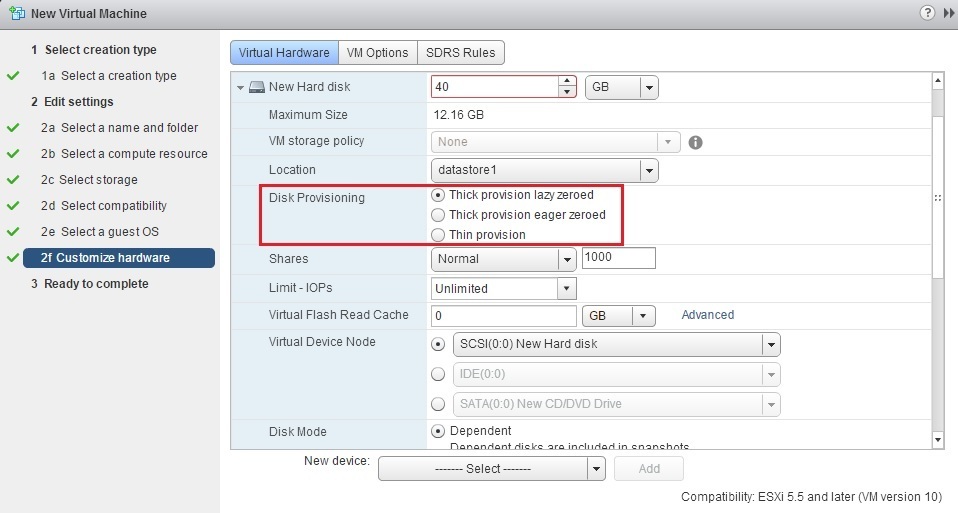
Thin Provisioning vs. Thick Provisioning
The provisioning type of a virtual disk interacts with disk modes to influence storage allocation and performance.
| Provisioning Type | Description | Best For |
|---|---|---|
| Thick Provision Eager Zeroed | Allocates and zeroes all storage space upon creation, ensuring optimal performance. | High-performance applications requiring consistent disk performance. |
| Thick Provision Lazy Zeroed | Allocates storage space at creation but zeroes out blocks as data is written. | Balanced environments needing reliable performance without full upfront storage allocation. |
| Thin Provision | Allocates storage space on-demand as data is written to the disk. | Environments aiming to conserve storage space initially, with manageable performance trade-offs. |
Balancing Performance and Storage Efficiency
Administrators must balance the need for high performance with storage efficiency when selecting disk modes and provisioning types.
-
Performance Optimization: Choose provisioning types and disk modes that align with performance requirements, such as using Thick Provision Eager Zeroed for critical applications.
-
Storage Conservation: Implement Thin Provisioning where appropriate to maximize storage utilization without compromising essential performance needs.
Recap and Conclusion
Choosing the appropriate disk mode for VMware ESXi VMs is pivotal for optimizing performance, ensuring data integrity, and managing storage efficiently. The three primary disk modes—Dependent, Independent-Persistent, and Independent-Nonpersistent—each offer distinct behaviors tailored to specific use cases.
Dependent mode is best suited for general-purpose VMs where snapshot integration is essential for backup and recovery operations. It allows for comprehensive state management but requires careful snapshot handling to avoid unintended data loss.
Independent-Persistent mode ensures that data changes persist beyond VM reboots and are unaffected by snapshots, making it ideal for critical applications like databases. However, it necessitates alternative backup strategies since snapshots do not capture these disks.
Independent-Nonpersistent mode is tailored for testing and transient environments where data changes are meant to be temporary. It facilitates the creation of clean states for repeated testing but is unsuitable for scenarios requiring data persistence.
By aligning disk mode selections with application requirements, snapshot strategies, and performance considerations, administrators can effectively manage VMware ESXi environments to meet diverse operational needs.
References
Last updated January 28, 2025