
Unlock Your Ethical Hacking Potential: Practical Project Ideas for CSCI 369
Explore unique, hands-on ethical hacking projects covering web apps, wireless networks, and IoT security.
Highlights
- Practical Skill Development: Engage in hands-on projects using industry-standard tools like Kali Linux, Metasploit, Burp Suite, and Nmap within controlled lab environments.
- Real-World Relevance: Address current cybersecurity challenges by investigating vulnerabilities in web applications, wireless networks, and Internet of Things (IoT) devices.
- Ethical Considerations: Learn to conduct security assessments responsibly, emphasizing the importance of permissions, controlled testbeds, and ethical guidelines throughout your project.
Embarking on Your Ethical Hacking Project
Choosing a project for your CSCI 369 Ethical Hacking course is an exciting opportunity to apply theoretical knowledge to practical scenarios. Hands-on experience is crucial in cybersecurity, allowing you to understand attacker methodologies and, consequently, how to build better defenses. The projects outlined below are designed to be student-friendly, utilizing accessible tools and platforms, while focusing on prevalent security issues. Remember, all ethical hacking activities, even simulated ones, must be conducted within strictly controlled environments (like virtual machines or dedicated lab networks) and always with explicit permission if testing systems you don't own. Ethical conduct is paramount.

A conceptual visualization of a modern penetration testing lab environment.
Project Idea 1: Web Application Vulnerability Assessment (OWASP Juice Shop)
Title:
Web Application Security Deep Dive: Exploiting OWASP Juice Shop
Scope and Objective:
This project involves conducting a comprehensive security assessment of the OWASP Juice Shop, a deliberately insecure web application designed for security training. The primary objective is to identify, exploit, and understand common web application vulnerabilities like SQL Injection (SQLi), Cross-Site Scripting (XSS), broken authentication, and insecure access control. This project simulates real-world web penetration testing in a safe, legal environment.
Phases Addressed:
- Reconnaissance: Gathering information about the application's structure, technologies used, and potential entry points.
- Scanning: Using automated tools (like OWASP ZAP or Burp Suite Scanner) and manual inspection to identify potential vulnerabilities.
- Gaining Access / Exploitation: Crafting and executing payloads to exploit identified vulnerabilities (e.g., SQLi to extract data, XSS to execute scripts, bypassing authentication).
- Maintaining Access (Simulated): Exploring techniques like session hijacking or attempting privilege escalation within the Juice Shop environment.
- Analysis & Reporting: Documenting findings, exploitation steps, impact, and providing mitigation recommendations.
Security Properties:
- Confidentiality: Assessing risks of unauthorized data disclosure (e.g., user credentials, sensitive information via SQLi).
- Integrity: Evaluating the potential for unauthorized modification of data or application behavior (e.g., defacement via XSS, data tampering).
- Availability: Investigating potential denial-of-service vectors or application crashes resulting from malicious inputs (though less emphasis than C/I).
Tools and Platforms:
- Operating System: Kali Linux (recommended, includes necessary tools).
- Target Application: OWASP Juice Shop (deployed via Docker, Node.js, or pre-packaged VM).
- Scanning/Proxy Tools: OWASP ZAP (free, open-source) or Burp Suite (Community Edition is free, Pro offers more features).
- Exploitation Tools: SQLMap (for automating SQLi), browser developer tools, potentially custom scripts.
- Environment: Virtual Machine (e.g., VirtualBox, VMware) to host Kali and potentially Juice Shop, ensuring isolation.
Setup Plan:
- Set up a virtual machine with Kali Linux.
- Install Docker on your host machine or within a separate VM.
- Deploy OWASP Juice Shop using Docker or another preferred method, ensuring it's only accessible within your controlled virtual network.
- Install and configure OWASP ZAP or Burp Suite on your Kali VM.
- Familiarize yourself with the basic functionality of Juice Shop and the testing tools.
- Begin the reconnaissance and scanning phases against your local Juice Shop instance.
Potential Challenges:
- Steep learning curve for understanding complex vulnerabilities like certain types of XSS or SQLi.
- Differentiating between intended application features and actual vulnerabilities in Juice Shop (it has many!).
- Setting up the environment correctly, especially network configurations between VMs/Docker.
- Time management to explore a sufficient number of vulnerabilities within the project timeline.
Expected Outcome:
A comprehensive report detailing the vulnerabilities discovered in OWASP Juice Shop. The report should include proof-of-concept exploitation steps (screenshots, code snippets), an assessment of the potential impact of each vulnerability, and practical recommendations for developers on how to fix and prevent such issues in real-world applications. A presentation demonstrating key findings is also a likely deliverable.
An overview of commonly used tools in ethical hacking and penetration testing.
Project Idea 2: Wireless Network Security Assessment (WPA2 Pentest)
Title:
Wireless Network Penetration Test: Assessing WPA2 Security in a Controlled Lab
Scope and Objective:
This project simulates an attack against a WPA2-PSK protected wireless network within a dedicated, isolated lab environment. The objective is to understand the process of capturing necessary handshake packets, attempting to crack the pre-shared key (PSK), and exploring potential post-access steps. It aims to demonstrate the vulnerabilities inherent in weak PSK choices and configuration weaknesses, highlighting the importance of robust wireless security practices.
Phases Addressed:
- Reconnaissance/Scanning: Identifying the target network (BSSID), associated clients, and putting the wireless adapter into monitor mode.
- Gaining Access / Exploitation: Capturing the WPA/WPA2 4-way handshake using tools like
airodump-ng. Attempting to crack the captured handshake offline using dictionary attacks or brute-force methods withaircrack-ngor Hashcat. - Post-Exploitation (Simulated): Once the key is cracked (or if assumed cracked for the exercise), connecting to the network and performing basic network scanning (
nmap) to identify other devices or open services within the isolated lab network. (Optional: Traffic sniffing with Wireshark). - Analysis & Reporting: Documenting the entire process, tools used, success/failure of cracking attempts, findings from post-exploitation scans, and security recommendations.
Security Properties:
- Confidentiality: Demonstrating how cracking the WPA2 key allows decryption of wireless traffic (if encryption relies solely on the PSK).
- Integrity: Assessing if unauthorized access could lead to manipulation of network resources or traffic.
- Availability: Understanding potential denial-of-service attacks against wireless clients (e.g., deauthentication attacks used to capture handshakes).
Tools and Platforms:
- Operating System: Kali Linux.
- Hardware: A wireless network adapter capable of packet injection and monitor mode (essential - e.g., Alfa AWUS036 series or adapters with specific chipsets like Atheros AR9271, Ralink RT5370). A dedicated wireless router for the test network. At least one client device (e.g., old laptop, VM with USB Wi-Fi passthrough) to connect to the test network.
- Software Tools: Aircrack-ng suite (
airodump-ng,aireplay-ng,aircrack-ng), Wireshark (for packet analysis), Nmap (for post-access scanning), Hashcat (alternative/advanced cracking). Wordlists (e.g., rockyou.txt) for dictionary attacks. - Environment: Isolated physical space or careful VM setup. The test router must NOT be connected to any other network (university, home, etc.).
Setup Plan:
- Acquire a compatible wireless adapter and verify its monitor mode capabilities in Kali Linux.
- Set up a dedicated wireless router, configuring it with WPA2-PSK security (choose a moderately complex password for testing purposes). Ensure it's completely isolated.
- Connect a test client device to this isolated wireless network.
- Boot Kali Linux, connect the compatible wireless adapter, and put it into monitor mode.
- Use
airodump-ngto identify the target network's BSSID and channel, and any connected clients. - Use
airodump-ngto capture packets on the target channel, waiting for a client to connect/reconnect or usingaireplay-ngto deauthenticate an existing client to force a handshake capture. - Once the handshake is captured, use
aircrack-ngor Hashcat with a wordlist to attempt cracking the PSK. - If successful, connect to the network and perform limited Nmap scans.
Potential Challenges:
- Acquiring a compatible wireless adapter that properly supports monitor mode and packet injection.
- Setting up the isolated network environment correctly and safely.
- Capturing the WPA2 handshake can sometimes be tricky and require patience or forcing client reconnections.
- Password cracking time depends heavily on PSK complexity and available computing power/wordlist quality. Success is not guaranteed within a limited timeframe if the key is strong.
- Strict adherence to ethical guidelines and ensuring tests remain confined to the isolated lab setup.
Expected Outcome:
A detailed report documenting the setup, tools used, and steps taken to assess the WPA2 network's security. It should include evidence of the handshake capture, the cracking process (successful or otherwise, noting time/resources used), results of any post-access scanning, and strong recommendations for securing wireless networks (e.g., strong PSKs, WPA3, network segmentation, disabling WPS).
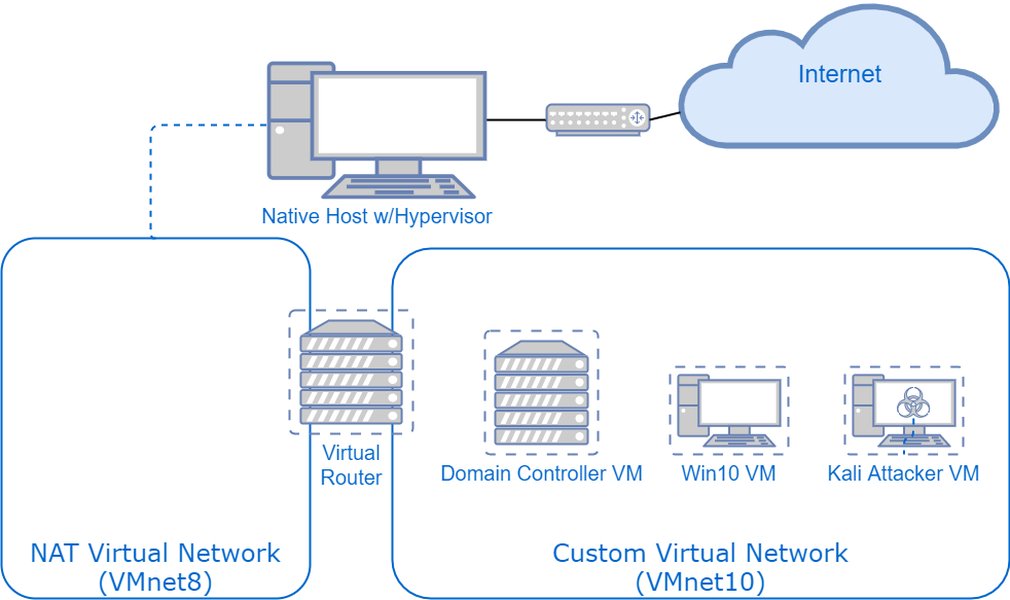
Conceptual diagram of a home lab setup for penetration testing practice.
Project Idea 3: IoT Device Security Audit (Simulated Environment)
Title:
Evaluating the Attack Surface of IoT Devices: A Simulated Network Audit
Scope and Objective:
This project focuses on identifying security weaknesses in Internet of Things (IoT) devices within a simulated or controlled lab environment. The objective is to perform reconnaissance, scan for vulnerabilities (like default credentials, open ports, outdated firmware), and attempt simulated exploitation to understand common IoT attack vectors. The goal is to raise awareness about the security risks associated with consumer or industrial IoT devices and propose hardening techniques.
Phases Addressed:
- Reconnaissance: Identifying IoT devices on the simulated network, fingerprinting their operating systems and services.
- Scanning: Using network scanners (Nmap) and potentially IoT-specific tools or Shodan queries (used carefully for research, not active scanning against external IPs) to find open ports, identify services, and check for known vulnerabilities or default credentials.
- Gaining Access / Exploitation (Simulated): Attempting to log in using default/common credential lists. Using frameworks like Metasploit to test for known exploits against simulated device firmware or services.
- Maintaining Access (Conceptual): Researching potential persistence mechanisms applicable to IoT devices (e.g., firmware modification - conceptual only unless using emulators allowing this).
- Analysis & Reporting: Documenting discovered vulnerabilities, successful simulated exploits, potential impact, and security best practices for IoT deployment.
Security Properties:
- Confidentiality: Assessing if sensitive data (e.g., sensor readings, user configurations) could be accessed.
- Integrity: Evaluating if device settings or functionality could be maliciously altered (e.g., changing smart thermostat settings).
- Availability: Determining if devices could be rendered inoperable (e.g., through DoS attacks or firmware corruption).
- Authentication/Authorization: Testing the strength of login mechanisms and access controls.
Tools and Platforms:
- Operating System: Kali Linux.
- Scanning Tools: Nmap (with NSE scripts for IoT), potentially firmware analysis tools (Binwalk - for static analysis if firmware images are available).
- Exploitation Framework: Metasploit Framework (contains some IoT-related exploits/modules).
- Target Environment Options:
- Inexpensive IoT hardware (e.g., ESP8266/ESP32 boards running custom or sample code, older smart plugs known to be vulnerable - **used offline only**).
- IoT firmware emulators (e.g., Firmadyne, FAT - can be complex to set up).
- Purpose-built vulnerable IoT VMs/containers (e.g., exploring specific vulnerable firmware images in QEMU).
- Network simulation software (e.g., Cisco Packet Tracer with IoT devices, GNS3).
- Environment: Isolated network segment or virtual network.
Setup Plan:
- Choose the target environment approach (physical hardware, emulation, simulation).
- Set up the chosen IoT devices/emulators/simulations within an isolated network.
- Configure Kali Linux with necessary tools (Nmap, Metasploit, etc.).
- Perform network discovery and reconnaissance to identify the IoT targets.
- Conduct port scanning and service enumeration using Nmap.
- Research potential vulnerabilities based on identified services/firmware versions (if known). Check for default credentials.
- Attempt simulated exploitation using Metasploit or manual login attempts.
- Document all findings meticulously.
Potential Challenges:
- Setting up a realistic and functional IoT test environment, especially with emulators which can be complex.
- Diversity of IoT protocols and architectures making standardized testing difficult.
- Finding readily available and safe-to-use vulnerable firmware or devices for testing.
- Legal and ethical considerations are paramount, ensuring no real-world devices are targeted or affected.
- Exploits might be device-specific and require significant research.
Expected Outcome:
A detailed security assessment report for the simulated IoT environment. This should include a map of the IoT devices, identified vulnerabilities (e.g., default credentials, open ports, known CVEs), successful simulated exploitation techniques, risk analysis, and concrete recommendations for securing IoT devices (e.g., changing defaults, network segmentation, firmware updates, security monitoring).
Exploring the diverse landscape of tools available for ethical hacking assessments.
Comparing Project Focus Areas
The three project ideas offer different learning experiences and focus areas. This chart provides a subjective comparison across several dimensions to help you consider which might best align with your interests and resources. Scores range from 2 to 10, where higher values indicate a greater degree of the dimension.
Visualizing the Ethical Hacking Process
Ethical hacking typically follows a structured methodology, often broken down into distinct phases. This mindmap illustrates these general phases and how the proposed project ideas relate to them, providing a high-level overview of the workflow involved in security assessments.
Methodology"] id1["1. Reconnaissance
(Information Gathering)"] id1a["Passive (OSINT)"] id1b["Active (Scanning Prep)"] id1c["Project Examples:
- Web App: Identify tech stack
- Wireless: Find BSSIDs
- IoT: Device discovery"] id2["2. Scanning
(Vulnerability Identification)"] id2a["Port Scanning (Nmap)"] id2b["Vulnerability Scanning (Nessus, ZAP)"] id2c["Network Mapping"] id2d["Project Examples:
- Web App: ZAP/Burp scan
- Wireless: Identify clients
- IoT: Nmap for open ports/services"] id3["3. Gaining Access
(Exploitation)"] id3a["Exploiting Vulnerabilities (Metasploit)"] id3b["Password Attacks (Hydra, John, Hashcat)"] id3c["Social Engineering"] id3d["Project Examples:
- Web App: SQLi, XSS
- Wireless: WPA2 cracking
- IoT: Default credentials, known exploits"] id4["4. Maintaining Access
(Persistence - Simulated)"] id4a["Installing Backdoors/Rootkits"] id4b["Creating User Accounts"] id4c["Escalating Privileges"] id4d["Project Examples:
- Focus is primarily conceptual or limited simulation within safe bounds"] id5["5. Covering Tracks / Analysis
(Reporting & Cleanup)"] id5a["Clearing Logs (Simulated)"] id5b["Removing Tools/Payloads"] id5c["Analysis of Findings"] id5d["Report Generation"] id5e["Project Examples:
- All projects require detailed analysis and reporting of findings and mitigation steps"]
Essential Tools and Platforms Overview
Successfully completing these projects requires familiarity with various ethical hacking tools. The table below summarizes some of the key tools mentioned across the project ideas, their category, and typical use case.
| Tool | Category | Primary Use | Relevant Project(s) |
|---|---|---|---|
| Kali Linux | Operating System | Pentesting distribution containing numerous security tools. | All Projects |
| Nmap | Network Scanner | Network discovery, port scanning, service identification, OS fingerprinting. | Wireless, IoT |
| Aircrack-ng Suite | Wireless Tools | Wireless network discovery, packet capture, WEP/WPA/WPA2-PSK cracking. | Wireless |
| Wireshark | Packet Analyzer | Capturing and analyzing network traffic. | Wireless (Optional), Web App (Debugging) |
| OWASP ZAP / Burp Suite | Web Proxy/Scanner | Intercepting/modifying web traffic, automated/manual web vulnerability scanning. | Web App |
| Metasploit Framework | Exploitation Framework | Developing, testing, and executing exploit code against known vulnerabilities. | IoT, Web App (limited), Wireless (limited) |
| SQLMap | Database Exploitation | Automating SQL Injection detection and exploitation. | Web App |
| Hashcat / John the Ripper | Password Cracking | Offline cracking of password hashes (e.g., captured WPA2 handshakes). | Wireless |
| OWASP Juice Shop | Vulnerable Web App | Intentionally vulnerable application for web security training. | Web App |
| VirtualBox / VMware | Virtualization Software | Creating isolated virtual machine environments for testing. | All Projects |
Instructor Approval Proposal Draft
Below is a general draft proposal you can adapt for your chosen project. Be sure to replace the bracketed information and tailor it specifically to the project you select, highlighting the unique aspects and learning objectives.
Subject: Project Proposal for CSCI 369: Ethical Hacking - [Your Chosen Project Title]
This proposal outlines my intended project for the CSCI 369 Ethical Hacking course. I plan to undertake a hands-on project focused on [Briefly state the core area, e.g., assessing web application security, analyzing wireless network vulnerabilities, auditing simulated IoT devices]. This project directly addresses prevalent real-world security concerns by investigating [Mention specific types of vulnerabilities, e.g., common web exploits like SQLi/XSS, WPA2 weaknesses, default credentials in IoT].
The project will systematically apply key phases of the ethical hacking methodology, including reconnaissance, scanning, simulated exploitation, and analysis, all conducted within a strictly controlled and isolated [Specify environment, e.g., virtualized lab environment using Kali Linux and OWASP Juice Shop, dedicated offline wireless test network, simulated IoT network using emulators/VMs]. Key tools like [Mention 2-3 primary tools, e.g., Nmap, Burp Suite, Aircrack-ng, Metasploit] will be utilized to gain practical experience. The primary learning objective is to understand [State main goal, e.g., attacker techniques against web apps and mitigation strategies, the practicalities of wireless cracking and defense, common IoT attack vectors and hardening methods], while strictly adhering to ethical principles and ensuring no impact on external systems. The expected outcome is a detailed report documenting the process, findings, and security recommendations, fulfilling the course requirements by Week 10.
Suggested 10-Week Project Timeline
This timeline provides a general framework. You may need to adjust it based on your chosen project's complexity and your progress.
| Week(s) | Activities |
|---|---|
| 1-2 | Finalize project selection, obtain instructor approval. Research specific tools and techniques. Begin setting up the lab environment (VMs, software installation, network configuration, acquire hardware if needed). |
| 3-4 | Complete environment setup and initial testing. Familiarize yourself with primary tools. Begin the Reconnaissance phase: information gathering, network mapping/application structure analysis. |
| 5-6 | Conduct the Scanning phase: run vulnerability scans, identify potential weaknesses, analyze scan results. Begin the Gaining Access/Exploitation phase: attempt initial exploits based on scans (e.g., default credentials, simple SQLi, capturing wireless handshakes). Start meticulous documentation of steps and findings. |
| 7-8 | Continue and deepen the Exploitation phase: attempt more complex exploits, analyze impact. If applicable, perform limited Post-Exploitation steps within the lab. Refine documentation, capture evidence (screenshots, logs). Address any technical challenges encountered. |
| 9 | Focus on Analysis: consolidate all findings, evaluate the security posture based on results. Formulate mitigation strategies and recommendations. Structure and begin writing the final report. |
| 10 | Complete the final project report, ensuring all required sections are included. Prepare any required presentation or demonstration. Submit the project deliverables. |
Enhance Your Learning
Exploring different project ideas and perspectives can broaden your understanding of ethical hacking. This video discusses a range of project ideas suitable for various skill levels, potentially sparking further inspiration or clarifying concepts relevant to your chosen path.
Video discussing various ethical hacking project ideas to inspire further exploration.
Frequently Asked Questions (FAQ)
What are the most important ethical rules for these projects?
NEVER test any system, network, or application without explicit, written permission from the owner. For these university projects, all activities MUST be confined to your own isolated lab environment (VMs, dedicated hardware disconnected from the internet/university network). Do not target university resources, public websites, or any third-party services. The goal is learning in a safe sandbox, not causing harm or breaking laws.
Can I use my university's network for testing (e.g., scanning Wi-Fi)?
Absolutely NOT, unless you have secured *explicit, formal, written permission* from the university's IT department and your course instructor, which is highly unlikely for student projects involving potentially disruptive testing like scanning or cracking attempts. Assume all university networks are off-limits. Your testing must occur on networks you create and control entirely (e.g., an isolated router for the wireless project).
What if I get stuck setting up the tools or environment?
This is common! First, consult online documentation, tutorials, and forums for the specific tool or platform (e.g., Kali docs, VirtualBox manual, OWASP Juice Shop setup guides). Break the problem down into smaller steps. Check error messages carefully. If you're still stuck, seek help from your instructor, TA, or classmates, clearly describing the problem and what you've already tried.
How do I ensure my project is original?
While the concepts (like testing Juice Shop or WPA2) are standard learning exercises, originality comes from your specific approach, the depth of your analysis, the clarity of your documentation, and your unique insights or recommendations. Focus on thoroughly understanding *why* vulnerabilities exist and *how* mitigations work. Document your specific setup, commands, results, and challenges in detail. Your analysis and conclusions should reflect your own learning process.
What if I can't crack the WPA2 password or find a critical web vulnerability?
Ethical hacking projects are about the process and learning, not just successful exploitation. If you can't crack a strong WPA2 key within a reasonable time, that itself is a significant finding about the effectiveness of strong passwords. Document the attempt, the tools/wordlists used, the time spent, and discuss why it was difficult. Similarly, for web apps, thoroughly document your scanning and testing methodology even if you don't find high-severity flaws. The report should focus on the assessment process and security posture, regardless of whether major exploits were achieved.
Recommended Further Exploration
- Learn how to set up a secure virtual lab environment for penetration testing practice.
- Discover a detailed guide on using OWASP ZAP effectively for web application scanning.
- Explore the concepts of monitor mode and packet injection for wireless network adapters in Kali Linux.
- Investigate common security vulnerabilities found in IoT devices and methods for their detection.
References

Last updated May 5, 2025