
Unlocking Data Management: Exporting Groups from Figshare
A Comprehensive Guide to Leveraging Figshare's Group Export Capabilities for Enhanced Research Collaboration and Oversight
Key Insights into Figshare Group Export
- Comprehensive Group Management: Figshare provides robust tools for administrators to manage institutional groups, including viewing user assignments, project allocations, and storage quotas, which are crucial for organizational oversight and resource planning.
- API for Advanced Data Retrieval: While the user interface offers some insights, the Figshare API is essential for exporting detailed metadata and statistics related to groups, enabling deeper analysis and integration with other systems.
- Structured Data Export Formats: Figshare supports various standard metadata export formats, such as Dublin Core and DataCite, facilitating interoperability and compliance with open data principles when extracting group-related information.
Understanding Figshare's Group Structure and Purpose
Figshare is a versatile online repository designed to help researchers preserve, share, and publish various research outputs, including datasets, figures, images, papers, and non-traditional research materials. A core component of its functionality, particularly for institutions, is the concept of "groups." Groups in Figshare enable institutions to organize research data in a meaningful way, aligning with their divisions, organizational structures, or specific research initiatives. These groups are fundamental for managing user access, allocating storage, and overseeing projects within an institutional context.
The Role of Groups in Institutional Figshare Instances
For institutions utilizing Figshare, groups serve as the backbone for administrative control and data organization. Administrators have a clear overview of their institution's group structure, allowing them to monitor various metrics such as the number of users in each group, the count of group projects, and the allocated storage quotas. This granular control is vital for resource management and ensuring compliance with institutional policies.
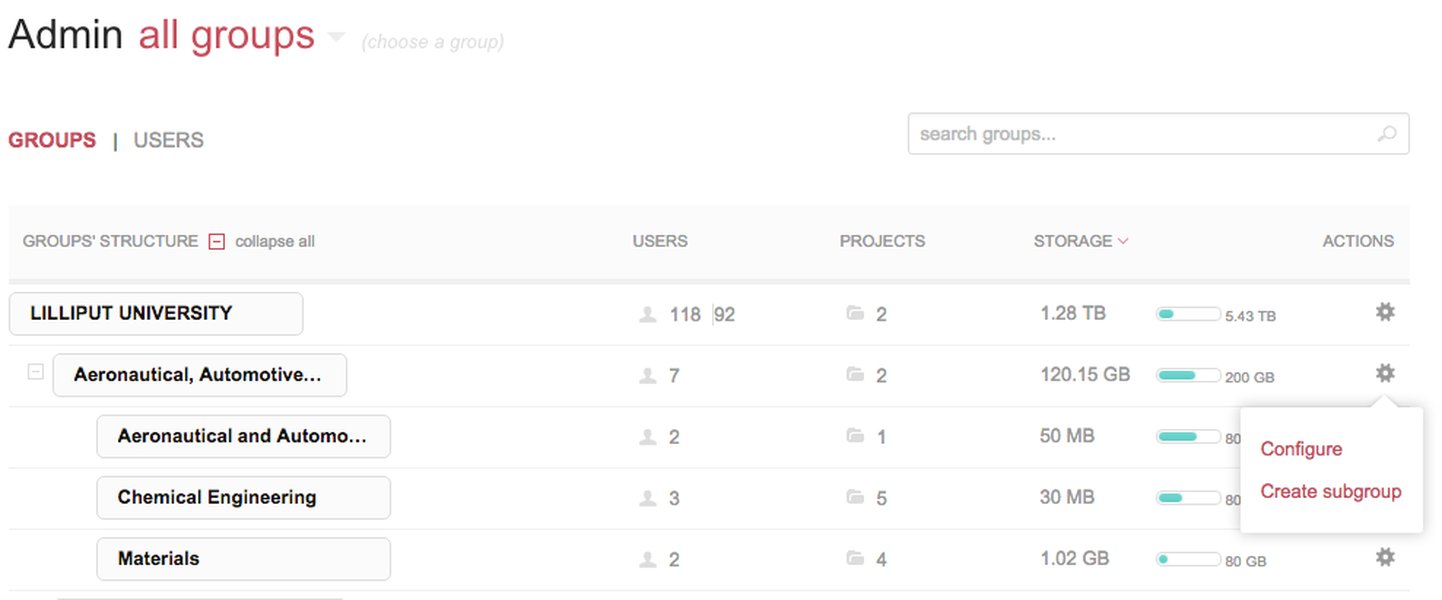
Figshare's administrative interface provides a clear overview of institutional group structures.
Navigating Group Administration
Accessing group administration settings typically involves navigating through the profile drop-down menu and selecting "Administration." The initial view presents a group structure page, offering an overview of how the institution's groups are organized. Administrators can sort groups by name, number of projects, allocated quota, or available quota, and combine these sorting options with search terms for efficient management. This detailed view includes information on both directly assigned users and those inherited from subgroups, providing a comprehensive understanding of user distribution and storage utilization across the institution.
Methods for Exporting Group Information from Figshare
Exporting information related to groups from Figshare can be approached through various methods, depending on the depth and format of data required. While direct "export group" buttons for comprehensive group structures aren't explicitly highlighted for mass export in the user interface, Figshare provides mechanisms for extracting data related to groups and their associated content, primarily through its API and reporting tools.
Leveraging the Figshare API for Group Data Export
The Figshare API is the most powerful tool for retrieving detailed information about institutions and groups. It allows for the retrieval of public metadata and files, and with proper authentication (OAuth for private endpoints), it can access private information about institution and groups. This includes fetching details about items, authors, collections, groups, and projects, with the ability to filter results by category or item type. The API documentation serves as a definitive guide for interacting with these endpoints.
For instance, to retrieve information about institutions and groups, specific private endpoints requiring OAuth are used. An example of retrieving institution information via the API would be:
GET /v2/account/institutionFurthermore, the API allows for statistical data export, enabling users to analyze metrics such as views, downloads, and shares related to items within specific groups. This goes beyond the user interface's capabilities, offering granular data for in-depth analysis and reporting.
This video explains how Figshare projects facilitate collaboration with colleagues, including those outside your institution, a key aspect of group functionality.
Statistical Reporting and Export Capabilities
While not a direct "group export" feature, the statistics dashboard and reporting tools within Figshare allow administrators to export reports related to groups and projects in CSV format. These reports can provide insights into usage patterns and content within groups, which indirectly helps in understanding group activity. The dashboard provides statistics for items, authors, collections, groups, and projects, and these results can be filtered and exported for further analysis.
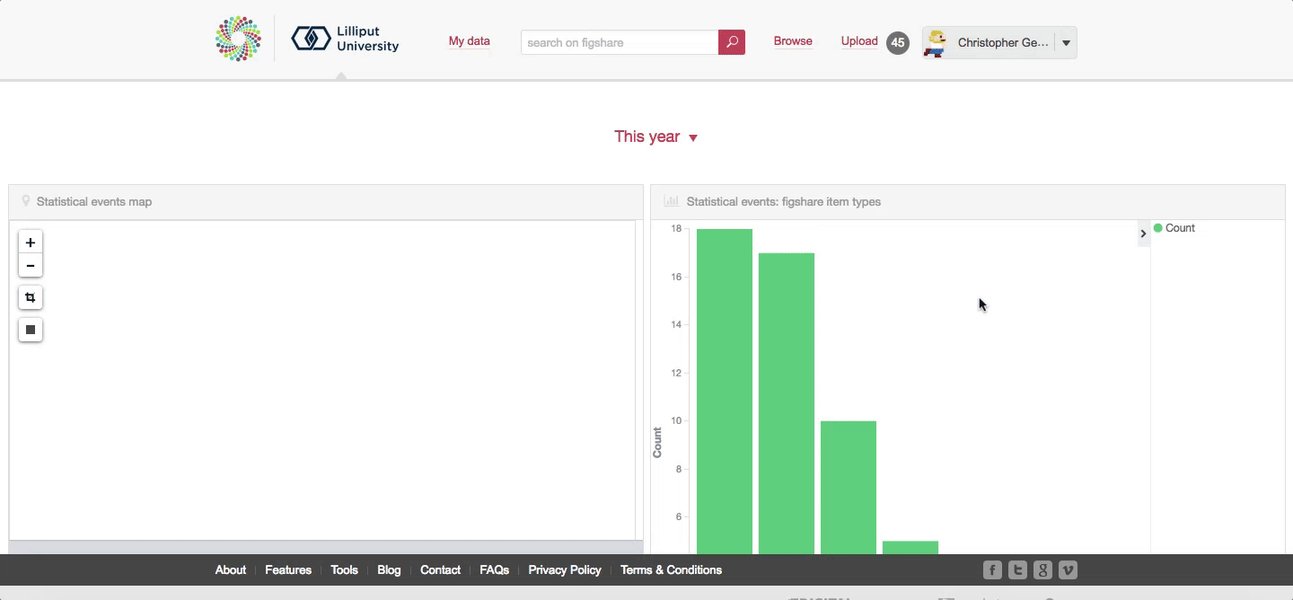
Figshare's statistics dashboard provides exportable reports on various metrics, including group activities.
Metadata Export for Group-Affiliated Items
Figshare allows the export of metadata in standard formats like Dublin Core (oai_dc), DataCite (oai_datacite), and others, through the item page, OAI-PMH ListSets, or via the API. While this isn't a direct "group export," it enables the retrieval of metadata for items that are affiliated with specific groups. By filtering API queries or OAI-PMH harvests by group_id, institutions can effectively collect and analyze data associated with particular groups.
For instance, the API can be used to retrieve item IDs within a specific group, and then subsequently gather full metadata for each of those items. This allows institutions to export all relevant metadata for research outputs categorized under certain groups, supporting comprehensive data management and reporting needs.
        // Example API call to retrieve item IDs in a specific group
        // This would require authentication with a token belonging to an admin/owner of the group
        // For security, never hardcode API keys in production code.
        const groupId = 'YOUR_GROUP_ID';
        const apiUrl = `https://api.figshare.com/v2/account/groups/${groupId}/articles`;

        fetch(apiUrl, {
            headers: {
                'Authorization': 'token YOUR_ACCESS_TOKEN'
            }
        })
        .then(response => response.json())
        .then(data => {
            console.log('Items in group:', data);
            // Further processing to retrieve full metadata for each item
        })
        .catch(error => console.error('Error fetching group items:', error));
Key Considerations for Exporting Group Data
When exporting group-related information from Figshare, several factors are important to consider to ensure data integrity, utility, and compliance.
Data Formats and Standards
Figshare supports various standard metadata formats for export, such as Dublin Core and DataCite. This ensures interoperability with other systems and adherence to FAIR data principles (Findable, Accessible, Interoperable, Reusable). When performing API exports, understanding these formats is crucial for successful integration and analysis of the exported data.
Authentication and Permissions
Accessing detailed group information, especially for private institutional groups, requires proper authentication. The Figshare API uses OAuth for private endpoints. Administrative roles or specific tokens belonging to group admins/owners are necessary to retrieve comprehensive data, ensuring that sensitive information is only accessible to authorized personnel.
Batch Management and Migration
For institutions looking to migrate existing repository items into their Figshare instance, batch management tools are available. These tools allow items to be linked to user accounts and uploaded, streamlining the process of populating groups with existing research outputs. While this is an import function, it highlights Figshare's capabilities in handling large-scale data movements related to groups.
Comparing Figshare's Group Management and Export Capabilities
To further illustrate the strengths of Figshare in managing and potentially extracting group-related data, let's consider a radar chart comparing its capabilities in areas relevant to institutional research data management and sharing.
This radar chart visually represents how Figshare's capabilities align with the typical needs of an institution regarding research data management and group functionality. Figshare demonstrates strong performance in areas like administrative oversight, API access for data retrieval, and scalability for large datasets, which are all critical for managing and exporting information related to groups and their associated research outputs effectively.
Summary of Group-Related Features and Export Relevance
Below is a table summarizing key features of Figshare's group functionality and their relevance to data export and management.
| Feature | Description | Relevance to Group Export / Management |
|---|---|---|
| Group Structure Overview | Administrators can view hierarchy of groups, users, and projects. | Essential for understanding the organizational context from which data might be exported. |
| Storage Quota Tracking | Monitoring allocated and available storage per group. | Indirectly relevant for assessing the volume of data within groups, which could impact export strategies. |
| User Association (Direct/Inherited) | Visibility into users directly assigned to a group vs. inherited from subgroups. | Important for understanding data ownership and access permissions during export. |
| API Access for Groups | Programmatic retrieval of institution and group information, including items and statistics. | Primary method for comprehensive, automated export of group-related metadata and usage statistics. |
| Metadata Export Formats | Support for standard formats (Dublin Core, DataCite) for item metadata. | Ensures exported data is interoperable and compliant with open data standards. |
| Statistical Dashboard | Exportable CSV reports on views, downloads, and shares for items within groups. | Provides usage metrics related to group content, exportable for reporting and analysis. |
| Project Collaboration | Ability to create individual or group projects for collaborative work. | Projects contain data that may be associated with groups, thus indirectly affecting group-level data export. |
| Batch Management | Tools for migrating existing records into Figshare and associating them with groups. | Relevant for initial population or large-scale updates of group data. |
FAQs on Figshare Group Export
Can I directly export a list of all groups in my institution from Figshare?
What kind of group-related data can be exported using the Figshare API?
- Information about institutions and individual groups (requiring OAuth).
- Item IDs and full metadata for items that are affiliated with specific groups.
- Statistics related to items, authors, collections, groups, and projects, which can be filtered by category or item type, allowing for the export of usage metrics (views, downloads, shares) at a group level.
- Details about users assigned to specific groups.
In what formats can I export metadata for items associated with groups?
Is it possible to export reports on group activity and usage?
Conclusion
While Figshare does not offer a single, direct "export groups" button for a comprehensive dump of all institutional group data from its user interface, its robust API and administrative tools provide powerful mechanisms to extract and manage group-related information. Institutions can leverage the API to programmatically retrieve detailed data on groups, their associated users, projects, and the metadata of published research outputs. Coupled with the statistical reporting capabilities and support for standard metadata formats, Figshare offers a flexible and comprehensive platform for institutions to manage, monitor, and export their research data organized by groups, ensuring compliance, enhancing discoverability, and fostering collaboration.
Recommended Queries
- How to use the Figshare API for detailed institution data export?
- What are the supported metadata export formats in Figshare and their applications?
- Best practices for managing user access and roles within Figshare groups?
- What are effective data migration strategies for institutions using Figshare?