
Unlock Facebook Ads Mastery: Your Intensive 30-Day Action Plan
Transform from novice to knowledgeable advertiser with this structured daily guide to navigating Meta's powerful ad platform.
Essential Insights for Your 30-Day Journey
- Structured Learning is Key: Dedicate time daily to understanding core concepts, platform tools, and strategic frameworks before diving deep into spending.
- Practice Makes Proficient: Real-world application through launching, testing, and analyzing campaigns (even with small budgets) is crucial for skill development.
- Continuous Optimization Drives Success: Facebook Ads mastery isn't static; it requires ongoing analysis, iteration based on data, and adaptation to platform changes.
Embarking on the path to mastering Facebook Ads (now Meta Ads) within 30 days is an ambitious yet achievable goal with a dedicated, structured approach. This action plan integrates foundational learning, hands-on campaign management, rigorous testing, and strategic optimization to rapidly build your proficiency.
Week 1: Building the Foundation (Days 1-7)
Focus: Understanding the Ecosystem, Setting Up, and Core Concepts
The first week is dedicated to immersing yourself in the fundamentals of the Facebook Ads platform and preparing your essential assets.
Day 1-2: Platform Immersion & Goal Setting
- Explore the Tools: Familiarize yourself with Meta Business Manager, Ads Manager, and Audience Manager. Understand their roles in organizing assets and running campaigns. If you haven't already, create your Business Manager account.
- Define Objectives: Clearly outline what you want to achieve with Facebook Ads (e.g., increase brand awareness, generate leads, drive website sales, promote app installs). Your objectives dictate campaign strategy.
- Initial Learning: Begin exploring free resources. Meta Blueprint offers foundational courses directly from the source. Consider introductory modules on platforms like Simplilearn or HubSpot Academy.
Day 3: Understanding Campaign Structure & Targeting
- Campaign Hierarchy: Learn the structure: Campaign (Objective) → Ad Set (Audience, Placement, Budget, Schedule) → Ad (Creative, Copy). Understanding this hierarchy is vital for organization and testing.
- Targeting Deep Dive: Study Facebook's powerful targeting options:
- Core Audiences: Based on demographics, interests, behaviors, and location.
- Custom Audiences: Created from your own data (e.g., website visitors, customer lists, app users, engagement).
- Lookalike Audiences: Reach new people similar to your existing best customers or audiences.
- Audience Research: Start thinking about your ideal customer. Analyze competitor pages and research potential interests and behaviors relevant to your niche.
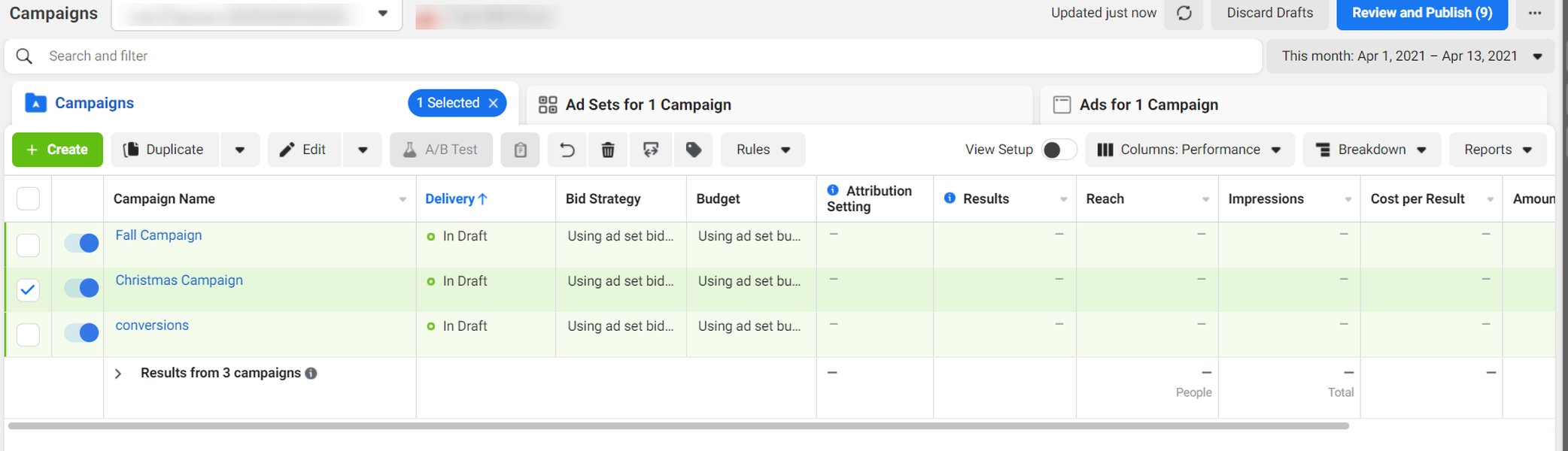
Example of the Meta Ads Manager dashboard where campaigns are created and managed.
Day 4: The Meta Pixel & Conversion Tracking
- Pixel Power: Understand the Meta Pixel (a snippet of code for your website). Learn its purpose: tracking website actions (conversions), building Custom Audiences (retargeting), and optimizing ad delivery.
- Installation & Verification: Install the Meta Pixel on your website. Use Facebook's tools (like the Pixel Helper browser extension) to verify it's firing correctly for standard events (e.g., PageView, ViewContent, AddToCart, Purchase).
Day 5: Ad Formats & Creative Basics
- Explore Formats: Familiarize yourself with the various ad formats available: Single Image, Video, Carousel, Collection, Instant Experience. Consider which formats best suit your objectives and message. Video often shows strong performance.
- Creative Brainstorming: Start thinking about your ad visuals and copy. What message will resonate with your target audience? Research competitor ads using the Facebook Ad Library for inspiration.
- Asset Preparation: If possible, begin gathering or creating initial image or video assets. Tools like Canva or Biteable offer user-friendly options for ad creation.
Day 6: Budgeting & Ad Policies
- Budgeting Basics: Understand the difference between Daily Budgets (consistent spend per day) and Lifetime Budgets (flexible spend over the campaign duration). Learn about Campaign Budget Optimization (CBO) vs. Ad Set Budget Optimization (ABO).
- Start Small: Plan to begin testing with a small daily budget (e.g., $5-$10 per day per ad set) to gather data without significant financial risk.
- Ad Policies: Review Facebook's Advertising Policies thoroughly. Understanding what's allowed and prohibited is crucial to avoid ad disapprovals and account issues.
Day 7: Week 1 Review & Planning
- Consolidate Learning: Review the concepts covered during the week. Revisit any areas that are unclear.
- Draft Campaign Plan: Outline your first test campaign: What objective will you choose? Which initial audience(s) will you target? What ad format and basic message will you use?
Week 2: Launching, Testing & Initial Analysis (Days 8-14)
Focus: Creating Campaigns, A/B Testing Fundamentals, Reading Metrics
This week moves from theory to practice. You'll launch your first campaigns, focus on creative testing, and learn how to interpret initial performance data.
Day 8-9: Creating Your First Campaign
- Campaign Setup: In Ads Manager, create your first campaign based on the plan drafted in Week 1. Choose your objective (e.g., Traffic, Engagement, or Leads if you have a lead magnet ready).
- Ad Set Configuration: Define your target audience, select placements (start with Automatic Placements unless you have a specific reason not to), and set your small daily budget and schedule.
- First Ad Creation: Build your first ad(s) within the ad set. Upload your creative, write compelling ad copy (headline, primary text, description), and choose a relevant Call-to-Action (CTA) button.
Day 10-11: Implementing A/B Testing (Creative & Copy)
- Testing Principles: Understand the importance of A/B testing (split testing). The goal is to isolate variables and identify what resonates best with your audience.
- Dynamic Creative: Utilize Facebook's Dynamic Creative option. Upload multiple assets (e.g., 3-5 images/videos, 2-3 headlines, 2-3 primary texts). Facebook will automatically mix and match to find high-performing combinations.
- Manual Testing (if preferred): Alternatively, create multiple ads within the same ad set, changing only *one* element per ad (e.g., different image, different headline) to test specific variations.
- Launch & Monitor: Launch your campaign. Allow 2-3 days for the ads to exit the learning phase and gather initial data. Check Ads Manager regularly.
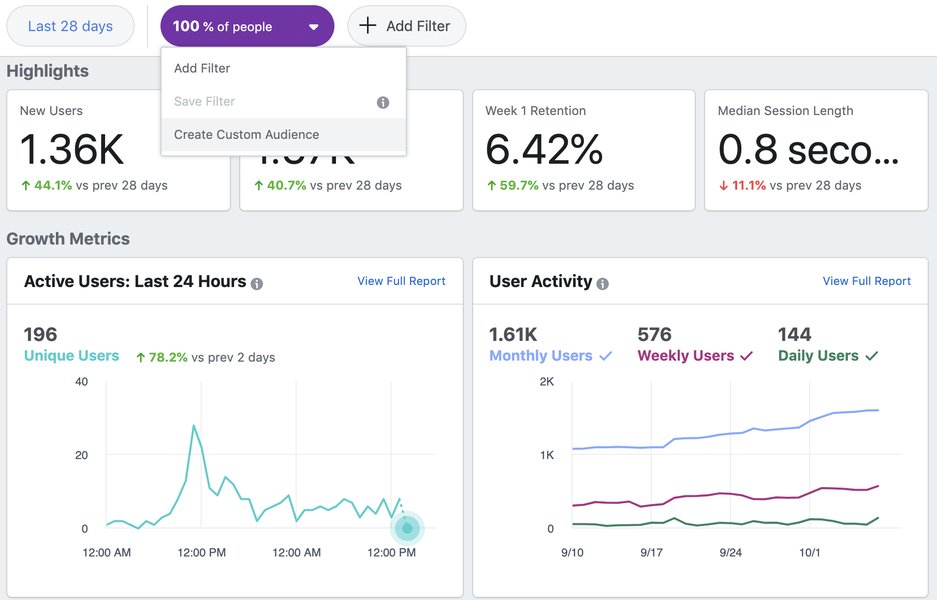
Creating Custom Audiences based on website visitors is key for retargeting.
Day 12: Understanding Key Metrics
- Navigate Ads Manager Reporting: Learn how to customize columns in Ads Manager to view the metrics most relevant to your campaign objective.
- Core Metrics: Focus on understanding initial metrics:
- Reach: Number of unique people who saw your ads.
- Impressions: Total number of times your ads were displayed.
- Frequency: Average number of times each person saw your ad (Impressions / Reach).
- Amount Spent: How much budget has been used.
- Link Clicks: Number of clicks on links within your ad.
- CTR (Link Click-Through Rate): Percentage of impressions that resulted in a link click (Link Clicks / Impressions). Indicates ad relevance/appeal.
- CPC (Cost Per Link Click): Average cost for each link click (Amount Spent / Link Clicks).
- CPM (Cost Per 1,000 Impressions): Cost to reach 1,000 impressions.
- Objective-Specific Metrics: Pay attention to metrics tied to your goal (e.g., Cost Per Lead, Cost Per Purchase, Post Engagements).
Day 13: Introduction to Retargeting
- Retargeting Concepts: Understand the power of retargeting – showing ads specifically to people who have already interacted with your business (e.g., visited your website, engaged with your Facebook page).
- Create Custom Audiences: Set up essential Custom Audiences based on website visitors (using your Pixel data) and potentially Facebook/Instagram page engagers.
- Plan Retargeting Campaign: Outline a simple retargeting campaign. The message should often differ from your initial "cold" audience ads (e.g., offer a discount, highlight testimonials).
Day 14: Week 2 Analysis & Refinement
- Review Performance: Analyze the data gathered over the past few days. Which ads/creatives have the best CTR or lowest CPC? Are you seeing any conversions (if applicable)?
- Pause Underperformers: Based on the initial data (don't make decisions too hastily), pause ads or potentially entire ad sets that are clearly underperforming compared to others.
- Allocate Budget (Slightly): If one ad or ad set shows significantly better results, consider slightly shifting budget towards it, but avoid drastic changes early on.
- Document Learnings: Note down initial observations about what seems to be working or not working.
Key Facebook Ad Metrics by Funnel Stage
Tracking the right metrics is essential for understanding campaign performance at each stage of the customer journey. Here’s a simplified overview:
| Funnel Stage | Objective | Primary Metrics | Secondary Metrics |
|---|---|---|---|
| Awareness | Reach new audiences, build brand recognition | Reach, Impressions, Frequency, CPM, Video Views (if applicable) | Ad Recall Lift (estimated), Brand Awareness Lift (estimated) |
| Consideration | Drive traffic, engagement, lead generation | Link Clicks, CTR (Link), CPC (Link), Landing Page Views, Post Engagement, Leads | Cost Per Landing Page View, Cost Per Lead, Video ThruPlays |
| Conversion | Drive sales, app installs, specific actions | Conversions (Purchases, Adds to Cart, etc.), Cost Per Conversion, ROAS (Return on Ad Spend), Conversion Rate | Value of Conversions, CPA (Cost Per Action) |
Week 3: Optimization, Scaling & Advanced Tactics (Days 15-21)
Focus: Refining Campaigns, Budget Adjustments, Deeper Audience Work
With initial data flowing in, Week 3 focuses on optimizing based on performance, cautiously scaling successful elements, and exploring more advanced targeting and strategies.
Day 15: Deep Dive Analysis & Optimization
- Analyze Winning Elements: After ~5-7 days of consistent running, analyze which creatives, copy variations, and potentially audiences are driving the best results for your key metrics.
- Iterate Based on Winners: Create new ad variations inspired by the top performers. If certain images or headlines work well, test similar styles or messaging.
- Refine Targeting: Look at performance breakdowns by age, gender, placement, or device (available in Ads Manager reporting). If specific segments are underperforming significantly, consider excluding them or creating separate ad sets.
Day 16: Introduction to Scaling
- Scaling Concepts: Understand that scaling means increasing your ad spend to get more results, but it must be done carefully to maintain efficiency.
- Vertical Scaling: Gradually increase the budget (e.g., by 15-20% every 2-3 days) on your *best-performing* ad sets. Monitor performance closely after each increase; if efficiency drops significantly, pull back.
- Horizontal Scaling: Test new, similar audiences (e.g., different Lookalike percentages, new interest groups) to find more pockets of potential customers.
- Avoid Rapid Scaling: Large, sudden budget increases can disrupt the algorithm's learning and hurt performance.
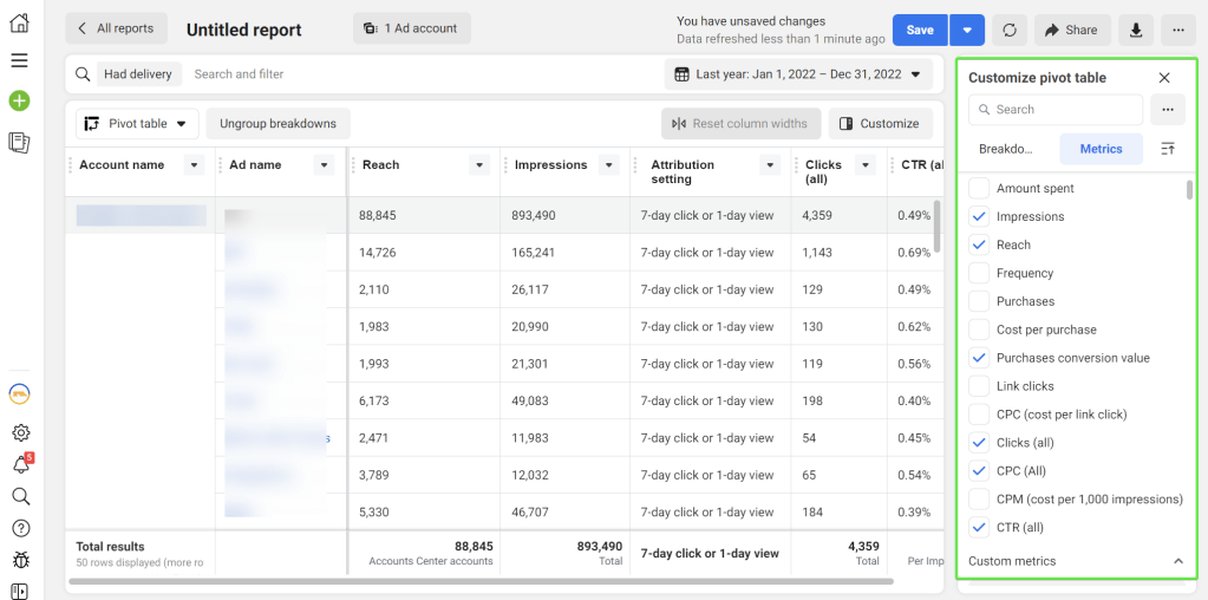
Analyzing key metrics like ROAS and CPA is crucial for optimization.
Day 17: Placements & Ad Fatigue
- Placement Analysis: Review performance data broken down by placement (e.g., Facebook Feed, Instagram Stories, Audience Network). Are certain placements significantly more effective or costly?
- Manual Placement Testing: Consider creating separate ad sets to test specific placements if Automatic Placements show highly skewed results or if you want creatives tailored to specific formats (like vertical videos for Stories).
- Ad Fatigue Awareness: Monitor ad frequency. If it gets too high (e.g., above 5-10, though this varies greatly), your audience may be seeing the ad too often, leading to decreased performance. Plan to refresh creatives regularly.
Day 18: Launching Retargeting Campaign
- Activate Retargeting: Launch the simple retargeting campaign planned in Week 2, targeting website visitors (excluding those who converted, if possible).
- Tailored Messaging: Ensure the ad creative and copy acknowledge the audience's prior interaction (e.g., "Still thinking about it?", "Complete your purchase").
- Monitor Separately: Track the performance of your retargeting campaign distinctly from your prospecting (cold audience) campaigns. Expect higher CTR and conversion rates but a smaller audience size.
Day 19: Campaign Budget Optimization (CBO) Testing
- Understanding CBO: Learn how Campaign Budget Optimization allows Facebook to automatically distribute your campaign budget across the ad sets within it, spending more on the best-performing ones.
- Test CBO: Consider duplicating a successful ABO (Ad Set Budget) campaign and enabling CBO at the campaign level to compare performance. This works best with multiple ad sets within the campaign.
Day 20: Exploring Advanced Audience Strategies
- Layered Targeting: Experiment with combining targeting criteria (e.g., Interest A *AND* Behavior B) to create more specific audiences in new ad sets.
- Exclusions: Refine audiences by excluding irrelevant demographics or interests, or excluding existing customers/converters from prospecting campaigns.
- Lookalike Audience Testing: Create Lookalike Audiences based on your Pixel data (e.g., purchasers, leads) or customer list uploads. Start testing 1% Lookalikes in new ad sets.
Mapping Core Facebook Ads Components
Mastering Facebook Ads involves understanding how various components interrelate. This mindmap provides a high-level overview:
(Awareness, Consideration, Conversion)"] id2b["Budgeting
(Daily vs. Lifetime, CBO vs. ABO)"] id2c["Funnel Stages"] id2d["Competitor Research"] id2e["Goal Setting (KPIs)"] id3["Execution & Tactics"] id3a["Targeting
(Core, Custom, Lookalike)"] id3b["Ad Formats
(Image, Video, Carousel, etc.)"] id3c["Creative Development"] id3d["Compelling Copywriting"] id3e["Placement Selection"] id3f["Retargeting"] id3g["Campaign Structure"] id4["Analysis & Optimization"] id4a["Key Metrics
(CTR, CPC, CPA, ROAS)"] id4b["Reporting & Dashboards"] id4c["A/B Testing
(Creative, Audience, Copy)"] id4d["Scaling Strategies
(Vertical & Horizontal)"] id4e["Troubleshooting"] id4f["Ad Fatigue Management"]
Day 21: Week 3 Review & Optimization Cycle
- Performance Deep Dive: Conduct a thorough review of all active campaigns. Compare prospecting vs. retargeting results. Analyze CBO vs. ABO tests if applicable.
- Identify Bottlenecks: Are clicks high but conversions low? This might indicate issues with your landing page or offer. Is CTR low? Your creative or targeting might need work.
- Refine & Iterate: Based on the analysis, make further optimizations. Pause consistently poor performers, reallocate budget towards winners, and launch new tests based on insights gained.
Week 4: Advanced Optimization, Automation & Future Planning (Days 22-30)
Focus: Refining Expertise, Leveraging Automation, Long-Term Strategy
The final week concentrates on solidifying your understanding, exploring advanced features, and establishing a process for continuous improvement beyond the initial 30 days.
Day 22-23: Advanced Metrics & Attribution
- ROAS & CPA Focus: Deepen your understanding of Return on Ad Spend (ROAS) and Cost Per Acquisition/Action (CPA). Learn how to calculate and interpret these crucial profitability metrics.
- Conversion Windows: Understand how Facebook attributes conversions based on view-through and click-through windows and how this impacts reporting.
- Facebook Analytics (Optional): Explore Facebook Analytics for deeper insights into customer journeys across your website, app, and Facebook assets (though its features are evolving). Consider cross-checking data with Google Analytics (if set up with UTM parameters).
Day 24: Exploring Automated Rules
- Automation Potential: Learn about Facebook's Automated Rules. These can automatically take actions based on predefined criteria (e.g., pause an ad if CPA exceeds $X, increase budget on an ad set if ROAS is above Y).
- Set Up Basic Rules: Experiment with setting up simple rules for tasks like pausing underperforming ads or getting notified about high frequency. Start cautiously.
Facebook Ads Skill Development Radar
This radar chart provides a conceptual visualization of key skill areas in Facebook Ads. Aim to develop proficiency across all dimensions. The "Day 1" represents a baseline starting point, while "Day 30 Goal" represents the target level of proficiency after completing this action plan.
Day 25-26: Creative Refresh & Funnel Deepening
- Combat Ad Fatigue: Introduce new creative variations into your top-performing ad sets to keep content fresh and prevent audience burnout.
- Funnel Strategy: Review your overall funnel. Are you effectively moving users from awareness to consideration to conversion? Consider testing different offers or ad sequences for different stages of the funnel (e.g., specific retargeting for cart abandoners).
Leveraging Video Content
Video ads often perform well on Facebook. Understanding how to create and run them effectively is a valuable skill. This tutorial provides insights into running Facebook Ads using the Meta Ads Manager interface.
This tutorial covers the basics of setting up Facebook Ad campaigns in the modern Meta Ads Manager.
Day 27-28: Staying Updated & Community Learning
- Platform Changes: Recognize that Facebook Ads is constantly evolving. Make a habit of reading industry blogs (like Meta for Business, Hootsuite, WordStream, Social Media Examiner), following experts, and checking for platform updates.
- Community Engagement: Join relevant online communities (e.g., Facebook groups, Reddit subreddits like r/PPC) to ask questions, share experiences, and learn from other advertisers.
Day 29: Comprehensive 30-Day Review
- Performance Audit: Conduct a final, comprehensive review of your campaign performance over the entire 30 days. What were your biggest wins and losses? What generated the best ROAS or lowest CPA?
- Document Key Learnings: Summarize your key takeaways, successful strategies, failed experiments, and insights gained about your audience and creatives.
Day 30: Future Strategy & Continuous Improvement
- Develop Ongoing Plan: Outline your Facebook Ads strategy moving forward. What will your typical budget be? What is your testing methodology? How often will you refresh creatives?
- Set Future Goals: Define clear, measurable goals for the next 30-60 days (e.g., improve ROAS by 10%, scale budget by 25%, test a new campaign objective).
- Consider Certification: If desired, explore Meta Blueprint Certification to formally validate your skills.
Mastering Facebook Ads is a continuous journey, not a destination. This 30-day plan provides an intensive foundation, but ongoing learning, testing, and adaptation are crucial for long-term success.
Frequently Asked Questions (FAQ)
How much budget do I realistically need for this 30-day plan?
While you can start learning with zero ad spend, practical application requires a budget. Starting with a small daily budget like $5-$10 per ad set for testing is recommended initially (as suggested in Week 1). This allows you to gather data without significant risk. A total budget of $150-$300 ($5-$10/day) for the month could suffice for initial testing and learning, but results will be limited. More budget allows for faster testing and potentially quicker scaling once winning elements are identified.
What are the most important metrics to focus on?
The most important metrics depend heavily on your campaign objective.
- Awareness: Focus on Reach, Impressions, Frequency, CPM.
- Consideration (Traffic/Engagement/Leads): Focus on Link Clicks, CTR, CPC, Landing Page Views, Cost Per Lead.
- Conversion (Sales): Focus on Conversions (Purchases), Cost Per Conversion (CPA), Return on Ad Spend (ROAS), Conversion Rate.
How long should I let ads run before deciding if they work?
It's generally recommended to let ads run for at least 3-5 days after they exit the initial "learning phase" before making significant decisions. This allows the algorithm time to optimize and gather enough data for meaningful analysis. For conversion campaigns, you might need longer or require a certain number of conversions (e.g., 50 per week per ad set, though this can be difficult with small budgets) for the algorithm to fully optimize. Avoid making drastic changes based on just one or two days of data.
What's the biggest mistake beginners make with Facebook Ads?
Common mistakes include:
- Poor Targeting: Audiences are too broad or irrelevant.
- Weak Creatives/Copy: Ads don't capture attention or communicate value effectively.
- Not Installing/Using the Pixel: Missing out on crucial tracking, optimization, and retargeting capabilities.
- Lack of Testing: Running only one ad variation and assuming it's the best.
- Impatience: Making decisions too quickly without sufficient data or giving up too soon.
- Ignoring Ad Policies: Leading to disapproved ads or account suspension.
- Focusing only on Cold Traffic: Neglecting retargeting, which often yields higher conversion rates.
Recommended Next Steps
Explore these related queries for deeper insights into specific areas of Facebook advertising:
- What are advanced Facebook Ads retargeting strategies for e-commerce businesses?
- How can I effectively scale Facebook Ad campaigns without sacrificing Return on Ad Spend?
- What are the best practices for creating high-converting Facebook video advertisements?
- How do iOS privacy changes impact Facebook Ads targeting and measurement today?
References
Last updated May 4, 2025