
Navigating Facebook Comments and Video Content: A Comprehensive Guide
Understanding Engagement, Moderation, and Strategic Responses in 2025
In the dynamic landscape of social media, particularly on platforms like Facebook, understanding how to effectively engage with and manage comments, especially those containing video content, is paramount. This guide provides a detailed analysis of Facebook's comment features, the intricacies of video content within comments, and strategies for responding to user interactions, all within the context of Facebook's evolving algorithm and features in 2025.
Key Highlights of Facebook Comment and Video Interaction
- Video Comments are Integral: Facebook has long supported video comments, allowing users to share pre-recorded clips or live recordings directly in comment threads, significantly enhancing engagement and immersive conversations.
- Algorithm Prioritizes Engagement: The Facebook algorithm in 2025 heavily favors content that generates user interaction, including comments. Businesses and individuals often leverage this by prompting users to check comments for videos, boosting visibility.
- Robust Moderation Tools Available: Facebook offers various tools, both native and third-party, to manage and moderate comments, enabling users to hide inappropriate content, block links, and even turn off commenting on posts.
Understanding Facebook's Video Comment Functionality
Facebook launched video comments to enable more engaging and immersive conversations, recognizing the meteoric rise of online video consumption. This feature allows users to respond to posts with short video clips, transforming static comment sections into dynamic visual exchanges. Initially developed during a Facebook hackathon, this functionality is available across desktop web, iOS, and Android platforms, allowing users to tap a camera icon in the comment box to upload a prerecorded clip from their device's camera roll.
The integration of video comments is part of Facebook's broader strategy to prioritize video content and foster deeper interaction. This feature complements other multimedia options already present in comments, such as images, links, stickers, and emojis, creating a rich environment for user expression.
Why Users Share Videos in Comments
While Facebook allows direct video uploads to posts, some users or pages strategically instruct their followers to "check the comments for the video" or "video in the comments." This practice, though sometimes frustrating for users due to scam links or difficulty locating the video, is often a deliberate tactic related to Facebook's algorithm and visibility:
- Algorithm Visibility: Placing external links or even direct video uploads in the main post can sometimes reduce its visibility in users' feeds. By prompting users to engage with the comment section to find the video, content creators can trick the algorithm into thinking the post is highly engaging, thereby increasing its reach. This indicates user "interest" in the post, leading to more of their content being shown in the feed.
- Boosting Engagement Metrics: Encouraging users to click on comments to find the video directly contributes to engagement signals that the Facebook algorithm values. This includes increased clicks, time spent on the post, and interaction within the comment section itself.
However, it's important to note that this strategy can backfire if the comment section becomes cluttered with spam or if users find it too difficult to locate the intended video, leading to a negative user experience.
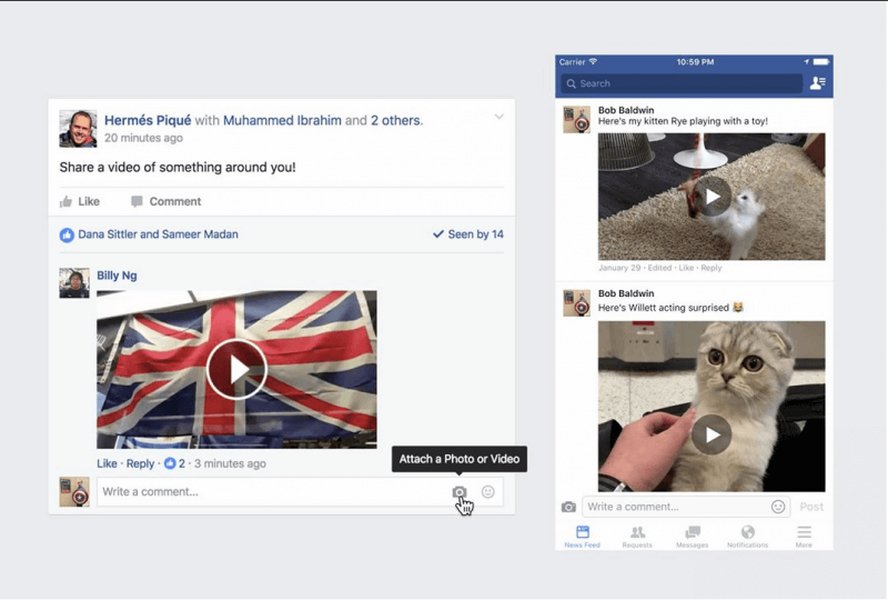
The visual interface for posting a video comment on Facebook, highlighting the camera icon.
The Evolving Facebook Algorithm in 2025 and its Impact on Comments
In 2025, the Facebook algorithm continues to evolve, with a strong emphasis on personalization and engagement. Artificial intelligence (AI) is an integral part of this algorithm, utilizing advanced machine learning to analyze user behavior and preferences. This means the content you see is highly tailored to your past interactions, including the types of content you engage with most frequently (e.g., videos) and the sources you trust.
Key Algorithmic Factors Affecting Comments:
- Who Posted It: Content from friends, business pages, and trusted sources you frequently interact with tends to rank higher.
- Type of Content: If a user consistently interacts with videos, they are more likely to see more video content in their feed, including video comments.
- User Interaction: The algorithm actively seeks signals of meaningful interaction. Responding to comments, encouraging discussions, and fostering a sense of community can significantly boost a post's visibility.
- Civic Content: Facebook is adjusting its policy on civic content, phasing back in more personalized political and social issue content for users who explicitly or implicitly signal interest. This change could impact the nature of discussions in comments.
The platform's increased emphasis on short-form video, particularly Facebook Reels, also influences how video content is prioritized and consumed. This further underscores the importance of video in all aspects of Facebook engagement, including comments.
Strategies for Managing and Responding to Facebook Comments
Effective comment management is crucial for maintaining a positive brand image and fostering a healthy online community. Given the nature of comments, including the potential for spam and inappropriate content, robust moderation strategies are essential.
Moderation and Management Tools:
- Native Facebook Tools: Facebook allows users to turn off comments on individual posts or adjust default settings for all posts. You can also hide comments with specific keywords.
- Third-Party Solutions: Tools like Statusbrew offer advanced automation for moderating comments, allowing you to automatically hide or delete inappropriate or spam comments, move them to dedicated inboxes for review, and notify team members. These tools can identify comments containing links or attachments, or even hide comments received during non-working hours.
- AI-Powered Summaries: Meta's AI is beginning to inject itself into comment sections by providing summaries of what people are saying. While potentially helpful for quickly grasping the gist of a discussion, these summaries can also highlight the "wild" or "unhinged" nature of some comment sections.
Responding to Comments:
Engaging with comments is a powerful way to send positive signals to the Facebook algorithm and build a loyal audience. When users feel heard, they are more likely to continue interacting with your content.
- Prompt and Thoughtful Replies: Respond to comments in a timely and thoughtful manner. This demonstrates engagement and appreciation for your audience.
- Encourage Interaction: Create content that naturally prompts comments, such as live videos, Q&A sessions, or posts that ask for feedback.
- Address Spam and Negative Comments: Utilize moderation tools to manage spam and inappropriate content. For constructive negative feedback, a polite and professional response can turn a negative experience into a positive one.
Exporting and Analyzing Facebook Comments
For individuals and businesses looking to gain deeper insights from their Facebook interactions, exporting comments for analysis is a valuable capability. This can be useful for sentiment analysis, competition management, or simply archiving data.
Methods for Exporting Comments:
| Method | Description | Use Case |
|---|---|---|
| Facebook's "Download Your Information" | Allows users to download a copy of all their Facebook activity, including posts, photos, messages, and comments, within a specified date range. | Personal data archiving, general activity review. |
| Third-Party Web Tools (e.g., ExportComments.com, CommentPicker.com, EasyComment.ai) | These tools allow you to copy the URL of a Facebook post and export all available comments to CSV or Excel files. They often support various languages and can be used for competition winner selection. | Marketing analysis, contest management, quick data extraction from specific posts. |
| Browser Developer Tools | For downloading embedded videos from comments, you can use the "Inspect" element in your browser, navigate to the "Network" tab, filter for "MP4" files, and then download the video. | Downloading specific videos embedded in comments (requires technical comfort). |
| Chrome Extensions (e.g., ESUIT Comments Exporter for Facebook™) | Extensions designed to export comments from Facebook articles into JSON or CSV formats. | Convenient, on-the-fly comment export from articles. |
| Facebook Graph API (for developers/businesses) | Allows for programmatic access to Facebook data, including comments. Requires setting up a Facebook app and obtaining appropriate access tokens. | Large-scale data collection, continuous monitoring, custom business solutions. |
A comparison of different methods for exporting Facebook comments and their primary applications.
When exporting comments, especially with third-party tools, ensure you understand the permissions required and the data being accessed. While many tools are designed for legitimate purposes like sentiment analysis or competition management, privacy and data security should always be considered.
Analyzing Engagement Dynamics on Facebook Comments
The engagement within Facebook comment sections is a complex interplay of factors, including content relevance, user sentiment, and algorithmic prioritization. Understanding these dynamics is crucial for content creators and businesses aiming to maximize their reach and impact.
This radar chart illustrates the perceived strengths and weaknesses in different aspects of Facebook comment engagement. "Optimal Engagement Strategy" represents an ideal scenario where content creators effectively leverage all available tools and insights to maximize their presence, while "Typical User Experience" reflects common challenges and opportunities for improvement in the average user's interaction with comments. This visual helps to highlight areas where strategic effort can yield significant improvements in visibility and user satisfaction.
Diving Deeper: The Nuances of Video in Comments
The ability to include video in comments transforms the nature of online discourse. Instead of just text or static images, users can share dynamic, often emotional, responses. This immediacy and richness of expression contribute significantly to the immersive feel Facebook aims for.
This video provides an overview of how to add a video to a Facebook comment, demonstrating the practical steps involved in enhancing your interactions with rich media content.
How to Post a Facebook Video in the Comment Thread, an instructional guide by Online With Michelle.
This capability was a significant update, developed during a Facebook hackathon. It underscores Facebook's commitment to prioritizing video content and facilitating more engaging conversations on its platform. The engineering effort involved in supporting video across various interfaces (desktop, iOS, Android) and within high-traffic services like comments and videos was considerable, highlighting the strategic importance Facebook places on this feature.
Frequently Asked Questions
How do I add a video to a Facebook comment?
Why do some Facebook posts tell me to find the video in the comments?
Can I download videos posted in Facebook comments?
How has the Facebook algorithm changed in 2025 regarding comments and videos?
What tools are available to manage comments on Facebook?
Conclusion
The ability to post videos in Facebook comments has profoundly impacted how users interact and how content is disseminated and consumed on the platform. This feature, coupled with the ever-evolving AI-driven algorithm, highlights the importance of engagement and strategic content placement. For both individual users and businesses, understanding these dynamics, leveraging available tools for moderation, and adapting to algorithmic shifts are crucial for maximizing visibility and fostering a vibrant online presence. As Facebook continues to prioritize rich media and personalized experiences, mastering the art of video comments and comprehensive comment management will remain key to success.
Recommended Further Queries
- How to optimize Facebook video content for 2025 algorithm?
- What are the best practices for moderating Facebook comments effectively?
- What is the impact of AI on social media algorithms in 2025?
- What are some advanced strategies for increasing Facebook post engagement?
References
Last updated May 21, 2025