
Engaging with Your Audience: A Comprehensive Guide to Facebook Video Comments
Strategies for Effective Interaction and Content Optimization on Facebook
Understanding and effectively responding to comments on your Facebook video content is crucial for fostering community, managing brand reputation, and optimizing your future video strategy. While the specific video link provided leads to a "Temporarily Blocked" page, preventing direct analysis of its comments, we can extrapolate from common Facebook user behavior and best practices for video engagement and comment management. This guide will delve into how to analyze video comments, craft effective responses, and leverage insights to enhance your overall Facebook presence.
Key Insights for Facebook Video Comment Management
- Respond Promptly and Thoughtfully: Timely and personalized replies to comments, both positive and negative, are essential for demonstrating engagement and valuing your audience.
- Leverage Facebook Insights for Video Performance: Utilize Facebook's built-in analytics and third-party tools to understand audience behavior, content resonance, and optimize future video content.
- Be Vigilant Against Spam and Misinformation: Actively moderate comments to remove spam, fake reviews, and inappropriate content to maintain a positive and trustworthy environment.
Understanding Facebook Video Comments and Their Importance
Facebook comments are a vital channel for direct dialogue and engagement with your audience. For video content, comments can reveal a wealth of information about viewer reactions, questions, and overall sentiment. Facebook has even allowed users to upload videos directly into comments since 2016, expanding the richness of interactions.
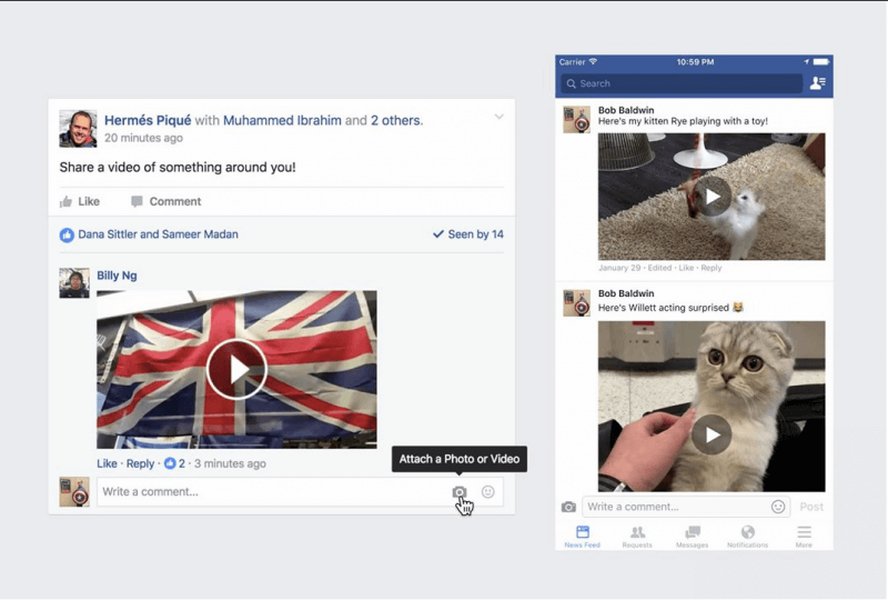
Facebook's integration of video comments allows for richer user interaction.
Comments on videos can be positive, negative, neutral, or even spam. Each type requires a different approach. Positive comments offer an opportunity to build brand loyalty and amplify positive sentiment. Negative feedback, if handled correctly, can transform a dissatisfied customer into a loyal advocate and showcase your business's commitment to customer service. Spam and irrelevant comments, on the other hand, need to be managed to maintain the integrity of your comment section and prevent the spread of misinformation or malicious links.
The Value of Comment Analysis
Analyzing comments goes beyond simply reading them. It involves understanding the underlying sentiment, identifying recurring themes, and recognizing potential issues or opportunities. This qualitative data, when combined with quantitative video metrics, provides a holistic view of your video's performance and audience reception. Tools that offer sentiment analysis can help businesses gauge the overall mood of comments, classifying them as positive, negative, or neutral. This can be particularly useful for large volumes of comments.
Strategies for Responding to Facebook Video Comments
Effective comment management is a cornerstone of a strong social media presence. Here's a breakdown of how to approach different types of comments:
Responding to Positive Comments
When users leave positive feedback or express appreciation for your video, it's an opportunity to reinforce positive sentiment. Always "Like" their comments to acknowledge them. For a few comments, you should reply individually, expressing gratitude and potentially asking a follow-up question to encourage further engagement. Personalizing responses by mentioning something specific from their comment shows you've read and valued their feedback. For businesses, this can involve thanking them for their kind words and expressing hope to see them again soon.
// Example of a positive comment response
function respondToPositiveComment(commenterName, specificDetail) {
    console.log(<code>Thank you, ${commenterName}, for your kind words! We really appreciate you noticing ${specificDetail}.);
    console.log("We're so glad you enjoyed the video!");
}

respondToPositiveComment("Alice", "the explanation of the new feature");
Handling Negative Feedback
Negative comments require a delicate and professional approach. The worst thing you can do is ignore them, as an ignored negative comment can escalate. Instead, respond promptly and professionally. Begin by thanking the commenter for their feedback and expressing sincere regret for their poor experience. A non-confrontational response that acknowledges their concern is key. For businesses, this is an opportunity to showcase excellent customer service by offering to resolve the issue through a private channel, such as direct message or email. This demonstrates accountability and a willingness to address problems, which can significantly enhance your brand's trustworthiness.
Key steps for responding to negative feedback:
- Acknowledge and Thank: "Thank you for sharing your feedback. We're sorry to hear about your experience."
- Empathize: "We understand your frustration regarding [specific issue]."
- Offer a Solution (if applicable): "We'd like to make this right. Please send us a direct message with your contact details so we can assist you further."
- Take it Offline: Encourage private communication to resolve sensitive issues and prevent public arguments.
Managing Spam and Inappropriate Content
Facebook's comment sections can sometimes be plagued by spam, scam links, or inappropriate content. It's crucial to actively moderate these to maintain a clean and trustworthy environment. Facebook's reporting system is largely automated, using AI to scan for banned words or phrases. However, a dedicated team of reviewers also handles abusive content. If you encounter spam or inappropriate comments:
- Report the Comment: Hover over the comment, click the three dots, and select "Report comment." Follow the prompts to specify the nature of the abuse.
- Hide or Delete: You can hide or delete comments that are irrelevant, promotional, or offensive. This helps to keep your comment section focused and positive.
- Block Links/Phone Numbers: Facebook allows you to set up filters to block comments containing certain links or phone numbers, which can be useful against persistent spammers.
- Be Wary of "Video in the Comments" Scams: Some users post content that directs viewers to "check the comments for the video," often leading to scam links. Facebook's algorithm penalizes external links in main posts, which is why some resort to this tactic to increase visibility, but it often leads to a poor user experience.
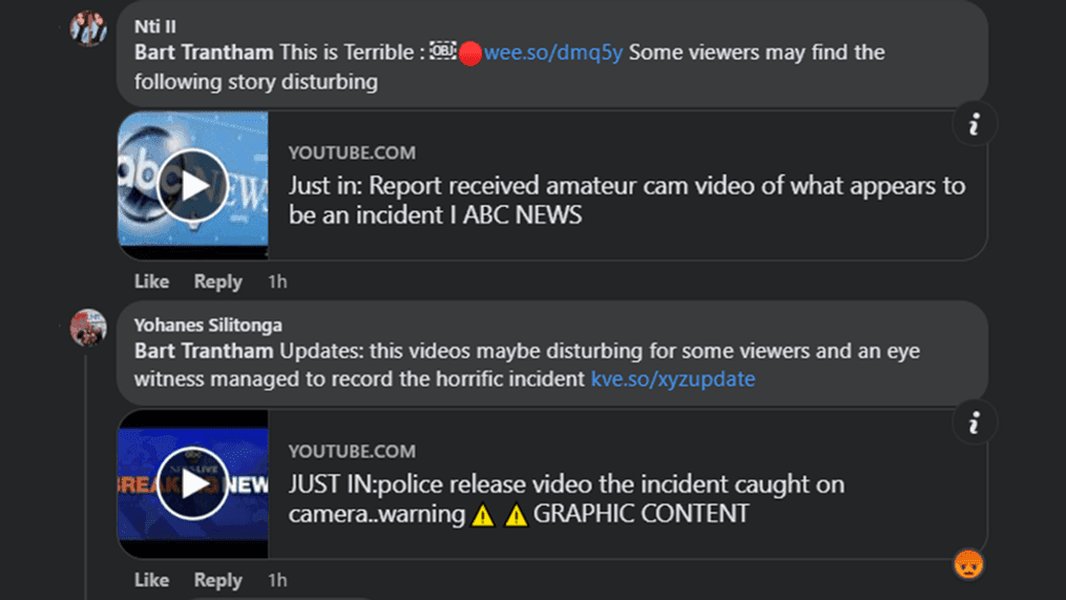
An example of a spam comment often seen on Facebook, attempting to lure users with deceptive video links.
Leveraging Facebook Video Analytics for Enhanced Performance
Beyond individual comment responses, understanding the broader performance of your video content through Facebook analytics is vital. Facebook provides various insights to help you track performance, identify top content, and connect more effectively with your audience.
Key Facebook Video Metrics to Track
To make informed decisions about your video strategy, focus on these metrics:
- Watch Time: The total cumulative time people spent watching your video. This indicates how engaging your content is.
- Video Views: A view is counted after someone watches for at least 3 seconds. Unrepeated seconds watched are counted to avoid skewing data from rewatches.
- Audience Retention: How long viewers stay engaged with your video. A graph of retention can show drop-off points, indicating areas where content might be less engaging.
- Engagement (Reactions, Comments, Shares): These metrics indicate how interactive your audience is with your content. More engagement generally means higher relevance and reach.
- Reach: The number of unique people who saw your video. This helps understand the breadth of your video's exposure.
- Sentiment Analysis: While not a direct Facebook metric, using external tools for sentiment analysis on comments can provide insights into overall audience mood.
Shorter videos, particularly those around 60 seconds, tend to generate more interactions on average. This suggests that concise and impactful content can lead to higher engagement.
Analyzing Video Performance and Content Strategy
Facebook's Video Performance graph in Insights tracks effectiveness over time, measuring watch time, views, and engagement. For short-form content like Reels, you can analyze engagement, reach, and video views. This data helps you refine your video strategy for better reach and engagement. By comparing native Facebook videos with YouTube videos shared on Facebook, you can also determine which platform strategy yields better results for your audience.
This radar chart illustrates the perceived performance attributes of different Facebook video content strategies based on engagement and analytical potential.
The radar chart above visualizes how different types of Facebook video content—short-form, long-form educational, and live videos—compare across various performance attributes. For instance, short-form videos like Reels excel in virality and engagement, while long-form educational content might lead to higher audience retention and clearer sentiment analysis due to more in-depth discussion. Live videos, on the other hand, often foster strong immediate engagement and reach. By analyzing these dimensions, content creators can tailor their video strategies to optimize for specific goals, whether it's maximizing viral reach or building a deeply engaged community around educational content.
Recommended Tools for Video and Comment Analysis
While Facebook's native Insights are a good starting point, several tools can enhance your analytical capabilities:
- Meta Business Suite: Provides a comprehensive overview of your page performance, including video and Reel insights.
- Third-Party Analytics Tools (e.g., Sprout Social, Hootsuite, Metricool, Measure Studio): These platforms offer deeper insights, custom reports, and often integrate comment management features, allowing you to respond to comments and messages from one dashboard.
- Sentiment Analysis Tools (e.g., Repustate): Utilize machine learning and natural language processing to perform sentiment analysis on comments, giving you an aggregated view of audience mood.
- Facebook Comments Scrapers (e.g., Apify): For advanced analysis, these tools can extract real-time comments, including text, timestamp, author details, and engagement metrics, which can be downloaded for further study.
Drafting a Response to General Comments (Extrapolated)
Given the inability to access the specific comments on the provided link, here’s a general framework for how to draft a comprehensive response to a variety of comments you might expect on a Facebook video. This approach covers typical scenarios, from positive feedback to concerns or technical issues.
Overall Approach for Video Comment Responses
A structured and empathetic approach is key. You'll want to acknowledge engagement, provide assistance where needed, and reinforce your brand's values. Here’s a template that can be adapted:
| Comment Type | Desired Outcome | Response Strategy | Example Phrase/Action |
|---|---|---|---|
| Positive Feedback/Praise | Strengthen loyalty, encourage more engagement. | Thank individually, acknowledge specific points, express appreciation. | "Thank you so much for your kind words, [User Name]! We're thrilled you enjoyed [specific part of video]. Your support means a lot!" |
| Questions about Content | Provide clarity, offer more information. | Answer directly and concisely, or direct to a resource. | "Great question, [User Name]! The [specific detail] can be found at [timestamp/link]. Let us know if you have more questions!" |
| Constructive Criticism/Suggestions | Show responsiveness, gather insights for improvement. | Thank for feedback, acknowledge validity, express consideration. | "We appreciate your honest feedback, [User Name]. We're always looking to improve, and your suggestion about [specific point] is valuable. Thank you!" |
| Negative Experience/Complaint | De-escalate, resolve privately, preserve reputation. | Apologize sincerely, empathize, offer to move to private message/email. | "We're truly sorry to hear about your negative experience, [User Name]. Please send us a private message, and we'd be happy to help resolve this for you." |
| Technical Issues (e.g., video not playing) | Provide troubleshooting, direct to support. | Acknowledge issue, offer common fixes, suggest direct support. | "Apologies for the inconvenience, [User Name]. Could you try refreshing your page or checking your internet connection? If the issue persists, please reach out to our support team." |
| Spam/Irrelevant Comments | Maintain integrity, protect audience from malicious content. | Report, hide/delete. | (No direct response needed, focus on moderation.) |
Example Consolidated Response (Hypothetical)
Assuming a scenario where your video garnered a mix of positive comments, questions, and some technical issues, a consolidated response could look like this. Remember, for individual highly engaged or negative comments, direct replies are always preferable.
Subject: Thank You for Your Engagement on Our Latest Video!
Dear Valued Viewers,
We're incredibly grateful for all the amazing comments and engagement on our recent video! Your feedback is invaluable to us, and we love seeing your reactions and questions.
To those who shared their positive thoughts, a huge thank you! We're so glad you found the content engaging and informative. Your support motivates us to create even more great videos for you.
For those who had questions about [specific topic from video], we appreciate your curiosity! We've seen a few questions about [specific detail or common question]. For more in-depth information, you can find additional resources at [link to relevant page/FAQ]. We'll also be addressing some of these questions in an upcoming Q&A session, so stay tuned!
We also noticed a few of you experienced technical issues with the video playback. We apologize for any inconvenience this may have caused. Please try refreshing your browser or checking your internet connection. If you're still having trouble, feel free to send us a private message with details about the issue and your device, and our team will be happy to assist you directly.
We're committed to providing the best possible experience for our community. We'll continue to monitor comments and engage with you all. Thank you for being a part of our journey!
Best regards,
The [Your Brand/Page Name] Team
This type of consolidated response can be useful when you have a high volume of comments and want to address general themes while still showing appreciation for individual engagement.
Enhancing Engagement with Facebook Comments
Engaging with comments isn't just about responding; it's about fostering a vibrant community around your content. Here's a relevant video that explores how to manage and reply to Facebook comments effectively:
This video provides practical guidance on how to manage and reply to Facebook comments within Meta Business Suite, a crucial skill for content creators and businesses.
This video is highly relevant as it directly addresses the practical aspects of managing and replying to Facebook comments, specifically within Meta Business Suite. It offers actionable advice for navigating the platform's tools to streamline your response process. Understanding these mechanics is fundamental to applying the strategies discussed, from responding to positive feedback to handling negative reviews. Efficient comment management, as highlighted in the video, ensures that your audience feels heard and valued, ultimately contributing to stronger engagement and a positive brand image.
Frequently Asked Questions (FAQ)
How do I respond to negative feedback on Facebook?
Can I upload a video as a comment on Facebook?
Why do some Facebook posts say "video in the comments"?
How can I analyze the performance of my Facebook videos?
Are there fake comments on Facebook videos and reviews?
Conclusion
While the specific video link was inaccessible, the principles of effective Facebook video comment management remain universal. By actively engaging with your audience, whether through personalized replies to positive comments, empathetic responses to negative feedback, or vigilant moderation against spam, you build a stronger, more trusting relationship with your community. Coupled with a data-driven approach to video analytics, you can continuously refine your content strategy, ensuring your videos resonate deeply and achieve their intended impact on the platform.
Recommended Further Reading
- Explore best practices for responding to Facebook reviews to build brand loyalty.
- Discover key Facebook video metrics that drive deeper audience engagement.
- Learn about advanced tools for performing sentiment analysis on Facebook comments.
- Understand effective strategies for moderating Facebook comments and handling spam.
References
Last updated May 21, 2025