
Unlocking Fedora 42: Running Entirely from RAM
Discover the Power and Flexibility of a RAM-Only Fedora 42 Environment
Key Insights into RAM-Only Fedora 42
- Transient Operation: Running Fedora 42 directly from RAM creates a transient system, meaning all changes are lost upon reboot, providing a clean slate for each session. This is ideal for testing, secure browsing, or public terminals.
- Performance Benefits: Loading the entire operating system into RAM significantly boosts performance and responsiveness due to much faster read/write speeds compared to traditional disk storage.
- Resource Requirements: While the default Fedora Workstation 42 with GNOME recommends 4GB of RAM for installation and basic operation, running entirely from RAM will typically require more, often 2GB to 4GB for Fedora CoreOS live images, and potentially more for other spins or heavier workloads.
Running Fedora 42 entirely from RAM offers a unique blend of speed, security, and transience. This setup is particularly beneficial for scenarios where data persistence is not desired, or where maximum performance is critical. By loading the entire operating system into volatile memory, you can achieve remarkable responsiveness and ensure that no traces of your session remain after shutdown. This guide will delve into the technical aspects of achieving a RAM-only Fedora 42 environment, covering different approaches and essential considerations.
Understanding RAM-Only Operation in Fedora 42
The Fundamentals of Live Booting and In-Memory Systems
When you boot Fedora 42 from a live USB or ISO, it typically operates in a "live" mode. In this mode, the system primarily runs from the bootable media, with temporary storage prepared in RAM. This temporary storage, often leveraging /sbin/dmsquash-live-root, allows for changes and file creation during the live session. However, these changes are generally non-persistent and are wiped upon reboot.
The concept of "RAM-only" extends this by ensuring that the entirety of the operating system, or as much as practically possible, is loaded into RAM. This minimizes reliance on the slower USB or optical drive, leading to a much snappier user experience. Fedora CoreOS, for instance, is explicitly designed to be run directly from RAM, making it a prime candidate for such deployments. The live environment of Fedora CoreOS is a fully functional copy that can even provision itself via Ignition and execute containers.
Why Run Fedora 42 from RAM?
- Enhanced Security and Privacy: For sensitive tasks or public terminals, a RAM-only system ensures that no data or changes are written to persistent storage, leaving no digital footprint behind.
- Performance Boost: RAM is significantly faster than any solid-state drive (SSD) or hard disk drive (HDD). Running the OS from RAM eliminates I/O bottlenecks, leading to incredibly fast boot times and application responsiveness.
- Ideal for Testing and Troubleshooting: Developers and system administrators can use a RAM-only Fedora 42 environment to test new software, configurations, or troubleshoot issues without affecting their primary system.
- Portability: A live USB that boots entirely to RAM can be carried and used on various machines, providing a consistent and secure computing environment.
Key Components for RAM-Only Booting
To achieve a RAM-only Fedora 42 environment, several components play a crucial role:
- Live ISO Image: This is the primary source of the Fedora 42 operating system. It contains the compressed filesystem that will be loaded into RAM.
- Bootloader (GRUB, PXELINUX, iPXE): The bootloader is responsible for initiating the boot process and passing necessary kernel arguments to load the entire system into RAM.
- Kernel Parameters: Specific kernel parameters, such as
rd.live.ramfor some Fedora spins, orcoreos.live.rootfs_urlfor Fedora CoreOS, instruct the kernel to load the root filesystem into RAM. - Sufficient RAM: The most critical requirement is having enough physical RAM to accommodate the entire operating system image, plus any applications you intend to run.
Methods for Creating a RAM-Only Fedora 42 Environment
Leveraging Live USBs and Network Booting
Creating a Bootable Live USB with UNetbootin (for non-persistent live)
While UNetbootin is primarily for creating bootable USBs, it allows you to create a live image. For a transient system (changes lost on reboot), this is a good starting point. However, direct "boot-to-RAM" functionality might require manual kernel parameter modifications for some Fedora spins, as it's not always an explicit option in every live environment.
To create a live USB:
- Download the Fedora Workstation 42 ISO image from the official Fedora website.
- Use a tool like UNetbootin to write the ISO image to a USB drive. UNetbootin is a graphical tool that simplifies this process.
- Once the USB is created, you may need to manually edit the boot parameters in the GRUB menu (typically by pressing 'e' at the boot screen) to add options like
rd.live.ram. For some Fedora versions, justrd.live.ramwithout=1might work.
It's important to note that while Fedora LiveCDs typically prepare temporary storage in RAM, explicitly forcing the entire OS to RAM for all Fedora spins might vary in implementation and support.
Running Fedora CoreOS Directly from RAM (ISO, PXE, or iPXE)
Fedora CoreOS (FCOS) is particularly well-suited for running directly from RAM. This is documented and supported by the Fedora Project. You can boot a transient FCOS system via ISO, PXE, or iPXE.
- ISO Boot: Booting from a live ISO directly to RAM is possible. The FCOS live environment is a full copy.
- PXE/iPXE Boot: This method involves booting FCOS over a network. For performance and reliability, mirroring the kernel and initramfs images on local infrastructure is recommended. Essential kernel arguments like
ignition.firstbootandignition.platform.id=metalare required. Additionally, thecoreos.live.rootfs_urlkernel argument, if used, requires at least 2 GiB of RAM, while without it, 4 GiB is recommended for the live PXE image.
Here's an example of how you might configure a PXELINUX entry for Fedora CoreOS to boot directly to RAM:
DEFAULT pxeboot
TIMEOUT 20
PROMPT 0
LABEL pxeboot
  KERNEL fedora-coreos-42.20250427.3.0-live-kernel-x86_64
  APPEND initrd=fedora-coreos-42.20250427.3.0-live-initramfs.x86_64.img,fedora-coreos-42.20250427.3.0-live-rootfs.x86_64.img ignition.firstboot ignition.platform.id=metal ignition.config.url=http://192.168.1.101/config.ign IPAPPEND 2
This configuration loads the kernel and initramfs images directly into RAM, enabling a full RAM-only operation. The ignition.config.url specifies an Ignition configuration file, which is crucial for provisioning FCOS systems, even when running transiently.
RAM Requirements and Performance Considerations
Optimizing for a Smooth RAM-Only Experience
While the idea of running Fedora 42 entirely in RAM is appealing for performance, it's crucial to understand the memory requirements. Fedora Workstation 42 with the GNOME desktop environment recommends 4GB of RAM for installation and running. For a truly RAM-only system, where the entire OS image is loaded, you will likely need more, especially if you plan to run applications.
Anecdotal evidence suggests that a fresh boot of Fedora GNOME might use a little over 1GB of RAM. However, background processes like Gnome Software can consume anywhere from 100MB to 900MB. If you're running Docker Desktop on Fedora 42, allocating 4GB to Docker alone is a good balance for systems with 8GB of RAM.
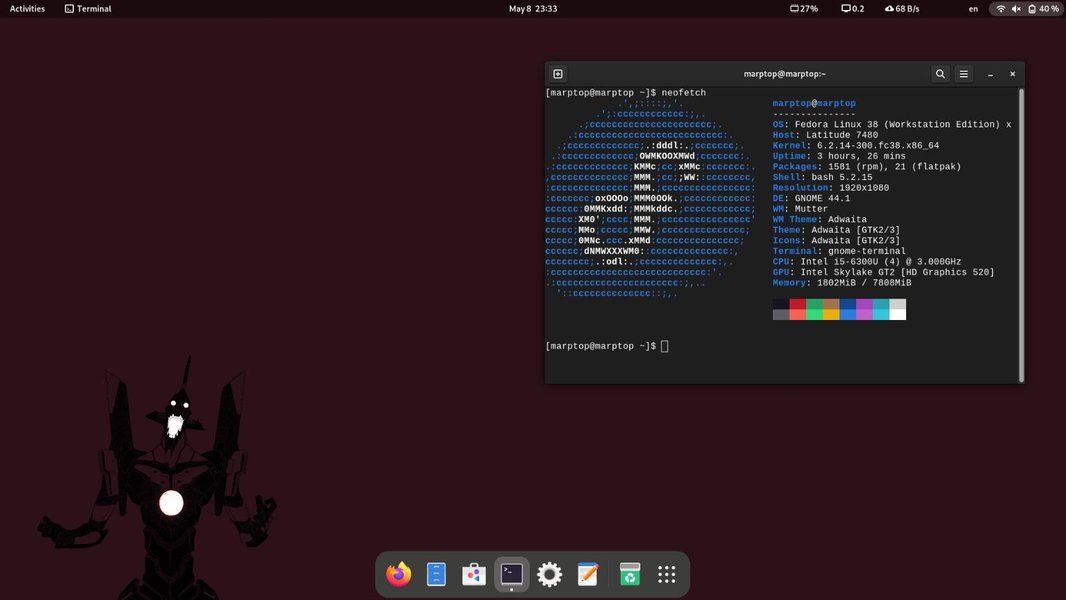
Example of Fedora GNOME RAM usage with Firefox open.
Minimum and Recommended RAM for Various Scenarios
| Scenario | Minimum Recommended RAM | Optimal RAM for RAM-Only | Notes |
|---|---|---|---|
| Fedora Workstation 42 (GNOME) Installation | 4 GB | 8 GB+ | General installation, not explicitly RAM-only. Better experience with more RAM. |
Fedora CoreOS Live PXE (with coreos.live.rootfs_url) |
2 GiB | 4 GiB+ | Designed for transient, RAM-only operation. |
Fedora CoreOS Live PXE (without coreos.live.rootfs_url) |
4 GiB | 8 GiB+ | Higher requirement if rootfs is not explicitly streamed. |
| Lightweight Fedora Spin (e.g., Xfce, LXQt) | 2 GB | 4 GB+ | Less resource-intensive, but still benefits from more RAM for a full in-memory load. |
| Fedora 42 with Docker Desktop | 8 GB | 16 GB+ | Requires substantial RAM, especially if allocating 4GB to Docker. |
It's evident that for a dedicated RAM-only Fedora 42 setup, especially with the GNOME desktop, having 8GB or more RAM is highly advisable for a smooth and responsive experience. Users of systems with minimum memory (2GB) might consider Fedora Spins with less resource-intensive Desktop Environments.
Performance Factors for RAM-Only Systems
The performance of a RAM-only Fedora 42 system is influenced by several factors:
- RAM Speed: Faster RAM (e.g., higher MHz, lower CAS latency) will yield better performance.
- CPU Speed and Cores: A capable CPU, especially one with more cores, can significantly improve performance in multithreaded operations, benefiting from the rapid data access in RAM.
- Desktop Environment: GNOME, while visually appealing, is more resource-intensive than lightweight alternatives like Xfce or LXQt. Choosing a lighter DE can reduce the RAM footprint.
- Background Processes: Services that autostart on boot, like Gnome Software (which can consume up to 900MB RAM), should be disabled if not needed to free up valuable RAM.
Challenges and Troubleshooting for RAM-Only Fedora 42
Navigating Potential Hurdles
While running Fedora 42 from RAM offers significant advantages, users might encounter specific challenges:
UEFI Boot Entry Issue with Live Media
A known issue with some Fedora 41 and 42 Live images is that merely booting the media can add an unexpected "Fedora" entry to the UEFI boot manager list, even if no installation occurs. This is primarily an annoyance, especially for dual-boot setups.
Persistent Storage Limitations
By design, a RAM-only system is transient. This means any changes made, files created, or software installed during a session are lost upon reboot. If persistence is desired, you would need to implement specific configurations, such as creating a persistent partition on the USB drive, which deviates from a pure RAM-only setup.
This video provides a comprehensive guide on installing Fedora 42, which can be a good starting point for understanding the general installation process before attempting advanced RAM-only configurations:
How to Install Fedora Linux Version 42 from Start to Finish + Create a Bootable USB
Suspending to RAM Issues
Some users have reported issues with suspending to RAM on Fedora 42, experiencing screen tearing or system lag. This can be related to specific hardware configurations (e.g., CPU, GPU, UEFI settings) and the interaction with systemd 257. While this isn't directly related to "running from RAM" in the boot sense, it highlights potential memory-related quirks in Fedora 42 that users should be aware of.
Memory-Related Installation Errors
During installation, if the installer reports a memory issue, it's advisable to run a memory test tool like Memtest86+ to check for hardware problems. This is crucial before attempting any RAM-only configurations.
Evaluating Fedora 42's Suitability for RAM-Only Operations
A Comprehensive Radar Chart Analysis
To better understand Fedora 42's characteristics when aiming for a RAM-only environment, we can analyze several key attributes. This radar chart illustrates my opinionated assessment of Fedora 42 across various factors relevant to a RAM-only setup, on a scale of 1 to 10 (1 being lowest, 10 being highest).
As the chart illustrates, Fedora 42 performs exceptionally well in "Performance (RAM-Only)" and "Stability for Transient Use," reflecting its design for robust live environments. "Security Features (Default)" also scores highly due to Fedora's strong security posture. However, "Ease of RAM-Only Setup" is moderate, as it often requires command-line tweaks, and "Persistence Configuration Complexity" is low because a pure RAM-only setup intentionally avoids persistence. "Default RAM Footprint (GNOME)" is also moderate, indicating that while it's functional, a lighter spin might be more ideal for minimal RAM systems.
Conclusion
The Transient Power of Fedora 42 in RAM
Running Fedora 42 entirely from RAM is a powerful capability that provides a secure, high-performance, and transient computing environment. While the default Workstation edition with GNOME might be memory-intensive for a full RAM-only load, Fedora CoreOS is explicitly designed for this purpose, offering robust PXE and iPXE booting options. Users interested in this setup should prioritize sufficient RAM and be prepared for potential manual configuration of kernel parameters. The benefits of speed and privacy often outweigh the complexities, making a RAM-only Fedora 42 a valuable tool for specific use cases.
Frequently Asked Questions
Can I save files when running Fedora 42 from RAM?
What are the minimum RAM requirements for running Fedora 42 entirely from RAM?
coreos.live.rootfs_url kernel argument, or 4 GiB otherwise.Is it possible to dual-boot if I run Fedora 42 from RAM?
Are there any performance benefits to running Fedora 42 from RAM compared to an SSD?
Recommended Further Exploration
- How to create a persistent Fedora 42 Live USB
- Optimizing Fedora 42 for low RAM systems
- Advanced PXE boot configurations for Linux
- Fedora CoreOS Ignition configuration examples