
Unlocking Your Data: Is There a Direct Bridge from FileNet P8 to Laserfiche?
Navigating the complexities of migrating your enterprise content between IBM FileNet P8 and Laserfiche.
Migrating enterprise content, especially from a robust system like IBM FileNet P8 to Laserfiche, is a significant undertaking. While you might be looking for a straightforward "official FileNet P8 Connector for Laserfiche," the reality of such migrations often involves a multi-faceted approach. This guide provides a comprehensive overview of the strategies and steps typically involved, drawing upon common industry practices and available technologies.
Key Insights into Your Migration Journey
- No Single "Official" Connector: It's important to understand that a dedicated, off-the-shelf "FileNet P8 Connector *specifically for Laserfiche* migration" is not commonly documented or offered as a singular product by IBM or Laserfiche. Migration typically involves using general FileNet P8 connectors or APIs for data extraction, and Laserfiche's import tools or SDKs for data ingestion.
- CMIS as a Potential Bridge: Both IBM FileNet P8 and Laserfiche support Content Management Interoperability Services (CMIS). This standard can facilitate data exchange, though it might require custom scripting or configuration.
- Custom Solutions & Third-Party Tools: For complex migrations, developing a custom solution using the Laserfiche SDK or employing specialized third-party migration tools and services is often necessary to handle intricate metadata mapping, transformations, and validation.
Understanding the Migration Landscape
Migrating documents and metadata from IBM FileNet P8 to Laserfiche is a multi-step process that requires careful planning and execution. While the term "official FileNet P8 Connector for Laserfiche" might suggest a direct, plug-and-play solution, the path usually involves leveraging different tools and technologies at various stages of the migration.
The general approach involves:
- Extracting data from FileNet P8 using its available mechanisms (e.g., general FileNet P8 connectors, APIs, CMIS).
- Potentially transforming the extracted data and metadata to align with Laserfiche's structure.
- Importing the prepared data into Laserfiche using its import utilities, SDK, or CMIS capabilities.
The Role of FileNet P8 Connectors (General Purpose)
Connectors for IBM FileNet P8, such as those from IBM (e.g., for Content Collector, Watson Explorer) or third parties (e.g., Micro Focus IDOL connector), are designed to interact with FileNet P8 repositories. Their primary function is to retrieve or integrate FileNet content with other systems. In a migration-to-Laserfiche scenario, such a connector would be used for the extraction phase from FileNet.
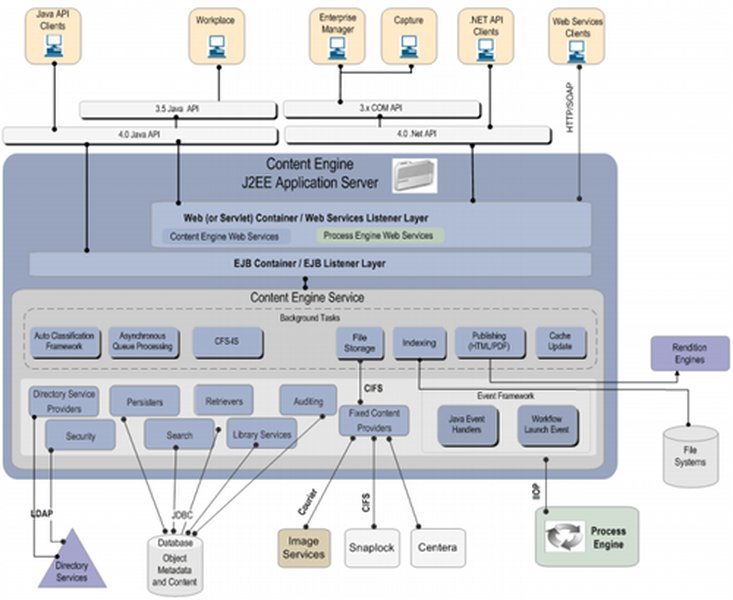
Conceptual illustration of a Java-based connection to FileNet P8, similar to how a connector might interact with the Content Engine.
Step-by-Step Migration Approach: FileNet P8 to Laserfiche
This guide outlines the typical phases and considerations for migrating your content. Given the absence of a single "official FileNet P8 to Laserfiche connector," these steps represent a common methodology.
Phase 1: Planning and Preparation
Thorough planning is the cornerstone of a successful migration. This phase involves understanding your source and target environments, defining the scope, and preparing resources.
1.1. Assess Source (FileNet P8) and Target (Laserfiche) Systems
- FileNet P8 Version: Confirm your FileNet P8 environment version (e.g., 4.5.x, 5.x, or later) and its API/export capabilities.
- Laserfiche Version & Setup: Note your Laserfiche platform version. Prepare the Laserfiche repository structure (e.g., folders, metadata templates) for the incoming content.
- Data Volume & Complexity: Quantify the documents, their types, sizes, and the complexity of associated metadata.
- Metadata Mapping: Crucially, define a clear mapping strategy from FileNet metadata fields to Laserfiche metadata fields. This may involve transformations or new field creations.
1.2. Prerequisites and Environment Setup
- Connectivity: Ensure network access between the migration server, FileNet P8, and Laserfiche.
- Permissions: Secure necessary administrative credentials for both FileNet (for extraction) and Laserfiche (for import).
- Software & Tools:
- For FileNet extraction: A FileNet P8 connector (general purpose), CMIS tools (like Apache Chemistry), or custom scripts using FileNet APIs. A compatible Java Runtime Environment (JRE) is often required.
- For Laserfiche import: Laserfiche Import Agent, Laserfiche SDK, CMIS-capable scripts, or third-party migration tools.
- Backup Strategy: Implement a comprehensive backup of both FileNet P8 and the Laserfiche environment before starting any migration activities.
- CMIS Enablement: Verify that CMIS is enabled and configured on both FileNet P8 and Laserfiche if this is part of your chosen strategy.

CMIS provides a standardized web services interface for interacting with content management systems, potentially aiding in cross-platform migrations.
Phase 2: Data Extraction from FileNet P8
This phase focuses on getting your documents and metadata out of FileNet P8 in a structured manner.
2.1. Configure Extraction Tools
- If using a FileNet P8 connector (e.g., from IBM or Micro Focus for general purposes), configure its connection parameters to your FileNet Content Engine (CPE URI, credentials).
- Define the scope of extraction: Specify document classes, object stores, and metadata fields to be extracted.
- Consider batch sizes and concurrency settings to optimize performance and minimize impact on the production FileNet system.
2.2. Execute Extraction
- Initiate the extraction process using your chosen tool or scripts.
- The output should typically consist of the document binaries (e.g., TIFF, PDF, DOCX) and associated metadata, often in a structured format like XML, CSV, or JSON.
2.3. Validate Exported Data
- Perform spot checks and systematic validation to ensure all intended documents and metadata have been extracted accurately.
- Verify file integrity and that metadata files correspond correctly to document binaries.
- Ensure consistent formatting for a smoother import into Laserfiche.
Phase 3: Data Transformation (If Necessary)
Sometimes, the data extracted from FileNet P8 may not directly align with Laserfiche's structure or metadata schema. This phase addresses any required conversions.
- Reformat Data: Convert document formats if necessary (though ideally, original formats are preserved).
- Metadata Transformation: Apply the predefined metadata mapping rules. This might involve renaming fields, changing data types, concatenating values, or looking up values. Scripts or ETL (Extract, Transform, Load) tools can be useful here.
Phase 4: Importing Data into Laserfiche
Once data is extracted and prepared, it's time to load it into Laserfiche.
This video from Laserfiche provides a tutorial on data capture, which is relevant to understanding how content and metadata can be brought into the Laserfiche system, a key part of the import phase of migration.
4.1. Prepare Laserfiche Import Environment
- Configure Laserfiche import tools (e.g., Laserfiche Import Agent, Laserfiche Connector) or prepare custom import scripts using the Laserfiche SDK.
- Set up import profiles, defining how documents and metadata will be ingested, including target folders, template assignments, and handling of versions.
4.2. Perform Import
- Import documents and their associated metadata into the designated Laserfiche repository.
- Utilize batch processing for large volumes to improve efficiency.
- Apply security settings (access rights, permissions) to the documents in Laserfiche as per requirements.
4.3. Monitor and Troubleshoot Import
- Closely monitor the import process for errors, such as metadata mismatches, failed document ingestion, or permission issues.
- Review Laserfiche logs and import tool reports for detailed error information.
- Address any failures by correcting data or configurations and re-attempting the import for the failed items.
Phase 5: Post-Migration Validation and Cleanup
After the data is imported, thorough validation is essential to ensure the migration's success.
5.1. Verify Data Integrity and Completeness
- Conduct comprehensive audits by comparing source FileNet data with the migrated content in Laserfiche. Sample various document types and metadata.
- Check for missing documents, incorrect metadata, broken links, or corrupted files.
- Test search functionality and document retrieval in Laserfiche.
5.2. System Optimization and User Acceptance
- Optimize Laserfiche indexing and search settings for efficient performance with the newly migrated content.
- Conduct User Acceptance Testing (UAT) with key stakeholders to confirm the migrated content meets business requirements.
5.3. Decommissioning and Archival (If Applicable)
- Once the migration is confirmed successful and stable, plan for the decommissioning of the old FileNet P8 system or archival of its data according to your organization's data governance policies.
5.4. Documentation and Training
- Document the migration process, configurations, and any lessons learned.
- Provide training to end-users on accessing and working with the migrated content in Laserfiche.
Visualizing Migration Strategies
To better understand the different approaches you might consider for your FileNet P8 to Laserfiche migration, the following mindmap outlines the key phases and considerations discussed. This visual representation can help in structuring your project plan.
(Connectors, APIs, CMIS)"] id2_2["Execute Document & Metadata Extraction"] id2_3["Validate Exported Data Integrity"] id3["Phase 3: Data Transformation"] id3_1["Reformat Data (if needed)"] id3_2["Apply Metadata Mapping Rules"] id4["Phase 4: Importing Data into Laserfiche"] id4_1["Prepare Laserfiche Import Environment
(Import Tools, SDK, CMIS)"] id4_2["Perform Document & Metadata Import"] id4_3["Apply Security Settings"] id4_4["Monitor & Troubleshoot Import"] id5["Phase 5: Post-Migration"] id5_1["Data Integrity & Completeness Verification"] id5_2["System Optimization"] id5_3["User Acceptance Testing (UAT)"] id5_4["Documentation & Training"] id5_5["Old System Decommissioning"] id6["Key Considerations"] id6_1["Lack of Single 'Official' LF Connector"] id6_2["Role of General FileNet P8 Connectors"] id6_3["Leveraging CMIS"] id6_4["Custom SDK Development"] id6_5["Third-Party Migration Tools & Services"]
This mindmap illustrates the structured approach required for such a migration, highlighting that it's a process involving multiple stages rather than a single tool deployment.
Comparing Migration Approaches
When migrating from FileNet P8 to Laserfiche, several methodological approaches can be considered. Each has its own set of characteristics regarding complexity, cost, and flexibility. The table below offers a comparative overview. It's important to note that an "Official Direct Connector" specifically for FileNet P8 to Laserfiche migration is not a commonly available, single product; thus, this comparison focuses on realistic pathways.
| Feature/Aspect | CMIS-Based Migration | Custom SDK Development | Third-Party Migration Tool/Service |
|---|---|---|---|
| Primary Mechanism | Standardized API (CMIS) for content operations between compliant systems. | Custom code utilizing FileNet APIs for export and Laserfiche SDK/APIs for import. | Specialized software or services designed for ECM migrations. |
| Connector Type | Relies on built-in CMIS interfaces of both FileNet and Laserfiche. | Connectors are custom-built as part of the solution. | Often provide pre-built or highly configurable connectors for various ECMs. |
| Setup Complexity | Moderate; requires CMIS configuration and potentially scripting for orchestration. | High; involves significant development, testing, and debugging effort. | Low to Moderate; tools often have intuitive UIs but require understanding of source/target. |
| Estimated Cost | Low to Moderate (primarily internal effort, some scripting tools). | High (development resources, time, potential for consultant fees). | Moderate to High (license fees for tools, service fees for consultants). |
| Customization Level | Limited by the CMIS specification; good for standard content and metadata. | Very High; complete control over extraction, transformation, and loading logic. | Moderate to High; tools often offer extensive configuration options and some scripting. |
| Migration Speed | Moderate; performance can depend on CMIS implementation and data volume. | Variable; initial development is slow, but optimized code can be fast. | Often fast, as tools are optimized for performance and batch processing. |
| Vendor Support | Community forums, standard documentation; specific issues may need internal expertise. | Reliant on internal development team or contracted developers. | Typically provided by the tool vendor or service provider. |
| Ideal Scenario | Relatively straightforward migrations with standard metadata, where teams are CMIS proficient. | Complex requirements, unique transformations, or deep integration needs. Long-term control desired. | Need for rapid deployment, rich out-of-the-box features, handling large volumes, or lacking in-house expertise. |
Choosing the right approach depends on your organization's specific requirements, budget, timeline, and in-house technical capabilities.
Evaluating Migration Factors
The choice of migration strategy involves weighing several factors. The radar chart below provides a visual comparison of three common approaches—CMIS-based, Custom SDK development, and using a Third-Party Migration Tool—across key evaluation criteria. For these criteria, a higher score (on a scale of 1 to 10, where the axis minimum is 1) generally indicates a more favorable outcome or characteristic.
This chart helps visualize the trade-offs: for instance, third-party tools might offer ease and speed but come at a higher cost, while SDK development offers maximum customization but requires significant technical effort and time.
Frequently Asked Questions (FAQ)
Is there an official FileNet P8 Connector specifically for Laserfiche migration? ▼
Based on available information, there isn't a single, dedicated "official FileNet P8 Connector *for Laserfiche*" marketed as a direct migration tool by IBM or Laserfiche. Migrations typically involve using general-purpose FileNet P8 connectors (from IBM or other vendors like Micro Focus) for data extraction from FileNet. The import into Laserfiche is then handled using Laserfiche's own tools (like Import Agent, SDK) or via standards like CMIS, or through specialized third-party migration software.
What is CMIS and how does it help in this migration? ▼
CMIS stands for Content Management Interoperability Services. It's an OASIS standard that allows different content management systems to communicate with each other. Since both IBM FileNet P8 and Laserfiche support CMIS, it can be used as a bridge. You could potentially use CMIS protocols to read content and metadata from FileNet and write it into Laserfiche. However, this often requires custom scripting or a tool that can orchestrate CMIS operations, and it might not cover all proprietary features or complex metadata transformations.
What are the main challenges in a FileNet to Laserfiche migration? ▼
Common challenges include:
- Metadata Mapping: Accurately translating FileNet's metadata structures, document classes, and properties to Laserfiche's templates and fields.
- Data Volume: Migrating large volumes of documents efficiently and within acceptable downtime windows.
- Complex Content Types: Handling specialized document formats, versions, annotations, or compound documents.
- Customizations: Migrating custom applications or workflows built on FileNet P8.
- Permissions and Security: Replicating complex security models from FileNet to Laserfiche.
- Data Integrity: Ensuring no data loss or corruption during the transfer.
- Change Management: Training users on the new Laserfiche system.
Do I need custom development for this migration? ▼
It's highly probable, especially for complex migrations. While CMIS or basic import tools might handle simple scenarios, custom development using the Laserfiche SDK (Software Development Kit) or scripts is often required for:
- Complex metadata transformations.
- Handling specific business logic during import.
- Automating the end-to-end migration process.
- Integrating with other systems if needed.
Alternatively, third-party migration tools are designed to minimize custom development by providing configurable solutions.
Recommended Next Steps & Further Research
To deepen your understanding and plan your migration effectively, consider exploring these related queries:
- Compare third-party tools for IBM FileNet to Laserfiche migration.
- What are the best practices for metadata mapping in ECM migration projects?
- How can CMIS be utilized for large-scale content migration between FileNet and Laserfiche?
- What is involved in developing a custom migration solution using the Laserfiche SDK for content from FileNet P8?
References
The following resources provide additional context and information related to FileNet P8, Laserfiche, and content migration concepts:
Last updated May 16, 2025