
Unlocking Your Product's ID: Is the Manufacturer Part Number for Your TDOO TV Stand Hiding in Plain Sight?
A deep dive into finding the MPN for your Amazon purchase and understanding why this code matters.
You're looking for the Manufacturer Part Number (MPN) for the TDOO TV Stand With Wall Mount Bracket for 26-75 Inch TVs, specifically the model associated with ASIN B09KXBRKY5 on Amazon.sa. Let's explore what an MPN is, whether it's available for this item, and how you might locate it.
The TDOO TV Stand with Wall Mount Bracket, suitable for 26-75 inch televisions.
Key Insights: Decoding Your Product's Identity
- MPN Not Listed: The Manufacturer PartNumber for the TDOO TV Stand (ASIN: B09KXBRKY5) is not explicitly stated on the Amazon product page or in readily available search information.
- Understanding MPN: An MPN is a unique code assigned by the manufacturer (TDOO, in this case) to distinguish specific products. It's different from Amazon's ASIN or retailer-specific SKUs.
- Finding the MPN: To locate the MPN, you may need to check the product packaging, user manual, the official TDOO website, or contact TDOO customer support directly.
What Exactly is a Manufacturer Part Number (MPN)?
A Manufacturer Part Number (MPN) is a unique alphanumeric code assigned by the manufacturer to identify a specific product. Think of it as a product's fingerprint, ensuring that each distinct item can be accurately tracked and referenced across various sellers, distributors, and databases. Unlike retailer-specific codes, the MPN is universal for that particular product model.
Why MPNs Matter
Precision in Identification
MPNs help distinguish between similar products, especially those with variations in size, color, or features. For a TV mount like the TDOO model, an MPN would clearly define its specific version, load capacity, and compatibility.
E-commerce and Search Performance
On platforms like Google Shopping or large e-commerce marketplaces, providing accurate MPNs is crucial. It helps search engines categorize and display products correctly, potentially improving visibility and ensuring customers find the exact item they're looking for. Submitting incorrect or missing MPNs can sometimes lead to reduced product performance or even disapproval from these platforms.
Inventory Management and Comparisons
For businesses, MPNs are vital for accurate inventory management. For consumers, they allow for precise product comparisons across different retailers or when seeking compatible accessories or replacement parts.
MPN vs. Other Product Identifiers
It's important not to confuse MPNs with other common product codes. The Amazon product page you linked uses an ASIN (Amazon Standard Identification Number), which is B09KXBRKY5. This is Amazon's internal tracking code, unique to its platform.
Here’s a table clarifying some common product identifiers:
| Identifier | Definition | Assigned By | Primary Use |
|---|---|---|---|
| MPN (Manufacturer Part Number) | A unique code to identify a specific product model. | Manufacturer | Universal product identification, distinguishing specific models. |
| ASIN (Amazon Standard Identification Number) | A 10-character alphanumeric unique identifier. | Amazon | Product identification within the Amazon marketplace. |
| GTIN (Global Trade Item Number) | A globally unique number used to identify trade items, products, or services. Includes UPC, EAN, ISBN. | GS1 (Global Standards Organization) | Point-of-sale scanning, global supply chain tracking. |
| SKU (Stock Keeping Unit) | An internal code used by retailers to track inventory. | Retailer/Seller | Internal inventory management and tracking. |
The table above illustrates how different codes serve distinct purposes in the product lifecycle and supply chain. For your TDOO TV stand, the ASIN helps identify it on Amazon, but an MPN would be the manufacturer's own standard identifier.
Is an MPN Available for Your TDOO TV Stand?
Based on the information available from the Amazon.sa product page and general search data, an explicit MPN for the TDOO TV Stand With Wall Mount Bracket (ASIN: B09KXBRKY5) is not readily provided in the product listing details. This is not uncommon, especially for products from smaller brands or those sold primarily through marketplace channels where the ASIN becomes the dominant identifier for that platform.
Manufacturers like TDOO do assign MPNs, but they may not always be prominently displayed on retailer websites. The product description for this item focuses on features such as:
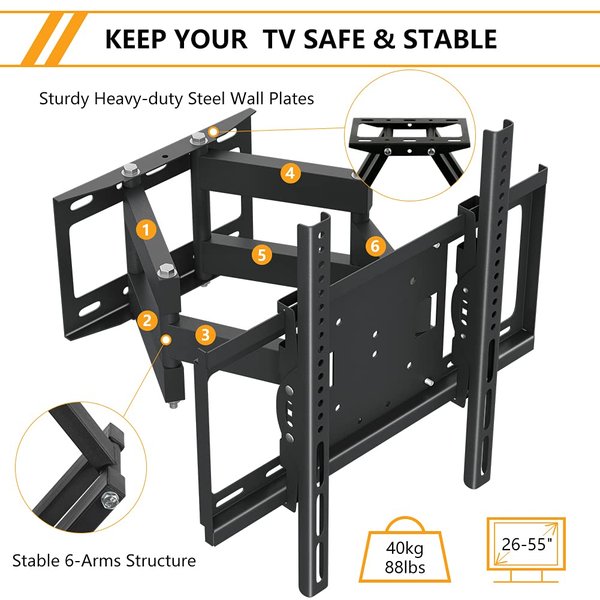
- Compatibility with 26-75 inch TVs.
- VESA pattern compatibility (e.g., 200x200mm to 600x400mm).
- Load-bearing capacity (often up to 40kg or more).
- Features like tilt, swivel, and adjustable arms.
While these details describe the product, they don't include its MPN.

Example of a TDOO TV wall mount, showcasing typical design features and mounting points.
Visualizing Product Identifier Relevance
Different product identifiers hold varying degrees of importance and visibility depending on the context—whether it's from the manufacturer's perspective, a retailer's operational needs, consumer awareness, or an e-commerce platform's requirements. The radar chart below offers an opinionated visualization of this relevance for common identifiers.
This chart suggests that while MPNs are highly emphasized by manufacturers and important for certain e-commerce contexts, identifiers like ASINs might have higher visibility on specific retail platforms, and GTINs play a crucial role in broader supply chain and retail scanning.
How to Potentially Find the MPN for Your TDOO Mount
If you need the MPN for the TDOO TV Stand (ASIN: B09KXBRKY5) for warranty purposes, product registration, or precise comparison, here are several steps you can take:
- Check the Product Packaging: The MPN is often printed on the original box or packaging of the product. Look for labels or text that might include "MPN," "Part No.," or "Model No." (though Model Number can sometimes differ from MPN).
- Inspect the Product Itself: Some manufacturers place the MPN on a sticker or stamp directly on the product. For a TV mount, check the mounting plate, arms, or base.
- Consult the User Manual or Documentation: Any printed materials that came with the TV stand, such as an instruction manual or warranty card, might list the MPN.
- Visit the Official TDOO Website: If TDOO has an official website, try searching for your specific TV stand model. Product pages on manufacturer sites often include detailed specifications, including the MPN.
- Contact TDOO Customer Support: Reaching out to the manufacturer directly is often the most reliable way to obtain the MPN. Provide them with the product name, description, and the ASIN (B09KXBRKY5) from the Amazon page to help them identify the exact model.
- Amazon Seller Q&A / Reviews: Sometimes, other customers or the seller might have asked for or provided the MPN in the "Customer questions & answers" section or in product reviews on the Amazon page.
Visualizing the Search for Product Information
The mindmap below illustrates the interconnectedness of product information and the pathways to finding an MPN when it's not immediately obvious.
(ASIN: B09KXBRKY5)"] id1["Product Identifiers"] id1_1["MPN (Manufacturer Part Number)
Status: Not explicitly listed"] id1_2["ASIN (Amazon Standard Identification Number)
Identifier: B09KXBRKY5"] id1_3["GTIN (UPC/EAN)
Status: Unknown from current data"] id1_4["SKU (Stock Keeping Unit)
Status: Retailer specific, not universal"] id2["Manufacturer: TDOO"] id2_1["Official Website"] id2_2["Customer Support"] id3["Sources to Check for MPN"] id3_1["Product Packaging"] id3_2["Product Manual/Documentation"] id3_3["Physical Product Label"] id3_4["Manufacturer Communication (Website/Support)"] id3_5["Retailer Listing (e.g., Amazon - check Q&A, full description)"] id4["Product Features (Context)"] id4_1["For 26-75 inch TVs"] id4_2["Wall Mount Bracket"] id4_3["VESA Compatibility"] id4_4["Load Capacity"]
This mindmap shows that while the ASIN is readily available for your Amazon purchase, finding the MPN might require looking at physical attributes of the product or contacting the manufacturer, TDOO, directly.
Installing TV Wall Mounts: General Guidance
While we are discussing the specifics of identifying your TDOO TV mount, understanding the general process of installing such a device can be helpful. TV wall mounts, like the one you're inquiring about, require careful installation to ensure the safety of your television and the integrity of your wall.
The following video provides a general overview of how to install a TV wall bracket. Although it features a Hisense TV and a different bracket, the fundamental principles of locating studs, securing the bracket, and attaching the TV are often similar across various mount types and brands. This can give you a better appreciation for the hardware you're dealing with.
This video demonstrates the installation process for a TV wall bracket, covering common steps like finding studs and securing the mount.
Key considerations during TV mount installation generally include:
- Wall Type: Determine if you have drywall, plaster, concrete, or brick walls, as this affects the mounting hardware and technique.
- Stud Finding: For drywall, locating wooden or metal studs is crucial for a secure installation. Electronic stud finders are commonly used.
- VESA Compatibility: Ensure your TV's VESA mounting hole pattern matches the capabilities of your TDOO mount.
- Weight Capacity: Never exceed the specified weight limit of the TV mount.
- Leveling: Use a spirit level to ensure the mount and TV are perfectly horizontal.
- Cable Management: Plan how you will route cables for a clean look and to avoid strain on connections.
Frequently Asked Questions (FAQ)
What is an MPN and why is it important?
MPN stands for Manufacturer Part Number. It's a unique code assigned by the manufacturer to distinguish one specific product model from another. It's important for accurate product identification, inventory management, price comparisons, and ensuring you're getting the exact product, especially on e-commerce platforms where many similar items might be listed.
Why isn't the MPN for the TDOO TV stand on the Amazon page?
Retailers like Amazon primarily use their own identification system, the ASIN (Amazon Standard Identification Number), for products sold on their platform. While manufacturers assign MPNs, these are not always required or prominently displayed by all sellers or on all marketplace listings, especially if the ASIN serves the platform's internal tracking needs. Some brands also provide this information less consistently than others.
How is an ASIN different from an MPN?
An ASIN (Amazon Standard Identification Number) is a 10-character alphanumeric unique identifier assigned by Amazon.com and its partners for product identification within the Amazon marketplace. An MPN (Manufacturer Part Number) is assigned by the product's manufacturer and is intended to be a universal identifier for that specific product model across all sellers and distributors, not just on Amazon.
What should I do if I absolutely need the MPN and can't find it?
If the MPN is crucial (e.g., for a warranty claim or specific compatibility check) and you can't find it on the product, packaging, or manual, the best course of action is to contact the manufacturer, TDOO, directly. Their customer service should be able to provide the MPN if you give them details about the product, such as its name, description, and the ASIN from the Amazon listing.
Recommended Further Exploration
- How do I find the official TDOO website for product support?
- What are the differences between MPN, GTIN, and SKU in e-commerce?
- Tips for safely mounting a large TV to a wall.
- How to verify VESA compatibility for my TV and mount?
References


 amazon.com
amazon.com
amazon.com

Last updated May 14, 2025