
Flashing the Fujitsu D2607 to LSI IT Mode: A Comprehensive Guide
Unlocking the Full Potential of Your SAS HBA
Key Takeaways for Flashing the Fujitsu D2607
- Crossflashing involves flashing a different vendor's firmware (like LSI's) onto the Fujitsu D2607.
- The primary goal of flashing to IT (Initiator-Target) mode is to bypass the card's hardware RAID capabilities and present individual drives directly to the operating system, which is essential for software RAID solutions like ZFS and UnRAID.
- The process can be complex and requires specific tools, firmware versions, and careful execution, with the potential for bricking the card if not done correctly.
The Fujitsu D2607, based on the LSI SAS2008 chipset, is a popular choice for homelab enthusiasts looking to build cost-effective storage solutions. While it functions as a RAID controller with its original firmware, many users prefer to flash it to LSI's IT (Initiator-Target) mode firmware. This transforms the card into a Host Bus Adapter (HBA), allowing the operating system to directly manage connected drives, which is crucial for software-defined storage solutions like ZFS and UnRAID.
However, the process of flashing the Fujitsu D2607 to LSI IT mode can be intricate due to the card's OEM nature and potential differences from the reference LSI design. This guide aims to provide a comprehensive overview of the process, common challenges, and best practices based on user experiences and available resources.
Understanding IT Mode and Its Benefits
Why Flash to IT Mode?
The native firmware on the Fujitsu D2607 typically operates in Integrated RAID (IR) mode or a similar hardware RAID configuration. In this mode, the card manages connected drives as RAID arrays, abstracting the individual drives from the operating system. While this is suitable for traditional hardware RAID setups, it's not ideal for software RAID solutions like ZFS, where the operating system needs direct access to the raw drives to manage parity and data distribution effectively.
Flashing the card to IT mode disables the hardware RAID functionality and presents each connected drive as a separate, individual device to the operating system. This is often referred to as "just a bunch of disks" (JBOD) passthrough, although IT mode is more accurate as it specifically refers to the HBA functionality where the card acts as an initiator and the drives as targets.
The benefits of using IT mode with software RAID include:
- Enhanced Data Integrity: Software RAID filesystems like ZFS offer advanced features like checksumming and self-healing, providing better data protection than many hardware RAID controllers.
- Increased Flexibility: Software RAID allows for easier expansion and modification of storage pools without the limitations of hardware RAID configurations.
- Improved Performance (in some cases): By offloading the RAID calculations to the CPU, software RAID can sometimes outperform lower-end hardware RAID controllers, especially with faster processors.
- Drive Health Monitoring: IT mode allows the operating system to directly access S.M.A.R.T. data from individual drives, enabling better monitoring of drive health and predictive failure analysis.
The Crossflashing Process: A Step-by-Step Overview
Navigating the Firmware Landscape
Crossflashing the Fujitsu D2607 involves replacing its original Fujitsu firmware with LSI's IT mode firmware. This process typically requires a combination of specific tools and firmware files. The general steps involved, based on various guides and user experiences, are as follows:
1. Preparation: Gathering the Necessary Tools and Files
Before starting, you'll need to gather the appropriate tools and firmware files. This usually includes:
- A bootable USB drive (DOS, UEFI, or FreeDOS are commonly used).
- LSI SAS2 flash utility (
sas2flsh.efifor UEFI or a DOS version). - The LSI IT mode firmware file (e.g.,
2118it.binfor the SAS2008 chip). - Potentially an SBR (Serial Bootstrap Record) file, sometimes needed to prepare the card for flashing.
- An Option ROM file (e.g.,
mptsas2.rom) if you need the card's BIOS to be accessible during boot. - It is often recommended to use a system with a motherboard that has good compatibility and to place the D2607 card in the primary PCIe slot (often an x16 slot) for better success rates.
2. Booting to a Compatible Environment
You'll need to boot your system from the prepared USB drive into a minimal environment where the flashing utilities can be run. DOS, FreeDOS, or a UEFI shell are common choices. Ensure your motherboard's BIOS settings are configured to boot from the USB drive in the appropriate mode (Legacy/CSM for DOS, or UEFI).
3. Identifying the Card and Erasing Existing Firmware
Once in the bootable environment, you'll typically use the sas2flsh utility to interact with the card. The first step is often to identify the card and its current firmware version. Then, you'll need to erase the existing Fujitsu firmware. This is a critical step, and the command can vary depending on the utility version and guide being followed. A common command structure might involve sas2flsh -o -e 7, where -o is often required for OEM cards.
4. Flashing the LSI IT Mode Firmware
After erasing the existing firmware, you can flash the LSI IT mode firmware. The command usually looks something like sas2flsh -o -f 2118it.bin. Again, the -o option might be necessary for OEM cards like the Fujitsu D2607.
5. Flashing the Option ROM (Optional but Recommended)
If you want to access the card's configuration utility during boot (for example, to see connected drives), you'll need to flash a compatible Option ROM. The command would be similar, like sas2flsh -o -b mptsas2.rom.
6. Verification and Reboot
After the flashing process is complete, the utility should indicate success. It's recommended to verify the firmware version using sas2flsh -o -sas2flash -list or a similar command. Then, reboot your system. With the LSI IT mode firmware, the card should now present individual drives directly to the operating system.
Common Challenges and Troubleshooting
Navigating Potential Pitfalls
Flashing OEM cards like the Fujitsu D2607 can present challenges. Users have reported various issues, including:
- "Mfg Page 2 Mismatch Detected" Errors: This error can occur during flashing and seems related to differences in the manufacturing page data between the original and new firmware. Some guides suggest specific SBR files or sequences of flashing different firmware versions to work around this.
- Only Four Ports Working: After flashing, some users have found that only half of the card's ports (one SFF-8087 connector) are functional. This issue appears to be linked to the SBR and potential "half-flashed" scenarios where the card's flash capacity differs from the standard LSI card.
- Difficulty Erasing Firmware: The
sas2flsh -e 7command might fail on some Fujitsu D2607 cards. Alternative methods, such as using themegarecutility with an empty SBR, have been suggested, although even these can be problematic. - Tool and Firmware Version Compatibility: The success of the flash can be highly dependent on the specific versions of the flashing utility, firmware files, and even the bootable environment used. Finding a working combination might require experimentation.
- Bricking the Card: If the flashing process is interrupted or goes wrong, there is a risk of rendering the card inoperable. Some users have reported success in recovering bricked cards, but it can be a complex process.
Troubleshooting often involves trying different versions of the flashing tools and firmware, ensuring the card is in a primary PCIe slot, and carefully following guides that have been confirmed to work for the specific D2607 variant (e.g., D2607-A21, D2607-A11).
Comparing IT and IR Modes
Choosing the Right Firmware for Your Needs
While flashing to IT mode is popular for software RAID, it's worth noting the difference between IT and IR (Integrated RAID) modes for SAS2008-based cards. The table below highlights the key distinctions:
| Feature | IT Mode | IR Mode |
|---|---|---|
| Primary Functionality | Host Bus Adapter (HBA) | Hardware RAID Controller |
| Drive Presentation to OS | Individual drives | RAID arrays |
| RAID Management | Software RAID (e.g., ZFS, UnRAID) | Hardware RAID (RAID 0, 1, 10) |
| S.M.A.R.T. Data Access | Directly accessible by OS | Often abstracted by the controller |
| Ideal Use Cases | Software-defined storage, JBOD | Traditional hardware RAID setups |
For most users building a home server or NAS with ZFS or UnRAID, IT mode is the preferred choice as it provides the necessary direct access to the drives for these software solutions to function optimally.
Visualizing the Firmware Impact
A Radar Chart of Controller Capabilities
To illustrate the functional shift when flashing from the original Fujitsu firmware (often based on IR/MegaRAID) to LSI IT mode, consider the following radar chart. This chart is an opinionated representation of the card's capabilities in each mode, highlighting the strengths and weaknesses from a homelab perspective.
As the chart illustrates, the original Fujitsu firmware excels in hardware RAID features and potentially initial ease of setup for basic RAID configurations. However, it falls short in compatibility with software RAID and providing direct drive access. Conversely, the LSI IT mode firmware, while lacking hardware RAID, is highly compatible with software RAID, offers direct drive access, and benefits from stronger community support for flashing and troubleshooting.
Visual Aid: A Fujitsu D2607 Card
Recognizing Your Hardware
To help identify the card you're working with, here is an image of a Fujitsu D2607:
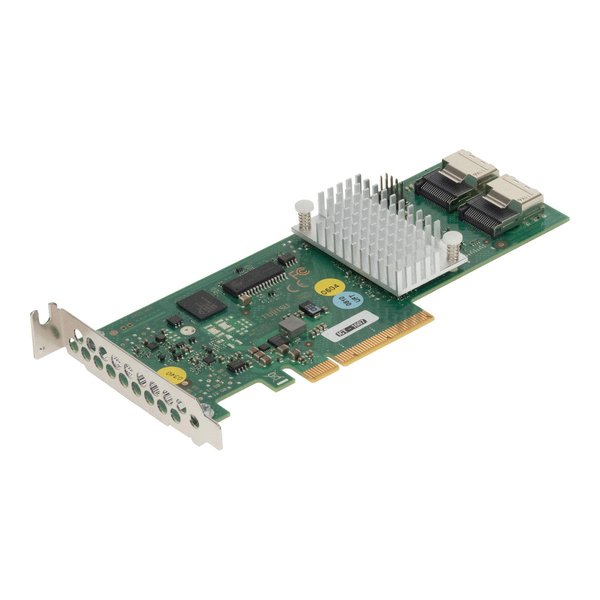
A typical Fujitsu D2607 SAS/SATA controller card.
Recognizing the specific model and any revisions (like D2607-A21 or D2607-A11) can be important, as subtle hardware differences might affect the flashing process or require specific firmware versions.
Community Resources and Guides
Learning from Shared Experiences
Given the complexities of crossflashing, relying on community-driven guides and forums is highly recommended. Websites like ServeTheHome and TrueNAS forums have extensive discussions and guides specifically for flashing SAS2008-based cards, including the Fujitsu D2607. These resources often contain detailed steps, links to necessary files, and troubleshooting tips based on real-world experiences.
Searching these forums for "Fujitsu D2607 IT mode flash" or "SAS2008 crossflash" will yield valuable information. Pay close attention to the dates of the guides and the firmware versions they recommend, as older methods might be outdated or less reliable.
Frequently Asked Questions
Addressing Common Concerns
Recommended Further Exploration
Dive Deeper into Related Topics
To gain a more in-depth understanding of SAS HBAs, firmware flashing, and related technologies, consider exploring the following topics:
- What are the technical specifications of the LSI SAS2008 chipset?
- What are the advantages of using ZFS for my home server?
- How do I troubleshoot common errors when flashing LSI HBAs?
- Which other SAS HBA models are recommended for homelab use?
References
Sources for This Guide
Last updated May 20, 2025