
Unlocking the Fujitsu D2616-A22: A Guide to IT Mode Flashing
Transforming Your RAID Controller into a Pure HBA for Enhanced Storage Flexibility
The Fujitsu D2616-A22, a SAS RAID controller often found in Fujitsu Primergy servers, is a powerful piece of hardware designed for managing complex RAID arrays. However, for users seeking direct access to individual drives, particularly for software-defined storage solutions like FreeNAS (now TrueNAS) or unRAID, its default RAID (Integrated RAID or IR) firmware can be limiting. This is where flashing it to "Initiator Target" (IT) mode becomes crucial. IT mode transforms the RAID controller into a Host Bus Adapter (HBA), allowing the operating system to directly control the attached drives without any hardware RAID abstraction. This guide will walk you through the essential steps and considerations for flashing your D2616-A22 to IT mode.
Key Highlights of D2616-A22 IT Mode Flashing
- Chipset Compatibility: The Fujitsu D2616-A22 is commonly based on the LSI SAS2108 chipset, which is a key factor enabling the IT mode cross-flash.
- Firmware Transformation: Flashing to IT mode converts the card from a RAID controller to a pure HBA, allowing direct drive passthrough to the operating system.
- Crucial for Software RAID: IT mode is generally required for optimal performance and compatibility with ZFS-based systems like TrueNAS and other software RAID solutions.
Understanding the Fujitsu D2616-A22 and IT Mode
The Hardware Beneath the Firmware
The Fujitsu D2616-A22 is a 6Gb/s SAS RAID controller equipped with 512MB of cache and supporting RAID levels 5 and 6. While its primary function is hardware RAID, its underlying chipset, often the LSI SAS2108 (also known as "Liberator"), makes it a candidate for cross-flashing to IT mode. This is distinct from other Fujitsu cards like the D2607, which might use different LSI chipsets (e.g., SAS2008) and have different flashing procedures. It's essential to confirm your specific card's chipset, though the D2616 series is consistently linked to the SAS2108.
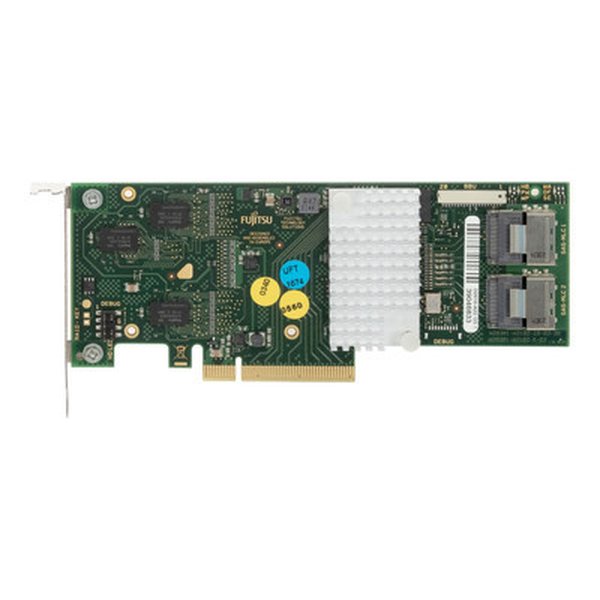
A Fujitsu D2616-A22 RAID Controller, a common target for IT mode flashing.
Why IT Mode?
When a RAID controller operates in its default Integrated RAID (IR) mode, it presents logical drives (RAID volumes) to the operating system rather than individual physical drives. This is suitable for traditional hardware RAID setups but can be problematic for software-defined storage solutions. Systems like TrueNAS (formerly FreeNAS) and unRAID rely on direct access to the raw disks to manage their own software RAID or JBOD configurations. Flashing to IT mode bypasses the hardware RAID functionality, allowing the operating system to "see" each drive independently, which is critical for these platforms to function correctly and efficiently.
Prerequisites and Precautions Before Flashing
Essential Preparations
Before attempting to flash your Fujitsu D2616-A22, it's crucial to gather the necessary tools and understand the risks involved. Incorrect flashing can brick the card, rendering it unusable. Always proceed with caution and ensure you have backups of any important data.
Required Tools and Software
- Bootable USB Drive: A USB drive formatted with FreeDOS or a similar minimalist operating system. Tools like Rufus can help create this.
- MegaREC Utility: A low-level flashing utility often used for LSI-based controllers. This is fundamental for cleaning the flash and writing new SBRs (Service Boot ROM).
- IT Mode Firmware: The specific IT mode firmware file compatible with the LSI SAS2108 chipset. Finding the correct firmware for cross-flashing can sometimes be challenging due to vendor-specific customizations.
- LSI SBR File: A specific SBR file that aligns the card with LSI's standards, which is necessary before flashing LSI-based firmware.
- Backup of Original Firmware: While not always explicitly mentioned in brief guides, it is highly recommended to back up your existing Fujitsu firmware. This allows for potential reversal if issues arise, though reversibility for the D2616-A22 can be complex and is often debated.
Critical Precautions
- No I/O Activity: Ensure no input/output activities are occurring on the card during the firmware upgrade process to prevent data corruption or bricking.
- Power Stability: A stable power supply is paramount. Any power interruption during the flash can permanently damage the card.
- Verify Compatibility: Double-check that the firmware you intend to flash is indeed compatible with the LSI SAS2108 chipset found on your D2616-A22. Using the wrong firmware can lead to an unrecoverable state.
- Understand the Risks: Cross-flashing is not officially supported by manufacturers and carries the risk of bricking your card. Proceed only if you are comfortable with this risk.
The Flashing Procedure: A Step-by-Step Overview
From RAID to HBA
The process of flashing the Fujitsu D2616-A22 to IT mode involves several critical steps, primarily executed from a DOS environment using the MegaREC utility. While exact file names and versions may vary, the general sequence remains consistent.
Overview of Flashing Steps
- Prepare Bootable USB: Create a FreeDOS bootable USB drive using Rufus. Copy all necessary firmware files (e.g., IT mode firmware, SBR files like
sbrempty.bin,sbrlsi.bin, and themegarec.exeutility) to this USB drive. - Boot to DOS: Insert the USB drive into your system with the D2616-A22 installed and boot from it into the FreeDOS environment.
- Clean Flash with MegaREC:
The first step is to clean the existing Service Boot ROM (SBR) from the card. This prepares it for the new firmware. Execute the following command:
megarec -writesbr 0 sbrempty.binHere, '0' typically refers to the controller index. If you have multiple controllers, you might need to adjust this.
sbrempty.binis a blank SBR file. - Reboot: After cleaning the SBR, a reboot is usually required to ensure the changes are properly registered before proceeding.
- Change SBR to LSI SBR:
Next, you need to write an LSI-specific SBR to the controller. This is crucial for compatibility with LSI IT mode firmware.
megarec -writesbr 0 sbrlsi.binsbrlsi.binis the LSI SBR file. - Clean the FLASH:
A more thorough cleaning of the flash memory is then performed to remove any remnants of the old firmware.
megarec -cleanflash 0 - Flash New LSI IT Mode Firmware:
Finally, flash the desired IT mode firmware onto the controller. The firmware file will typically have a
.binextension.megarec -m0flash 0 [firmware_file_name].binReplace
[firmware_file_name].binwith the actual name of your IT mode firmware file (e.g.,2108it.bin). - Reboot: After successfully flashing the firmware, reboot your system. The card should now operate in IT mode.
Illustrative Command Sequence
Here's a condensed example of the common commands, assuming the files are in the root of the bootable drive:
megarec -writesbr 0 sbrempty.bin
rem --- Reboot system here ---
megarec -writesbr 0 sbrlsi.bin
megarec -cleanflash 0
megarec -m0flash 0 firmware.bin
rem --- Reboot system here ---
It's important to note that some sources suggest the D2616, being based on the LSI SAS2108 (a MegaRAID on Chip), is more complex to cross-flash to a pure IT mode HBA compared to cards with SAS2008 chipsets, and some users have faced challenges or even bricked cards. However, the successful cross-flash to LSI 9260-8i firmware (an IR firmware) has been documented, implying that a transformation is possible, albeit potentially to an LSI IR mode rather than a pure IT mode HBA suitable for ZFS. For true IT mode, a SAS2008-based card is often preferred.
Understanding Performance Characteristics After Flashing
Impact on System Performance and Capabilities
Flashing a RAID card like the D2616-A22 to IT mode fundamentally changes its operational characteristics. This transformation affects not only how drives are presented to the OS but also the performance profile and feature set available. The radar chart below provides a conceptual comparison of a typical RAID controller in its default (IR) mode versus after being successfully flashed to IT mode. The values are illustrative and based on general expectations rather than specific benchmarks of the D2616-A22 itself, reflecting the shift in focus from hardware RAID to direct drive management.
As illustrated in the radar chart, a RAID controller in its default (IR) mode excels in RAID functionality and typically utilizes its onboard cache for performance. However, its direct drive access and compatibility with software RAID are limited. Conversely, after flashing to IT mode, the card gains superior direct drive access and becomes highly compatible with OS-managed software RAID solutions like ZFS. This comes at the expense of its hardware RAID capabilities and the direct benefits of its onboard cache for traditional RAID operations, as the OS now manages these functions. Firmware complexity can also be lower in IT mode as the card effectively acts as a pass-through device.
Common Challenges and Troubleshooting
Navigating Potential Pitfalls
Flashing firmware, especially cross-flashing, can sometimes present challenges. Being prepared for common issues can save a lot of frustration.
Common Issues
- Card Not Posting/Bricked: This is the most severe issue, where the system fails to boot with the card installed. This can occur if the wrong firmware is flashed, or if the process is interrupted. Reversing a bricked D2616 can be extremely difficult, sometimes impossible without specialized tools.
- Disks Not Recognized: After flashing, the operating system might not recognize the attached drives. This could be due to incorrect firmware, missing drivers in the OS, or issues with the SAS cabling.
- Controller Not Detected: The system might not detect the controller at all after a failed flash. This often points to a corrupted boot block or severe firmware issue.
- Incorrect SAS Address: Each HBA requires a unique SAS address. If this is missing or incorrect, it can cause issues. Tools like
sas2flsh(not typically used for SAS2108 in the same way as SAS2008) ormegarecfor specific SBR writes handle this.
Troubleshooting Tips
- Verify Firmware Hash: Always verify the integrity of downloaded firmware files using checksums (MD5, SHA256) if available, to ensure they are not corrupted.
- Try Different USB Drives/Ports: Sometimes, issues can be related to the bootable media itself or the USB port used.
- Consult Forums: Online communities like ServeTheHome and TrueNAS forums are excellent resources for specific flashing guides and troubleshooting tips for the D2616-A22. Many users have shared their experiences and solutions.
- Seek Original Firmware: If you encounter issues, finding and flashing the original Fujitsu firmware back might be an option, though this is often not straightforward for cross-flashed cards.
Alternative Solutions and Considerations
Beyond Flashing
While flashing to IT mode is a common solution for HBA functionality, it's important to consider other options, especially if flashing proves too risky or problematic for your specific card.
JBOD Mode
Some RAID controllers, even if not fully flashable to IT mode, might support a "JBOD" (Just a Bunch Of Disks) mode. In JBOD mode, the controller presents each drive individually to the operating system, effectively mimicking some aspects of IT mode without requiring a firmware flash. The D2616 is noted to have a SAS2108 chip that supports JBOD. This can be a safer alternative if IT mode flashing is too difficult or risky.
Dedicated HBAs
For users who absolutely require IT mode for ZFS or other software RAID solutions, purchasing a dedicated HBA that ships in IT mode (or is easily flashable to it, like many LSI SAS2008-based cards) is often the simplest and most reliable solution. While the D2616-A22 can be made to work, it's generally considered a RAID controller first, and dedicated HBAs might offer a more streamlined experience for direct drive passthrough.
Comparative Analysis of RAID Controller Modes
A Glance at Operational Differences
To further contextualize the discussion, here's a table comparing the primary characteristics of RAID controllers in their default IR mode, JBOD mode, and IT mode. This helps to clarify why IT mode is often preferred for specific use cases like TrueNAS.
| Feature | IR (Integrated RAID) Mode | JBOD (Just a Bunch Of Disks) Mode | IT (Initiator Target) Mode |
|---|---|---|---|
| Drive Presentation to OS | Logical volumes (RAID arrays) | Individual physical drives | Individual physical drives (raw) |
| RAID Management | Hardware-managed RAID arrays | No RAID management by controller | No RAID management by controller; handled by OS |
| Caching (if present) | Utilized for hardware RAID performance | Not typically utilized or has minimal impact | Not utilized; OS handles caching |
| Suitability for ZFS/Software RAID | Not recommended; creates abstraction layer | Better than IR, but still some controller logic | Ideal; direct access to drives for OS-level control |
| Complexity of Setup | Moderate (controller setup) | Low (simple pass-through) | Low (simple pass-through post-flash) |
| Firmware Modification Required | No | No (if supported by default) | Yes (cross-flashing) |
This table highlights that while JBOD offers some direct drive access, IT mode provides the purest form of passthrough, making it the preferred choice for advanced software-defined storage solutions where the operating system needs complete control over the storage devices.
Deep Dive: Flashing LSI SAS HBA to IT Mode
A Detailed Look into the Broader LSI Flashing Process
While the D2616-A22 specifically uses the MegaRAID SAS 2108 chipset, the broader process of flashing LSI SAS HBAs to IT mode shares many similarities and is a common procedure in the homelab community. Understanding the general context can be beneficial.
How-To: Flash LSI 9200-8e HBA to P20 IT Mode for ZFS. This video, while for a different card (LSI 9200-8e, a SAS2008-based HBA), illustrates the general principles and steps involved in flashing an LSI card to IT mode, including preparation and execution. While the exact commands and files will differ for the D2616-A22 (SAS2108), the conceptual flow of booting to a DOS environment and using a flashing utility remains relevant.
The provided video demonstrates the process for flashing an LSI 9200-8e, which is based on the SAS2008 chipset. Although the specific commands and firmware files for a D2616-A22 (SAS2108) will vary (e.g., using megarec instead of sas2flsh), the underlying concept of preparing a bootable DOS environment, using specific utilities to clean and flash the firmware, and ensuring correct SAS address programming are common to both. This video provides a valuable visual aid for understanding the environment and general sequence of operations involved in such a delicate procedure. It highlights the importance of having the correct tools and files ready before beginning.
Frequently Asked Questions
Is it possible to flash a Fujitsu D2616-A22 to IT mode?
What is the primary utility used for flashing the D2616-A22?
What are the risks of flashing the D2616-A22 to IT mode?
Why is IT mode preferred for FreeNAS/TrueNAS and unRAID?
Can I revert the D2616-A22 back to its original firmware after flashing to IT mode?
Conclusion
Flashing the Fujitsu D2616-A22 to IT mode is a common procedure for users who wish to repurpose this RAID controller into a pure HBA for software-defined storage solutions. While feasible due to its LSI SAS2108 chipset, the process requires careful adherence to specific commands using the MegaREC utility in a DOS environment. Understanding the risks involved, such as potential bricking, and ensuring you have the correct firmware and SBR files are paramount for a successful outcome. For those building FreeNAS/TrueNAS or unRAID systems, the transition to IT mode is often a necessary step to unlock the full potential of direct drive passthrough, despite the inherent challenges of cross-flashing a hardware RAID controller.
Recommended Searches
- Where can I download the latest firmware for Fujitsu D2616-A22?
- What are the best LSI SAS2108 IT mode firmware versions for ZFS?
- How to troubleshoot a Fujitsu D2616-A22 that is not detected after flashing?
- Explain the fundamental differences between IR mode and IT mode HBAs.
References
 geeksunlimitedinc.wordpress.com
Last updated May 21, 2025