
Unlock PSTN Calling with Free VoIP: Your Ultimate Guide to Connecting!
Discover how to leverage free, open-source VoIP software to make and receive calls on traditional phone networks.
Integrating a free, open-source Voice over Internet Protocol (VoIP) system with the Public Switched Telephone Network (PSTN) allows you to bridge the gap between internet-based calling and traditional phone lines. This means your VoIP setup can make calls to and receive calls from standard landline and mobile numbers. This comprehensive guide will walk you through the necessary components, software choices, and configuration steps to achieve this, enabling you to build a cost-effective and flexible communication solution.
Essential Insights: Key Takeaways
- Open-Source Power: Utilize robust, free open-source PBX software like Asterisk, FreePBX, or FreeSWITCH as the core of your VoIP system to manage calls, routing, and features.
- PSTN Connection Methods: Connect to the PSTN primarily through FXO gateways (for physical analog line integration) or SIP trunking services (for virtual, internet-based connectivity).
- Configuration is Key: Successful integration hinges on careful configuration of your PBX software, PSTN interface (gateway or SIP trunk), dial plans for call routing, and ensuring robust security measures are in place.
Understanding the Fundamentals
Before diving into the setup, it's crucial to understand the core technologies involved:
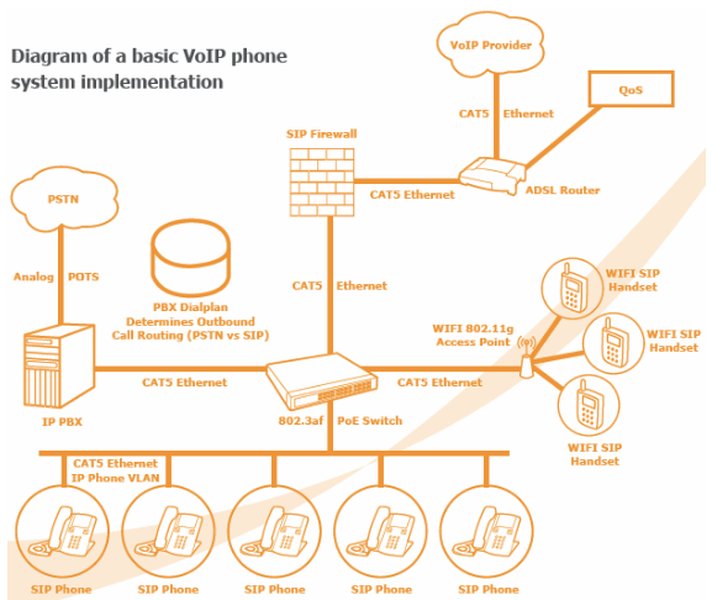
A typical VoIP phone system diagram showing how IP PBX connects to IP phones and the PSTN.
What is VoIP?
VoIP, or Voice over Internet Protocol, is a technology that allows you to make voice calls using an internet connection instead of a traditional analog phone line. Voice signals are converted into digital data packets and transmitted over IP networks.
What is the PSTN?
The PSTN, or Public Switched Telephone Network, is the global network of traditional circuit-switched telephone lines. It's the infrastructure that supports landline phones and connects to mobile networks.
What is an Open-Source PBX?
A Private Branch Exchange (PBX) is a private telephone network used within a company or organization. An open-source PBX is PBX software whose source code is freely available, allowing for customization and often free usage. It manages internal calls between VoIP extensions and acts as the gateway for external calls to and from the PSTN.
Core Components for PSTN Connectivity
To enable your free open-source VoIP system to communicate with PSTN numbers, you'll need several key components working together.
Popular Open-Source VoIP Software (PBX)
The heart of your system will be an open-source PBX. Here are some leading choices:
Asterisk: A highly powerful and flexible open-source telephony framework. It's known for its extensive features and customizability but can have a steeper learning curve. Asterisk can handle various protocols and connect to the PSTN via hardware or SIP trunks. It even supports SMS over PSTN.
FreePBX: A web-based graphical user interface (GUI) built on top of Asterisk. It significantly simplifies the management and configuration of Asterisk, making it more accessible for users who prefer a visual interface. It supports all of Asterisk's PSTN connectivity options.
FreeSWITCH: Another robust and scalable open-source telephony platform, designed to be modular. It supports various protocols including SIP, H.323, and WebRTC, and offers extensive PSTN interface capabilities. It's often considered for high-performance and complex deployments.
Kamailio: Primarily a powerful SIP server (proxy, registrar, location server), often used for large-scale VoIP deployments. While not a full PBX on its own, it can be a crucial component in a larger architecture interacting with PSTN gateways.
Elastix: Historically based on Asterisk, Elastix is a unified communications server software that integrates IP PBX, email, IM, faxing, and collaborative functionalities. It provides PSTN interfaces for comprehensive communication solutions.
PSTN Connection Methods: Bridging VoIP and Traditional Telephony
You need a way to bridge your IP-based VoIP system with the circuit-switched PSTN. The two primary methods are:
1. FXO Gateways (Physical Connection)
An FXO (Foreign Exchange Office) gateway is a hardware device that connects your VoIP system to traditional analog PSTN lines. The FXO ports on the gateway plug into your existing phone lines, converting the analog voice signals from the PSTN into digital IP packets for your VoIP system, and vice-versa.
- How it works: It acts as a bridge, allowing your VoIP PBX to simulate being a standard telephone connected to the PSTN.
- Hardware: Requires purchasing an FXO gateway device. Companies like Sangoma provide telephony interface cards (e.g., DAHDI compatible cards for Asterisk) and VoIP gateways that facilitate this.
- Use Cases: Suitable for businesses with existing analog lines they wish to integrate or in areas where SIP trunking is not readily available.
For larger organizations, a PRI (Primary Rate Interface) connection can be used. This is a digital connection offering multiple voice channels over a single physical line, typically connected via a PRI gateway or card.
2. SIP Trunking (Virtual Connection)
SIP (Session Initiation Protocol) trunking is a service provided by a VoIP provider that connects your IP-PBX to the PSTN over your internet connection. Instead of physical lines, you get virtual phone lines.
- How it works: Your PBX registers with the SIP trunk provider's servers. Calls to and from the PSTN are routed through this internet-based connection.
- Hardware: Generally does not require specific gateway hardware, as the connection is IP-based. Your existing internet connection is used.
- Features: Often comes with Direct Inward Dialing (DID) numbers, allowing external callers to reach specific extensions directly. Elastic SIP trunking offers flexibility in scaling channels up or down.
- Use Cases: Highly popular due to scalability, cost-effectiveness (often pay-as-you-go), and geographic flexibility. Providers like Twilio, Flowroute, SignalWire, or VoIP.ms offer these services.
VoIP Endpoints
These are the devices your users will use to make and receive calls:
- Softphones: Software applications (e.g., Zoiper, Linphone) that run on computers or smartphones, turning them into VoIP phones.
- Hardware IP Phones: Physical desk phones that connect directly to your IP network.
Visualizing Open-Source PBX Software Features
Choosing the right open-source PBX software depends on your specific needs regarding ease of use, flexibility, community support, PSTN integration capabilities, and scalability. The radar chart below provides a comparative overview of Asterisk, FreePBX, and FreeSWITCH based on these factors. Note that these are generalized assessments; actual performance can vary based on configuration and deployment.
This chart helps visualize how each platform balances user-friendliness with power and adaptability. For instance, FreePBX scores high on 'Ease of Use' due to its GUI, while Asterisk and FreeSWITCH excel in 'Flexibility & Customization' and 'Scalability' for more demanding scenarios.
Step-by-Step Guide: Connecting Your VoIP System to PSTN
Here’s a general workflow to get your open-source VoIP system calling PSTN numbers:
Step 1: Choose and Install Your Open-Source VoIP Software
Select one of the PBX platforms mentioned earlier (Asterisk, FreePBX, FreeSWITCH). Installation typically involves:
- Downloading the software (ISO image or packages) from the official website.
- Installing it on a dedicated server, a virtual machine (VM), or a Virtual Private Server (VPS). Linux distributions like CentOS or Ubuntu are common hosts.
- Performing initial configuration, such as setting network parameters and administrator passwords. FreePBX, for example, offers a comprehensive web interface for this.
Step 2: Select and Configure Your PSTN Connection Method
This is a critical step where you decide how your VoIP system will physically or virtually connect to the PSTN.
Option A: Using an FXO Gateway
- Purchase an FXO Gateway: Choose a gateway compatible with your PBX software and the number of PSTN lines you need.
- Physical Connection: Connect the FXO port(s) of the gateway to your analog PSTN line(s). Connect the gateway's Ethernet port to your local network (LAN) where your PBX server resides.
- Gateway Configuration: Access the gateway's web-based admin panel. Configure its network settings and set it up to register with your PBX server (e.g., as a SIP trunk or peer). You'll need to provide your PBX server's IP address.
- PBX Configuration: In your PBX software (e.g., Asterisk's
chan_dahdi.confor FreePBX's trunk settings), configure a trunk that points to your FXO gateway. This involves specifying the gateway's IP address and any necessary authentication details. For Asterisk with analog cards, DAHDI drivers are typically used.
Option B: Using a SIP Trunk Provider
- Choose a Provider: Select a SIP trunk provider that meets your needs regarding pricing, features (like DIDs), and geographic coverage. Many offer pay-as-you-go plans or free trial credits.
- Sign Up and Get Credentials: Register with the provider and obtain your SIP trunk credentials (username, password, SIP server/proxy address, and sometimes a registration domain). You may also purchase DID numbers.
- PBX Configuration:
- In your PBX software (e.g., FreePBX Trunks module, Asterisk's
sip.conf), create a new SIP trunk. - Enter the credentials provided by your SIP trunk provider. This typically includes the server address, username, and secret (password).
- Ensure the registration string and context settings are correct as per your provider's instructions.
- In your PBX software (e.g., FreePBX Trunks module, Asterisk's
Step 3: Configure Dial Plans and Routing in Your PBX
Dial plans instruct your PBX on how to handle incoming and outgoing calls.
- Outbound Routes: Define rules for calls going to PSTN numbers. For example, you might configure a rule that any number dialed with a prefix (e.g., '9') or matching a certain pattern (e.g., 10-digit numbers) should be routed out through the FXO gateway or SIP trunk you configured in Step 2.
- Inbound Routes: Configure how incoming calls from the PSTN are handled. For SIP trunks with DIDs, you can route calls to specific extensions, ring groups, IVRs (Interactive Voice Response menus), or voicemail based on the DID called. For FXO gateways, incoming calls on a specific analog line can be routed similarly.
In Asterisk, this is primarily managed in extensions.conf. FreePBX offers a GUI for creating inbound and outbound routes.
Step 4: Set Up VoIP Endpoints (Phones/Softphones)
Configure your softphones or hardware IP phones to register with your PBX server.
- Create extensions in your PBX (e.g., extension 101, 102). Each extension will have a unique number and a password (SIP secret).
- On each VoIP endpoint, enter the PBX server's IP address, the extension number, and its password.
- Once registered, these endpoints can make internal calls to each other and, through the configured routes, to PSTN numbers.
Step 5: Test and Secure Your System
- Test Calls:
- Make outbound calls from a VoIP extension to various PSTN numbers (local, long-distance, mobile).
- Make inbound calls from PSTN numbers to your DIDs (if using SIP trunking) or main business line (if using FXO gateway).
- Check for audio quality (no echo, jitter, or one-way audio), call completion, and correct caller ID display.
- Security Measures:
- Use strong, unique passwords for PBX administration, SIP extensions, and gateway access.
- Implement firewall rules to restrict access to your PBX server (e.g., allow SIP traffic only from trusted IPs or your SIP trunk provider).
- Keep your PBX software and underlying operating system updated with the latest security patches.
- Consider using Fail2Ban to block IPs that attempt too many failed logins.
- Enable encryption like TLS for SIP signaling and SRTP for media if supported by your endpoints and provider.
Mapping Your VoIP-to-PSTN Journey
The mindmap below illustrates the interconnected components and considerations involved in setting up your open-source VoIP system for PSTN communication. It provides a high-level overview of the entire process, from choosing software to final deployment and security.
with Open-Source Software"] id1["Core: Open-Source PBX"] id1a["Asterisk
(Flexible, CLI-focused)"] id1b["FreePBX
(Asterisk with GUI)"] id1c["FreeSWITCH
(Scalable, Modular)"] id1d["Kamailio
(SIP Server/Router)"] id2["PSTN Connection Mechanisms"] id2a["Hardware-Based: Gateways"] id2aa["FXO Gateway
(Connects to Analog PSTN Lines)"] id2ab["PRI Gateway/Card
(Digital Multi-Channel Lines)"] id2ac["Telephony Cards (e.g., Sangoma)"] id2b["Service-Based: SIP Trunking"] id2ba["Connects via Internet to Provider"] id2bb["Virtual Phone Lines (Channels)"] id2bc["DID Numbers for Inbound Calls"] id2bd["Elastic SIP Trunking for Scalability"] id3["Essential Configuration Steps"] id3a["PBX Software Installation & Setup"] id3b["Trunk Configuration
(Gateway or SIP Provider Details)"] id3c["Dial Plan Creation"] id3ca["Outbound Routes (VoIP -> PSTN)"] id3cb["Inbound Routes (PSTN -> VoIP)"] id3d["Extension Setup for Endpoints"] id4["VoIP Endpoints (User Devices)"] id4a["Softphones
(Software on PC/Mobile)"] id4b["Hardware IP Phones
(Desk Phones)"] id5["Crucial Considerations"] id5a["Cost Analysis
(Software (free) vs Hardware/Service Fees)"] id5b["Network Infrastructure
(Bandwidth, QoS)"] id5c["Security Management
(Firewalls, Strong Passwords, Encryption)"] id5d["Technical Expertise Required"] id5e["Call Quality & Reliability"] id5f["Legal & Regulatory Compliance"]
This mindmap highlights that successful VoIP-to-PSTN integration is a multi-faceted process involving software selection, choosing the right connection method (hardware gateway or SIP trunking service), careful configuration of call routing, and ongoing attention to security and system performance.
Comparing PSTN Connection Methods: FXO Gateway vs. SIP Trunking
Choosing between an FXO gateway and SIP trunking is a key decision. The table below outlines their main differences to help you decide which is more suitable for your needs.
| Feature | FXO Gateway | SIP Trunking |
|---|---|---|
| Connection Type | Physical connection to analog PSTN lines (or digital via PRI gateway). | Virtual connection over the internet via SIP protocol to a provider. |
| Primary Hardware Required | FXO gateway device, possibly telephony interface cards (e.g., for Asterisk). | Minimal to none; uses existing internet router/modem and PBX server. |
| Initial Cost | Moderate to high (cost of gateway hardware). | Low (often no setup fees, or minimal). |
| Recurring Costs | PSTN line rental charges from the local telecom company. | SIP trunk provider fees (per channel, per minute, or flat rate), DID number rental. |
| Scalability | Limited by the number of physical ports on the gateway. Adding capacity often means more hardware. | Highly scalable; channels can often be added or removed quickly through the provider's portal. |
| Maintenance | Requires managing physical hardware and connections. | Provider manages the core PSTN connectivity infrastructure; user manages PBX configuration. |
| Geographic Flexibility | Tied to the physical location of the PSTN lines. | High; DIDs can often be provisioned for various geographic locations, independent of physical presence. |
| Internet Dependency | Less critical for calls purely over PSTN lines (but PBX itself might be IP-based). | Highly dependent on a stable, quality internet connection for all calls. |
| Typical Use Case | Integrating existing analog lines, backup PSTN access, areas with poor internet. | New deployments, businesses seeking cost savings, scalability, and advanced features. |
In essence, FXO gateways are suitable if you need to integrate existing traditional phone lines or prefer a direct physical link. SIP trunking is generally more modern, flexible, and cost-effective for most new VoIP deployments, provided you have reliable internet service.
See It in Action: Setting Up Asterisk and FreePBX
Visual learners might appreciate a walkthrough. The video below demonstrates how to set up an Asterisk server with the FreePBX graphical user interface. While it may not cover every specific detail of PSTN integration discussed here, it provides a foundational understanding of installing and configuring a popular open-source PBX system, which is the first major step in our guide.
This video provides an overview of installing Asterisk and FreePBX, crucial first steps for building your VoIP system.
Understanding the PBX setup process shown in the video will equip you with the basic knowledge needed to then proceed with configuring trunks (either FXO or SIP) and dial plans as outlined in our step-by-step guide for PSTN connectivity.
Important Considerations for Your VoIP-PSTN Setup
While leveraging free, open-source VoIP software for PSTN connectivity offers significant advantages, there are several important factors to keep in mind:
Cost Implications
While the PBX software itself (like Asterisk or FreePBX) is free, there are associated costs:
- Hardware: If using an FXO gateway or telephony cards, these need to be purchased. A dedicated server or VPS for hosting the PBX also has costs.
- SIP Trunking Fees: SIP trunk providers charge for their services, which can include per-channel fees, per-minute rates for calls, and monthly charges for DID numbers.
- PSTN Line Charges: If using FXO gateways, you'll still pay your local telecom provider for the analog or PRI lines.
Technical Expertise
Setting up and maintaining an open-source PBX, configuring gateways or SIP trunks, and troubleshooting issues require a certain level of technical knowledge in networking, Linux (often the host OS), and telephony concepts. While GUIs like FreePBX simplify things, understanding the underlying principles is beneficial.
Security
VoIP systems, especially those connected to the internet, are targets for toll fraud and other attacks. It's crucial to implement robust security measures: strong passwords, firewalls, intrusion detection/prevention systems (like Fail2Ban), and keeping software updated. Neglecting security can lead to unauthorized calls and significant financial loss.
Call Quality
VoIP call quality is heavily dependent on your internet connection's bandwidth, latency, jitter, and packet loss. Ensure you have a stable and adequate internet service. Implementing Quality of Service (QoS) on your network can help prioritize voice traffic.
Legal and Regulatory Aspects
Depending on your region, there might be regulations concerning VoIP services, emergency call (e.g., E911) provisioning, and data retention. Ensure your setup complies with local laws.
Frequently Asked Questions (FAQ)
Can I truly set up VoIP-to-PSTN calling entirely for free?
The open-source PBX software (like Asterisk, FreePBX) is free. However, connecting to the PSTN usually involves costs. If you use an FXO gateway, you need to buy the hardware and pay for the underlying PSTN line. If you use SIP trunking, you'll pay a service provider for the trunk and call usage. Some SIP providers offer limited free trial credits, but ongoing PSTN calling will typically incur charges.
What is the most challenging part of this setup?
For beginners, the initial setup and configuration of the PBX software and the PSTN trunk (be it a gateway or SIP trunk) can be challenging. Dial plan logic, NAT traversal issues, and ensuring proper audio can also require troubleshooting. Security configuration is critical and requires careful attention.
Do I need a dedicated server for my open-source PBX?
While it's possible to run PBX software on a shared machine or a low-power device for very small setups, a dedicated server (physical or virtual) is highly recommended for reliability, performance, and security, especially for business use. This ensures that other applications do not interfere with call processing.
How do I handle emergency calls (e.g., 911, 112) with this setup?
Emergency call handling is a critical consideration. If using an FXO gateway connected to a traditional PSTN line that has E911 service, emergency calls can be routed out through that line. For SIP trunking, you must work with your provider to ensure E911/Enhanced 911 service is properly configured for your DIDs, associating them with a physical address. This is a legal requirement in many regions and crucial for safety. Always verify E911 functionality with your provider.
Recommended Further Exploration
To deepen your understanding or tackle specific aspects of your VoIP-PSTN setup, consider these related queries:
- How can I effectively secure my Asterisk or FreePBX server against common VoIP attacks and toll fraud?
- What are the key features and pricing models to compare when choosing a SIP trunking provider for a small business VoIP system?
- What are the common causes and solutions for audio problems in VoIP calls, such as echo, jitter, or one-way audio?
- How can I create advanced custom call routing logic using Asterisk's dialplan scripting capabilities?
References
The information in this guide was synthesized from various sources, including the following key references:
Last updated May 8, 2025