
Forge Your Full-Stack Future: A Comprehensive Guide to Crafting a Standout Portfolio Website & App
Unlock career opportunities with a compelling digital showcase of your full-stack development skills, even with temporary visuals to start.
Transitioning into a full-stack developer role is an exciting journey, and creating a dedicated portfolio website and an accompanying app is a powerful strategy to showcase your capabilities. This comprehensive guide will walk you through planning, designing, and building these crucial assets, ensuring you present a professional and compelling case to potential employers, even if you're using temporary stock images initially.
Key Highlights for Your Portfolio Journey
- Strategic Showcase: A well-crafted portfolio (both web and app) is often more impactful than a resume, providing tangible proof of your full-stack skills, problem-solving abilities, and project experience.
- Content is King: Focus on clearly articulating your projects, the technologies used, your specific contributions, and the challenges you overcame. Essential sections include an introduction/bio, detailed project showcases, a skills inventory, and clear contact information.
- Temporary Visuals are Okay (Initially): Using high-quality, relevant stock images or placeholders is acceptable as a temporary measure. However, plan to replace them with actual screenshots, demos, or custom visuals of your own work as your projects develop.
Planning Your Full-Stack Portfolio: The Foundation for Success
Before diving into development, a solid plan will ensure your portfolio effectively communicates your value as a full-stack developer.
Defining Your Purpose and Audience
Your primary goal is to impress potential employers, recruiters, and clients. Your portfolio should clearly demonstrate:
- Your proficiency across the full stack (frontend, backend, databases, deployment).
- Your ability to build complete, functional applications.
- Your problem-solving skills and technical creativity.
- Your commitment to learning and growth in the field.
Essential Content and Structure
A consistent and intuitive structure for both your website and app will enhance user experience. Consider these core sections:
| Section | Purpose & Key Content |
|---|---|
| Homepage / Introduction | A concise professional bio, your career aspirations (transitioning to full-stack), a summary of your core skills, and a compelling call to action (e.g., view projects). |
| Projects Showcase | This is the heart of your portfolio. For each project (aim for 3-5 strong examples):
|
| Skills Section | Categorize your technical skills:
|
| About Me | Expand on your background, your passion for development, your learning journey, and what makes you a unique candidate. Highlight soft skills like teamwork, communication, and problem-solving. |
| Contact | Provide multiple ways for interested parties to reach you: a contact form, email address, and links to your LinkedIn and GitHub profiles. |
| Blog / Articles (Optional) | Sharing insights, tutorials, or thoughts on tech trends can showcase your expertise, communication skills, and continuous learning. |
The table above outlines the essential sections and their purpose in a developer portfolio.
Building Your Portfolio Website
Your website will likely be the primary entry point for most viewers. It needs to be professional, responsive, and easy to navigate.
Choosing Your Platform and Tech Stack
Platform Options:
- Static Site Generators: Tools like Jekyll, Hugo, or Next.js (for static export) are great for performance and can be hosted for free on platforms like Netlify or GitHub Pages.
- Website Builders: Platforms like Wix, Squarespace, or Webflow offer templates and drag-and-drop interfaces, simplifying design. Some offer developer-specific templates.
- Custom Build: Leverage your full-stack skills by building it from scratch using your preferred technologies. This itself can be a portfolio piece.
Recommended Tech Stack (if building custom):
- Frontend: React, Vue.js, or Angular for a dynamic and interactive UI. Consider utility-first CSS frameworks like Tailwind CSS or component libraries like Material UI or Chakra UI for efficient styling.
- Backend (if needed for features like a contact form or blog): Node.js with Express, Python with Django/Flask, or Ruby on Rails.
- Database (if needed): MongoDB, PostgreSQL, or MySQL. For simpler needs, serverless functions with a NoSQL database like Firebase can be effective.
- Hosting: Vercel, Netlify, Heroku, AWS Amplify, or GitHub Pages are popular choices.
- Version Control: Essential. Host all your code on GitHub, ensuring clean commit history and detailed READMEs for each project.
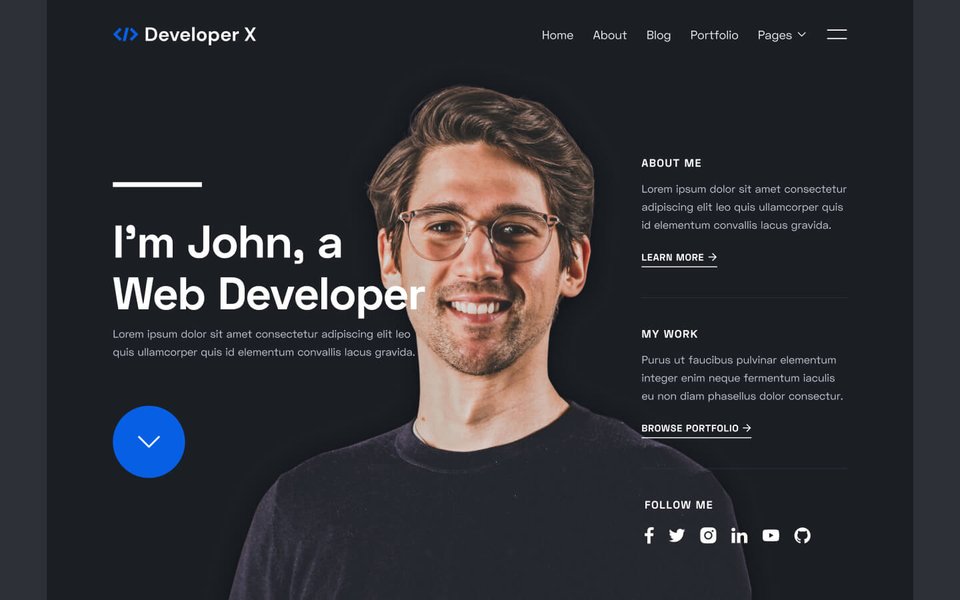
A visually appealing and well-structured portfolio, like the example template shown, can make a strong first impression.
Guidance on Using Temporary Stock Images
It's understandable to want your portfolio to look polished from the start. Using stock images or generic photos temporarily is a common practice.
- Choose Wisely: Select high-quality, professional-looking images that are relevant to the theme of your projects or the tech industry. Good sources for royalty-free images include Unsplash, Pexels, and Pixabay.
- Be Transparent (Optional): You might consider a small disclaimer if images are purely illustrative and not direct representations of your work, especially if they are used as project thumbnails.
- Plan for Replacement: The ultimate goal is to showcase your work. As your projects progress or you develop new ones, prioritize creating actual screenshots, mockups, or even short video demos to replace the stock imagery.
- Focus on Your Code: While aesthetics matter, the core of your portfolio is the code and the functionality you've built. Ensure your GitHub links are prominent and your project descriptions are detailed.
Key Features for an Effective Website Portfolio
- Responsive Design: Ensure your site looks and functions flawlessly on all devices (desktops, tablets, mobiles).
- Fast Load Times: Optimize images and code for quick loading to retain visitor attention.
- Clear Navigation: Intuitive menus and logical flow between sections.
- Interactive Elements: Consider subtle animations, project filtering (by technology or type), or interactive demos if applicable.
- Accessibility (a11y): Design with accessibility in mind (e.g., proper color contrast, keyboard navigation, ARIA attributes).
- SEO Optimization: Use relevant keywords in your content and meta tags to improve visibility in search engine results.
Crafting Your Portfolio App
A portfolio app can be a compelling companion to your website, especially if you have mobile development skills or want to showcase your ability to build cross-platform experiences.
Purpose and Approach
Your app can serve multiple purposes:
- Demonstrate Mobile/Cross-Platform Skills: If you've used frameworks like React Native or Flutter, the app itself becomes a project.
- Offer a Native Experience: Provide a tailored mobile experience for browsing your projects.
- Innovative Showcase: Differentiate yourself by offering an alternative way to engage with your portfolio.
Frameworks and Technologies
- React Native: If you're familiar with React, this allows you to build native apps for iOS and Android from a single codebase.
- Flutter: Google's UI toolkit for building natively compiled applications for mobile, web, and desktop from a single codebase.
- SwiftUI (iOS) / Jetpack Compose (Android): For native platform-specific development if you want to specialize.
- Progressive Web App (PWA): You can also enhance your website to function like an app, installable on devices and capable of offline functionality.
Key Considerations for the App
- Content Synchronization: Ensure the content (projects, bio, skills) is consistent with your website. Consider using a headless CMS or a shared API to manage content for both platforms.
- User Experience (UX): Design for mobile-first interaction. Navigation should be intuitive for touchscreens.
- Performance: Optimize for smooth performance and quick loading on mobile devices.
- Showcase the App Itself: List your portfolio app as one of your projects, detailing its development process and the technologies used.
Visualizing Portfolio Effectiveness: Website vs. App
While both a website and an app can showcase your skills, they might differ in their effectiveness across various attributes important for a full-stack developer portfolio. The radar chart below offers an opinionated comparison of how each might perform. For instance, a website generally has a broader reach to recruiters, while a dedicated app might allow for a more in-depth demonstration of mobile-specific UI/UX skills if that's a focus area for you.
This chart illustrates a hypothetical comparison. The actual effectiveness will depend on the quality of execution and your specific career goals.
Mindmap: Your Full-Stack Portfolio Development Journey
Creating a comprehensive portfolio involves several interconnected stages. The mindmap below provides a visual overview of the key areas to focus on, from initial planning to ongoing maintenance, for both your website and app.
Website & App"] id1["Planning & Strategy"] id1a["Define Goals & Audience
(Target Full-Stack Roles)"] id1b["Select Key Projects (3-5)"] id1c["Outline Content Structure
(About, Projects, Skills, Contact)"] id1d["Decide on Tech Stack"] id2["Website Development"] id2a["Choose Platform
(Static Gen, Builder, Custom)"] id2b["Design UI/UX
(Responsive, Accessible)"] id2c["Develop Sections"] id2d["Implement Features
(Demos, GitHub Links)"] id2e["Use Temporary Stock Images
(Plan for Replacement)"] id2f["SEO & Performance Optimization"] id2g["Deploy"] id3["App Development (Optional/Complementary)"] id3a["Choose Framework
(React Native, Flutter, PWA)"] id3b["Design Mobile UI/UX"] id3c["Sync Content with Website"] id3d["Showcase Mobile-Specific Skills"] id3e["Test Thoroughly"] id3f["Deploy to Stores/Web"] id4["Showcasing Full-Stack Skills"] id4a["Detail Project Contributions
(Frontend, Backend, DB, etc.)"] id4b["Write Technical Summaries
(Challenges, Solutions)"] id4c["Link to Live Demos & GitHub"] id4d["Highlight Full-Stack Concepts
(APIs, Auth, Databases)"] id5["Maintenance & Growth"] id5a["Regularly Update Projects"] id5b["Replace Stock Images with Own Work"] id5c["Add New Skills & Learnings"] id5d["Gather Feedback & Iterate"] id5e["Network & Share Portfolio"]
This mindmap helps visualize the interconnected tasks involved in building and maintaining your portfolio as a transitioning full-stack developer.
Video Inspiration: Crafting the Perfect Portfolio
Understanding what makes a portfolio website truly effective can be greatly enhanced by looking at real examples and expert advice. The video below discusses key elements that should be included in a perfect portfolio website, offering valuable insights as you design and build your own.
This video offers practical tips on content, structure, and presentation that can elevate your portfolio from good to great, helping you make a memorable impact on potential employers.
Best Practices for Portfolio Success
- Be Concise yet Comprehensive: Provide enough detail to showcase your skills without overwhelming the visitor. Focus on quality over quantity.
- Tell a Story: Frame your projects and experiences as a narrative of growth and problem-solving.
- Proofread Meticulously: Errors can undermine your professionalism. Get a second pair of eyes to review your content.
- Keep it Updated: Your portfolio is a living document. Regularly add new projects, skills, and experiences. Critically, replace temporary images with your own project visuals as soon as possible.
- Seek Feedback: Ask peers, mentors, or industry professionals to review your portfolio and provide constructive criticism.
- Network Actively: Share your portfolio on LinkedIn, GitHub, and in your email signature. Mention it during networking events and interviews.
Frequently Asked Questions (FAQ)
How many projects should I include in my portfolio?
Aim for 3-5 strong projects that best showcase the breadth and depth of your full-stack abilities. Quality is more important than quantity. Choose projects that are relevant to the type of roles you're targeting and demonstrate a range of technologies and problem-solving skills. Ensure each project has a detailed description, your role, technologies used, and links to a live demo and/or GitHub repository.
Is it really okay to use stock images temporarily?
Yes, it's generally acceptable to use high-quality, relevant stock images as placeholders, especially when you're starting out and your projects are still in development or lack polished visuals. The key is to ensure they look professional and don't misrepresent your work. However, make it a priority to replace them with actual screenshots, diagrams, or demos of your own projects as soon as they are available. Your own work is always more compelling.
What's more important: the website or the app portfolio?
For most full-stack developer roles, the portfolio website is generally more critical as it's the standard and most accessible way for recruiters and hiring managers to view your work. An app portfolio can be a valuable addition, especially if you want to showcase mobile development skills or offer a unique user experience. Consider the app as a complementary piece or a project in itself. Prioritize a strong, well-maintained website first.
How technical should my project descriptions be?
Your project descriptions should strike a balance. They need to be understandable to less technical recruiters but also provide enough depth for technical interviewers. Explain the project's purpose, your role, the technologies used (frontend, backend, database, APIs), any significant challenges you faced, and how you solved them. Highlighting architectural decisions or complex features can be very beneficial. Always link to your GitHub repository so they can dive into the code if they wish.
Recommended Further Exploration
To deepen your understanding and find more inspiration, consider exploring these related queries:
- How to effectively showcase backend projects in a developer portfolio?
- What are the best practices for designing a user-friendly portfolio navigation?
- Examples of full-stack developer portfolios that led to job offers.
- How to write compelling project case studies for a software developer portfolio?
References
This guide was compiled by synthesizing information from various expert sources. For further reading, consider these resources:
Last updated May 9, 2025