
Streamlining Google Cloud Resources: The Power of Labels and Tags
Unlock Enhanced Organization and Cost Management in Your GCP Environment
- Key-Value Pairs: Google Cloud labels fundamentally operate as key-value pairs, with the key defining the category and the value providing the specific attribute.
- Versatile Application: Labels offer broad utility across various GCP resources for purposes like cost tracking, access control, and resource identification.
- Strategic Policy Enforcement: While not strictly mandatory, implementing a robust labeling policy and automating its application is crucial for maintaining order and optimizing cloud operations.
In the dynamic landscape of cloud computing, effectively organizing and managing resources is paramount for operational efficiency, cost optimization, and robust security. Google Cloud Platform (GCP) provides powerful tools for this purpose: labels and tags. Although often used interchangeably in general discourse, within GCP, these terms refer to distinct concepts, each serving unique organizational and policy-driven functions. Understanding the nuances between labels and tags, and specifically, the information required for creating labels, is crucial for anyone managing resources in GCP.
Labels are a highly flexible and versatile mechanism in GCP. They are essentially metadata that you can attach to your resources. Think of them as custom sticky notes you can put on your cloud components, allowing you to categorize, filter, and analyze them based on criteria meaningful to your organization. This capability extends to managing costs, identifying ownership, tracking environments, and enforcing security policies. The widespread support for labels across many GCP services makes them an indispensable tool for comprehensive cloud governance.
The Core Components of GCP Labels: Key and Value
Defining the Essential Information for Effective Labeling
When you create labels for your Google Cloud Platform resources, you are required to provide two fundamental pieces of information: a key and a value. This pairing forms the core of every label, enabling a structured and meaningful way to categorize your cloud assets.
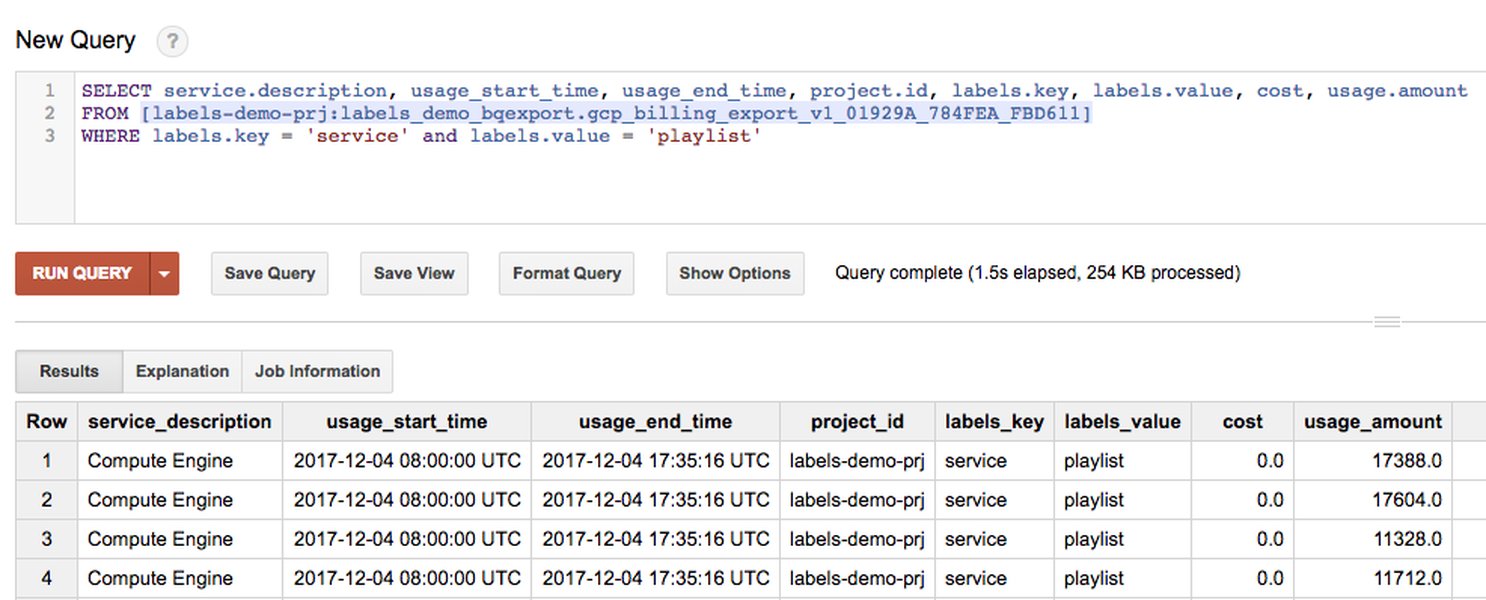
Labels, consisting of key-value pairs, are essential for organizing and managing GCP resources, facilitating streamlined operations and cost analysis.
Understanding the Label Key
The key in a label represents the category or type of metadata you are applying. It acts as a descriptor for the characteristic you want to track. For instance, if you want to categorize resources by the environment they belong to, "environment" would be a suitable key. Similarly, "cost-center" could be a key for financial tracking, or "application" for grouping resources by the software they support.
- Keys must start with a lowercase letter or international character.
- They must have a minimum length of 1 character and a maximum length of 63 characters.
- Keys cannot be empty.
- All key characters must use UTF-8 encoding, allowing for international characters.
Understanding the Label Value
The value associated with a label key provides the specific attribute or instance within that category. It gives context to the key. Following our previous examples:
- For the key "environment", possible values could be "production", "development", "staging", or "testing".
- For "cost-center", values might be "marketing", "engineering", or "sales".
- For "application", values could be "frontend-service", "backend-api", or "data-pipeline".
Values can be empty, but they have a maximum length of 63 characters. Like keys, all value characters must use UTF-8 encoding.
The combination of a well-defined key and a precise value allows for granular organization and powerful filtering capabilities across your GCP resources. For example, a label environment:production clearly identifies resources running in your production environment, making it easy to filter and manage them.
The Distinct Roles of Labels and Tags in GCP
Navigating Organizational Tools Beyond Key-Value Pairs
While labels are widely used for general resource organization and management, GCP also features "tags," which serve a more specific, network-related purpose. It's crucial to differentiate between these two concepts to leverage GCP's full organizational potential.
Labels: Versatility for Organization and Cost Tracking
Labels are highly flexible key-value pairs used for a broad range of organizational tasks. Their primary use cases include:
- Cost Allocation: Labels allow organizations to break down their cloud spending by department, project, application, or environment, providing granular insights into where costs are incurred. This is invaluable for FinOps practices and budget management.
- Resource Identification and Search: By applying labels, users can easily search, filter, and group resources based on specific criteria, enhancing visibility and manageability, especially in large and complex cloud environments.
- Automation and Policy Enforcement: Labels can be used to trigger automated actions or enforce specific policies. Although direct enforcement of labels during resource creation isn't universally supported for all GCP products, programmatic application via tools like Terraform or Cloud Functions is a common practice to ensure consistent labeling.
- Access Control (Indirect): While labels don't directly control IAM policies, they can be used in conjunction with policy engines to define conditions for access based on resource attributes.
Each resource can have multiple labels, up to a maximum of 64. Labels can be applied at various levels, including projects, Compute Engine instances, Cloud Storage buckets, BigQuery datasets, and more.
Tags: Network-Specific Policy Application
In contrast to labels, tags in Google Cloud have a very specific meaning related to virtual networks. Their main purpose is to apply policies based on set conditions, particularly for network-related configurations.
- Network Policy Enforcement: Tags are primarily used to define network access policies, such as firewall rules. For example, a firewall rule can be configured to apply to all resources that have a specific network tag.
- Conditional Policies: Tags provide a way to conditionally allow or deny policies, offering fine-grained control over network traffic based on whether a resource has a particular tag.
The key distinction is that while both labels and tags involve key-value pairs, tags are specifically designed for network policy application, whereas labels offer broader organizational and management capabilities.
Strategic Labeling Best Practices
Maximizing the Value of Labels for Cloud Governance
To truly harness the power of labels in GCP, it's essential to adopt a strategic approach and adhere to best practices. Without a well-defined labeling policy, resources can become disorganized, leading to challenges in cost tracking, auditing, and management.
This video provides insights into organizing resources for cost management on GCP, highlighting the role of labels. Effective labeling directly contributes to better cost allocation and visibility.
Key Principles for an Effective Labeling Strategy
- Always Use Labels: The most fundamental rule is to consistently apply labels to all your GCP resources. Unlabeled resources are "black boxes" that obscure visibility and make management difficult.
- Standardize Labels: Develop and enforce a formal labeling policy across your organization. This policy should define standard keys and acceptable values for common attributes like
environment,application,owner, andcost-center. Consistency makes it easier to search, filter, and report on resources. - Apply Labels Programmatically: Manual labeling is prone to human error and inconsistency. Leverage automation tools like Terraform, Cloud Deployment Manager, or custom scripts to apply labels during resource provisioning. This ensures compliance with your labeling policy from the outset.
- Avoid Confidential Information: Do not include sensitive or confidential data in your label keys or values.
- Keep it Simple, but Comprehensive: While it's tempting to create a plethora of labels, aim for a balanced approach. Focus on labels that provide meaningful insights for cost tracking, ownership, and operational context. Over-tagging can lead to clutter and diminish effectiveness. A good practice is to aim for no more than ten labels per resource initially.
- Align with Reporting Needs: Design your label strategy with your desired reporting outcomes in mind, especially for cost analysis. Labels should enable you to segment costs based on your organizational structure and financial requirements.
- Regular Review and Adaptation: Your labeling strategy should be flexible and evolve with your business requirements. Regularly review your policies and adapt them as your cloud footprint grows and changes.
Enforcing Labeling Standards
While GCP does not universally "force" the usage of labels at resource creation for all products, organizations can implement mechanisms to enforce their labeling policies. This often involves:
- Cloud Functions/Automation: Developing Cloud Functions that periodically scan for unlabelled or improperly labeled resources and, if necessary, take corrective actions (e.g., adding default labels, flagging for review, or even terminating non-compliant resources).
- Infrastructure as Code (IaC): Using tools like Terraform or Pulumi to define and deploy resources with mandatory labels. This makes labeling an inherent part of the resource provisioning process.
- Policy Engines: Implementing custom policy engines or utilizing third-party tools that integrate with GCP to validate and enforce labeling standards during resource deployment.
By combining a well-thought-out labeling strategy with programmatic enforcement, organizations can achieve a highly organized and observable GCP environment, leading to better cost control, improved security posture, and enhanced operational efficiency.
Comparative Overview of GCP Labeling and Tagging Attributes
Illustrating the Core Differences and Use Cases
To further clarify the distinction between labels and tags in GCP, the following table outlines their key attributes and primary use cases. This comparison highlights why both are important but serve different organizational and functional needs.
| Feature | Labels | Tags |
|---|---|---|
| Definition | Key-value pairs for resource metadata. | Key-value pairs specifically for network-related policies. |
| Primary Purpose | Organization, identification, categorization, cost tracking, automation. | Applying policies based on conditions, especially for networking (e.g., firewall rules). |
| Scope of Application | Broadly applicable across many GCP resources (VMs, disks, projects, storage buckets, BigQuery datasets, etc.). | Specific to network-related resources and policies (e.g., Compute Engine instances for firewall rules). |
| Flexibility | Highly flexible; users define custom keys and values based on organizational needs. | More rigid; tied to specific policy enforcement mechanisms. |
| Enforcement | Not strictly mandatory by default; enforced through policy, automation, or IaC. | Can be used to enforce conditional policies directly. |
| Use Cases | Cost allocation by department/project, environment classification (dev/prod), application grouping, ownership tracking. | Applying firewall rules to groups of VMs, network access control based on resource attributes. |
The table above underscores that while both labels and tags utilize a key-value structure, their architectural intent and application within the Google Cloud ecosystem are fundamentally different. Labels are the general-purpose organizational tool, whereas tags are specialized for network policy management.
Assessing Labeling Strategy Effectiveness: A Radar Chart Analysis
Visualizing Key Dimensions of a Robust Labeling Policy
An effective labeling strategy in GCP is not just about applying labels, but ensuring they provide tangible benefits across various organizational dimensions. This radar chart illustrates the perceived effectiveness of a well-implemented labeling strategy across critical areas, based on common industry practices and documented benefits.
This radar chart visually represents the impact of a comprehensive labeling strategy across different facets of cloud management, showing how strong adherence to best practices can lead to significant improvements in cost optimization, resource visibility, and policy enforcement.
As the radar chart illustrates, a well-defined and consistently applied labeling strategy (represented by 'Ideal Labeling Strategy') significantly enhances various aspects of cloud management. These include:
- Cost Allocation Clarity: Pinpointing exactly where cloud spending occurs, attributing costs to specific teams, projects, or environments.
- Resource Searchability: Enabling quick and precise identification of resources based on meaningful metadata, crucial in large cloud deployments.
- Policy Enforcement Efficacy: Facilitating the implementation and validation of organizational policies, even if indirect for labels.
- Operational Efficiency: Streamlining management tasks, improving incident response, and reducing manual effort for resource categorization.
- Security Posture Insight: Gaining better understanding of resource exposure and adherence to security standards by categorizing assets.
- Auditability & Compliance: Providing clear trails for auditing and demonstrating compliance with regulatory requirements by documenting resource purpose and ownership.
Conversely, a suboptimal or absent labeling strategy (represented by 'Suboptimal/No Labeling') leaves an organization with minimal control and visibility across these critical dimensions, leading to potential cost overruns, operational bottlenecks, and compliance risks.
Frequently Asked Questions (FAQs)
What are the character limits for GCP label keys and values?
Can I force the use of labels on new GCP resources?
How many labels can I apply to a single GCP resource?
Are labels inherited down the resource hierarchy in GCP?
What is the main difference between labels and tags in Google Cloud?
Conclusion
Effectively managing a Google Cloud Platform environment requires robust organizational strategies, and labels are a cornerstone of this effort. By understanding that labels necessitate two types of information—a key and a value—organizations can establish a structured framework for categorizing and identifying their resources. While labels offer broad utility for cost tracking, searchability, and operational insights, it's equally important to differentiate them from network-specific tags. Adhering to best practices, such as programmatic application, standardization, and regular review, ensures that labels become a powerful tool for enhancing visibility, optimizing costs, and streamlining the management of your GCP resources.
Recommended Further Exploration
- How to enforce a comprehensive labeling policy across all your GCP resources?
- Explore advanced FinOps strategies leveraging labels for detailed cloud cost allocation and optimization.
- Discover how to automate resource tagging and labeling using Infrastructure as Code tools like Terraform.
- Deep dive into the Google Cloud resource hierarchy and its interplay with labeling for enterprise-scale management.
References
Last updated May 21, 2025