
Unlocking the Mystery: Why Your GE 90-30 PLC Shows Error 8544 During Flash Writes
A deep dive into the common culprits behind Flash memory failures and how to address them effectively.
Error 8544 on a GE Fanuc Series 90-30 PLC is a specific fault indicating that an operation involving the Flash memory has failed. This typically occurs when you attempt to write, store, or verify a program or configuration data to the PLC's non-volatile Flash memory (often an EEPROM). Understanding the root causes is essential for quick and effective troubleshooting to restore your automation system's reliability.
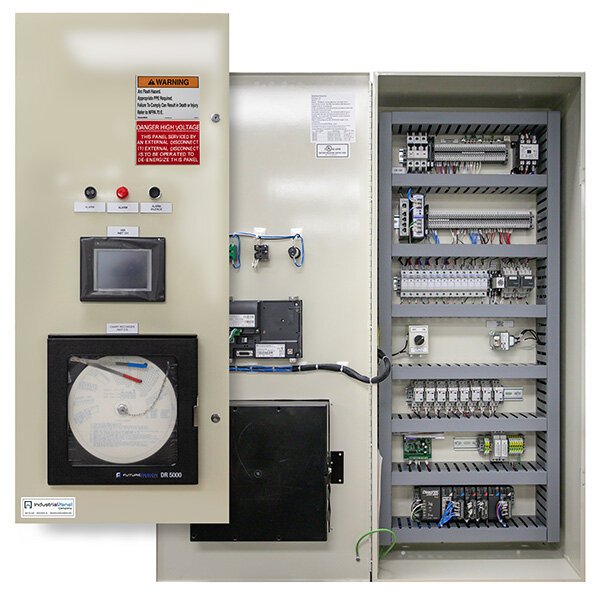
A typical industrial PLC control panel, housing components like the GE 90-30 PLC.
Key Insights into Error 8544
- Privilege & Protection: One of the most frequent triggers is attempting Flash operations without the necessary security privileges, especially if the PLC program is password-protected.
- Data & Device Health: Corrupted data on the Flash memory or physical issues with the EEPROM chip itself are significant contributors to this error.
- Operational Integrity: The success of Flash operations hinges on correct procedural steps, including CPU mode settings and avoiding interruptions during the process.
Core Causes of GE 90-30 PLC Error 8544
Several distinct factors can lead to the "Error 8544: Flash operation failed" message. These can broadly be categorized into issues related to access permissions, data integrity, hardware malfunctions, and operational procedures.
1. Insufficient Privilege Level
The PLC's security system is designed to protect its program and configuration. If a Flash write operation is attempted without adequate authorization, Error 8544 can occur. This is often accompanied by sub-error codes like [0x02][0xFE].
Password Protection
If the PLC program is password-protected, the programming software (e.g., Proficy Machine Edition, Logicmaster) must be logged in with a user account that has the necessary privilege level to write to the EEPROM or Flash memory. Without the correct password or a sufficiently high access level, the PLC will reject the write attempt.
Verification
Always ensure you have entered the correct password and have the highest required privilege level before initiating a Flash write. Some systems may require specific user roles for such operations.
2. Data Integrity Problems
The reliability of the data stored on the Flash device and the integrity of the Flash operation itself are crucial.
Flash Memory Corruption
Data stored on the Flash memory (EEPROM) can become corrupted over time or due to specific events. This is a common reason for Error 8544, often indicated by messages like "Data stored on device has been corrupted and is no longer reliable" and sub-error codes such as [0x05][0xCC]. Causes for corruption include:
- Power Fluctuations or Outages: Sudden loss of power during a write cycle.
- Hardware Aging: EEPROM chips have a finite number of write cycles and can degrade over time.
- Incomplete Previous Operations: If a prior Flash write was interrupted.
- Battery Failure: If a battery backup for RAM is failing, it might indirectly lead to issues if the system attempts to write inconsistent data to Flash.
Interrupted Flash Operations
If a Flash write, clear, or verification process is interrupted (e.g., due to power loss, communication cable disconnection, or user abort), the Flash memory can be left in an inconsistent or corrupted state. Subsequent attempts to access or write to Flash may then result in Error 8544.
3. Hardware Malfunctions and Compatibility
Physical problems with the PLC hardware, particularly the Flash memory components or the CPU itself, are significant causes.
Faulty Flash Memory Chip (EEPROM)
The EEPROM chip where the program is stored can be physically damaged, loose, or simply at the end of its operational life. In such cases, it cannot reliably store new data, leading to the error. Sometimes, reseating the chip can help, but often a replacement is necessary.
CPU or Associated Board Issues
The problem might not be isolated to the EEPROM chip but could stem from a fault in the CPU module itself or the backplane it connects to. Issues with the circuitry that interfaces with the Flash memory can prevent successful write operations.
Incompatible or Absent Flash Memory
Using an incorrect type of Flash memory module or an EEPROM that is not compatible with the specific GE 90-30 CPU model can cause Error 8544. Additionally, if the PLC expects a Flash device to be present (based on configuration) and it is missing or not detected, this error will occur. Ensure the EEPROM is the correct part number for your CPU.
4. Operational and Configuration Errors
The manner in which the Flash operation is performed and the PLC's configuration play a vital role.
CPU Key Switch Position
For GE 90-30 series PLCs, the CPU's Start/Stop key switch typically needs to be in the "STOP" or "OFF" position before attempting to write to Flash memory. If the CPU is in "RUN" or "PROGRAM" mode (depending on the specific model and firmware), it may reject Flash write commands to protect ongoing operations.
Software Configuration Mismatches
Incorrect settings within the programming software, such as a mismatch between the configured hardware and the actual physical hardware (e.g., regarding Flash memory presence or type), can lead to this error. It's also possible that a full fault table in the PLC prevents new operations until cleared.
Visualizing Error 8544 Causes: Likelihood and Impact
The radar chart below offers an opinionated perspective on the common causes of Error 8544, comparing their relative likelihood of occurrence, the typical difficulty in diagnosing them, and their potential impact on the system if not resolved.
This chart helps to illustrate that while some issues like an incorrect key switch position are relatively easy to diagnose and fix, others like CPU board failures can be more challenging and have a severe impact.
Mindmap of Error 8544 Causation
The following mindmap provides a hierarchical view of the factors contributing to Error 8544 when writing to Flash memory on a GE 90-30 PLC.
Flash Write Failure"] id1["Access & Privilege Issues"] id1a["Insufficient Privilege Level"] id1b["Password Protection Not Met"] id2["Data Integrity Problems"] id2a["Flash Memory Corruption"] id2b["Interrupted Flash Operation"] id2c["Unreliable Stored Data"] id3["Hardware Faults & Compatibility"] id3a["Faulty EEPROM/Flash Chip"] id3b["CPU Module Malfunction"] id3c["Backplane Issues"] id3d["Incompatible Flash Memory"] id3e["Missing Flash Device"] id4["Operational & Procedural Errors"] id4a["Incorrect CPU Key Switch Position
(Not in STOP/OFF)"] id4b["Software Configuration Mismatch"] id4c["Attempt to Clear/Verify After
Interrupted Write"]
Troubleshooting Steps for Error 8544
When confronted with Error 8544, a systematic approach to troubleshooting is recommended:
- Verify Privilege Levels: Ensure you are logged into the programming software with the correct password and have sufficient privileges for Flash operations.
- Check CPU Key Switch Position: Confirm the CPU key switch is in the "STOP" or "OFF" position before initiating a Flash write.
- Inspect Flash Memory (EEPROM):
- Physically inspect the EEPROM chip for proper seating and any signs of damage.
- If possible, try reseating the chip.
- Verify that the EEPROM module is the correct type and part number for your CPU.
- Attempt Download Without Saving to Flash: In your programming software, try downloading the program to RAM only (uncheck "Save to Flash" or similar options) to see if the PLC operates correctly. This can help isolate whether the issue is specifically with the Flash writing process.
- Ensure Stable Operations: Maintain a stable power supply and a reliable communication link (e.g., programming cable) during any Flash operation to prevent interruptions.
- Clear PLC Fault Tables: Access the PLC's fault diagnostics table through the programming software. Clear any existing faults, including Error 8544. Sometimes, a full fault log can prevent further operations. After clearing, power cycle the PLC.
- Check Hardware Configuration: Ensure the hardware configuration in your PLC project matches the actual physical hardware installed, especially concerning memory modules.
- Consider EEPROM/CPU Replacement: If data corruption is suspected or the EEPROM is old, replacing it with a new, compatible chip might be necessary. If problems persist after EEPROM replacement, the CPU module itself could be faulty.
- Backup Program: Before making significant hardware changes or attempting forceful memory clears, always try to back up the existing PLC program and configuration if possible.
Helpful Video Resource
While not directly addressing Error 8544, clearing faults is a common preliminary step in PLC troubleshooting. The following video demonstrates how to clear faults on a GE 90-30 PLC, which might be useful if the fault table is full or if other errors are present:
This video shows a general procedure for clearing faults in a GE 90-30 PLC.
Summary of Causes in Table Format
Here's a quick reference table summarizing the primary causes of Error 8544:
| Cause Category | Specific Reason | Common Indicators / Sub-Codes |
|---|---|---|
| Access & Privilege | Insufficient privilege level / Password not entered | Error message mentions privilege; e.g., [0x02][0xFE] |
| Data Integrity | Flash memory data corruption | "Data stored on device has been corrupted"; e.g., [0x05][0xCC] |
| Interrupted Flash operation | Error occurs after an incomplete write, clear, or verify | |
| Hardware & Compatibility | Faulty/damaged EEPROM or Flash chip | Persistent errors even with correct procedures |
| CPU module or backplane issue | Error persists after EEPROM replacement | |
| Incompatible or missing Flash memory | Error occurs with new/different memory, or if none installed | |
| Operational & Configuration | CPU key switch not in STOP/OFF | Flash write rejected by PLC |
| Software/hardware configuration mismatch | System expects different hardware than present |
Frequently Asked Questions (FAQ)
What does Error 8544 specifically mean on a GE 90-30 PLC?
Can a forgotten password cause Error 8544?
Is Error 8544 always indicative of a hardware problem?
What position should the CPU key switch be in for a Flash write on a GE 90-30?
Could a power surge cause Error 8544?
Conclusion
Error 8544 on a GE 90-30 PLC, signaling a Flash operation failure, can arise from a variety of sources ranging from simple procedural oversights like incorrect key switch positions or insufficient privileges, to more complex issues like data corruption or hardware malfunctions. A methodical troubleshooting approach, starting with the easiest checks and progressing towards more involved hardware diagnostics, is key to identifying the specific cause and implementing an effective solution. By understanding these potential culprits, users can minimize downtime and ensure the continued reliable operation of their automation systems.
Recommended Further Exploration
- How to properly backup and restore programs on a GE 90-30 PLC?
- What are the steps for diagnosing EEPROM failure in industrial PLCs?
- Understanding user privilege levels and password management in GE Fanuc PLCs.
- What are the common fault codes for GE 90-30 series PLCs besides Error 8544?
References
 cdn.automationdirect.com
cdn.automationdirect.com
cdn.automationdirect.com
Last updated May 21, 2025