
Understanding and Resolving Error 8544 on GE Fanuc 90-30 PLCs
A Comprehensive Guide to Diagnosing and Fixing Flash Memory Issues in Industrial Control Systems
- Error 8544 primarily indicates a flash memory operation failure on GE Fanuc 90-30 PLCs, often stemming from corrupted data, missing EEPROM, or insufficient privilege levels.
- Resolving this error frequently involves clearing the PLC's fault table, verifying program integrity, and ensuring proper access rights for saving programs to flash memory.
- Proactive measures like regular program backups and understanding power supply stability are crucial in preventing program loss and mitigating future occurrences of Error 8544.
Error 8544 on a GE Fanuc 90-30 Programmable Logic Controller (PLC) is a critical fault that signifies a problem with flash memory operations. This error typically manifests when the PLC attempts to write data to its flash memory (often an EEPROM chip) but encounters an issue that prevents the operation from completing successfully. Understanding the root causes of this error is paramount for effective troubleshooting and maintaining the reliability of industrial control systems that rely on these robust, albeit aging, PLC platforms.
Decoding the Core Causes of Error 8544
The 8544 error on GE Fanuc 90-30 PLCs is directly linked to the system's inability to perform flash memory operations. This can encompass a range of underlying problems, from data integrity issues to security permissions. Here's a breakdown of the most common causes:
Corrupted Data or Missing EEPROM
One of the primary triggers for Error 8544 is corrupted data within the flash memory or the physical absence/malfunction of the EEPROM (Electrically Erasable Programmable Read-Only Memory) IC itself. When the PLC attempts to save a program or configuration to flash memory, it expects to find a reliable storage medium. If the data previously stored is corrupted, or if the EEPROM chip is either not present or faulty, the flash operation will fail, triggering Error 8544. This is particularly common in older systems where components may degrade over time or after unexpected power events.
Users have reported encountering this error when downloading a program and selecting the option to "save flash program," only to be met with the message "Controller Error: Controller Error - Data stored on device has been corrupted and is no longer reliable or the device is not present." Even after replacing the EEPROM IC, the error may persist, suggesting a deeper issue with the CPU's interaction with the flash memory.
Insufficient Privilege Level
Another significant cause of Error 8544, especially for Series 90-30 CPUs, is an "insufficient privilege level." This means the user attempting to perform the flash operation (e.g., saving a program to flash) does not have the necessary security permissions or has not entered the correct password to write to the EEPROM. GE Fanuc PLCs, like many industrial controllers, incorporate security features to prevent unauthorized modifications to the stored program. If the program is password-protected, writing to flash memory requires a higher privilege level, and failure to meet this requirement will result in Error 8544.
This situation is analogous to attempting to modify a protected system file on a computer without administrator rights. The system prevents the operation to maintain integrity and security. Therefore, verifying and elevating privilege levels, if necessary, is a crucial troubleshooting step.
Interrupted Flash Operations or Incompatible Flash Memory
The 8544 error can also occur if a flash memory write operation is interrupted. This could happen due to a power fluctuation, an unexpected shutdown, or even an intentional interruption during a save process. Such interruptions can leave the flash memory in an inconsistent state, leading to corruption and subsequent 8544 errors when new attempts to write or verify flash memory are made. Furthermore, in some instances, the error message might specify "Flash memory is incompatible," although sources suggest this specific detail might apply more to 90-70 CPUs rather than 90-30s. Nevertheless, using an incompatible EEPROM or flash memory component could theoretically lead to similar issues.
Practical Troubleshooting Steps for Error 8544
Addressing Error 8544 requires a systematic approach, starting with basic checks and progressing to more involved solutions. Given the industrial environment, safety and proper procedure are paramount.
Clearing the Fault Table and Program Integrity
One of the initial steps in troubleshooting a GE 90-30 PLC, especially when it's in a faulted state (like with Error 8544), is to clear the fault table. This can sometimes allow the CPU to return to run mode, although it doesn't address the root cause of the error. Clearing the fault table can typically be done through the programming software (e.g., Logicmaster 90) or, in some cases, by manipulating buttons on the PLC itself (e.g., "UP/DOWN and LEFT/RIGHT buttons" for clearing faults). However, it's critical to note that clearing the fault table only removes the fault message; it doesn't fix the underlying problem.
After clearing the fault table, attempt to download the program again. If the error persists, especially with the "Save to flash" option checked, consider unchecking this box during the download. This can help determine if the issue is specifically with the flash saving process rather than the program download itself. If the program downloads and runs without the "Save to flash" option, it strongly points to a flash memory issue.
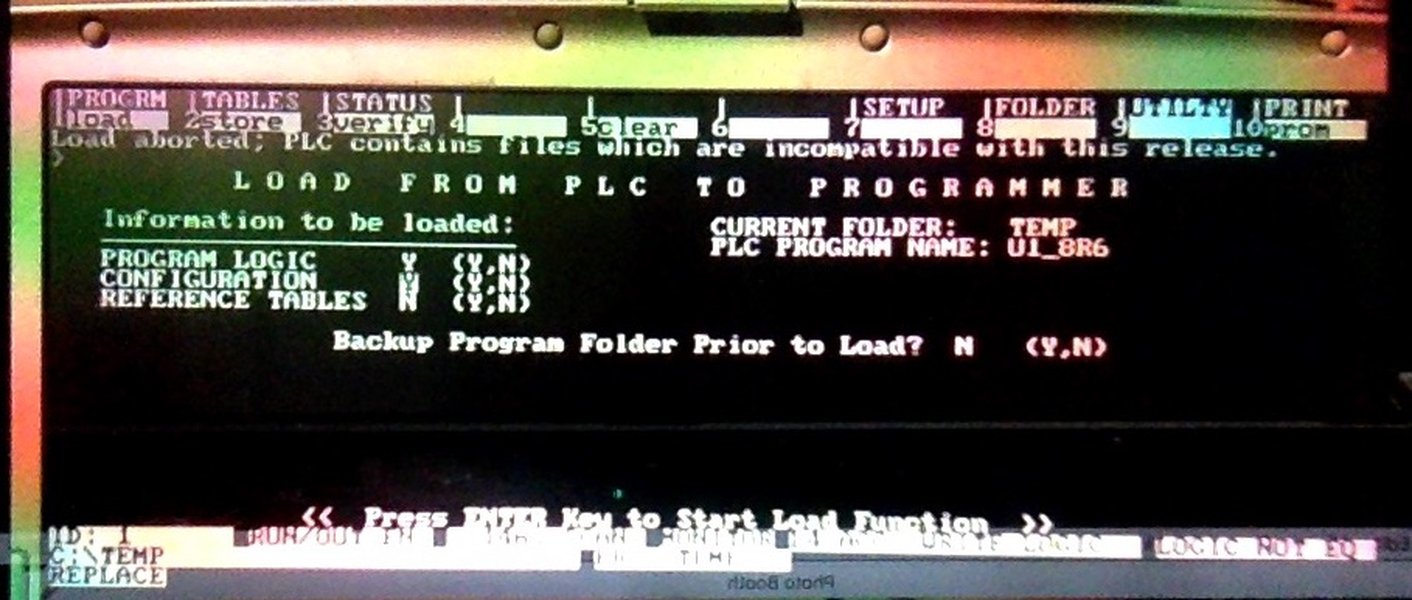
An example of an error message within Logicmaster 90 software.
Addressing Privilege Levels and Software Considerations
If "insufficient privilege level" is cited as a cause, the immediate solution is to ensure you have the necessary access rights. This often involves entering a four-character hexadecimal password if the Logicmaster 90 file is password-protected. Without the correct privilege level, the PLC will prevent write operations to flash memory. For older software like Logicmaster 90-30, remember it is DOS-based and is optimally run in Windows 95, 98, or 2000 environments, with potential compatibility issues in newer operating systems, especially regarding serial port drivers for 64-bit OS.
Modern software like Proficy Machine Edition (PME8.5, for example) is used for downloading programs. When using such software, ensure that the "Save to flash" option is appropriately managed, as it directly relates to Error 8544. If you consistently receive the error when this option is checked, it underscores a problem with the flash memory or the CPU's ability to interface with it.
Hardware Inspection and Component Replacement
Hardware issues can directly lead to flash operation failures. If software solutions don't resolve the 8544 error, consider physical inspection and potential component replacement:
- CPU Module: The CPU module itself might have a hardware fault. The GE Series 90-30 has numerous CPU modules (e.g., CPU311, 313, 321, 323, 331, 341, 350, 360, 352). If the CPU is the culprit, replacement might be necessary.
- EEPROM Chip: If the CPU module has a field-writeable EEPROM for program memory (identifiable by a small glass window on the chip), it might be the source of the problem. While replacing the EEPROM might seem like a direct fix, it doesn't always resolve the error, as the issue could lie with the CPU's ability to communicate with or write to the EEPROM.
- Power Supply: Though less directly linked to Error 8544, power supply failures can indirectly lead to program loss or flash corruption. An unstable or failing power supply can cause unexpected interruptions, potentially corrupting flash memory data. Ensuring a stable power supply is part of overall system health.
Understanding PLC Status and Error Codes
Beyond specific error codes like 8544, a comprehensive understanding of the PLC's status indicators and fault tables is essential for any troubleshooting effort. The GE Series 90-30 PLC has four LEDs on the front of its power supply that provide immediate status feedback: PWR, RUN, OK, and BATT.
- PWR (Power): Indicates power is supplied.
- RUN: Green indicates the CPU is in run mode and executing program logic. If this LED is off, it often means an incident has forced the CPU out of run mode.
- OK: Indicates the CPU is operating normally.
- BATT (Battery): A red light indicates a low battery, which is critical for maintaining program memory in RAM when power is removed. If this light is on, immediately back up your program to prevent loss.
The PLC Fault Table is a vital diagnostic tool, providing a record of exceptions and errors logged by the PLC. Accessing this table through programming software is key to identifying the specific major and minor error codes that help pinpoint the problem. For instance, serial error codes like 30 (BCC Error) or 31 (Expected X-Buffer Message Not Received) indicate communication issues, while major error codes like 82H can indicate "Insufficient Privilege at client PLC" - a direct link to the 8544 issue.
Radar chart illustrating the relative impact and commonality of various GE 90-30 PLC issues. Each axis represents a troubleshooting aspect, with higher values indicating greater significance.
The radar chart above visually represents the perceived impact and commonality of various factors contributing to PLC issues, specifically highlighting those relevant to Error 8544. Factors like 'Data Corruption Risk' and 'Privilege Access Impact' score highly for Error 8544, indicating their significant role. In contrast, 'Communication Reliability' is a more general PLC concern but less directly implicated in flash memory errors. This chart helps prioritize troubleshooting efforts by showing which areas are most likely to be the source of a problem.
Common Error Codes and Their Meanings
Beyond Error 8544, the GE Fanuc 90-30 PLCs generate various error codes that provide more specific diagnostic information. These codes are often categorized as major and minor errors, with minor errors providing additional detail for a given major error.
Key Major and Minor Error Codes
Here's a table summarizing some common error codes and their typical interpretations relevant to troubleshooting GE 90-30 PLCs:
| Error Code (Hex) | Description | Typical Cause / Relevance to 8544 |
|---|---|---|
| 8544 | Flash operation failed | Corrupted data, missing EEPROM, insufficient privilege, interrupted write. |
| 0x1e (30) | BCC Error in X-Buffer Message | Serial communication error, often related to data transmission integrity. |
| 0x1f (31) | Expected X-Buffer Message Not Received | Serial communication timeout or missing response. |
| 0x20 (32) | Unknown PLC Error | General or unclassified PLC internal error. |
| 82H | Insufficient Privilege at client PLC | User lacks rights to perform an operation (directly relevant to 8544). |
| 87H | Client PLC CPU's Service Request Queue is full | PLC is overwhelmed with requests; retry later. |
| 90H | Client API error | Error in the application programming interface call. |
| PLC-499 | Generic PLC Error (Hex value given) | A catch-all for errors generated by the connected PLC, with a specific hexadecimal code providing more detail (e.g., 0013 for "Port configurator error"). |
| 0.10 Module Hardware Fault (Code 479/486) | Module hardware fault | Specific to a particular module (e.g., in rack 0, slot 10). May require reseating or replacing the module. |
| SVC_REQ Function Code 13 | Service Request that shuts down the PLC | Programmed instruction in ladder logic forcing PLC to stop. |
| COMMREQ Function | Communication Request in ladder logic | Instructions exchanging data between PLCs; issues here can cause faults if external communication fails. |
Understanding these codes helps narrow down the problem. For instance, if Error 8544 occurs alongside an "Insufficient Privilege" major error, the focus should immediately shift to access rights. If it appears after a power interruption, the likelihood of data corruption increases.
Preventative Measures and Best Practices
To minimize the occurrence of Error 8544 and other critical PLC faults, adopting preventative measures and following best practices is essential:
- Regular Program Backups: Always maintain a current backup copy of your PLC program. This is crucial, especially when the battery light is red, as losing power could result in program loss.
- Proper Battery Maintenance: The battery in a GE 90-30 PLC retains the program in RAM. If the battery dies, the internal clock resets, and the program can be lost, potentially leading to fault conditions if the PLC attempts to run without a valid program. Replace batteries proactively.
- Controlled Power Down Procedures: Avoid abrupt power shutdowns, especially during flash operations or when the battery is low. Unexpected power loss is a significant contributor to data corruption and program loss.
- Understand Ladder Logic: Familiarize yourself with the PLC's ladder logic, particularly instructions like
SVC_REQandCOMMREQ, as these can trigger faults if their conditions are not met or if they are misconfigured. - Maintain Proper Privilege Levels: Ensure that personnel attempting to modify or save PLC programs have the correct privilege levels to prevent "insufficient privilege" errors.
- Environmental Control: Protect the PLC from extreme temperatures, humidity, and excessive vibration, which can degrade hardware components over time.
Visualizing a GE Fanuc 90-30 PLC in Action
This video provides an overview of troubleshooting the GE Series 90-30 PLC System, emphasizing practical steps and common issues. It visually demonstrates components and processes discussed, offering valuable context for understanding system behavior and diagnosing faults like Error 8544.
The embedded video offers a visual guide to troubleshooting the GE Series 90-30 PLC, demonstrating essential practices such as inspecting LEDs and understanding the system's operational status. While it may not specifically highlight Error 8544, the general troubleshooting methodologies it presents are highly applicable. For instance, the video's emphasis on checking power supply status and recognizing the importance of a healthy RUN LED provides foundational knowledge that underpins the diagnosis of many PLC faults, including those related to flash memory issues.
Conclusion
Error 8544 on a GE Fanuc 90-30 PLC is a clear indicator of a flash memory operation failure, frequently caused by corrupted data, insufficient privilege levels, or issues with the EEPROM itself. Effective troubleshooting involves a methodical approach, starting with clearing the fault table, verifying software permissions, and carefully inspecting hardware components. While these PLCs are robust, their age means that component degradation and data integrity issues become more prevalent. Proactive measures, such as regular program backups, vigilant battery maintenance, and adhering to proper power-down procedures, are indispensable for ensuring the longevity and reliability of these critical industrial control systems.
Recommended Further Exploration
- How to diagnose and fix power supply failures in GE Fanuc 90-30 PLCs?
- What are the best practices for replacing the battery in a GE Fanuc 90-30 PLC without losing the program?
- Detailed analysis of common communication errors (e.g., BCC, X-Buffer) in GE Fanuc 90-30 PLCs.
- In-depth guide to diagnosing hardware faults in GE Fanuc 90-30 CPU modules.
Frequently Asked Questions
What does "insufficient privilege level" mean for Error 8544?
Can a faulty power supply cause Error 8544?
Is it safe to clear the fault table on a GE 90-30 PLC?
What is the difference between a flash memory and an EEPROM on a PLC?
References
 cdn.automationdirect.com
cdn.automationdirect.com
cdn.automationdirect.com
Last updated May 21, 2025