
Unlocking Ironclad Security: A Deep Dive into Secure WireGuard Key Generation
Master the art of creating robust cryptographic keys for your WireGuard VPN, ensuring unparalleled privacy and data integrity.
Key Insights into Secure WireGuard Key Generation
- Asymmetric Cryptography: WireGuard relies on X25519 (Curve25519) key pairs, consisting of a private key (secret) and a public key (shareable), forming the foundation of its secure, encrypted tunnels.
- Command-Line Utility: The
wgutility (e.g.,wg genkey,wg pubkey,wg genpsk) is the primary and most recommended tool for generating WireGuard keys securely, ensuring proper base64 encoding and direct control over the process. - Fortified Key Management: Beyond generation, secure storage with strict file permissions (
umask 077orchmod 600), the optional use of Pre-Shared Keys (PSKs) for quantum resistance, and hardware security modules (like YubiKeys) are paramount for long-term key protection.
WireGuard, a modern and highly efficient VPN protocol, owes its robust security to its reliance on cryptographic keys. The integrity of your WireGuard VPN connection hinges entirely on the secure generation and meticulous management of these keys. Understanding the underlying cryptographic principles and adopting stringent best practices are crucial for preventing unauthorized access and ensuring the confidentiality of your network traffic. This comprehensive guide will walk you through the process of generating WireGuard keys securely, covering everything from the fundamental commands to advanced protection techniques.
Understanding WireGuard's Cryptographic Foundation
At its core, WireGuard utilizes asymmetric cryptography, specifically X25519 (Curve25519) key pairs. Each participant in a WireGuard network, whether a server or a client, possesses a unique pair: a private key and a public key. The private key, a 256-bit value, must remain absolutely secret. It is the cryptographic anchor that authenticates your device and enables decryption of incoming traffic. Conversely, the public key, which is trivially derived from the private key, is designed to be shared openly. Its purpose is to allow other peers to identify your device and encrypt data intended for you. The strength of this system lies in the computational infeasibility of deriving the private key from its public counterpart, making the public key safe to distribute.
Both public and private keys, when base64 encoded, appear as 44 alphanumeric characters, typically ending with an equals sign. This standardized format ensures compatibility across different WireGuard implementations.
Step-by-Step Secure Key Generation
The most recommended and secure method for generating WireGuard keys is through the official wg utility, which is part of the WireGuard installation. This command-line tool provides direct control over the key generation process, ensuring that keys are created in a controlled and secure manner.
Preparing Your Environment
Before initiating key generation, it's vital to prepare a secure environment. This means performing the generation on a trusted, uncompromised machine, ideally in an isolated or offline setting to minimize exposure risks. A critical initial step is to set restrictive file permissions to ensure that only the owner can read and write the generated key files. This is achieved using the umask command:
umask 077This command sets default file permissions for newly created files, ensuring that they are only accessible by the user who created them, preventing unauthorized access by other users or processes on the system.
Generating the Private Key
The private key is the cornerstone of your WireGuard security. To generate it, use the wg genkey command:
wg genkey > privatekeyThis command outputs a base64-encoded private key and redirects it into a file named privatekey. Remember to store this file in a highly secure location, such as an encrypted directory or, for enhanced security, a hardware security module.
Deriving the Public Key
Once you have your private key, you can derive its corresponding public key using the wg pubkey command. This public key can be safely shared with other WireGuard peers to establish encrypted connections:
wg pubkey < privatekey > publickeyThis command reads the private key from the privatekey file and pipes it to wg pubkey, which then outputs the derived public key into a new file named publickey. Alternatively, you can generate both keys in a single command, piping the output of wg genkey to tee (to save the private key) and then to wg pubkey:
wg genkey | tee privatekey | wg pubkey > publickeyGenerating a Pre-Shared Key (Optional but Recommended)
WireGuard supports an optional Pre-Shared Key (PSK), which adds an extra layer of symmetric-key cryptography. This PSK acts as a shared secret between two peers, enhancing security, particularly against potential future quantum attacks that could compromise asymmetric encryption. To generate a PSK, use wg genpsk:
wg genpsk > presharedkeyIt is highly recommended to use a unique PSK for each client-server or peer-to-peer connection for maximum security. Like private keys, PSKs must be kept confidential.
Integrating Keys into WireGuard Configuration
After generating your keys, you need to incorporate them into your WireGuard configuration file (e.g., /etc/wireguard/wg0.conf).
- For the local peer (server or client), the private key is placed under the
[Interface]section:[Interface] PrivateKey = <contents of privatekey file> Address = 192.168.2.1/24 - For each remote peer you wish to connect with, their public key is added under a
[Peer]section:[Peer] PublicKey = <contents of publickey file> AllowedIPs = 192.168.2.2/32 Endpoint = example.com:51820 - If using a Pre-Shared Key, it's also added to the
[Peer]section:[Peer] PublicKey = <contents of publickey file> PresharedKey = <contents of presharedkey file> AllowedIPs = 192.168.2.2/32 Endpoint = example.com:51820
Always ensure that your configuration files are handled with the same security precautions as your key files.
Key Management and Security Best Practices
Generating keys is only the first step; effective key management is paramount for maintaining the long-term security of your WireGuard setup.
Strict File Permissions and Secure Storage
As emphasized during generation, ensuring that private key files have restricted permissions (e.g., chmod 600) is critical. This prevents unauthorized users from reading or modifying your sensitive keys. Beyond file permissions, consider storing your keys in encrypted locations, such as encrypted disk volumes or secure password managers like pass. If generating client keys on a server, avoid permanent storage on the server and delete them immediately after secure distribution to the client.
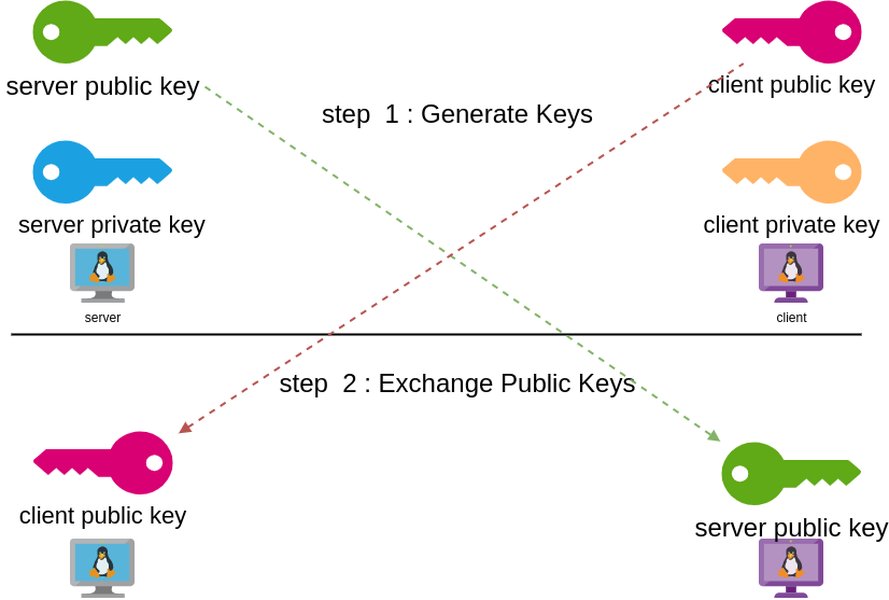
A visual representation of WireGuard key pairs, illustrating the relationship between private and public keys.
Leveraging Hardware Security Modules (HSMs)
For the highest level of security, consider integrating hardware security modules (HSMs) like YubiKeys. These devices can securely store and protect your WireGuard private keys using OpenPGP card capabilities or PIV slots. This approach significantly mitigates the risk of key theft, as the private key never leaves the hardware device, requiring physical presence and often a PIN for access. While requiring more complex setup, it offers unparalleled protection against software-based key compromises.
This video delves into setting up a "super secure WireGuard" connection, emphasizing end-to-end encryption to your home network. It highlights the importance of strong security measures beyond basic configuration, aligning perfectly with the concepts of secure key generation and enhanced management techniques discussed in this guide.
Key Rotation Practices
Regularly rotating your WireGuard keys is a crucial security best practice. This limits the window of exposure should a key be inadvertently compromised without your knowledge. While WireGuard itself doesn't have built-in key rotation mechanisms, it's recommended to periodically generate new key pairs for your peers and update your configurations. Automation scripts can assist in this process, helping to update configurations seamlessly without significant downtime.
Avoiding Common Pitfalls
- Online Key Generators: Exercise extreme caution with online key generators. While some claim client-side trustless generation, the security depends entirely on the integrity of the website and your browser environment. Always prefer offline generation using the `wg` utility.
- Generating Keys on Untrusted Systems: Never generate WireGuard keys on public, shared, or potentially compromised machines.
- Insecure Key Transmission: Avoid transmitting private keys or PSKs over insecure channels like email, unencrypted chat, or public cloud storage. Use secure channels like SSH or encrypted messaging for key distribution.
- Hardcoding Keys: Instead of embedding private keys directly into configuration files, tell WireGuard to read them from a secure file.
Evaluating Key Security Measures
To provide a comprehensive understanding of the various security measures discussed, the following radar chart illustrates their relative impact on overall WireGuard security. This evaluation is based on the consensus of best practices for cryptographic key management.
This radar chart provides an analytical perspective on the security measures discussed for WireGuard key management. "Security Impact Rating" reflects how much each measure contributes to the overall security of your WireGuard setup, with higher values indicating a greater positive impact. "Implementation Difficulty" assesses the complexity involved in adopting each measure, from straightforward command-line steps to more advanced hardware integrations. For example, while hardware security modules (HSMs) offer the highest security impact, they also present the greatest implementation difficulty. Conversely, proper file permissions have a significant security impact with relatively lower implementation difficulty. This helps users prioritize and allocate resources effectively for their WireGuard security posture.
Summary of WireGuard Key Concepts and Security Layers
The following mindmap visually summarizes the critical components and security layers involved in WireGuard key generation and management.
This mindmap provides a structured overview of the entire process, from the initial generation of different key types to the crucial aspects of secure management and integration into WireGuard configurations. It highlights the hierarchical relationship between concepts, emphasizing that secure key generation is a foundational element, while secure management practices build upon it to ensure robust, long-term security for your WireGuard VPN.
Summary of Key Generation Commands and Best Practices
The table below provides a consolidated view of the essential commands for generating WireGuard keys and the corresponding security best practices for each, ensuring a clear and concise reference.
| Key Type | Generation Command | Purpose | Security Best Practices |
|---|---|---|---|
| Private Key | |
Establishes unique identity, encrypts outbound traffic, decrypts inbound traffic. Must be kept secret. | Generate on secure, trusted machine; Restrict file permissions (`chmod 600`); Store in encrypted location (e.g., password manager, HSM); Never share. |
| Public Key | |
Identifies peer; Allows others to encrypt traffic for you. Can be shared. | Derived from private key; Share only with intended peers for configuration. |
| Pre-Shared Key (PSK) | |
Adds an optional symmetric encryption layer, enhancing post-quantum resistance. | Generate uniquely for each peer pair; Keep secret; Store securely alongside private key. |
Frequently Asked Questions (FAQ)
Why is secure key generation so critical for WireGuard?
What is the difference between a private key and a public key in WireGuard?
Should I use a Pre-Shared Key (PSK) with WireGuard?
Can I generate WireGuard keys online?
How often should I rotate my WireGuard keys?
Conclusion
Generating WireGuard keys securely is a foundational step in establishing a robust and confidential VPN connection. By leveraging the built-in `wg` utility, applying strict file permissions with `umask 077` and `chmod 600`, and consistently adhering to secure key management practices—such as using encrypted storage, considering hardware security modules, and regularly rotating keys—you can significantly bolster the security posture of your WireGuard deployment. Understanding the asymmetric cryptographic principles underpinning WireGuard and diligently avoiding common pitfalls will ensure that your VPN traffic remains private and your network infrastructure is protected against unauthorized access. The combination of secure generation and continuous vigilant management creates an impenetrable fortress for your data.
Recommended Queries
- What are the best practices for configuring WireGuard to maximize security and performance?
- How can I implement an effective key rotation strategy for my WireGuard VPN across multiple peers?
- What are the practical steps to integrate hardware security modules like YubiKey with WireGuard for enhanced key protection?
- How do I configure firewall rules effectively to secure WireGuard traffic and control network access?