
Unlock Your Current Position: A Comprehensive Guide to Finding Your Location
Discover the various methods and technologies available to pinpoint your exact whereabouts on demand.
Highlights: Your Quick Guide to Location Finding
- Multiple Methods Available: Your location can be determined using a variety of approaches, including web-based tools that work in your browser, dedicated features on your mobile device (utilizing GPS, Wi-Fi, and cellular signals), and analysis of your internet (IP) address.
- Permission is Paramount: For the most accurate location services to function, they require your explicit consent. This is typically requested as a prompt by your browser or mobile operating system to access your device's location data, a crucial step that safeguards your privacy.
- Accuracy Can Vary: The precision of your determined location depends on the technology used. Global Positioning System (GPS) generally offers high precision, especially outdoors. Wi-Fi and cell signals are valuable for indoor positioning or when GPS is weak. IP-based location is typically less precise, offering regional or city-level estimates.
Knowing your current location can be incredibly useful, whether you're navigating to a new destination, sharing your whereabouts with friends and family, or using location-aware applications. As of May 12, 2025, a sophisticated array of technologies works behind the scenes to provide this information swiftly and, in many cases, with remarkable accuracy. This guide will walk you through how these technologies function and the practical steps you can take to find your location.
Unveiling the Magic: Technologies That Pinpoint Your Position
Several key technologies are commonly employed, often in combination, by your devices and applications to determine your geographical position. Understanding these can help you appreciate how your location is found and why accuracy might vary.
Global Positioning System (GPS): Your Satellite Navigator
GPS is perhaps the most well-known location technology. It relies on a network of satellites orbiting the Earth. Your GPS-enabled device receives signals from multiple satellites, and by measuring the time it takes for these signals to arrive, it can calculate its distance from each satellite. With data from at least four satellites, your device can triangulate its precise latitude, longitude, and even altitude. GPS is highly accurate, especially in open outdoor environments where there's a clear line of sight to the sky. However, its signals can be obstructed by tall buildings, dense foliage, or being indoors.
Wi-Fi Positioning: Leveraging Wireless Networks
Wi-Fi Positioning Systems (WPS) use the presence of nearby Wi-Fi access points to estimate your location. Devices scan for Wi-Fi networks and their signal strengths. This information is then compared against a vast database that maps the geographical locations of these access points. WPS is particularly effective in urban areas and indoors, where GPS signals may be weak or unavailable. The accuracy depends on the density and known locations of Wi-Fi hotspots in the area.
Cell Tower Triangulation: Using Mobile Signals
Similar to Wi-Fi positioning, cell tower triangulation (also known as cellular network-based location) uses your mobile device's connection to nearby cell towers. By measuring the signal strength to multiple towers or the time it takes for signals to travel, your device's approximate location can be determined. The more cell towers your device can "see," the more accurate the estimate. This method is widely available wherever there is cellular coverage but is generally less precise than GPS or dense Wi-Fi positioning, offering accuracy typically within a few hundred meters to several kilometers.
IP Address Geolocation: An Internet-Based Estimate
Your device's Internet Protocol (IP) address, assigned by your Internet Service Provider (ISP), can also be used to estimate your location. IP geolocation services maintain databases that associate IP address ranges with specific geographical areas, often down to the city or postal code level. This method doesn't require any special hardware like GPS and works whenever you're connected to the internet. However, it's the least accurate method, as it typically points to the location of your ISP's network equipment rather than your precise physical address. It's often used as a fallback or for providing location-based content like local news or advertisements.
The following chart offers a comparative overview of these core location technologies, evaluating them across several key characteristics. "Precision" refers to how close the technology can pinpoint your location. "Indoor/Outdoor Availability" indicates effectiveness in different environments. "Speed of Fix" relates to how quickly a location can be determined, and "Power Efficiency" reflects the impact on device battery (higher score means more efficient/less power used).
Your Toolkit: Practical Methods to Discover Your Location
Now that you understand the technologies, let's explore the common ways you can access your location information.
Via the Web: Instant Location on Your Browser
Numerous websites offer to find and display your current location directly within your web browser. These tools are convenient for quick checks without needing to install any specific app.
The Mechanics: How Browser-Based Tools Work
These websites utilize the HTML5 Geolocation API, a standard feature in modern web browsers (like Chrome, Firefox, Safari, and Edge). When you visit such a site, your browser will typically:
- Request Permission: A prompt will appear asking if you want to share your location with the website. You must grant permission for the service to work.
- Gather Data: If permission is granted, the browser uses available location sources on your device. This could be GPS (if your device has it and it's enabled), information about nearby Wi-Fi networks, your device's IP address, or cell tower data.
- Display Location: The website then processes this data to determine your latitude and longitude, and often your approximate street address, city, and region. This information is usually displayed on an interactive map.
Noteworthy Online Location Finders
Several reliable websites can help you find your location. The table below summarizes some popular options, highlighting their primary methods and features. Remember to use secure (HTTPS) connections when sharing location data.
| Tool Name | Primary Method(s) Used | Key Features | Typical Output |
|---|---|---|---|
mylocation.org |
Browser Geolocation (GPS, Wi-Fi, IP) | Simple interface, map view, coordinates, speed, altitude | Latitude/Longitude, address, map |
iplocation.io/my-location |
Browser Geolocation (GPS focus), IP | Detailed coordinates, address lookup, map, IP information | Latitude/Longitude, full address, map, IP details |
where-am-i.co |
Browser Geolocation (Google Maps integration) | Google Maps view, coordinates, address, easy sharing options | Latitude/Longitude, address, interactive Google Map |
www.gps-coordinates.net/my-location |
Browser Geolocation (Map integration, often Apple Maps or similar) | Map view, coordinates, address, reverse geocoding (address to coordinates) | Latitude/Longitude, address, interactive map |
On Your Smartphone: Built-in Precision
Smartphones are equipped with sophisticated location capabilities, often providing more accurate results than web-based tools alone due to integrated GPS hardware and optimized location services.
For Android Aficionados
Android devices offer robust location services, primarily managed through Google Play Services.
- Enable Location Services: Navigate to Settings > Location and ensure the toggle is switched on. For enhanced accuracy, you might find an option like "Google Location Accuracy" (or "Improve Location Accuracy") which allows Google's service to use Wi-Fi, mobile networks, and sensors to help determine location.
- Use Mapping Apps: Apps like Google Maps will show your current location as a blue dot on the map once location services are enabled and permission is granted to the app. Tapping this dot often provides more details.
- Find My Device: Google's "Find My Device" service can also locate your Android phone if it's lost or stolen, provided location services and the feature are active.
For iOS Enthusiasts (iPhone & iPad)
Apple's iOS devices also have comprehensive location services integrated into the operating system.
- Turn On Location Services: Go to Settings > Privacy & Security > Location Services and make sure it's enabled. You can also manage location access for individual apps here.
- Mapping Applications: Apple Maps, Google Maps, or other mapping apps can display your current location accurately after you grant them permission.
- Find My App: The "Find My" app on iOS allows you to see the location of your Apple devices (iPhone, iPad, Mac, Apple Watch, AirPods) and items with AirTags.
To get a visual understanding of how you can use a popular mapping application like Google Maps to find your location on your smartphone, the following video provides a straightforward tutorial:
A tutorial on finding your location using Google Maps.
The interconnectedness of methods, technologies, and the information you receive can be visualized in the mindmap below. It illustrates the pathways from your need ("My Current Location") to the various ways it's determined and what details are provided.
Accuracy and Influences: What to Expect
The accuracy of your determined location isn't constant; it's influenced by several factors:
- Technology Used: As discussed, GPS is generally the most accurate (meters), followed by Wi-Fi positioning (tens of meters), then cell tower triangulation (hundreds of meters to kilometers), and finally IP geolocation (city to regional level). Most modern devices use a combination of these (often called "fused location") to provide the best possible fix.
- Environment: GPS works best outdoors with a clear sky. Indoors, in urban canyons (amongst tall buildings), or underground, GPS signals can be weak or blocked. In such cases, Wi-Fi and cell signals become more critical.
- Device Capabilities: The quality of the GPS receiver and other sensors in your device plays a role. Newer devices often have more sensitive receivers and better algorithms for location determination.
- Data Availability: The accuracy of Wi-Fi and cell tower location depends on the comprehensiveness of the databases mapping these network points.
Mapping applications often provide visual cues about accuracy, such as a wider or narrower circle around your location marker. Advanced features in some apps, like Google Maps' "Live View," use augmented reality to help you orient yourself and navigate by overlaying directions onto the real-world view from your phone's camera, further enhancing your understanding of your precise location.
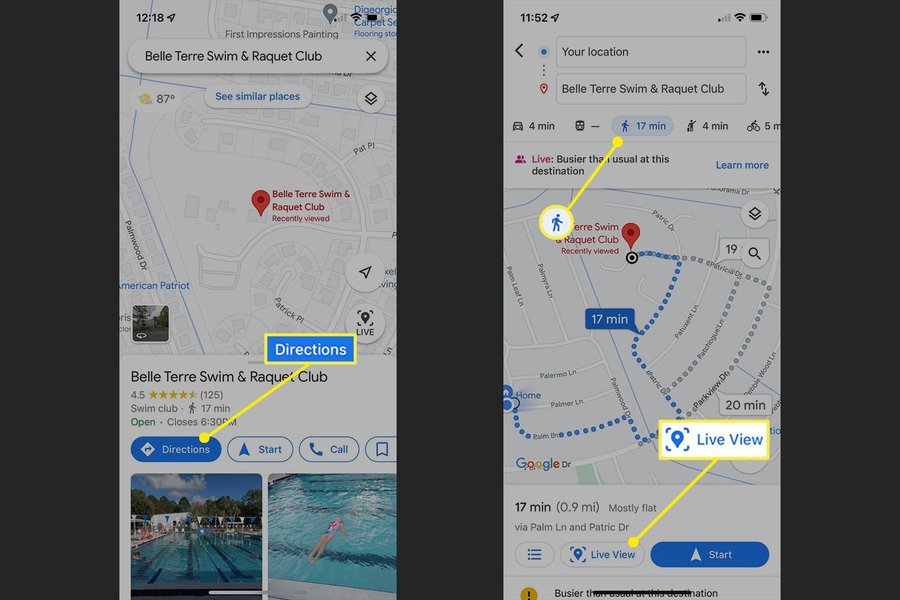
Visualizing your surroundings with features like Google Maps Live View can help confirm your location.
Your Data, Your Control: Understanding Location Privacy and Permissions
Sharing your location is a sensitive matter, and modern operating systems and browsers are designed with privacy in mind. Here’s what you should know:
- Explicit Consent: Websites and applications must ask for your permission before accessing your precise location data. You have the right to grant or deny this permission.
- Granular Controls: Mobile operating systems (Android and iOS) allow you to manage location permissions on a per-app basis. You can often choose to allow location access always, only while using the app, ask every time, or never.
- Revoking Access: You can typically review and change these permissions at any time through your device or browser settings.
- Data Usage: Reputable services will have privacy policies explaining how they use and protect your location data. Some tools emphasize that they do not store your location history.
- Secure Connections: When using web-based location tools, ensure the website uses HTTPS (indicated by a padlock icon in the address bar) to encrypt the data transmitted between your device and the website.
Being aware of these settings and actively managing them empowers you to control who has access to your location information, balancing convenience with privacy.
Frequently Asked Questions (FAQ)
How accurate is my determined location?
Accuracy varies significantly based on the method used and your environment. GPS can be accurate to within a few meters outdoors. Wi-Fi positioning is generally accurate to tens of meters in areas with good Wi-Fi density. Cell tower triangulation can range from a few hundred meters to several kilometers. IP address geolocation is the least accurate, typically identifying your city or region. Most modern devices combine these ("fused location") for the best possible result.
Why do websites and apps ask for location permission?
Requesting permission is a crucial privacy measure. It ensures that you are in control of your personal data. Accessing your precise location without your consent would be a significant privacy violation. By prompting you, browsers and operating systems allow you to decide whether a specific website or app should be able to access your location information.
What should I do if the location shown is incorrect?
If your location seems incorrect, try these steps:
- Ensure location services are enabled on your device and for your browser/app.
- If indoors, try moving near a window or going outside for a better GPS signal.
- Check your Wi-Fi and cellular connections; a stable internet connection often helps.
- Restart your device or browser.
- On mobile, ensure "Location Accuracy" or similar high-accuracy modes are enabled.
- Update your browser, operating system, and any relevant apps.
- If using IP-based location, understand it may only show your general area.
Can I find my location without an internet connection?
Yes, to some extent. GPS functionality itself does not require an internet connection to determine your coordinates, as it communicates directly with satellites. Many dedicated GPS devices and some smartphone apps with offline map capabilities can show your position on a map without internet. However, to display your location on a web-based map, translate coordinates into a street address, or use Wi-Fi/IP-based location, an internet connection is usually necessary.
How does enabling location services affect my device's battery?
Using location services, particularly GPS, can consume more battery power than when it's off. This is because the GPS receiver needs to actively search for and process satellite signals. However, modern devices and operating systems have become more efficient. They often use less power-hungry methods like Wi-Fi or cell tower location when high precision isn't needed, or they limit how frequently apps can request location updates. You can usually see which apps are using location services and adjust their permissions to manage battery life.
Explore Further
If you're interested in learning more about location technologies or related topics, consider these queries:
- How does assisted GPS (A-GPS) improve location speed and accuracy?
- What are the privacy implications of different location sharing settings on smartphones?
- Compare the "Find My Device" features across Android and iOS platforms.
- How do indoor positioning systems work in large venues like airports or malls?
References
Last updated May 12, 2025