
Unlocking the Layers: A Deep Dive into Human Identities in Google Workspace
Explore the foundational distinctions and advanced configurations of human identities within Google's powerful collaborative ecosystem.
Key Insights into Google Workspace Human Identities
- Managed User Accounts: These are the core identities provisioned and controlled by an organization's administrator, forming the backbone of Google Workspace for businesses.
- Cloud Identity Accounts: A distinct identity service, Cloud Identity offers free accounts for managing users and endpoints across Google services, often complementing paid Workspace subscriptions.
- Federated Identities: Google Workspace seamlessly integrates with external Identity Providers (IdPs), allowing users to authenticate with their existing corporate credentials while accessing Google services.
Google Workspace, a comprehensive suite of productivity and collaboration tools, meticulously manages human identities to ensure secure access and efficient administration. Unlike non-human identities such as service accounts, human identities are associated with individual users and are fundamental for interacting with services like Gmail, Google Drive, and Google Meet. While there isn't a single numerical answer for "types" of human identities, the ecosystem categorizes them based on management, authentication, and integration with external systems.
The Core Pillars of Human Identity in Google Workspace
At its heart, Google Workspace distinguishes between several key categories of human identities, primarily driven by how they are provisioned, managed, and authenticated within an organizational context. These categories ensure that businesses can maintain control, enforce policies, and secure their digital assets.
1. Managed User Accounts (Google Workspace & Cloud Identity)
The most prevalent form of human identity within a business environment is the managed user account. These accounts are directly provisioned and controlled by an organization's Google Workspace or Cloud Identity administrator. They are designed for employees, contractors, and partners who require access to organizational resources and collaborative tools. Managed user accounts are distinguished by several key characteristics:
- Organizational Control: Administrators have full control over these accounts, including user provisioning, de-provisioning, password resets, multi-factor authentication (MFA) enforcement, and application access permissions.
- Custom Domain Email: Typically, these accounts are associated with a custom email address at the organization's domain (e.g.,
yourname@yourcompany.com), projecting a professional image and integrating seamlessly with corporate communications. - Policy Enforcement: Managed accounts are subject to the organization's security policies, compliance requirements, and data governance rules, ensuring a secure and regulated environment.
- Business-Specific Features: They unlock enhanced features such as increased storage, advanced management tools, shared drives, and enterprise-grade video conferencing capabilities.
Within managed user accounts, there are two primary sub-categories that share a common platform for user management but differ in their core purpose:
Google Workspace Accounts
These are the standard, paid user accounts associated with Google Workspace editions (e.g., Business Starter, Business Standard, Business Plus, Enterprise, Education, Nonprofit, Government). They bundle the full suite of productivity and collaboration applications along with identity management features. Each edition offers varying levels of storage, security features, and administrative controls tailored to different organizational sizes and needs.
Cloud Identity Accounts
Cloud Identity is a standalone Identity as a Service (IDaaS) and Enterprise Mobility Management (EMM) product from Google. It provides core identity services and endpoint administration, often offered as a free option for user management, separate from a full Google Workspace subscription. Cloud Identity accounts are ideal for organizations that primarily need to manage user access to Google Cloud services or desire a centralized identity management solution without necessarily subscribing to the full Workspace productivity suite. They share the same underlying technical platform as Google Workspace for user and group management.
2. Federated Identities (Workforce Identity Federation)
Google Workspace supports federation with external Identity Providers (IdPs). This mechanism allows human users to authenticate with their existing corporate credentials managed by an external system (e.g., Microsoft Active Directory, Microsoft Entra ID, Okta, or other SAML/OAuth providers) rather than directly with Google. While these are still managed user accounts within the Google ecosystem, their primary authentication source resides outside Google's direct account management. This offers significant benefits:
- Centralized Authentication: Users can leverage a single set of credentials to access various enterprise applications, including Google Workspace services, streamlining the sign-in process.
- Simplified HR Integration: Identity lifecycle management (provisioning, de-provisioning) can be synchronized with the external IdP, simplifying user onboarding and offboarding processes.
- Enhanced Security Policies: Organizations can apply their existing IdP's advanced security policies, such as conditional access, to Google Workspace access.
Workforce Identity Federation is specifically designed for human users like employees, partners, and contractors, enabling seamless access to Google Cloud and Workspace services while leveraging existing identity infrastructure.
3. Guest or External User Accounts
Google Workspace facilitates collaboration with individuals outside an organization's managed domain. While not fully managed identities within the organization's Google Workspace environment, these guest users (or external collaborators) are still human identities that can be invited to access specific documents, calendars, or shared drives. Their access is typically granted to their existing Google Account (personal Gmail or another domain registered with Google) or sometimes via an external email address for limited visitor access. Key aspects include:
- Controlled Collaboration: Organizations can share specific resources with external parties while maintaining granular control over permissions and access expiration.
- Limited Management: These accounts are not subject to the inviting organization's comprehensive security policies or direct administrative control in the same way fully managed accounts are. Their primary identity management remains with their original provider.
This category underscores Google Workspace's flexibility in supporting inter-organizational collaboration while maintaining a clear distinction between internal and external identities.
4. Role-Based Distinctions (Within Managed Accounts)
Within the umbrella of managed user accounts, human identities are further differentiated by assigned roles and administrative privileges. These roles determine the level of access and control a user has over the Google Workspace environment:
- Super Administrators: Possess the highest level of authority, with full access to all administrative controls, user management, policy configuration, and billing.
- Delegated Administrators: Have specific administrative privileges delegated to them, such as managing users in a particular organizational unit, resetting passwords, or configuring specific services.
- Standard Users: Have typical user access to Google Workspace services (Gmail, Drive, Calendar, etc.) but no administrative control over the organization's settings or other users.
These roles do not represent distinct "types" of human identities in terms of their fundamental account structure but rather functional classifications within the managed account framework, defining their capabilities and responsibilities.
Understanding Identity Management in Google Workspace
Effective identity management is crucial for security and operational efficiency. Google Workspace provides robust tools and features to manage human identities across their lifecycle.
Authentication and Authorization
For all human identities, Google Workspace employs various authentication methods to verify a user's identity before granting access:
- Passwords: The traditional method, often augmented with complexity requirements and regular resets.
- Multi-Factor Authentication (MFA): A critical security layer, requiring users to provide two or more verification factors (e.g., password + security key, password + phone prompt).
- Passkeys: A modern, phishing-resistant authentication method using cryptographic keys, offering a more secure and convenient sign-in experience.
- Security Keys: Physical hardware devices that provide a strong, second factor for authentication, highly resistant to phishing and account takeovers.
- Application-Specific Passwords: Used for older applications that do not support modern MFA methods, providing a unique password for each application.
Authorization, on the other hand, determines what an authenticated user is permitted to do. This is managed through roles, group memberships, and access control lists (ACLs) applied to resources like Google Drive files, calendars, and sites.
Google Workspace Editions and Identity Configurations
The choice of Google Workspace edition significantly influences the features and capabilities available for managing human identities. From basic business plans to advanced enterprise solutions, each edition offers varying levels of storage, security controls, and compliance features, directly impacting how identities are managed and protected.
The following table provides a concise overview of how different Google Workspace editions cater to various organizational needs, reflecting the scalability of human identity management:
| Edition Category | Target User/Organization Size | Key Identity Management Features | Example Use Cases |
|---|---|---|---|
| Personal/Individual | Solopreneurs, very small teams | Basic user account with Gmail/Drive, limited admin control. | Freelancers, independent consultants. |
| Business Starter | Small to medium businesses (up to 300 users) | Custom domain email, shared drives, basic admin controls, 2-Step Verification. | Startups, small offices needing professional email and collaboration. |
| Business Standard | Medium businesses (up to 300 users) | Enhanced storage, improved video conferencing, standard security, audit logs. | Growing businesses requiring more storage and collaboration features. |
| Business Plus | Larger medium businesses (up to 300 users) | Advanced security (eDiscovery, DLP), compliance features, enhanced support. | Businesses with stricter compliance and data protection needs. |
| Enterprise (Essentials, Standard, Plus) | Large enterprises, organizations with over 300 users | Unlimited storage, advanced security & compliance, data regions, full IdP integration, granular controls. | Large corporations, highly regulated industries. |
| Specialized (Education, Nonprofit, Government) | Specific sectors | Tailored features and pricing, often with enhanced administrative and compliance tools relevant to the sector. | Schools, charitable organizations, public sector entities. |
Visualizing Human Identity Management Capabilities
To further illustrate the multifaceted nature of human identity management in Google Workspace, let's consider a radar chart comparing different aspects of identity control across theoretical "Managed User Accounts" and "Federated User Identities." This chart provides a subjective assessment of strengths in key areas.
The radar chart illustrates the trade-offs and complementary strengths of managed vs. federated identities. Managed accounts excel in direct control over Google-specific credentials and granular access policy within Google Workspace, whereas federated identities shine in leveraging existing external IdP policies and automating lifecycle management through centralized systems.
Demystifying Google Identity Concepts: A Mindmap
To provide a clear conceptual overview of how different identity types and related services fit into the broader Google ecosystem for human users, here is a mindmap.
Business Standard
Business Plus"] id1_1_2["Enterprise Editions"] id1_1_3["Specialized (Education, Nonprofit)"] id1_2["Cloud Identity Accounts"] id1_2_1["Free IDaaS & EMM Features"] id1_2_2["Core User Management"] id2["Federated User Identities"] id2_1["Workforce Identity Federation"] id2_2["External Identity Providers"] id2_2_1["Microsoft AD / Entra ID"] id2_2_2["Okta, Ping, etc."] id2_2_3["SAML / OAuth Integration"] id3["Guest / External Collaborators"] id3_1["Non-Managed User Accounts"] id3_2["Limited Resource Access"] id3_3["Collaboration Beyond Domain"] id4["Roles & Privileges"] id4_1["Super Administrators"] id4_2["Delegated Administrators"] id4_3["Standard Users"] id5["Authentication Methods"] id5_1["Passwords & MFA"] id5_2["Security Keys"] id5_3["Passkeys"] id5_4["Application-Specific Passwords"]
This mindmap visualizes the interconnectedness of various human identity types and supporting features within Google Workspace, from core managed accounts to the nuances of federation and role-based access.
Visual Guide to Adding & Managing Google Workspace Users
Managing human identities, especially adding new users, is a fundamental administrative task within Google Workspace. The process involves creating user accounts, assigning licenses, and configuring initial settings to ensure seamless integration into the organizational environment. The following video provides a practical walkthrough of how to add and manage users, which directly relates to handling human identities in the system.
A comprehensive tutorial on how to add and manage users within Google Workspace.
This video delves into the practical steps for provisioning new human identities within Google Workspace. It highlights key aspects such as creating individual user accounts, assigning roles, and configuring basic settings. Understanding these operational procedures is essential for administrators to efficiently manage the lifecycle of human identities, ensuring that each user has appropriate access to the necessary tools and resources while adhering to organizational policies.
Securing Human Identities in Google Workspace
Securing human identities is paramount in Google Workspace. Organizations implement various measures to protect user accounts from unauthorized access and potential threats.
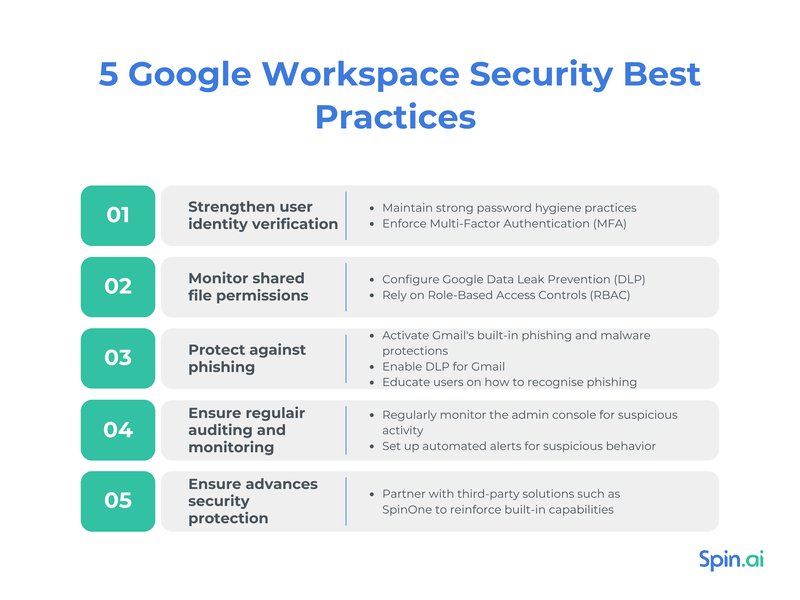
An illustration highlighting the layers of sensitive data protection within Google Workspace, emphasizing identity security.
Security is integrated at every layer of identity management. This includes leveraging multi-factor authentication (MFA), enforcing strong password policies, and utilizing security keys to prevent account takeovers. Additionally, administrators can configure single sign-on (SSO) with external IdPs for a unified and secure authentication experience. Google also employs advanced security challenges to verify user identity during suspicious sign-in attempts or for sensitive actions, ensuring the integrity of human identities within the Workspace environment.
Frequently Asked Questions (FAQ)
What is the primary difference between a "Managed User Account" and a "Consumer User Account" in the Google ecosystem?
Can external users collaborate on Google Workspace documents without having a managed Google Workspace account?
What is "Workforce Identity Federation" in Google Workspace?
Do Google Workspace editions (e.g., Business Starter, Enterprise) represent different "types" of human identities?
How does Cloud Identity relate to Google Workspace for human identity management?
Conclusion
Google Workspace effectively categorizes human identities primarily into two core types: Managed User Accounts (including Google Workspace and Cloud Identity accounts) and Consumer User Accounts. Beyond these foundational distinctions, the system accommodates Federated Identities (authenticating via external IdPs) and provides mechanisms for Guest or External Collaborators. Furthermore, within managed accounts, roles and privileges delineate different levels of access and control. This multi-layered approach ensures robust security, granular administrative control, and flexible collaboration capabilities, allowing organizations to manage their human workforce seamlessly within the Google ecosystem.
Recommended Further Exploration
- How does Google Cloud Identity enhance Google Workspace security features?
- Understanding the role of federated identity in enterprise cloud adoption
- Best practices for managing external collaborators in Google Drive and Shared Drives
- Comparing authentication methods: Passkeys vs. Security Keys in Google Workspace
Referenced Search Results

 blog.pics.io