
Polishing Your Message: Expert Grammar and Spelling Refinements
Your text, meticulously reviewed and enhanced for impeccable clarity and professionalism in your communications.
Key Insights at a Glance
- Precision in Spelling: The word "repeatly" has been corrected to "repeatedly" for accurate adverbial use.
- Grammatical Soundness: Your core sentence structure is largely correct, requiring only minor adjustments for optimal flow and professionalism.
- The Power of Proofreading: We delve into why careful proofreading is non-negotiable for impactful business communication, enhancing credibility and preventing misunderstandings.
Your Sentence, Corrected and Enhanced
Reviewing Your Initial Query
You asked us to "check the grammer and spelling" of your sentence. As a first step, please note the correct spelling of "grammar" (with an 'a' instead of an 'e'). Attention to such details is foundational in professional writing.
The sentence you provided for review was: "Keystone has been working with Chadwick Page from your team and has asked repeatly for a conference call in order to troubleshoot and resolve this issue."
The Corrected Sentence
Here is the grammatically corrected and spell-checked version of your sentence:
"Keystone has been working with Chadwick Page from your team and has asked repeatedly for a conference call in order to troubleshoot and resolve this issue."
Explanation of Changes:
- "repeatly" corrected to "repeatedly": The adverb "repeatedly" means "again and again" or "on multiple occasions." The form "repeatly" is a common misspelling.
Alternative Polished Version for Professional Impact
For an even more concise and formal tone, suitable for many business communications, consider this alternative phrasing:
"Keystone has been collaborating with Chadwick Page from your team and has repeatedly requested a conference call to troubleshoot and resolve this issue."
Refinements in this Version:
- "collaborating with" instead of "working with": "Collaborating" can sound slightly more formal and emphasize teamwork.
- "requested" instead of "asked for": "Requested" is generally preferred in formal business writing.
- "to troubleshoot" instead of "in order to troubleshoot": The phrase "in order to" can often be shortened to just "to" for conciseness without changing the meaning. This makes the sentence more direct.
Both corrected versions are now clear, professional, and error-free, ready for your use.
The Indispensable Role of Proofreading in Professional Communication
In today's fast-paced business environment, every written word contributes to your professional image. Proofreading is the final, critical stage of the writing process, ensuring your communications are clear, credible, and error-free. Errors in grammar, spelling, punctuation, or syntax can undermine your message, lead to misunderstandings, and negatively impact how clients, colleagues, and stakeholders perceive you and your organization.
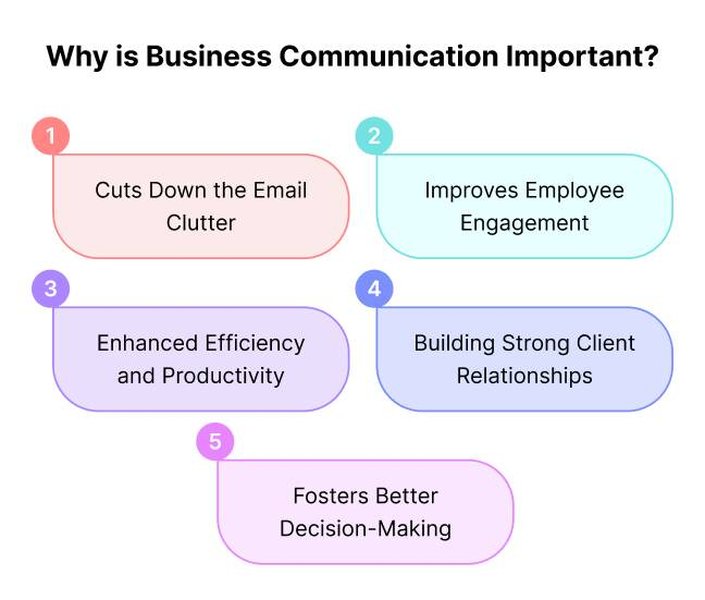
Clear and accurate business communication is vital for building trust and efficiency.
Effective proofreading goes beyond a simple spell-check. It involves a careful review for accuracy in all aspects of your writing. Investing time in this practice demonstrates attention to detail, conscientiousness, and a commitment to excellence. Conversely, careless errors can lead to confusion, misinterpretation, and even damage to your professional credibility. For instance, consistently misspelling a client's name or critical project terms can erode trust and suggest a lack of care.
Mastering the Art: Effective Proofreading Strategies
Developing strong proofreading habits can significantly elevate the quality of your written communications. Below is a mindmap outlining key strategies, followed by a more detailed explanation of these techniques to help you catch and correct errors effectively.
Gain Fresh Perspective"] id1b["Minimize Distractions
Create a Focused Environment"] id1c["Change the Format
Print or View on Different Screen"] id2["Manual Techniques"] id2a["Read Aloud
Catch Awkward Phrasing & Missed Words"] id2b["Read Backwards (Word by Word)
Isolate Spelling Errors"] id2c["Use a Ruler or Paper
Focus Line by Line"] id2d["Focus on One Error Type at a Time
(e.g., Spelling, then Grammar, then Punctuation)"] id3["Leveraging Tools (Use Wisely)"] id3a["Spell Checkers
Initial Scan for Typos"] id3b["Grammar Checkers (AI-powered)
Identify Complex Errors & Style Issues"] id3c["Online Dictionaries & Thesauruses
Verify Word Meanings & Choices"] id4["Final Review & Contextual Checks"] id4a["Verify Proper Nouns
(Names, Companies, Places)"] id4b["Check Dates, Numbers & Data"] id4c["Ensure Clarity & Conciseness"] id4d["Confirm Tone is Appropriate for Audience"] id4e["Peer Review
A Second Pair of Eyes"]
The mindmap above visualizes a comprehensive approach to proofreading. Here’s a deeper dive into some of these crucial techniques:
Step 1: Create Distance and Change Perspective
After writing, step away from your text for a while—even if it's just for a few minutes. This "cooling off" period allows you to approach the text with fresh eyes, making it easier to spot errors you might have previously overlooked. Reading your document in a different format (e.g., printing it out if you typed it, or changing the font/background color) can also help you see it anew.
Step 2: Engage Multiple Senses and Methods
Reading aloud forces you to slow down and can help you identify awkward phrasing, run-on sentences, and missed words that your eyes might skim over. Some proofreaders even suggest reading the text backward (from the last word to the first) to focus solely on individual word spellings, detaching from the content's flow.
Step 3: Systematic and Focused Checks
Don't try to catch everything at once. Review your document multiple times, each time focusing on a specific type of error. For instance:
- First pass: Focus on spelling errors and typos.
- Second pass: Check for grammatical mistakes (e.g., subject-verb agreement, tense consistency, pronoun usage).
- Third pass: Review punctuation (commas, apostrophes, semicolons, etc.).
- Fourth pass: Examine formatting, consistency (in terms, capitalization), and overall clarity.
Step 4: Leverage Technology Wisely
Utilize spell checkers and grammar tools (like those built into word processors or standalone applications such as Grammarly or ProWritingAid). However, remember that these tools are not infallible. They might miss contextual errors (e.g., "their" vs. "there" vs. "they're" if spelled correctly but used wrongly) or nuances of tone. Always combine automated checks with manual proofreading.
Step 5: Context is Key – Especially in Business
Pay special attention to names, titles, company names, dates, figures, and any industry-specific jargon. In your provided sentence, ensuring "Chadwick Page" and "Keystone" are spelled correctly is crucial. Misspelling a contact's name or a key client's company can appear disrespectful and unprofessional.
Common Writing Pitfalls and How to Avoid Them
Even seasoned writers can fall into common traps. Being aware of these pitfalls is the first step to avoiding them. The following table highlights some frequent errors in business communication and offers guidance on how to steer clear of them, ensuring your writing is always polished and professional.
| Error Type | Example of Error | Explanation & Solution |
|---|---|---|
| Spelling Errors (Typos & Homophones) | "Their going to the meeting." "Recieve" instead of "receive." |
Spell checkers catch many typos, but not all, especially homophones (words that sound alike but have different meanings). Solution: Proofread carefully, use a dictionary for tricky words, and be mindful of common homophone pairs (e.g., your/you're, its/it's, affect/effect). |
| Grammar Mistakes | "The team are working hard." (Subject-verb disagreement) "She done the report." (Incorrect verb form) |
Errors in subject-verb agreement, verb tense, pronoun agreement, and sentence structure. Solution: Understand basic grammar rules. Read sentences aloud to catch awkward phrasing. For "The team is working hard," team is singular. "She did the report" or "She has done the report." |
| Punctuation Errors | "Let's eat Grandma." (Missing comma) "The project was delayed however we met the deadline." (Comma splice or missing semicolon) |
Misuse of commas, apostrophes, semicolons, colons, and quotation marks can drastically alter meaning or reduce clarity. Solution: Learn standard punctuation rules. "Let's eat, Grandma." For the second, "The project was delayed; however, we met the deadline." or "The project was delayed. However, we met the deadline." |
| Incorrect Word Choice | Using "infer" instead of "imply." Overuse of jargon with an audience unfamiliar with it. |
Choosing words that don't precisely convey your meaning or are inappropriate for your audience. Solution: Use a thesaurus thoughtfully (don't just pick a synonym without understanding its nuance). Aim for clarity and precision. Know your audience and adjust your language accordingly. |
| Run-on Sentences & Sentence Fragments | "The meeting was productive we discussed all agenda items and made key decisions and assigned actionables." (Run-on) "Because the report was late." (Fragment) |
Run-on sentences connect multiple independent clauses improperly. Fragments are incomplete sentences. Solution: Break long sentences into shorter ones. Ensure every sentence has a subject and a verb and expresses a complete thought. |
| Inconsistent Style or Tone | Switching between formal and very informal language within the same document. | Lack of consistency in capitalization, formatting, terminology, or overall tone. Solution: Establish a style (or follow a company style guide) and maintain it. Ensure the tone is appropriate for the message and audience throughout the communication. |
By familiarizing yourself with these common errors and actively looking for them during your proofreading process, you can significantly improve the professionalism and effectiveness of your written communications.
A Comparative Look at Proofreading Resources
Various tools and methods are available to assist in the proofreading process. Each has its strengths and weaknesses. The radar chart below offers a visual comparison of different proofreading resources based on general perceptions of their capabilities across several key attributes. This can help you decide which combination of resources best suits your needs.
As illustrated, AI tools excel in speed and ease of use, offering good accuracy for common errors. Manual self-proofreading is cost-effective and allows for deep contextual understanding but can be slower and may miss ingrained errors. Peer reviews add a fresh perspective, while professional editors offer the highest accuracy and stylistic refinement, albeit typically at a higher cost. A combination of these methods often yields the best results.
Elevating Your Email Correspondence
Emails are a cornerstone of modern business communication. Ensuring they are professional, clear, and error-free is paramount. Beyond grammar and spelling, the structure, tone, and conciseness of your emails significantly impact their effectiveness. The video below offers valuable insights into crafting professional emails in English.
Video: "How to write professional emails in English" by engVid.com. This video provides practical tips for structuring and phrasing emails effectively.
Key takeaways for professional email writing include:
- Clear Subject Lines: Make them concise and informative so the recipient knows the email's purpose at a glance.
- Professional Greeting and Closing: Use appropriate salutations (e.g., "Dear Mr./Ms. Last Name," or "Hi [First Name]," depending on formality) and closings (e.g., "Sincerely," "Best regards,").
- Concise Messaging: Get to the point quickly. Use short paragraphs and bullet points for readability.
- Courteous Tone: Maintain a professional and respectful tone, even when discussing difficult issues.
- Action-Oriented Language: If you need the recipient to do something, make that clear.
- Thorough Proofreading: Always proofread your emails before sending. An error-filled email can undermine your professionalism, regardless of how well-structured it is. The sentence you provided, concerning Keystone and Chadwick Page, is likely part of an email, highlighting the importance of this step.
Frequently Asked Questions
Why is proofreading important even if I use a spell checker?
Spell checkers are excellent for catching typographical errors and common misspellings. However, they often miss:
- Contextual errors: Using a correctly spelled word in the wrong context (e.g., "your" instead of "you're", "affect" instead of "effect").
- Homophones: Words that sound the same but have different spellings and meanings (e.g., "to," "too," "two").
- Grammar nuances: Complex grammatical errors, issues with sentence structure, or awkward phrasing.
- Punctuation subtleties: Incorrect or missing punctuation that can change the meaning of a sentence.
- Consistency: Ensuring consistent terminology, capitalization, and formatting throughout a document.
- Tone and clarity: Spell checkers don't evaluate if the message is clear, concise, or appropriate for the intended audience.
How can I improve my proofreading skills?
Improving proofreading skills takes practice and conscious effort. Here are some tips:
- Know your common errors: Pay extra attention to the types of mistakes you frequently make.
- Read slowly and deliberately: Avoid skimming. Focus on each word and sentence.
- Take breaks: Proofread with fresh eyes to catch more errors.
- Read aloud: This helps identify awkward phrasing and missed words.
- Change the format: Print your document or change the font/size on screen. This can help you see it differently.
- Proofread for one type of error at a time: For example, check for spelling first, then grammar, then punctuation.
- Use tools as aids, not crutches: Let software help, but make the final judgments yourself.
- Practice regularly: The more you proofread, the better you'll become at spotting errors.
- Get feedback: Ask a colleague to review your work and learn from their corrections.
What are some common mistakes to look out for in business emails?
Common mistakes in business emails include:
- Typos and spelling errors: Especially in names of people or companies.
- Grammar mistakes: Subject-verb agreement, incorrect verb tenses.
- Punctuation errors: Missing commas, incorrect use of apostrophes.
- Vague subject lines: Making it hard for the recipient to prioritize or understand the email's content.
- Being too informal or too formal: Not matching the tone to the recipient and context.
- Lack of clarity or conciseness: Long, rambling emails that are hard to follow.
- Forgetting attachments: Mentioning an attachment but not including it.
- Incorrect recipients: Using "Reply All" inappropriately or sending sensitive information to the wrong person.
- Unprofessional email addresses: Using personal, informal email addresses for business correspondence.
- Not proofreading before sending: This is the overarching mistake that allows many of the above errors to slip through.
Is it always better to simplify sentences, like removing "in order to"?
Generally, yes, conciseness is valued in business communication. Removing redundant phrases like "in order to" (which can often be replaced with a simple "to") makes sentences more direct and easier to read. For example, "We need to call a meeting in order to discuss the budget" is less direct than "We need to call a meeting to discuss the budget."
However, there might be rare occasions where "in order to" is used for specific emphasis on purpose, especially in more formal or legalistic writing. But for most everyday business communication, opting for brevity improves clarity and reader engagement. The key is to ensure that simplification doesn't remove necessary meaning or make the sentence sound abrupt or incomplete in context.
Recommended Further Exploration
- What are the best AI-powered tools for improving business writing?
- How can I develop a professional tone in my emails?
- What are advanced techniques for proofreading long documents?
- How does cultural context affect professional communication styles?
References
Last updated May 15, 2025