
Comprehensive Guide to Token Generation and API Interface Calls
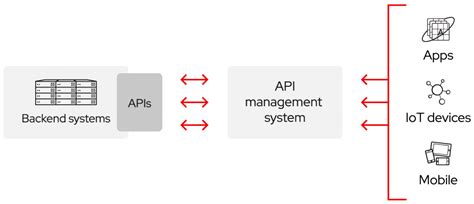
1. Overview
In modern web and mobile applications, secure authentication mechanisms are paramount for protecting sensitive data and ensuring authorized access to APIs. This guide provides a detailed walkthrough of generating tokens and making authenticated API interface calls using specific parameters and cryptographic methods.
2. Token Generation
2.1 Required Parameters
To generate a token, the following parameters are essential:
key: A unique identifier provided by the API service.timestamp: The current time, typically in Unix or ISO 8601 format, ensuring the token's validity period.sign: A signature that ensures the authenticity and integrity of the token request.
2.2 Signature Calculation
The sign parameter is crucial for securing the token generation process. It is calculated using the following steps:
- Parameter Ordering: The parameters must be arranged in a specific order:
key,secret, andtimestamp. - Concatenation: Combine the parameters into a single string using ampersands (
&) as separators. The format should be:key=&secret=×tamp= - MD5 Encryption: Apply the MD5 hashing algorithm to the concatenated string to produce a hash.
- Uppercase Conversion: Convert the resulting MD5 hash to uppercase, ensuring it is a 32-character hexadecimal string.
2.3 Example: Token Generation URL
Below is an example of generating a token using the ArcGIS REST API:
POST /webadaptor/sharing/rest/generateToken HTTP/1.1
Host: machine.domain.com
Content-Type: application/x-www-form-urlencoded
Content-Length: [length]

username=admin&password=test1234&client=referer&ip=&referer=https://myserver/mywebapp&expiration=60&f=json
In this example:
usernameandpasswordare used for authenticating the user.clientspecifies the client type, often used to indicate the source of the token request.refererindicates the source URL making the request, adding an extra layer of security.expirationdefines the token's validity period in minutes.f=jsonspecifies the response format.
2.4 Python Implementation Example
Here is a Python example demonstrating how to generate the sign parameter for token generation:
import hashlib
def generate_token_sign(key, secret, timestamp):
# Step 1: Concatenate parameters
sign_string = f"key={key}&secret={secret}×tamp={timestamp}"
# Step 2: MD5 Encryption
md5_hash = hashlib.md5(sign_string.encode()).hexdigest()
# Step 3: Convert to uppercase
sign = md5_hash.upper()
return sign
# Example usage
key = "your_api_key"
secret = "your_api_secret"
timestamp = "20231010T123456"
token_sign = generate_token_sign(key, secret, timestamp)
print(f"Generated Sign: {token_sign}")3. Calling the API Interface
3.1 Required Header Parameters
When making an authenticated API call, the following header parameters are required:
token: The token obtained from the token generation process.timestamp: The current timestamp, ensuring the request's freshness.sign: A signature that authenticates the API call.
3.2 Signature Calculation
The sign parameter for the API call is calculated as follows:
- Parameter Ordering: Arrange the parameters in the order of
timestamp,token, andurl. - Concatenation: Combine the parameters using ampersands (
&). The format should be:timestamp=&token=&url= - MD5 Encryption: Apply the MD5 hashing algorithm to the concatenated string to generate a hash.
- Uppercase Conversion: Convert the MD5 hash to uppercase, resulting in a 32-character hexadecimal string.
3.3 Example: API Interface Call
Below is an example of making an API call using the Getui API:
curl $BaseUrl/auth \
-X POST \
-H "Content-Type: application/json;charset=utf-8" \
-d '{"sign": "YOUR_SIGN", "timestamp": "YOUR_TIMESTAMP", "appkey": "YOUR_APPKEY"}'
In this example:
signauthenticates the request.timestampensures the request's validity period.appkeyidentifies the application making the request.
3.4 Python Implementation Example
Here is a Python example demonstrating how to generate the sign parameter for an API call:
import hashlib

def generate_api_sign(timestamp, token, url):
    # Step 1: Concatenate parameters
    sign_string = f"timestamp={timestamp}&token={token}&url={url}"

    # Step 2: MD5 Encryption
    md5_hash = hashlib.md5(sign_string.encode()).hexdigest()

    # Step 3: Convert to uppercase
    sign = md5_hash.upper()

    return sign

# Example usage
timestamp = "20231010T123456"
token = "your_generated_token"
url = "https://api.yourservice.com/endpoint"

api_sign = generate_api_sign(timestamp, token, url)
print(f"Generated API Sign: {api_sign}")
4. Security Considerations
4.1 Secure Management of Credentials
The key and secret are sensitive credentials. Proper management includes:
- Secure Storage: Store credentials in environment variables or secure vaults, avoiding hardcoding them into the application code.
- Access Control: Limit access to credentials to only those services or individuals that require them.
- Rotation: Regularly rotate credentials to minimize the risk of unauthorized access.
4.2 Use of HTTPS
Always use HTTPS for all API requests to ensure data encryption in transit. This protects tokens, signatures, and other sensitive data from being intercepted by malicious actors.
4.3 Error Handling
Implement robust error handling to manage scenarios such as:
- Encryption Failures: Detect and respond to failures in the MD5 hashing process.
- API Errors: Handle errors returned by the API, such as invalid signatures or expired tokens, gracefully without exposing sensitive information.
- Timeouts and Retries: Manage network issues by implementing retries and handling timeouts appropriately.
4.4 Timestamp Consistency
Ensure that the timestamp format is consistent across token generation and API calls. Common formats include Unix timestamps or ISO 8601. Inconsistencies can lead to signature mismatches and failed authentication.
4.5 Use of Strong Cryptographic Libraries
Leverage well-established cryptographic libraries to perform hashing and encryption. This ensures security and reduces vulnerabilities associated with custom or naive implementations. Examples include:
hashlibin Pythonjava.security.MessageDigestin Javacryptoin Node.js
Avoid using outdated or insecure algorithms. While MD5 is used in this guide, consider more secure alternatives like SHA-256 or HMAC-SHA256 for enhanced security.
5. Best Practices and Recommendations
5.1 Avoid Hardcoding Sensitive Information
Never hardcode key and secret values directly into your application code. Instead, use environment variables or dedicated secret management services.
5.2 Implement Token Expiration and Refresh Mechanisms
Tokens should have a defined expiration period to limit their validity. Implement mechanisms to refresh tokens automatically before they expire to maintain seamless access.
5.3 Monitor and Log API Activity
Maintain comprehensive logs of API requests and token generation activities. Monitoring these logs can help detect and respond to suspicious activities promptly.
5.4 Transition to More Secure Hashing Algorithms
While MD5 is utilized in this process, it's recommended to transition to more secure hashing algorithms like SHA-256 or HMAC-SHA256 to protect against collision and preimage attacks.
5.5 Validate All Inputs
Ensure that all input parameters are validated to prevent injection attacks and ensure the integrity of the data being processed.
6. Example Implementations
6.1 Python: Complete Implementation
The following Python script demonstrates the complete process of generating a token and making an API call:
import hashlib
import requests
import time

def generate_sign(parameters, order):
    concatenated = "&".join([f"{key}={parameters[key]}" for key in order])
    md5_hash = hashlib.md5(concatenated.encode()).hexdigest().upper()
    return md5_hash

def generate_token(key, secret):
    timestamp = str(int(time.time()))
    parameters = {
        "key": key,
        "secret": secret,
        "timestamp": timestamp
    }
    sign = generate_sign(parameters, ["key", "secret", "timestamp"])
    data = {
        "key": key,
        "timestamp": timestamp,
        "sign": sign
    }
    response = requests.post(
        "https://machine.domain.com/webadaptor/sharing/rest/generateToken",
        data=data
    )
    return response.json()

def call_api(token, url):
    timestamp = str(int(time.time()))
    parameters = {
        "timestamp": timestamp,
        "token": token,
        "url": url
    }
    sign = generate_sign(parameters, ["timestamp", "token", "url"])
    headers = {
        "token": token,
        "timestamp": timestamp,
        "sign": sign
    }
    response = requests.post(
        "https://api.getui.com/auth",
        headers=headers,
        json={"appkey": "your_app_key"}
    )
    return response.json()

# Example usage
key = "your_api_key"
secret = "your_api_secret"
token_response = generate_token(key, secret)
token = token_response.get("token")

api_response = call_api(token, "https://api.yourservice.com/endpoint")
print(api_response)
6.2 Java: Complete Implementation
The following Java code demonstrates the process of generating a token and making an API call:
import java.security.MessageDigest;
import java.security.NoSuchAlgorithmException;
import java.util.HashMap;
import java.util.Map;
import java.net.HttpURLConnection;
import java.net.URL;
import java.io.OutputStream;
import java.util.Scanner;
public class ApiClient {
public static String generateSign(Map parameters, String[] order) throws NoSuchAlgorithmException {
StringBuilder sb = new StringBuilder();
for(int i = 0; i < order.length; i++) {
sb.append(order[i]).append("=").append(parameters.get(order[i]));
if(i < order.length -1) {
sb.append("&");
}
}
String concatenated = sb.toString();
MessageDigest md = MessageDigest.getInstance("MD5");
byte[] digest = md.digest(concatenated.getBytes());
StringBuilder hexString = new StringBuilder();
for(byte b : digest){
String hex = Integer.toHexString(0xff & b);
if(hex.length()==1) hexString.append('0');
hexString.append(hex);
}
return hexString.toString().toUpperCase();
}
public static String generateToken(String key, String secret) throws Exception {
String timestamp = String.valueOf(System.currentTimeMillis() / 1000);
Map parameters = new HashMap<>();
parameters.put("key", key);
parameters.put("secret", secret);
parameters.put("timestamp", timestamp);
String sign = generateSign(parameters, new String[]{"key", "secret", "timestamp"});
String urlParameters = "key=" + key + "×tamp=" + timestamp + "&sign=" + sign;
URL url = new URL("https://machine.domain.com/webadaptor/sharing/rest/generateToken");
HttpURLConnection conn = (HttpURLConnection) url.openConnection();
conn.setDoOutput(true);
conn.setRequestMethod("POST");
conn.setRequestProperty("Content-Type", "application/x-www-form-urlencoded");
OutputStream os = conn.getOutputStream();
os.write(urlParameters.getBytes());
os.flush();
Scanner scanner = new Scanner(conn.getInputStream());
String response = "";
while(scanner.hasNext()) {
response += scanner.nextLine();
}
scanner.close();
return response;
}
public static String callApi(String token, String apiUrl) throws Exception {
String timestamp = String.valueOf(System.currentTimeMillis() / 1000);
Map parameters = new HashMap<>();
parameters.put("timestamp", timestamp);
parameters.put("token", token);
parameters.put("url", apiUrl);
String sign = generateSign(parameters, new String[]{"timestamp", "token", "url"});
String jsonInputString = "{\"sign\": \"" + sign + "\", \"timestamp\": \"" + timestamp + "\", \"appkey\": \"your_app_key\"}";
URL url = new URL("https://api.getui.com/auth");
HttpURLConnection conn = (HttpURLConnection) url.openConnection();
conn.setDoOutput(true);
conn.setRequestMethod("POST");
conn.setRequestProperty("Content-Type", "application/json;charset=utf-8");
OutputStream os = conn.getOutputStream();
os.write(jsonInputString.getBytes());
os.flush();
Scanner scanner = new Scanner(conn.getInputStream());
String response = "";
while(scanner.hasNext()) {
response += scanner.nextLine();
}
scanner.close();
return response;
}
public static void main(String[] args) throws Exception {
String key = "your_api_key";
String secret = "your_api_secret";
String tokenResponse = generateToken(key, secret);
System.out.println("Token Response: " + tokenResponse);
// Assuming token is extracted from tokenResponse
String token = "extracted_token";
String apiResponse = callApi(token, "https://api.yourservice.com/endpoint");
System.out.println("API Response: " + apiResponse);
}
}7. Additional Security Enhancements
7.1 Transition to HMAC-SHA256
While MD5 provides a basic level of security, it is susceptible to collision attacks. Transitioning to HMAC-SHA256 enhances the security of your signatures by providing stronger cryptographic guarantees.
Python Example:
import hmac
import hashlib

def generate_hmac_sha256_sign(parameters, order, secret):
    concatenated = "&".join([f"{key}={parameters[key]}" for key in order])
    signature = hmac.new(secret.encode(), concatenated.encode(), hashlib.sha256).hexdigest().upper()
    return signature

# Usage
parameters = {"key": "your_key", "secret": "your_secret", "timestamp": "20231010T123456"}
order = ["key", "secret", "timestamp"]
secret = "your_secret_key"

sign = generate_hmac_sha256_sign(parameters, order, secret)
print(f"HMAC-SHA256 Sign: {sign}")
7.2 Implement Rate Limiting
To protect against brute force attacks and ensure fair usage, implement rate limiting on your API endpoints. This controls the number of requests an individual or service can make within a specified timeframe.
7.3 Use OAuth 2.0 for Enhanced Security
Consider adopting OAuth 2.0, a robust authentication framework that provides granular access control and token management capabilities, enhancing the security of your API interactions.
8. Troubleshooting and Common Issues
8.1 Signature Mismatch
If you encounter a signature mismatch error:
- Verify the order of parameters during concatenation.
- Ensure that the same hashing algorithm is used consistently.
- Check for any discrepancies in parameter values, especially whitespace or encoding issues.
8.2 Token Expiration
If your token has expired:
- Generate a new token using the valid
keyandsecret. - Ensure that your application's system clock is synchronized to avoid premature expiration.
8.3 Network Errors
For network-related issues:
-
Check your internet connectivity.
-
Ensure that the API endpoints are reachable and not experiencing downtime.
-
Implement retry mechanisms with exponential backoff to handle transient network failures.
9. References and Additional Resources
10. Conclusion
Implementing secure token generation and authenticated API calls is essential for safeguarding your applications and data. By following the detailed steps outlined in this guide, adhering to best practices, and considering additional security enhancements, you can establish a robust authentication mechanism that protects against common vulnerabilities and ensures reliable API interactions.
Last updated January 7, 2025