
Unlock Peak Support Performance: Your Definitive Guide to Support Summary Reports
Discover how these vital reports transform support data into actionable strategies for unparalleled customer satisfaction and team efficiency.
Essential Insights at a Glance
- Strategic Decision-Making: Support summary reports provide a clear overview of performance, enabling data-driven decisions to optimize support operations and resource allocation.
- Performance Enhancement: By tracking key metrics like response times, resolution rates, and customer satisfaction, these reports help identify areas for improvement and boost team productivity.
- Proactive Issue Resolution: Analyzing trends in support requests and common issues allows for proactive problem-solving, ultimately enhancing the customer experience and reducing recurring problems.
Decoding the Support Summary Report: What Is It?
A Support Summary Report is a crucial analytical document or dashboard that provides a condensed, high-level overview of customer support activities, team performance, and key trends over a specific period. As of May 12, 2025, these reports are indispensable tools for businesses aiming to monitor and enhance their support services. They distill complex data from various support interactions—be it calls, emails, chat logs, or tickets—into an easily digestible format. The primary goal is to transform raw data into actionable insights, enabling managers, team leads, and stakeholders to assess the effectiveness of their support operations, identify recurring issues, and make informed decisions to improve overall customer satisfaction and operational efficiency.
These reports are not merely static compilations of figures; they can be dynamic dashboards offering real-time (or near real-time) visibility into support metrics. Whether generated daily, weekly, monthly, or quarterly, they serve as a vital communication tool, keeping everyone aligned on support performance, challenges, and successes.
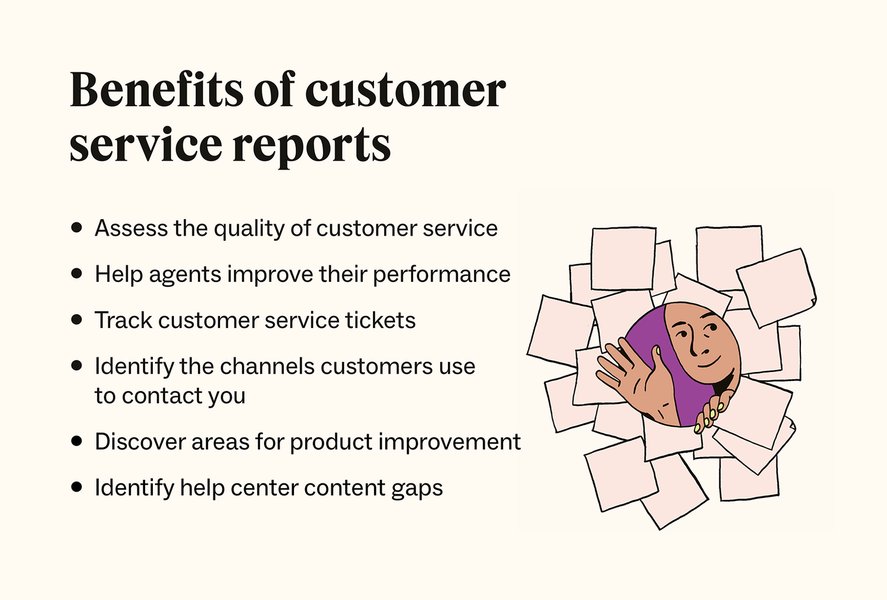
Visual representation of the benefits derived from customer service reports.
Why Are Support Summary Reports Indispensable?
The value of support summary reports extends across various facets of an organization, offering strategic advantages beyond just the support department.
Core Benefits
Enhanced Performance Monitoring
These reports enable consistent tracking of Key Performance Indicators (KPIs), helping evaluate team and individual performance against benchmarks and Service Level Agreements (SLAs).
Data-Driven Decision Making
Clear, quantifiable data empowers leadership to make strategic decisions on staffing, training, process adjustments, and technology, such as addressing high query volumes on a specific feature.
Improved Customer Experience (CX)
Analyzing issue categories and feedback (CSAT/NPS scores) allows proactive addressing of customer concerns, leading to higher satisfaction and loyalty.
Increased Accountability and Transparency
Regular reporting fosters accountability within the support team and provides transparency to other departments about support challenges and achievements.
Identification of Trends and Patterns
Reports reveal recurring issues, peak support times, and common queries, invaluable for product development, service improvements, and resource allocation.
Resource Optimization
Understanding workload distribution and peak demand helps managers optimize staffing and assignments for efficient resource use.
Anatomy of an Effective Support Summary Report: Key Components
A comprehensive support summary report is structured to provide a clear view of support operations. Key components generally include:
Essential Elements
- Report Objective and Period: States the report's purpose and timeframe (e.g., March 2025 performance).
- Executive Summary/Overview: A brief synopsis of main findings, trends, achievements, and challenges for stakeholders.
- Volume of Support Requests: Total incoming queries, breakdown by channel (email, phone, chat), and comparison with previous periods.
- Ticket Status and Resolution Metrics: New, resolved, open/pending, and escalated tickets; backlog size and aging.
- Key Performance Indicators (KPIs): Quantifiable performance metrics (detailed in the table below).
- Customer Satisfaction and Feedback: CSAT, NPS, CES scores; qualitative feedback summaries and satisfaction trends.
- Agent/Team Performance: Tickets per agent, Average Handle Time (AHT), First Contact Resolution (FCR), agent-specific CSAT, occupancy rates.
- Types and Categories of Support Issues: Breakdown by issue category, identification of frequent problems, and root cause analysis.
- Highlight of Critical Incidents: Details of major incidents, customer impact, and resolution steps.
- Security Status (if relevant): Summary of endpoint statuses, threat activities, licensing.
- Availability Summary (for IT/service monitoring): Uptime percentages, downtime details (duration, reasons).
- Recommendations and Next Steps: Actionable suggestions (training, process improvements) and planned initiatives.
- Visualizations: Charts and graphs for clear data presentation and trend identification.

Teams use support summary reports to drive discussions and strategic planning.
Key Performance Indicators (KPIs) in Support Summary Reports
Choosing the right KPIs is essential. These metrics provide quantifiable measures of performance. The table below outlines common and impactful KPIs:
| KPI Category | Metric | Description | Importance |
|---|---|---|---|
| Responsiveness | First Reply Time (FRT) | Average time for the initial response to a customer. | Impacts initial customer satisfaction. |
| Average Response Time (ART) | Average time for all responses during a ticket's lifecycle. | Reflects ongoing engagement speed. | |
| SLA Compliance for Response | Percentage of responses meeting time targets. | Measures adherence to promised service levels. | |
| Resolution Efficiency | Average Resolution Time (ART) / MTTR | Average time to completely resolve an issue. | Key indicator of overall support efficiency. |
| First Contact Resolution (FCR) | Percentage of issues resolved in the first interaction. | High FCR often means high CSAT and lower costs. | |
| SLA Compliance for Resolution | Percentage of resolutions meeting time targets. | Measures adherence to service levels for resolution. | |
| Workload & Capacity | Ticket Volume | Total support requests received, often by channel. | Helps in demand understanding and resource planning. |
| Ticket Backlog | Number of unresolved tickets, often by age. | Indicates if the team is keeping up with requests. | |
| Customer Experience | Customer Satisfaction (CSAT) Score | Measures customer satisfaction with an interaction or service. | Direct feedback on service quality. |
| Net Promoter Score (NPS) | Measures customer loyalty and willingness to recommend. | Broader indicator of customer perception. | |
| Customer Effort Score (CES) | Measures customer effort to get an issue resolved. | Lower effort often leads to higher loyalty. | |
| Agent Productivity | Tickets Handled per Agent | Number of tickets/interactions managed by an agent. | Indicates individual workload and efficiency. |
| Average Handle Time (AHT) | Average duration of a customer interaction (talk, hold, follow-up). | Measures agent efficiency in interactions. | |
| Service Availability | Uptime / Overall Availability | Percentage of time a service is operational (for IT support). | Crucial for continuous service availability. |
Visualizing Support Performance: KPI Impact Radar
A radar chart can effectively visualize the relative importance and current performance focus areas within support operations. This chart presents hypothetical ratings for various Key Performance Indicators (KPIs), reflecting their perceived impact on overall support success and customer satisfaction. A higher score suggests a greater focus or stronger performance in that area.
This radar chart illustrates a hypothetical comparison between current focus on key support metrics and desired target levels. For example, while 'Customer Satisfaction (CSAT)' might be high priority with strong performance, 'Knowledge Base Utilization' could be an area targeted for improvement, aiming to enhance self-service and reduce agent workload.
Crafting an Effective Support Summary Report
Creating an informative and actionable report involves these key steps:
- Define Purpose and Audience: Tailor content and detail to the report's goal and readers.
- Gather Accurate Data: Use reliable sources like helpdesk software, ensuring data consistency.
- Select Relevant KPIs: Choose metrics aligned with support goals, avoiding overload.
- Structure Logically: Organize clearly (e.g., summary, KPI analysis, issues, recommendations).
- Analyze and Interpret: Explain trends, patterns, and the practical meaning of data.
- Use Visualizations: Employ charts and graphs for clarity and to highlight trends.
- Provide Context: Compare with historical data or benchmarks.
- Include Qualitative Insights: Add customer comments or agent feedback for depth.
- Formulate Actionable Recommendations: Suggest specific, measurable, achievable, relevant, and time-bound (SMART) actions.
- Keep it Concise and Clear: Use straightforward language; proofread carefully.
- Regularity and Consistency: Establish a regular schedule and consistent format.
- Distribute and Discuss: Share with stakeholders and discuss findings and next steps.
Visualizing the Structure: Support Summary Report Mindmap
A mindmap effectively illustrates the interconnected components of a comprehensive support summary report, visualizing how different pieces of information contribute to the overall picture of support performance.
This mindmap provides a hierarchical view, starting from the central concept of the "Support Summary Report" and branching into its primary sections and sub-components, emphasizing the structured approach needed for comprehensive analysis.
Tools and Technologies for Reporting
Various tools aid in creating and managing support summary reports:
- Help Desk Software: Platforms like Zendesk, HubSpot Service Hub, and Freshdesk offer built-in reporting and analytics.
- Business Intelligence (BI) Tools: Microsoft Power BI, Tableau, and Google Looker Studio allow advanced data analysis and interactive dashboards.
- Spreadsheet Software: Microsoft Excel and Google Sheets are versatile for data collection, calculation, and basic charting.
- Specialized Reporting Tools: Geckoboard or Databox focus on real-time dashboard creation.
- Report Maker Tools: Venngage, Piktochart, or Canva provide templates for visually appealing reports.
This video demonstrates creating a summary report from an Excel table, a common method for many support teams.
The video "How to Create a Summary Report from an Excel Table" offers practical guidance for teams using spreadsheets. While many organizations use dedicated helpdesk or BI tools, understanding spreadsheet-based summarization is beneficial, especially for smaller teams or custom reports.
Frequently Asked Questions (FAQ)
What is the primary purpose of a support summary report? ▼
Its primary purpose is to offer a concise overview of support team activities and performance, helping stakeholders understand trends, assess efficiency, identify areas for improvement, and make data-driven decisions to boost customer satisfaction and operational effectiveness.
How often should support summary reports be generated? ▼
Frequency depends on business needs: daily for operational oversight, weekly for team leads, and monthly/quarterly for strategic reviews. Real-time dashboards are also common for continuous monitoring.
What are some common pitfalls to avoid when creating these reports? ▼
Common pitfalls include: including too much data ("data dumping"); focusing only on negatives; presenting data without analysis or recommendations; inconsistent data; poor visual presentation; and not tailoring the report to its audience.
How can a support summary report directly improve customer satisfaction? ▼
By tracking metrics like CSAT, FRT, and Resolution Time, teams identify areas short of customer expectations. Analyzing common issues helps address root causes. Report-driven recommendations can lead to process improvements, better agent training, or enhanced self-service options, all improving customer experience.
Recommended Further Exploration
To delve deeper into optimizing your support operations and reporting, consider exploring these related queries:
- How to implement effective Key Performance Indicators for a customer support team?
- What are the best practices for analyzing customer feedback to improve service quality?
- How can Business Intelligence tools be leveraged for advanced support analytics?
- Strategies for reducing Average Handle Time without compromising support quality?
References
Last updated May 12, 2025