
Comprehensive Guide to Analyzing On-Chip Variation (OCV) in PrimeTime Timing Reports
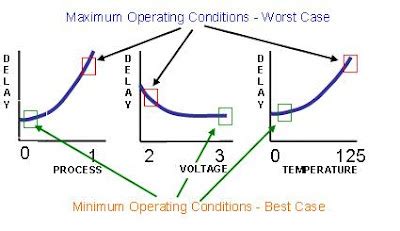
Understanding On-Chip Variation (OCV)
On-Chip Variation (OCV) is a critical factor in the design and verification of integrated circuits. It accounts for the inherent variations in manufacturing processes that can affect the performance and reliability of a chip. These variations can arise from differences in transistor characteristics, interconnect delays, and environmental factors such as voltage and temperature.
Identifying OCV in PrimeTime Timing Reports
PrimeTime, Synopsys's premier timing analysis tool, incorporates OCV into its timing reports through various columns and parameters. Unlike some metrics that are presented as a single value, OCV effects are distributed across multiple columns and sections within the report. Understanding these representations is essential for accurate timing analysis and optimization.
Key Columns Indicating OCV
- OCV Impact Columns: These columns explicitly denote the impact of OCV on specific aspects of the timing path. Common columns include:
OCVCELLDDELAY: Represents the variation in cell delays due to OCV.OCVNETDELAY: Indicates the variation in interconnect or wire delays caused by OCV.LIBRARYSETUP/HOLDOCV: Denotes variations in setup and hold times attributable to OCV.
- Delay Corners: These columns provide timing data under different process corners, reflecting OCV effects through variations in:
- Process Variations: Columns labeled as "max" or "min" indicating worst-case and best-case scenarios.
- Operational Conditions: Variations like "slow-slow-slow" or "fast-fast-fast" that represent different process, voltage, and temperature (PVT) combinations.
- Slack Columns: While not exclusively representing OCV, slack values are influenced by OCV and are crucial indicators:
- Setup Slack: Positive slack indicates timing margins, whereas negative slack reveals timing violations exacerbated by OCV.
- Hold Slack: Similar to setup slack, it shows the margin or violation concerning hold timing requirements.
Corner-Based Analysis
PrimeTime performs timing analysis across various corners to simulate the impact of OCV. These corners typically include:
- cbest: Represents the best-case scenario with optimal process, voltage, and temperature conditions.
- cworst: Denotes the worst-case scenario with the least favorable process, voltage, and temperature conditions.
- typical: Reflects average conditions, providing a balanced view of timing performance.
By comparing results across these corners, designers can assess the robustness of their designs against OCV-induced variations.
Step-by-Step Analysis of OCV in PrimeTime Reports
1. Identify Critical Paths
Start by locating the critical timing paths in your design. These are the paths with the tightest timing margins and are most susceptible to OCV impacts. PrimeTime typically highlights these paths with indicators such as negative slack or minimal positive slack.
2. Examine Delay Columns
Review the delay columns associated with each timing path. Pay special attention to the following:
- OCVCELLDDELAY: Analyze how cell delay variations affect the overall path delay.
- OCVNETDELAY: Assess the impact of interconnect variations on signal propagation delays.
- LIBRARYSETUP/HOLDOCV: Evaluate how setup and hold time requirements are influenced by OCV.
3. Assess Slack Values
Slack values provide a direct measure of timing margins. To understand the effect of OCV:
- Setup Slack: Determine if OCV has reduced the slack to a point where timing violations occur.
- Hold Slack: Check if hold requirements are still met under OCV-induced variations.
Negative slack values are critical indicators of potential timing failures caused by OCV.
4. Analyze Delay Corners
Compare timing results across different delay corners:
- Best-Case (cbest): Ensures that under optimal conditions, the design meets timing requirements.
- Worst-Case (cworst): Verifies that even under adverse conditions, the design maintains functionality.
- Typical: Provides an average expectation, balancing between best and worst scenarios.
This comparative analysis helps in identifying the susceptibility of the design to OCV.
5. Utilize Statistical Timing Analysis (STA)
If available, leverage Statistical Timing Analysis (STA) results to gain deeper insights into OCV effects. STA provides probabilistic measures of timing, offering metrics such as:
- Slack Distribution: Shows the range and frequency of slack values across different scenarios.
- Percentile Violations: Indicates the percentage of paths that violate timing requirements under OCV.
These metrics help in understanding the likelihood and extent of timing failures due to OCV.
6. Review PrimeTime Settings and OCV Models
The accuracy of OCV representation in timing reports depends on the configured models and parameters. Ensure that:
- OCV Models: Verify that the correct OCV models are applied, reflecting realistic manufacturing variations.
- Analysis Parameters: Check the settings in your PrimeTime scripts or settings files to confirm appropriate consideration of voltage, temperature, and process variations.
Adjusting these settings can enhance the precision of your OCV analysis.
7. Advanced Techniques for OCV Analysis
For a more granular understanding of OCV impacts, consider the following advanced techniques:
-
Path-Specific Analysis: Isolate and analyze specific timing paths to identify how OCV affects them individually.
-
Post-Processing Tools: Utilize additional tools for visualizing and processing timing data, enabling more effective debugging and optimization.
-
Visualization Features: Take advantage of PrimeTime's built-in visualization capabilities to quickly spot and address timing issues.
Interpreting OCV-Related Columns in PrimeTime Reports
OCVCELLDDELAY and OCVNETDELAY
OCVCELLDDELAY and OCVNETDELAY are specialized columns that quantify the delay variations at the cell and net levels, respectively. These columns help in pinpointing whether the delays are primarily due to transistor variations or interconnect issues.
LIBRARYSETUP/HOLDOCV
These columns reflect how setup and hold times are affected by OCV. Variations in these timings can lead to setup and hold violations, which are critical for ensuring data integrity and proper circuit operation.
Slack Columns
Slack values are indirect indicators of OCV impacts. By analyzing both setup and hold slack, designers can assess whether OCV-induced variations are pushing timing margins toward violations.
Best Practices for OCV Analysis in PrimeTime
1. Comprehensive Documentation Review
Familiarize yourself with the latest Synopsys PrimeTime User Guide. This documentation provides in-depth explanations of timing report structures, OCV modeling techniques, and analysis methodologies.
2. Consistent Corner Definitions
Ensure that your corner definitions are consistent across all analyses. Misaligned corner definitions can lead to inaccurate assessments of OCV impacts.
3. Utilize Automation Scripts
Leverage automation scripts to consistently apply OCV models and extract relevant data from timing reports. This reduces the potential for human error and enhances the reproducibility of your analysis.
4. Regularly Update OCV Models
Stay updated with the latest OCV models provided by your foundry or vendor. Updated models reflect the most recent manufacturing variations and environmental conditions, ensuring that your analysis remains accurate.
5. Cross-Verify with Physical Measurements
When possible, validate your timing analysis results with physical measurements from fabricated chips. This real-world data can help in refining your OCV models and improving the accuracy of your PrimeTime reports.
Resources for Further Learning
- Synopsys PrimeTime User Guide: Comprehensive documentation covering all aspects of PrimeTime, including OCV analysis.
- PrimeTime on Synopsys Website: Access to additional resources, updates, and support.
- Digital Design and Timing Analysis by J. Bhasker: A foundational text offering insights into timing analysis and OCV considerations.
- Synopsys Support Portal: For personalized assistance, troubleshooting, and advanced guidance on PrimeTime usage.
Conclusion
Analyzing On-Chip Variation in PrimeTime timing reports is a multifaceted process that requires a thorough understanding of various report columns and their implications. By systematically identifying critical paths, evaluating delay and slack values, and leveraging corner-based analyses, designers can effectively assess and mitigate the impacts of OCV on their designs. Utilizing comprehensive documentation and adopting best practices further enhances the accuracy and reliability of the timing analysis, ensuring robust and high-performance integrated circuits.
Last updated January 7, 2025