
Unlock Seamless User Access: Crafting Your Own Authentication Hook
A practical guide to building reusable authentication logic, focusing on a custom React hook example.
Handling user authentication is a cornerstone of modern web development. An "authentication hook" provides a structured and reusable way to manage user login, logout, session persistence, and access control within your application. While the term can apply in various contexts, this guide focuses on creating a powerful custom authentication hook in React, while also touching upon other implementations.
Essential Insights
- Centralized Logic: Authentication hooks, especially custom React hooks like
useAuth, centralize user session management, making your code cleaner and easier to maintain. - Context Matters: The implementation of an authentication hook varies significantly depending on the framework (React, Vue, Angular), backend language (Python, Node.js), or specific platform (Auth0, Clerk, OneLogin, Plesk).
- Beyond React: Hooks aren't limited to frontend JavaScript; Python libraries (like
requests,falcon) and platforms use hook mechanisms to intercept and customize authentication flows, often integrating with external systems like LDAP or APIs.
Understanding Authentication Hooks
What Are They and Why Use Them?
At its core, an authentication hook is a point within an application's lifecycle where you can inject custom logic related to verifying a user's identity and permissions. Think of it as a designated checkpoint in the authentication process.
These hooks allow developers to:
- Validate credentials against a database or external service (like LDAP or an OAuth provider).
- Manage user sessions and tokens (e.g., JWT).
- Implement specific security policies (like multi-factor authentication (MFA) checks or password expiry enforcement).
- Fetch user profile information upon successful login.
- Control access to specific parts of an application based on authentication status or user roles.
- Separate authentication concerns from component logic, improving code organization and reusability.
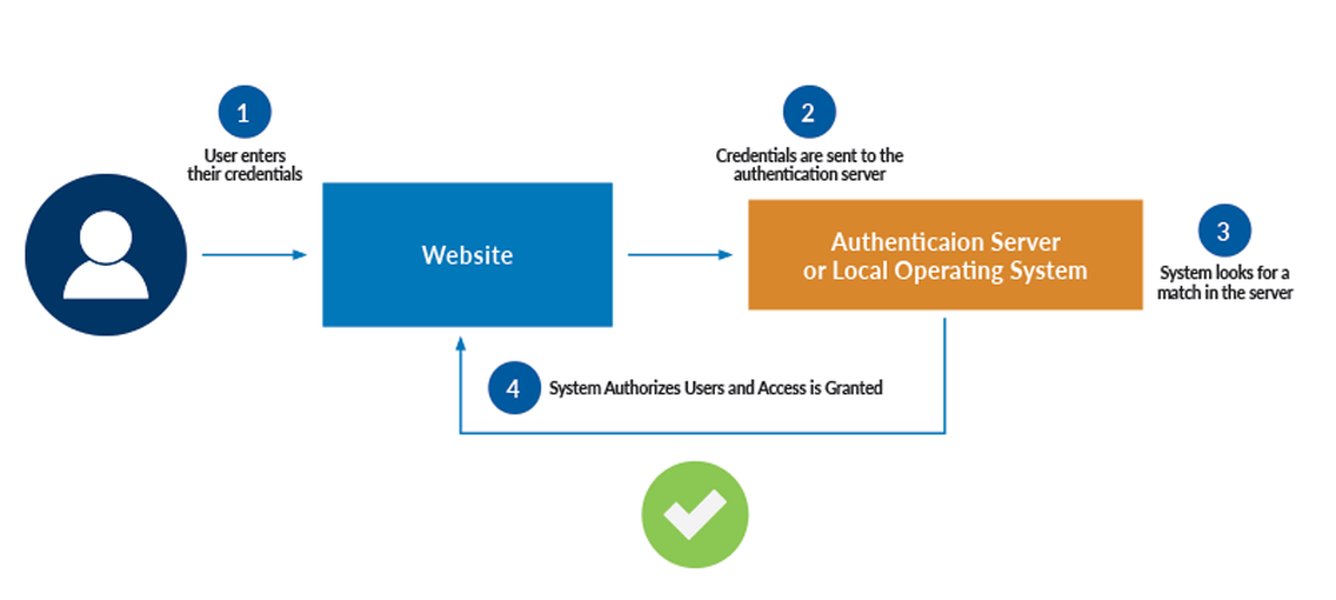
A typical user authentication process flow, often managed via hooks.
Building a Custom React Authentication Hook (`useAuth`)
A Step-by-Step Implementation
React's hook system provides an elegant way to manage state and side effects in functional components. A custom `useAuth` hook encapsulates all authentication-related logic, making it easy to consume across your application. This example combines state management, context API for global access, local storage for persistence, and simulated API calls.
1. Setting Up the Authentication Context
We'll use React's Context API to provide the authentication state and functions to any component within the `AuthProvider` tree.
// src/contexts/AuthContext.js
import React, { createContext, useState, useEffect, useContext } from 'react';

// Create the context
const AuthContext = createContext(null);

// Helper function to simulate token validation
function isValidToken(token) {
  // In a real app: verify token signature, check expiration, etc.
  // Here, we just check if it's a non-empty string for demonstration.
  return token && typeof token === 'string' && token.length > 10;
}

// Create the provider component
export function AuthProvider({ children }) {
  const [user, setUser] = useState(null); // Holds user info { id, username, email, etc. }
  const [token, setToken] = useState(localStorage.getItem('authToken'));
  const [loading, setLoading] = useState(true); // For initial auth check
  const [authError, setAuthError] = useState(null); // To store login/signup errors

  // Effect to check authentication status on initial load
  useEffect(() => {
    const storedToken = localStorage.getItem('authToken');
    if (storedToken && isValidToken(storedToken)) {
      // Simulate fetching user data based on the token
      // In a real app, you'd make an API call here, e.g., /api/me
      try {
        const storedUser = JSON.parse(localStorage.getItem('user'));
        if (storedUser) {
          setUser(storedUser);
          setToken(storedToken);
        } else {
          // If user data is missing but token exists, clear token
          logout(); // Or try fetching user data from backend
        }
      } catch (error) {
        console.error("Failed to parse user data from localStorage", error);
        logout(); // Clear invalid state
      }
    }
    setLoading(false);
  }, []);

  // Login function (simulated API call)
  const login = async (credentials) => {
    setLoading(true);
    setAuthError(null);
    // Simulate API call delay
    await new Promise(resolve => setTimeout(resolve, 1000));

    // *** Replace with actual API call ***
    // Example: const response = await fetch('/api/login', { method: 'POST', body: JSON.stringify(credentials) });
    // if (!response.ok) throw new Error('Login failed');
    // const data = await response.json(); // Expects { user: {...}, token: '...' }

    // --- Simulation Start ---
    if (credentials.username && credentials.password) {
      const fakeToken = 'fake-jwt-token-' + Date.now();
      const userInfo = { id: '123', username: credentials.username, email: `${credentials.username}@example.com` };
      // --- Simulation End ---

      localStorage.setItem('authToken', fakeToken);
      localStorage.setItem('user', JSON.stringify(userInfo));
      setToken(fakeToken);
      setUser(userInfo);
      setLoading(false);
      return userInfo; // Indicate success
    } else {
      const error = new Error('Invalid credentials provided.');
      setAuthError(error.message);
      setLoading(false);
      throw error; // Propagate error
    }
  };

  // Logout function
  const logout = () => {
    localStorage.removeItem('authToken');
    localStorage.removeItem('user');
    setUser(null);
    setToken(null);
    // Optionally: redirect to login page or clear other app state
  };

  // Value provided to consuming components
  const value = {
    user,
    token,
    isAuthenticated: !!user, // Boolean flag for convenience
    loading,
    authError,
    login,
    logout,
    // Add signup function similarly if needed
  };

  return (
    <AuthContext.Provider value={value}>
      {!loading && children} {/* Render children only after initial load check */}
    </AuthContext.Provider>
  );
}

// Create the custom hook
export function useAuth() {
  const context = useContext(AuthContext);
  if (context === undefined) {
    throw new Error('useAuth must be used within an AuthProvider');
  }
  return context;
}
2. Wrapping Your Application with the Provider
Wrap your main application component (or the relevant part of your component tree) with `AuthProvider` so that components can access the authentication context.
// src/App.js (or index.js)
import React from 'react';
import { AuthProvider } from './contexts/AuthContext';
import YourAppComponent from './YourAppComponent'; // Your actual app component

function App() {
  return (
    <AuthProvider>
      <YourAppComponent />
    </AuthProvider>
  );
}

export default App;
3. Using the `useAuth` Hook in Components
Now, any component within the `AuthProvider` can easily access authentication state and methods using the `useAuth` hook.
// src/components/LoginPage.js
import React, { useState } from 'react';
import { useAuth } from '../contexts/AuthContext';

function LoginPage() {
  const { login, loading, authError, isAuthenticated, user } = useAuth();
  const [username, setUsername] = useState('');
  const [password, setPassword] = useState('');

  const handleSubmit = async (event) => {
    event.preventDefault();
    try {
      await login({ username, password });
      // Redirect or update UI upon successful login
      console.log('Login successful!');
    } catch (error) {
      console.error('Login failed:', error.message);
      // Error is already set in authError state by the hook
    }
  };

  if (isAuthenticated) {
    return <div>Welcome back, {user?.username}! You are already logged in.</div>;
  }

  return (
    <form onSubmit={handleSubmit}>
      <h3>Login</h3>
      <div>
        <label htmlFor="username">Username:</label>
        <input
          id="username"
          type="text"
          value={username}
          onChange={(e) => setUsername(e.target.value)}
          required
        />
      </div>
      <div>
        <label htmlFor="password">Password:</label>
        <input
          id="password"
          type="password"
          value={password}
          onChange={(e) => setPassword(e.target.value)}
          required
        />
      </div>
      {authError && <p style={{ color: 'red' }}>{authError}</p>}
      <button type="submit" disabled={loading}>
        {loading ? 'Logging in...' : 'Login'}
      </button>
    </form>
  );
}

export default LoginPage;
4. Protecting Routes
You can create a wrapper component to protect routes that require authentication.
// src/components/ProtectedRoute.js
import React from 'react';
import { useAuth } from '../contexts/AuthContext';
import { Navigate, Outlet } from 'react-router-dom'; // Assuming react-router-dom

function ProtectedRoute() {
  const { isAuthenticated, loading } = useAuth();

  if (loading) {
    return <div>Loading authentication status...</div>; // Or a spinner
  }

  return isAuthenticated ? <Outlet /> : <Navigate to="/login" replace />;
}

export default ProtectedRoute;

// Usage in your router setup:
// <Route element={<ProtectedRoute />}>
//   <Route path="/dashboard" element={<Dashboard />} />
//   <Route path="/profile" element={<Profile />} />
// </Route>
Visualizing the `useAuth` Hook Structure
Understanding the Components
This mind map illustrates the key parts of the custom `useAuth` hook and its provider, showing how state, effects, and functions interact within the context.
- Read token/user from `localStorage`
- Validate token (optional API call)
- Set initial `user` state
- Set `loading` to false"] id3["Core Functions"] id3a["`login(credentials)`:
- Set `loading` true
- Call API (simulated)
- On success: save token/user, update state
- On failure: set `authError`"] id3b["`logout()`:
- Clear token/user from state & `localStorage`"] id3c["`signup(credentials)`: (Optional)
- Similar flow to login"] id4["Context API (`createContext`, `useContext`)"] id4a["`AuthContext`: Holds the shared state & functions"] id4b["`AuthProvider`: Wraps app, provides context value"] id4c["`useAuth()`: Hook to consume context in components"] id5["Persistence"] id5a["`localStorage`:
- Store `authToken`
- Store `user` object (JSON stringified)"] id6["Exports & Consumption"] id6a["Provider exported for wrapping the app"] id6b["Hook exported for use in components"] id6c["Consumed State:
`user`, `isAuthenticated`, `loading`, `authError`"] id6d["Consumed Functions:
`login`, `logout`"]
Evaluating the Custom React Hook
Feature Comparison
This radar chart provides an opinionated evaluation of the custom React `useAuth` hook presented above across several key development aspects. Scores are relative and based on the simplicity of the example; real-world implementations would vary.
Note: The 'Security' score for the base example is moderate because it uses `localStorage` (vulnerable to XSS) and simulates API calls. A production-ready hook would need enhancements like HttpOnly cookies or secure storage, robust token validation, and real API integration.
Beyond React: Other Authentication Hook Contexts
A Broader Perspective
While the React `useAuth` hook is a common and powerful pattern, "authentication hooks" exist in many other environments:
Backend Frameworks (Python Example)
- Python Requests Library: Allows passing a callable function to the `auth` parameter of requests, enabling custom authentication logic (e.g., custom token handling) before an HTTP request is sent.
- Python Falcon Framework: Supports hooks that run before or after API endpoint responders, suitable for implementing authentication and authorization checks for specific routes.
Platform-Specific Hooks
- Plesk Onyx: Provides an `pm_Hook_Auth` class that can be extended to check credentials against external systems like LDAP.
- OneLogin Smart Hooks: Serverless functions (JavaScript) triggered at specific points in the login flow. A "Pre-Authentication Hook" can enforce policies like MFA or password expiry before authentication completes.
- MQTT.Cool: Uses hooks to delegate authentication and authorization checks (e.g., validating connection tokens) to external services.
Authentication Libraries & Services
- Auth0, Clerk, Supabase Auth: These services often provide their own specialized hooks (like Clerk's `useAuth()` or Auth0's `useAuth0()`) designed to integrate seamlessly with their platforms within frontend frameworks like React, Vue, or Angular. They handle much of the complexity of token management, social logins, and security best practices.
Webhooks (Related Concept)
While not strictly authentication *hooks* for user login flows, webhooks often require authentication. They are HTTP callbacks triggered by events, and securing the endpoint that receives the webhook often involves validating a signature or token included in the request header or payload to ensure the sender is legitimate.
Comparing Hook Types
The following table summarizes the key differences between various types of authentication hooks:
| Hook Type | Context | Primary Use Case | Customizability | Typical Complexity |
|---|---|---|---|---|
| Custom React Hook (`useAuth`) | Frontend (React) | Manage UI state, handle login/logout, persistence, component access | High (fully custom logic) | Moderate |
| Library Hook (e.g., Clerk `useAuth`) | Frontend (React, Vue, etc.) | Integrate with specific Auth-as-a-Service platform features | Moderate (uses library's capabilities) | Low to Moderate |
| Backend Framework Hook (e.g., Falcon) | Backend API/Web Server | Protect API endpoints, integrate server-side auth logic | High | Moderate to High |
| HTTP Client Hook (e.g., Python Requests) | Client-side HTTP Requests | Add authentication credentials/logic to outgoing requests | High (within request scope) | Low to Moderate |
| Platform Hook (e.g., OneLogin) | Specific SaaS Platform / IDP | Customize platform's built-in authentication flow (e.g., pre-auth checks) | Moderate to High (within platform constraints) | Moderate to High |
Practical Integration Example
Auth Hooks with PocketBase & React Query
This video demonstrates building a full-stack React application using PocketBase, showcasing how authentication hooks can be integrated, particularly with data-fetching libraries like `react-query`. It provides a concrete example of connecting frontend hooks to a backend authentication system, illustrating concepts similar to those discussed in our custom `useAuth` hook but with a specific backend service.
Best Practices and Enhancements
Making Your Hook Production-Ready
The example `useAuth` hook is a great starting point. For production applications, consider these improvements:
- Secure Token Storage: Replace `localStorage` with HttpOnly cookies (set by the backend) or more secure browser storage mechanisms if appropriate for your threat model. `localStorage` is vulnerable to Cross-Site Scripting (XSS) attacks.
- Real API Integration: Replace simulated API calls with actual `fetch` or `axios` requests to your backend authentication endpoints.
- Token Refresh Mechanism: Implement logic to handle token expiration and automatically refresh tokens using a refresh token, providing a seamless user experience.
- Robust Error Handling: Provide more specific error messages based on API responses (e.g., "User not found," "Incorrect password").
- User Roles and Permissions: Extend the user object to include roles or permissions, and add functions or checks within the hook to verify authorization for specific actions or routes.
- Third-Party OAuth: Integrate login flows for providers like Google, GitHub, Facebook, etc.
- Typing: If using TypeScript, add explicit types for state, props, and function signatures.
- Caching: For hooks interacting with external systems (like platform or backend hooks), consider caching responses (e.g., authorization details) to improve performance, as suggested by the MQTT.Cool example.
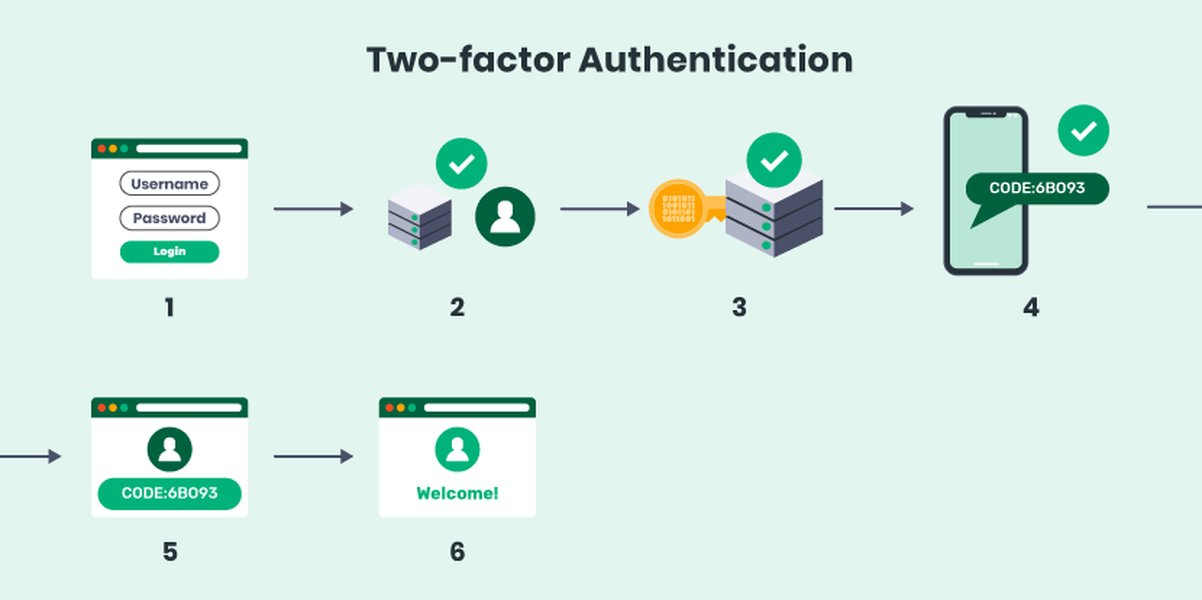
Consider enhancing security with mechanisms like Two-Factor Authentication (2FA).
Frequently Asked Questions (FAQ)
What's the difference between an authentication hook and using an authentication library like Auth0 or Clerk?
A custom authentication hook (like the `useAuth` example) gives you full control over the implementation details, state management, and integration with your specific backend. Libraries like Auth0 or Clerk provide pre-built solutions (often including their own hooks like `useAuth0` or `useAuth()`) that handle many complexities like token management, social logins, MFA, security best practices, and backend infrastructure. Using a library is generally faster and potentially more secure if implemented correctly, but offers less fine-grained control than building your own hook.
Is `localStorage` safe for storing authentication tokens?
Storing tokens (like JWTs) in `localStorage` is common but generally considered less secure due to its susceptibility to Cross-Site Scripting (XSS) attacks. If malicious JavaScript runs on your site, it can access and steal tokens from `localStorage`. A more secure approach is often to use HttpOnly cookies, which are inaccessible to JavaScript, mitigating this specific risk. The best storage method depends on your application's specific security requirements and architecture.
Can I use this React `useAuth` hook with Next.js or Remix?
Yes, the core concepts of the custom `useAuth` hook and `AuthProvider` using React Context are applicable in frameworks like Next.js and Remix. However, these frameworks have their own conventions for data fetching, server-side rendering (SSR), and session management (e.g., server components in Next.js, loaders/actions in Remix). You might need to adapt the hook to integrate properly with these features, especially regarding how authentication state is initialized on the server and hydrated on the client, and how API calls are made (e.g., using server actions or API routes).
What is the difference between Authentication and Authorization?
Authentication is the process of verifying who a user is (e.g., checking username/password or validating a token). Authorization is the process of determining what an authenticated user is allowed to do (e.g., checking if a user has 'admin' rights to access a specific page or perform an action). Authentication hooks often handle the first part, verifying identity, but they can also be extended or used in conjunction with other mechanisms to manage authorization based on user roles or permissions retrieved during authentication.
Recommended Next Steps
- How can I securely store JWT tokens in a frontend application?
- How do I implement token refresh logic within a React useAuth hook?
- What are the pros and cons of using a custom authentication hook versus a service like Clerk or Auth0?
- How can role-based access control be implemented in a React application?
References
Last updated May 5, 2025