
Using Helm Charts for Docker Image Deployment
Exploring how Helm charts relate to Docker container deployment without Kubernetes
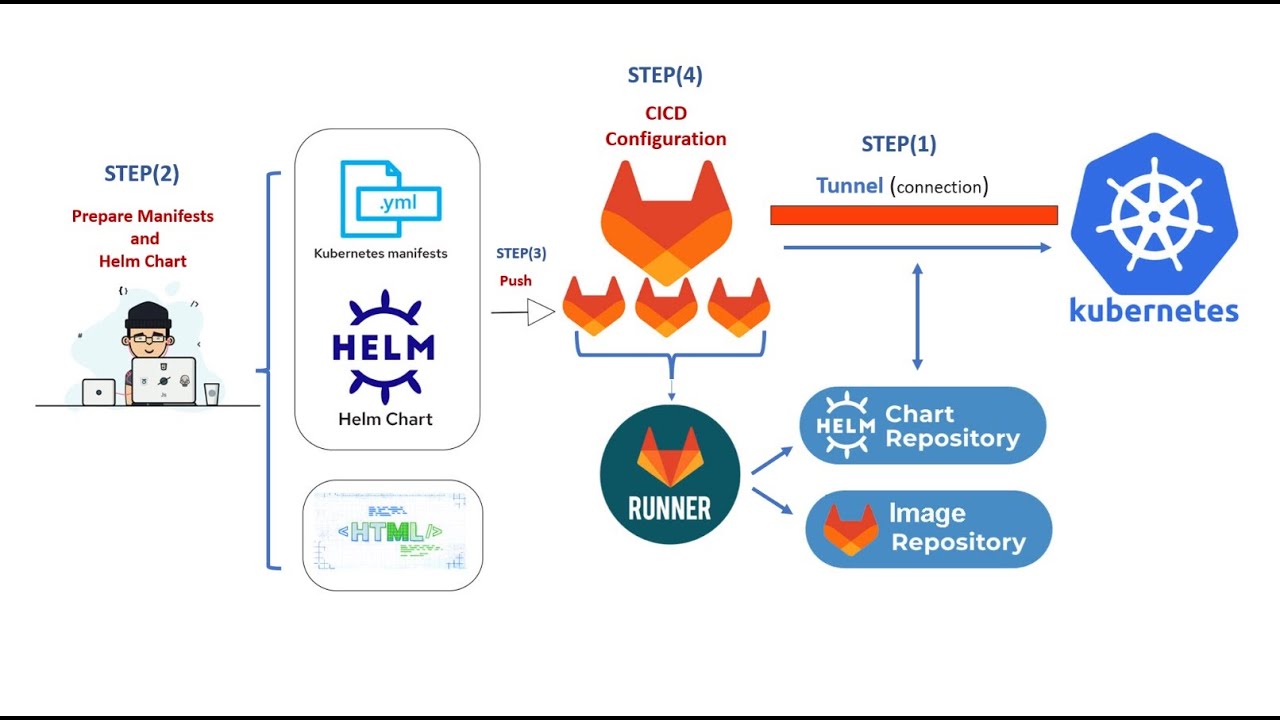
Key Insights
- Designed for Kubernetes: Helm charts are primarily created to package and deploy complex applications on Kubernetes clusters.
- Deployment Challenges: Deploying Docker containers directly without Kubernetes using Helm involves significant workarounds and adaptations.
- Alternative Tools: For non-Kubernetes environments, dedicated tools like Docker Compose or Docker CLI offer more straightforward container management.
Understanding Helm Charts and Their Purpose
Helm charts serve as the package manager for Kubernetes applications. They are collections of pre-configured Kubernetes resources that simplify the processes of defining, installing, and upgrading deployments within a Kubernetes cluster. When you create a Helm chart, you typically define a set of YAML templates that represent Kubernetes objects such as deployments, services, ingress rules, and more. These templates are enhanced by Helm’s templating syntax, which allows developers to parameterize various configurations.
Although Helm charts are built around Kubernetes, they inherently rely on the concept of Docker images because Kubernetes deploys applications in containers. In most use cases involving Kubernetes, the charts include references to Docker images, which are pulled from container registries and run within Kubernetes-managed pods. This design means that while you technically reference Docker images, the deployment and management process remains tightly coupled with Kubernetes resources.
Deploying Docker Images with Helm Charts
Helm’s Role in Deploying Docker Images
In a Kubernetes environment, Helm charts streamline the deployment process by managing and templating configurations. Here’s how they normally work:
Templating and Configuration Management
Helm charts use templates that allow you to inject variables and customize deployments across multiple environments easily. The values.yaml file within a Helm chart plays a crucial role by holding default configuration values which can be overridden at deployment time. In the context of Docker images, this file typically specifies the image repository, name, and tag:
# Example values.yaml snippet for an application
image:
  repository: mydockerhubuser/myapp
  tag: latest
  pullPolicy: IfNotPresent
During deployment, Helm uses this configuration to generate Kubernetes deployment objects that reference and run the specified Docker image.
Running Helm in a Kubernetes-Managed Environment
In production, you would typically use Helm to manage your Kubernetes deployments by issuing commands such as helm install or helm upgrade, which in turn manage the full lifecycle of your applications—from deployment to updates and rollbacks. This process utilizes Kubernetes's orchestration abilities, relying on Docker images as the core of the container workload.
Adapting Helm for Non-Kubernetes Docker Deployments
The original question explores whether it is possible to utilize Helm charts to deploy Docker images as containers in scenarios where Kubernetes is not in play. The straightforward answer is that Helm is not naturally designed to manage or control standalone Docker container environments. Helm's operational framework relies on Kubernetes API objects, which do not exist in a pure Docker environment.
However, there are several creative workarounds:
Generating Configuration Templates
One potential solution is to use Helm’s templating capabilities to generate configuration files that could be repurposed for Docker Compose or other Docker-specific deployment scripts. This process involves using Helm to generate the Kubernetes manifests and then manually converting them to Docker Compose configurations. Although this approach leverages Helm’s powerful templating system, it requires a significant amount of manual intervention and custom scripting.
Custom Scripting and Automation
Another strategy is to write custom scripts that mimic the functionality of Helm deployments. These scripts could potentially extract and use configuration data from Helm charts to deploy Docker containers using Docker CLI commands. Such scripts bridge the gap between the Helm chart’s configurations and the expected commands for Docker, but they do not represent a native or streamlined integration.
Using Local Kubernetes Setups
Alternatively, in environments where a Kubernetes cluster is not feasible for production but desired for its orchestration convenience, you might consider using lightweight Kubernetes distributions such as Minikube or Kind (Kubernetes in Docker). Although these still employ Kubernetes, they allow you to run a minimal local cluster. Helm charts function normally in these clusters, indirectly providing a means to deploy Docker images with minimal overhead.
Deployment Challenges and Considerations
Complexity and Overhead
The foremost challenge in using Helm charts for non-Kubernetes Docker deployments is the inherent complexity and overhead that come with Helm’s design. These charts encapsulate the entire lifecycle of an application within a Kubernetes context. When you try to decouple the Helm templates from Kubernetes, you end up with a configuration that is over-engineered for use in a straightforward Docker setup.
Helm expects to interact with Kubernetes APIs, which include objects like Deployments, StatefulSets, and Services. Without these Kubernetes abstractions, many of the templated features lose context and purpose. Thus, while it is technically possible to repurpose Helm’s templating mechanism, it is not the most efficient or straightforward solution.
Maintaining Portability and Consistency
A core advantage of using Helm within Kubernetes is the portability and consistency it enforces across multiple clusters and environments. This is achieved by abstracting configuration complexities and deploying standardized templates. When moving outside of Kubernetes, you lose that inherent consistency. Maintaining a deployment process that uses Helm for templating but Docker for runtime management can result in disjointed operations and increased maintenance overhead.
Additionally, any custom automation that bridges the gap between Helm’s outputs and Docker’s expected inputs may require frequent updates as either Docker or Helm evolves.
Alternatives to Helm for Docker Deployments
For scenarios where Kubernetes orchestration is not needed, there are several alternative approaches that are more in line with Docker's native management capabilities.
Docker CLI
Using standard Docker commands is the most direct method for deploying Docker images as containers. With commands like:
# Pull and run a Docker container
docker pull mydockerhubuser/myapp:latest
docker run -d --name myapp_container -p 8080:80 mydockerhubuser/myapp:latest
you can straightforwardly manage container lifecycles without the need for the additional abstractions that Helm provides.
Docker Compose
Docker Compose is particularly effective when dealing with multi-container Docker applications. By defining services in a docker-compose.yml file, you can manage multiple container configurations, networks, and volumes more conveniently than trying to adapt Kubernetes-specific configurations for a pure Docker environment. An example Docker Compose file might look like this:
version: "3.8"
services:
  web:
    image: mydockerhubuser/myapp:latest
    ports:
      - "8080:80"
    environment:
      - ENV_VAR=production
With Docker Compose, you get a clean, concise, and purpose-built configuration for Docker environments.
Docker Swarm
Docker Swarm provides built-in orchestration capabilities for Docker containers without the full complexity of Kubernetes. If your use case requires some level of container orchestration but without the overhead of a Kubernetes setup, Docker Swarm might be the right fit.
Comparative Analysis
Overview Table
| Aspect | Helm Charts (Kubernetes) | Docker-native Tools |
|---|---|---|
| Primary Function | Deploy and manage complex applications using Kubernetes templating | Direct container deployment and management |
| Configuration Management | Highly templated and configurable via values.yaml |
Simple YAML configuration (e.g., docker-compose.yml) |
| Deployment Complexity | Requires Kubernetes infrastructure and API | Minimal; uses Docker CLI and Docker Compose commands |
| Best Use Case | Full-scale container orchestration and scalable applications | Standalone container setups or simple multi-container configurations |
This table encapsulates the key differences when choosing between Helm charts and Docker-native tools. As the table illustrates, Helm shines in scenarios where the environment provides Kubernetes orchestration, while Docker-associated tools offer a more straightforward and less complex route for container-only deployments.
Practical Recommendations
Based on the discussion above, if you are considering using Helm charts to deploy a Docker image as a container outside of a Kubernetes environment, here are some practical recommendations:
Use Helm in Conjunction with Lightweight Kubernetes
When possible, consider employing a lightweight Kubernetes solution such as Minikube or Kind. These environments allow you to take full advantage of Helm’s capabilities without incurring the overhead of a full production-grade Kubernetes cluster. This approach keeps your deployment process consistent, especially for environments where you might later migrate to a full Kubernetes deployment.
Adopt Docker-native Solutions if Kubernetes Isn’t Required
If your primary need is to deploy Docker images and manage Docker containers without the complexity of Kubernetes, then investing time in Docker CLI scripts or learning Docker Compose can lead to a more maintainable and efficient deployment process. This approach ensures that you are using the best-suited tools for the task at hand, avoiding unnecessary layers of abstraction.
Consider Custom Scripting if Reusing Helm’s Templating is Essential
In cases where your team is highly familiar with Helm and its templating syntax, and there is a strong need to centralize configuration management across multiple deployment environments, one possible route is to develop custom scripts. These scripts can repurpose the templated configurations for use with Docker commands. However, it is important to thoroughly assess whether the benefits of reusing Helm configurations outweigh the added complexity.
Technical Steps for Custom Adaptation
Step-by-Step Considerations
1. Extract Configuration Data
Start by using Helm to render the Kubernetes YAML files from your chart. This can be done by running:
helm template mychart/ --values values.yaml > output.yaml
The output.yaml file will contain the fully rendered deployment specifications.
2. Identify Docker-Relevant Parameters
Review the output.yaml to extract details relevant to Docker deployments. Focus on elements such as image repository, tag, environment variables, command arguments, and exposed ports.
3. Convert to Docker-Compatible Formats
Use the extracted parameters to build a Docker Compose file or a series of Docker CLI commands. This conversion can be automated using a custom script, but be aware that Kubernetes-specific configurations (like readiness and liveness probes) may not have direct Docker counterparts.
4. Test the Converted Configuration
Once you have a Docker-compatible configuration, test it in a non-Kubernetes environment by deploying the container and verifying functionality. This step is crucial to ensure that the automated conversion process has not introduced discrepancies.
Final Thoughts on Using Helm for Docker Container Deployment
While it is technically feasible to adapt Helm charts for Docker container deployment outside of a Kubernetes environment, doing so requires significant customization and sustained efforts to bridge the inherent differences between Kubernetes orchestration and Docker’s standalone container management. Helm charts are exceptionally powerful within their intended context—providing a robust and templated mechanism for managing Kubernetes applications—but they are not designed as a one-to-one solution for deploying Docker containers without the Kubernetes layer.
Organizations that require agility in both Kubernetes and non-Kubernetes deployments should carefully weigh the benefits of reusing Helm’s templating system versus investing in tools that are designed for each specific environment. For many use cases, employing Docker-native tools such as Docker Compose, or even lightweight orchestration tools like Docker Swarm, will yield more straightforward and maintainable deployments.
Ultimately, if the operational environment already includes Kubernetes or can easily accommodate a lightweight version, Helm remains an invaluable tool. However, if the goal is to keep deployments simple and lean without the complexities introduced by Kubernetes, it is advisable to turn to methods that directly align with Docker’s native functionalities.
References
- Helm Charts - Helm.sh
- Helm Charts: Making It Simple to Package and Deploy Apps on Kubernetes - Kubernetes Blog
- What is a Helm Chart? A Tutorial for Kubernetes Beginners - FreeCodeCamp
- What is Helm? A complete guide - CircleCI
- GitHub - Helm/helm: The Kubernetes Package Manager - GitHub
-
Deploying Docker Images with Helm - IBM
- Using Helm to Deploy a Local Docker Image - Reddit
- Docker + Kubernetes + Helm: A Comprehensive Step-by-Step Using Java - Medium
- Managing Container Images and Helm Charts - JFrog
- Helm vs. Kubectl - Medium
Recommended Searches
Last updated March 2, 2025