
Unveiling Hexadecimal (Base16) Encoding: The Power of Pure, Spaceless Strings
Dive into how binary data transforms into a continuous stream of characters, crucial for digital systems and data integrity.
Hexadecimal encoding, often referred to as Base16 or simply "hex," is a fundamental method for representing binary data in a human-readable text format. When specified as "hex 16 encoding only, and without spaces," it refers to a particular convention where the encoded output is a continuous, unbroken string of hexadecimal characters. This format is vital in many computing applications, from programming and data transmission to cryptography.
Essential Insights: Key Takeaways
- Continuous String Format: Hex encoding "without spaces" means the resulting hexadecimal digits (0-9, A-F) are concatenated directly, forming a single, uninterrupted string (e.g.,
4A6F686Einstead of4A 6F 68 6E). This is critical for systems that expect this precise format. - Direct Binary Representation: Each byte (8 bits) of binary data is consistently represented by exactly two hexadecimal characters. Each hex digit corresponds to a 4-bit sequence (a "nibble"), making conversions straightforward and reversible.
- Widespread Application: This spaceless hex format is extensively used in cryptography (for keys, hashes, signatures), data serialization, network protocols, and debugging, where precise and unambiguous data representation is paramount.
Understanding Hexadecimal (Base16) Encoding
Hexadecimal is a base-16 numeral system. This means it uses sixteen distinct symbols to represent numbers. These symbols are the digits 0 through 9 and the letters A through F (or lowercase a through f). The letters A-F represent decimal values 10 through 15, respectively.
The primary purpose of hex encoding is to convert binary data—the fundamental language of computers (sequences of 0s and 1s)—into a more compact and human-readable form. While not a method of encryption, it simplifies the viewing, transmission, and storage of binary information, especially in text-based environments.
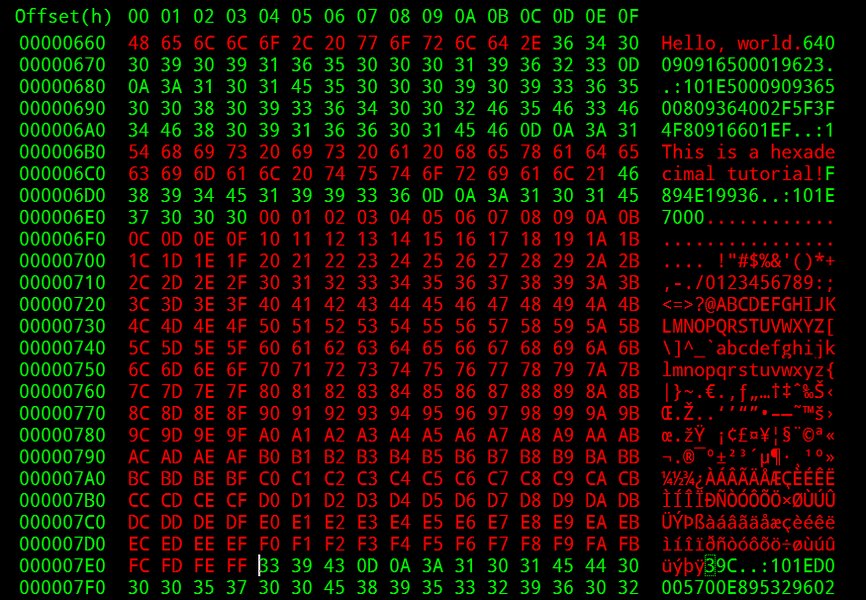
Visual representation of decimal, binary, and hexadecimal equivalents.
The "Without Spaces" Imperative
The constraint "without spaces" is crucial. In many contexts, especially in software development, data protocols, and cryptographic applications, hex-encoded data is expected as a continuous stream of characters. Spaces, commas, or any other delimiters can cause parsing errors or be misinterpreted by systems. For instance, a public key or a digital signature might be invalidated if it contains unexpected spaces.
Therefore, if a hex string like 4A 6F 68 6E (representing the ASCII string "John") is input into a system expecting a spaceless format, it would need to be 4A6F686E to be processed correctly. Programmatic removal of spaces is often a necessary preprocessing step if the source data includes them.
The Mechanics of Hex Encoding (Without Spaces)
The conversion process from binary data to a spaceless hex string is systematic and precise:
From Binary to Hex
Step 1: Byte Grouping
Binary data is processed byte by byte. A byte consists of 8 bits.
Step 2: Nibble Splitting
Each 8-bit byte is divided into two 4-bit segments. A 4-bit segment is known as a "nibble." For example, the byte 01001101 is split into 0100 (the most significant nibble) and 1101 (the least significant nibble).
Step 3: Nibble-to-Hex Conversion
Each 4-bit nibble is converted to its corresponding hexadecimal digit. Since 4 bits can represent \(2^4 = 16\) different values (from 0000 to 1111 in binary, or 0 to 15 in decimal), this maps perfectly to the 16 hexadecimal symbols.
0100(binary) = 4 (decimal) =4(hex)1101(binary) = 13 (decimal) =D(hex)
So, the byte 01001101 becomes the hex pair 4D.
Step 4: Concatenation
The resulting hex pairs for each byte are concatenated sequentially without any spaces or separators. If we were encoding multiple bytes, their hex representations would simply follow one another. For example, if "Hi" (ASCII: 01001000 01101001) is encoded:
- 'H' (
01001000) ->0100(4)1000(8) ->48 - 'i' (
01101001) ->0110(6)1001(9) ->69
4869.
From Text to Hex
When encoding text (e.g., an ASCII or UTF-8 string), each character in the string is first converted to its underlying numerical byte representation (e.g., its ASCII or UTF-8 byte value). Then, each of these bytes is converted to its two-digit hex representation as described above. These hex pairs are then concatenated without spaces.
Consider the string "Hex":
- 'H' -> ASCII 72 -> Binary
01001000-> Hex48 - 'e' -> ASCII 101 -> Binary
01100101-> Hex65 - 'x' -> ASCII 120 -> Binary
01111000-> Hex78
The resulting spaceless hex string is 486578.
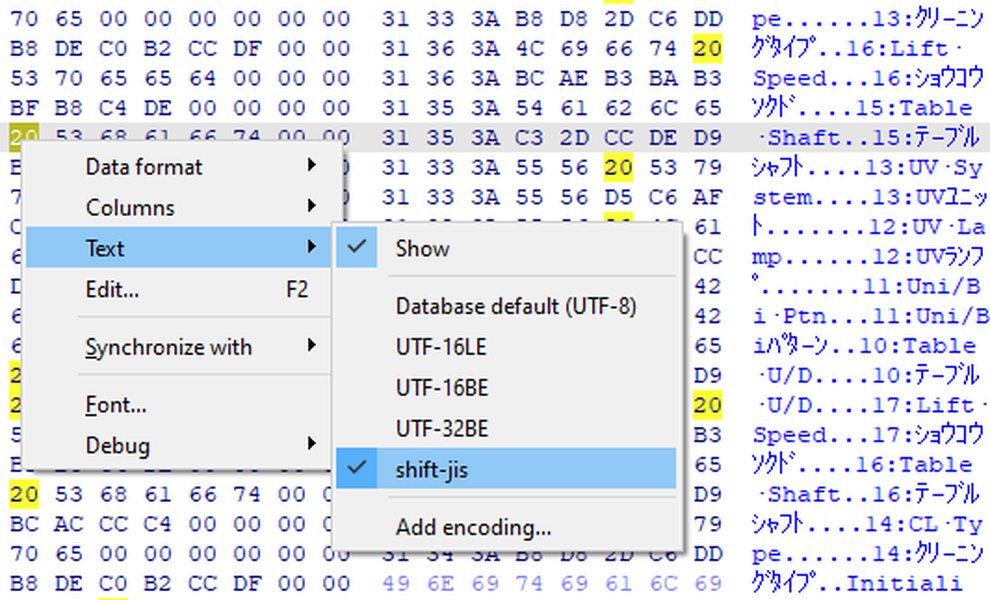
Example of text data represented in a hexadecimal view, typically without spaces between byte pairs.
Visualizing Hex Encoding Attributes
The following radar chart provides a comparative look at hexadecimal encoding (specifically, the "no spaces" format) against raw binary and another common encoding, Base64, across several attributes. The scores are opinion-based, intended to illustrate relative strengths and weaknesses for typical use cases.
This chart visualizes characteristics such as:
- Human Readability: How easily humans can interpret the data. Hex is better than binary.
- Data Density: How compactly the original data is represented. Binary is densest; hex doubles the size; Base64 increases size by about 33%.
- Transmission Safety (Text): Suitability for transmission over text-based protocols. Both Hex and Base64 are designed for this.
- Direct Binary Insight: How easily one can infer the original binary patterns. Hex excels here due to the direct nibble-to-digit mapping.
- Processing Overhead: The computational effort required for encoding/decoding. Hex is generally very low.
Key Concepts at a Glance: A Mindmap
This mindmap outlines the core aspects of hexadecimal encoding, particularly when focusing on the "without spaces" format, its process, and applications.
(Without Spaces)"] id1["Definition"] id1a["Base-16 System (0-9, A-F)"] id1b["Represents binary data as text"] id1c["Continuous string output (no delimiters)"] id2["Encoding Process"] id2a["Byte to Two Hex Digits"] id2b["Each hex digit = 4 bits (nibble)"] id2c["Text to ASCII/UTF-8 bytes first"] id2d["Concatenate hex pairs"] id3["Characteristics"] id3a["Human-readable (more than binary)"] id3b["Size increase (doubles original binary size)"] id3c["Case-insensitive (A-F usually same as a-f)"] id3d["Not encryption, just representation"] id3e["Direct mapping to binary"] id4["Use Cases"] id4a["Cryptography (Keys, Hashes, Signatures)"] id4b["Data Representation & Debugging"] id4c["Checksums"] id4d["Network Protocols"] id4e["Firmware/Memory Dumps"] id4f["Color Codes (e.g., HTML #RRGGBB)"] id5["Advantages"] id5a["Clarity over raw binary"] id5b["Standardized symbols"] id5c["Easy conversion to/from binary"] id5d["Essential for specific system inputs"] id6["Disadvantages/Considerations"] id6a["Less space-efficient than Base64"] id6b["Strict formatting (no spaces) can lead to errors if violated"]
Applications and Importance of Spaceless Hex Encoding
The "without spaces" format for hex encoding is not merely a stylistic choice; it's often a strict requirement in various technical domains:
- Cryptography: Public keys, private keys, digital signatures, and cryptographic hashes (like MD5, SHA-1, SHA-256) are almost universally represented as continuous hexadecimal strings. Software processing these values expects them in this precise, unadulterated format.
- Data Representation and Debugging: Programmers and engineers often use hex dumps to inspect raw binary data from memory or files. A continuous string is easier to copy, paste, and process with tools.
- Hardware and Firmware: MAC addresses (though often displayed with colons or hyphens for readability, the raw form can be spaceless hex), and data in firmware programming often use this format.
- Data Serialization: When binary data needs to be included in text-based formats like JSON or XML, hex encoding (without spaces) offers a straightforward way to represent it.
- API Communications: Many APIs that deal with binary data or identifiers may require or return them as spaceless hex strings.
Example Table: Character to Spaceless Hex
The following table illustrates the conversion of a simple text string "HEX" into its spaceless hexadecimal representation, showing the intermediate ASCII and binary values.
| Character | ASCII (Decimal) | Binary (8-bit) | Hex (2 digits per byte) |
|---|---|---|---|
| H | 72 | 01001000 |
48 |
| E | 69 | 01000101 |
45 |
| X | 88 | 01011000 |
58 |
| Concatenated Result (Spaceless Hex for "HEX") | 484558 |
||
Deeper Dive: Hexadecimal Encoding Explained
For a more visual and auditory explanation of hexadecimal numbers, how they work, and why they are used in computing, the following video provides an excellent overview. It covers the basics of the base-16 system and its practical applications, which aligns well with understanding hex encoding.
This video, "HEX CODE for Dummies (The Non-Technical Guide) (Base-16)" by tutvid, offers a beginner-friendly walkthrough of hexadecimal concepts, including its relation to colors in web design (a common application of hex representation). While it touches on color codes which often use a preceding '#', the core explanation of hexadecimal digits and their meaning is broadly applicable to understanding hex encoding in general.
Key Properties and Considerations
Case Sensitivity
Hexadecimal digits A-F can be represented in uppercase (A, B, C, D, E, F) or lowercase (a, b, c, d, e, f). Most systems and decoders treat them as equivalent (i.e., case-insensitive). So, 4A6F686E is typically the same as 4a6f686e. However, it's good practice to be consistent, and some strict protocols might specify a case.
Not Encryption or Compression
It's vital to remember that hex encoding is purely a representational transformation. It does not encrypt data (provide security) nor does it compress data (reduce size). In fact, hex encoding increases the data size, as each 8-bit byte becomes two characters, which themselves usually take 8 bits each in text encodings like ASCII or UTF-8 (thus, a 100% size increase for the encoded representation itself, plus any overhead for storing it as text).
Comparison with Base64
Base64 is another common binary-to-text encoding.
- Character Set: Hex uses 16 characters (0-9, A-F). Base64 uses 64 characters (A-Z, a-z, 0-9, +, /), plus '=' for padding.
- Space Efficiency: Hex encoding represents 1 byte (8 bits) with 2 characters. Base64 represents 3 bytes (24 bits) with 4 characters. This makes Base64 more space-efficient (data size increases by roughly 33%) compared to hex (100% increase).
- Readability: Hex is often considered slightly more directly readable for debugging binary patterns due to its simpler mapping (1 hex digit = 4 bits).
A Simple Code Example (Conceptual Python)
Many programming languages provide built-in functions for hex encoding. For instance, in Python, you can easily convert a byte string to its spaceless hex representation:
# Python example
text_string = "Hello"
byte_data = text_string.encode('utf-8')  # Convert string to bytes (UTF-8 encoded)
hex_encoded_string = byte_data.hex()     # Get the spaceless hex string

print(f"Original Text: {text_string}")
print(f"Byte Representation: {byte_data}")
print(f"Hex Encoded (no spaces): {hex_encoded_string}")
# Output for "Hello": 48656c6c6f
This demonstrates how straightforward it can be to achieve the desired spaceless hex output programmatically.
Frequently Asked Questions (FAQ)
Recommended Further Exploration
- How does hexadecimal encoding compare to Base64 encoding in terms of efficiency and use cases?
- What are the common pitfalls when working with hexadecimal strings in programming?
- Explain the role of hexadecimal encoding in modern cryptographic algorithms and protocols.
- Can you provide examples of converting files or large binary data to spaceless hex strings?
References
Last updated May 16, 2025