
Mastering HR Data Consolidation in Power BI: Unveiling Best Practices
Explore key strategies to optimize HR data reporting, transformation, and visualization in Power BI
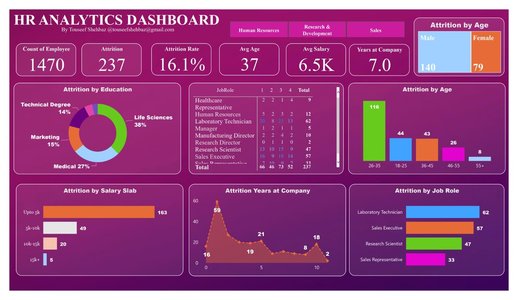
Key Highlights
- Clear Objectives and Unified Modeling: Establish defined goals and a comprehensive unified data model to align HR metrics across departments.
- Data Cleansing and Transformation: Leverage Power Query’s robust capabilities for cleansing, merging, and automating data integration from diverse sources.
- Visualization and Governance: Use strategic visualizations and implement effective governance practices for secure and insightful HR dashboards.
Overview
Consolidating HR data in Power BI is an essential process for organizations aiming to generate comprehensive, accurate, and actionable insights. By integrating disparate HR data sources into a single, unified model, HR professionals can streamline reporting, improve decision-making, and effectively align HR strategies with business objectives. This guide details best practices that address key aspects of data consolidation, including setting clear objectives, data collection, cleaning, transforming, and visualizing data with Power BI. Each section emphasizes practical strategies to ensure data integrity, enhance visualization quality, and support strategic HR decision-making.
Establishing Clear Objectives and Planning
Defining Goals and Key Questions
Before embarking on the consolidation process, it is vital to define clear objectives. This involves outlining the strategic questions your HR dashboard is meant to answer—whether it is analyzing turnover rates, monitoring employee retention, or understanding workforce demographics. Having well-defined questions guides the process of selecting relevant data sources, metrics, and visualizations.
Setting Clear Goals
- Identify key performance indicators such as headcount, employee turnover, training efficacy, and diversity ratios. - Determine the frequency and granularity of reports (e.g., monthly headcount versus real-time attrition trends). - Engage key stakeholders, including HR leadership and data analytics experts, to ensure the dashboard aligns with overall business strategies.
Initial Planning and Strategy Session
A well-planned blueprint is a cornerstone of successful HR data consolidation. Build a comprehensive strategy that includes not only data highways but also data governance and security protocols. Involving experienced Power BI professionals from the beginning can provide valuable insights into the nuances of data modeling and visualization.
Data Collection, Cleansing, and Transformation
Data Collection from Multiple Sources
HR data often originates from various systems such as HRIS, payroll, recruitment platforms, and engagement surveys. Consolidating these disparate data sources requires an organized approach:
- Gathering Data: Establish connection protocols to systematically collect data from multiple internal systems.
- Standardization: Convert different data formats into a standardized structure. For instance, align date formats and measurement units.
- Automated Data Integration: Utilize ETL (Extract, Transform, Load) or ELT processes to automate routine data integration tasks, thereby reducing manual errors.
Data Cleansing and Quality Assurance
Data cleansing is a pivotal step that ensures the reliability and accuracy of insights drawn from your dashboards. Using Power Query within Power BI allows for dynamic data cleansing techniques:
- Remove Duplicates: Ensure that repeated entries are identified and removed.
- Error Correction: Audit and address discrepancies such as incorrect data entries or misaligned data types.
- Handling Missing Data: Determine the approach for missing data points, whether through imputation methods or exclusion based on significance.
- Standardizing Data Formats: Consistency in date formats, numerical precision, and string normalization boosts the overall data quality.
Advanced Data Transformation
Once the data is cleansed, it must be transformed into a usable format through Power Query and advanced data modeling techniques:
- Mapping Data Relationships: Create relationships between various datasets to form a coherent data model. This unified model is critical when analyzing combined data, such as correlating employee performance with retention rates.
- Data Enrichment: Enhance raw data by integrating external benchmarks and industry standards, providing comparative insights.
- Real-Time Data Refresh: Establish protocols for automated data refresh to maintain up-to-date dashboards, ensuring that decision-makers always have access to the latest information.
Building a Unified Data Model in Power BI
Establishing Relationships and Metrics
Creating a unified data model is a critical step that facilitates reliable and insightful reporting. A unified data model ensures that HR data gathered from different sources fits into a master schema with clear relationships:
- Define Metrics: Standardize how key HR metrics such as employee count, attrition rate, and engagement scores are calculated across all datasets.
- Establish Relationships: Build relationships between disparate tables (e.g., linking employee personal data to performance ratings) so that cross-functional analysis is possible.
- Maintain Data Integrity: Regularly review and update the data model to accommodate new data sources or changes in business logic, reducing the risks of data anomalies.
Utilizing Power BI’s Capabilities
Power BI provides robust tools for creating and managing unified data models. Leverage these tools to:
- Design Interactive Dashboards: Use tools within Power BI to create dynamic dashboards that enable users to drill down into data specifics. Tools like slicers, tooltips, and trend analyses can provide deeper insights into HR data.
- Performance Monitoring: Monitor and optimize the performance of your dashboards. A well-structured data model enhances load times and supports the efficient execution of queries across large data sets.
- Scalability: Design your model to be scalable so that as HR data grows, the performance and quality of insights remain robust.
Visualization and Dashboards in HR Analytics
Effective Data Visualizations
The power of consolidating HR data is fully realized when the data is presented through compelling visualizations. Best practices for visualizing HR data with Power BI include:
- Select Appropriate Chart Types: Use bar charts for departmental headcounts, line graphs to illustrate trends over time (such as turnover rates), and scatter plots for correlation analysis.
- Interactive Elements: Integrate interactive filters, drill-down capabilities, and tooltips to enhance the user’s ability to explore detailed layers of HR data.
- Customized Dashboards: Tailor dashboards to different stakeholders. For instance, senior management might need high-level trends, whereas HR specialists might require detailed breakdowns of recruitment metrics.
Dashboard Layout and Interpretation
The layout of dashboards influences both the interpretability and usability of HR data:
- Centralized Reporting: Create centralized dashboards that bring together key HR metrics into one view, allowing for easy cross-analysis.
- Visual Consistency: Apply consistent color themes, labels, and scales to build a dashboard that promotes ease of understanding.
- Real-Time Analytics: Implement dynamic dashboards capable of real-time data refresh, providing the most current insights to HR managers.
Comparative Data Overview Table
| Key Aspect | Best Practice | Power BI Feature |
|---|---|---|
| Objective Definition | Set clear HR objectives and metrics | Custom KPIs, Slicers |
| Data Collection | Integrate HRIS, Payroll, Recruitment, Surveys | ETL/ELT via Power Query |
| Data Cleansing | Remove duplicates, standardize formats | Data transformation in Power Query |
| Data Modeling | Create unified models linking tables | Relationship mapping, DAX formulas |
| Visualization | Use interactive, dynamic dashboards | Power BI visualizations, custom themes |
| Data Governance | Implement robust security and access controls | Row-Level Security, audit logs |
Implementing Effective Governance and Maintenance Strategies
Governance in HR Data Consolidation
Proper governance ensures that HR data remains accurate, secure, and accessible to the right stakeholders:
- Data Integrity and Accuracy: Establish protocols to validate incoming data and maintain consistent standards across all data sources.
- Access Controls: Implement robust data governance practices by assigning roles and permissions to limit access to sensitive HR information.
- Regular Audits: Schedule periodic audits to review data accuracy, processing protocols, and adherence to data quality standards.
Ongoing Maintenance
Consistent maintenance is vital to ensure that HR dashboards continue to reflect accurate data:
- Automated Refresh: Utilize Power BI's data refresh capabilities to guarantee that dashboards are updated with the latest HR data.
- Continuous Improvement: Gather feedback from end-users and stakeholders to continually refine dashboards and the underlying data model.
- Scalability: As organizational needs evolve, ensure that the data model can scale without compromising performance or clarity.
Enhancing HR Decision-Making with Comprehensive Analytics
Leveraging Analytics for Strategic HR Initiatives
The culmination of HR data consolidation in Power BI not only facilitates effective reporting but also provides a strategic advantage by informing HR initiatives. With well-structured dashboards, HR professionals can:
- Identify Trends: Monitor workforce trends such as retention rates, training outcomes, and departmental performance over time, giving insights into long-term HR initiatives.
- Recognize Discrepancies: Use data analytics to quickly identify inconsistencies or areas needing attention, from compliance issues to underperforming departments.
- Drive Strategic Change: Empower leadership with data-backed insights to drive change management, improve employee engagement, and design training and development programs.
Integrating External Benchmarks
To refine insights further, it is beneficial to integrate external benchmarks. By comparing organizational data against industry standards:
- Benchmarking: Identify performance gaps and market competitiveness by studying industry average metrics from trusted sources.
- Informed Decision-Making: Use these benchmarks to drive HR strategies, from competitive compensation practices to innovative workforce engagement strategies.
- Feedback Mechanism: Regularly update and validate benchmarks to stay current with evolving industry practices.
Further Resources and Exploration
Additional Reference Materials
Expanding your understanding of HR data consolidation and analytics with Power BI can be accelerated through continuous learning and community resources. Several online platforms offer deep dives into the topics discussed:
- HR Analytics Accelerator: Explore accelerators that provide templates and pre-built dashboards tailored for HR professionals.
- Community and Forums: Participate in Power BI communities and specialty forums where professionals share experiences, recent innovations, and troubleshooting strategies.
- Regular Updates: Keep an eye on updates from Microsoft’s official documentation and industry publications for enhancements in Power BI data modeling and visualization techniques.
Training and Support
Providing user training on Power BI utilization and maintaining comprehensive documentation for internal protocols is essential. Empowering HR professionals through workshops and hands-on training sessions ensures they can leverage all features of Power BI efficiently.
References
- Power BI Best Practices - Medium
- Creating an HR Analytics Dashboard - Medium
- HR Analytics Accelerator - AppSource
- Exploring HR Data with Power BI - HR Data
- HR Management Enhancement - Kovaion
Recommended Exploration
Last updated March 27, 2025