
Revolutionizing Your Operations: A Blueprint for Speed, Efficiency, and Centralized Intelligence
Unlock significant process improvements and data-driven insights by integrating advanced ERP solutions with AI-powered automation across your enterprise.
Embarking on a journey to enhance your internal processes for greater speed and reduced manual intervention is a strategic move. By centralizing data and leveraging intelligent automation, you can transform your Engineering, Operations, Sales and Marketing, After Sales, and Finance departments. This comprehensive guide will outline how to achieve these goals, building upon your existing infrastructure like Microsoft Navision (now part of the Dynamics 365 family) and SolidWorks PDM.
Key Highlights for Your Transformation
- Centralized ERP as the Core: Implementing or upgrading to a modern Enterprise Resource Planning (ERP) system, integrated with Artificial Intelligence (AI), is fundamental to unifying data and streamlining workflows across all departments.
- AI-Powered Automation: Leveraging AI and machine learning tools can automate repetitive tasks, accelerate processes like design and reporting, and provide predictive insights, significantly reducing the need for manual intervention.
- Data Centralization and Mining: Consolidating data into a unified repository (potentially using data warehouses or lakes alongside your ERP) enables powerful data mining, providing accessible, real-time insights for informed decision-making across your organization.
The Core Strategy: A Unified Intelligent Platform
The cornerstone of your process improvement initiative will be a centralized, AI-enhanced Enterprise Resource Planning (ERP) system. Modern ERP solutions, such as advanced versions of Microsoft Dynamics 365, SAP S/4HANA, Oracle NetSuite, or IFS Cloud, serve as a unified data hub. They integrate disparate software and data sources—including your existing SolidWorks PDM and financials from Navision—into a single, coherent ecosystem. This integration facilitates:
- Real-time, company-wide visibility: Break down data silos and provide a consistent view of operations.
- Seamless collaboration: Enable smoother information flow and teamwork between departments.
- Reduced manual workload: Automate data entry and routine tasks.
- Improved accuracy: Minimize errors associated with manual processes and disparate data.
- Enhanced decision-making: Provide a solid foundation for data analysis and strategic planning.
AI capabilities embedded within or integrated into these ERP systems can further amplify benefits by enabling predictive analytics, intelligent document processing, and workflow automation tailored to your specific needs.
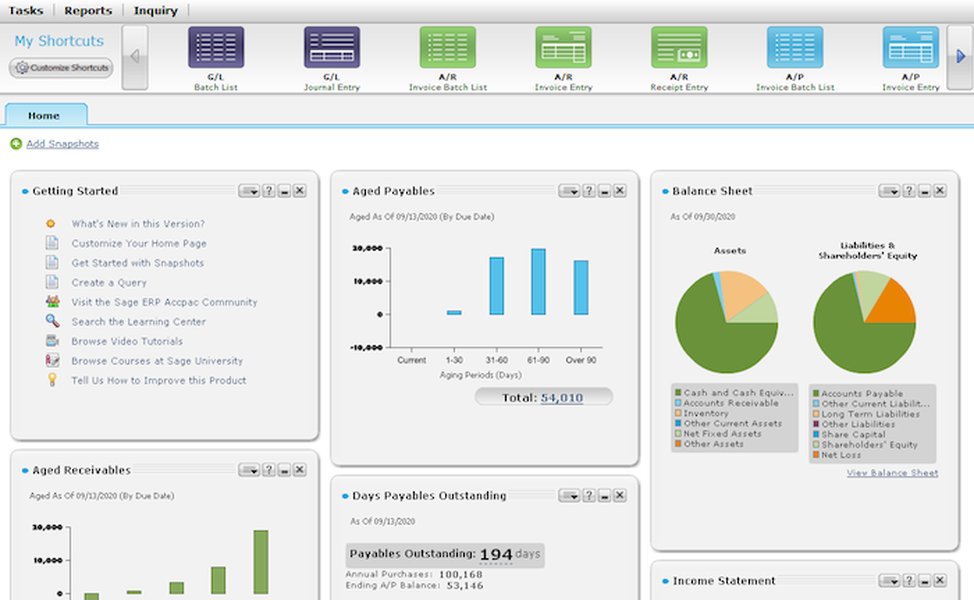
An illustrative example of an ERP system dashboard providing centralized access to business processes.
Visualizing Your Integrated Ecosystem
To better understand how these components interact, consider the following mindmap. It illustrates a centralized platform connecting your key departments through an ERP system and an AI automation layer, all drawing from and contributing to a unified data repository.
(e.g., Dynamics 365, SAP, Oracle)"] ---> D_ENG["Engineering Data Hub
(CAD, M&S, PDM Integration)"] ---> D_OPS["Operations Control Center
(Supply Chain, QMS, Work Orders)"] ---> D_SALES["Sales & Marketing Insights
(CRM, Order Management)"] ---> D_AS["After-Sales Service Hub
(Service Orders, Bulletins)"] ---> D_FIN["Financial Management Suite
(Reporting, Payroll, Cash Flow)"] --> AI["AI & Automation Layer"] ---> AI_ENG["AI-Assisted Design & Simulation
Automated Drawing Generation"] ---> AI_OPS["Predictive Supply Chain Analytics
Automated QA & NCR"] ---> AI_SM["AI-Powered Opportunity ID
Automated NDA & Permit Workflows"] ---> AI_AS["Automated Service Order Triage
Intelligent Bulletin Dissemination"] ---> AI_FIN["AI-Driven Financial Forecasting
Automated Report Generation"] --> DATA["Unified Data Repository & Mining"] ---> PDM_INT["SolidWorks PDM Integration"] ---> NAV_INT["Microsoft Navision/Dynamics Data Migration & Integration"] ---> BI_TOOLS["Business Intelligence & Dashboards
Cross-Departmental Analytics"]
This interconnected structure ensures that data flows seamlessly, automations are triggered intelligently, and insights are readily available to those who need them.
Transforming Your Operations: Department-by-Department
Let's explore specific improvements for each area you've identified, leveraging the centralized ERP and AI strategy.
1. Engineering: Innovating with AI and Integrated Data
Your SolidWorks PDM is a strong foundation. The goal is to integrate it deeply with the central ERP and enhance processes with AI.
AI-Assisted Design, Software Coding, and M&S
Utilize AI/ML-assisted design tools to accelerate design iterations and automate repetitive CAD modeling tasks. For software coding, AI tools can optimize workflows and automate testing. Integrate Modeling & Simulation (M&S) outputs directly into ERP workflows, ensuring design updates automatically trigger notifications for procurement and supply chain adjustments.
Automated Drawing Generation
Implement platforms or plugins that automatically generate 2D drawings from 3D parametric designs. These should link directly to your centralized document management system (either an enhanced SolidWorks PDM integrated with the ERP or the ERP's own document control module).
Centralization & Data Mining
Integrate SolidWorks PDM and other engineering software with the ERP to store all design data, BOMs, revisions, and simulation results in a central repository. This allows for mining historical data to identify common design challenges or successful patterns.
2. Operations: Streamlining for Peak Efficiency
Your Microsoft Navision (Dynamics 365 Business Central) ERP already handles some operational functions. The focus is on enhancing its capabilities with AI and ensuring full integration.
Work Order Generation & Supply Chain/Inventory Management
Automate work order generation based on real-time demand signals (e.g., sales orders) and production capacity analytics within the ERP. Implement advanced supply chain management tools that use AI forecasting for dynamic stock replenishment, connecting suppliers, inventory, and production data.
NCR Documentation and QMS Management
Use digital, AI-enhanced Quality Management Systems (QMS) for Non-Conformance Report (NCR) documentation. AI can assist in automating data capture, root cause analysis, and suggesting corrective actions. Centralize all QMS, inventory, and production records within the ERP for streamlined compliance, audits, and continuous improvement.
3. Sales and Marketing: Driving Growth Through Automation
Opportunity Identification & Lead Management
Deploy CRM modules (often part of comprehensive ERPs or integrable with them) powered by AI and sales analytics. These tools can identify promising leads, prioritize opportunities, and even predict customer behavior by analyzing market data and past interactions.
NDA, Export Permit, and Sales Order Management
Automate the generation of NDAs, export permit documentation, and sales orders using workflow automation tools integrated with your ERP. Implement digital signature capabilities and track document status in real-time. Your ERP should provide a consolidated, real-time view of the sales pipeline and order book.
4. After Sales: Enhancing Customer Service with Speed
Service Bulletin and Service Order Automation
Utilize ERP service management modules for the automatic generation, dissemination, and tracking of service bulletins and orders. Link these back to customer data, product history, and warranties. AI can help prioritize service actions by analyzing field data, identifying failure trends, and predicting maintenance needs.
5. Finance: Achieving Clarity and Control
Automated Financial Reporting, Cash Flow Modeling, and Payroll
Leverage the finance modules of your ERP (enhancing your existing Navision capabilities) to automate monthly financial report generation. AI can further enhance cash flow modeling by analyzing historical data and market trends for more accurate forecasting. Integrate or use specialized AI-powered payroll management systems that automate calculations, ensure compliance, and feed data directly into the ERP's general ledger.
Departmental AI & Automation Impact Assessment
The following radar chart provides a visual representation of the potential impact of AI and automation across your key departments. It assesses factors like current automation levels (where lower scores indicate more room for improvement), the potential for AI enhancement, the impact of data centralization, and the expected gains in efficiency and reduction in manual effort. This is an illustrative assessment to help prioritize efforts.
As the chart suggests, areas like Operations and Engineering often have high potential for AI enhancement and can see significant efficiency gains from better data centralization and automation.
Building Your Data Core: Centralization and Mining Strategies
Centralizing your data is crucial for achieving a single source of truth, minimizing information silos, improving data quality, and enabling effective data mining for cross-functional insights.
The Role of Your Modern ERP System
Your upgraded or new ERP system (e.g., Microsoft Dynamics 365) will be the primary engine for data centralization. It consolidates operational, engineering (integrating with SolidWorks PDM), sales, financial (from Navision and beyond), and customer data into its unified database. This facilitates real-time, company-wide visibility and seamless collaboration.
Beyond ERP: Data Warehouses and Business Intelligence
For more advanced analytics and handling vast amounts of historical or unstructured data, consider supplementing your ERP with:
- Data Warehouses: Ideal for structured data, providing a robust infrastructure for complex querying, analysis, and reporting.
- Data Lakes: Useful for storing raw data in its native format (structured, semi-structured, or unstructured), offering scalability and flexibility for data science and big data applications.
- Business Intelligence (BI) Tools: Layer BI systems (like Power BI, Tableau, or Qlik) on top of your ERP and data warehouse. These tools enable advanced analytics, data visualization, and the creation of user-friendly dashboards, making data mining accessible to various teams.
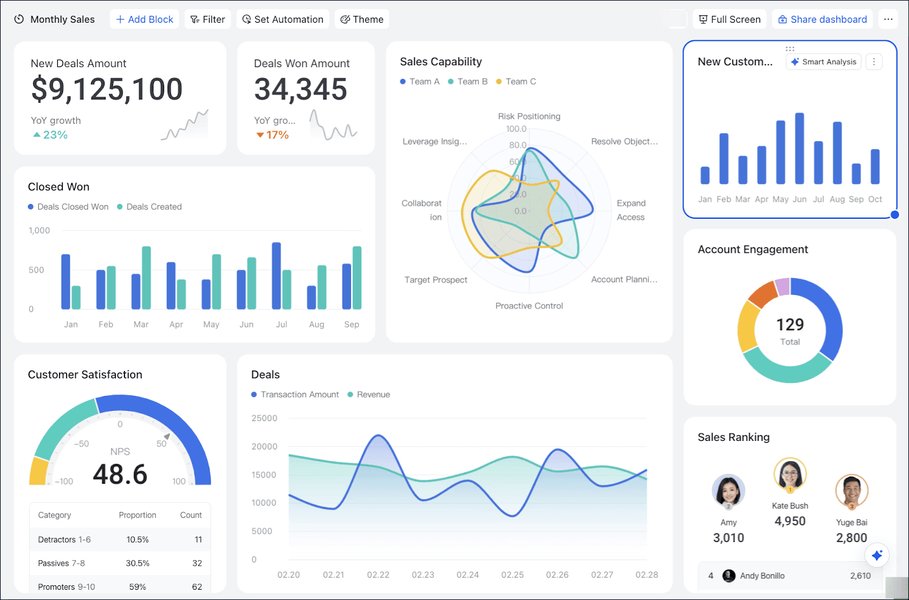
Example of an AI-driven dashboard for visualizing and analyzing centralized data.
The Power of AI in Data Mining
Employ AI and Machine Learning (ML) algorithms to mine your centralized data. This can uncover hidden patterns, predict future trends, identify production bottlenecks, understand customer buying behavior, detect service failure modes, and optimize processes—all leading to more informed strategic decisions.
Data Governance: Ensuring Quality and Security
Establish clear data governance policies. This includes defining data ownership, setting protocols for data updates and quality checks, managing access rights, and ensuring data security and compliance with regulations. Robust governance is key to maintaining the integrity and value of your centralized data.
Key Automation Opportunities and Recommended Tool Categories
The table below summarizes some key areas for automation within each department, along with the types of tools or technologies that can facilitate these improvements. This is not an exhaustive list but highlights high-impact opportunities.
| Department | Key Process | Automation Focus | Example Tool Category/Technology |
|---|---|---|---|
| Engineering | Repetitive Design Tasks & Drawing Generation | Automating standard component placement, rule-based design checks, 2D drawing creation from 3D models. | AI-Assisted CAD, Parametric Design Automation Scripts, PDM-Integrated Drawing Tools |
| Operations | Work Order Management & Inventory Control | Automated work order creation from sales, predictive inventory replenishment, real-time tracking. | ERP Modules (Manufacturing, SCM), AI-Powered Forecasting Tools, IoT Sensors |
| Operations | NCR & QMS Documentation | Automated data capture for NCRs, workflow for approvals, digital QMS record keeping. | Digital QMS Platforms, AI for Root Cause Analysis, ERP Quality Modules |
| Sales & Marketing | Lead Qualification & NDA/Contract Generation | AI-driven lead scoring, automated document creation from templates, digital signature workflows. | CRM with AI, Document Automation Software, Workflow Automation Platforms (e.g., Power Automate, Zapier) |
| After Sales | Service Order Creation & Bulletin Management | Automated creation of service orders from customer requests, targeted dissemination of service bulletins. | ERP Service Modules, AI for Service Triage, Communication Automation Tools |
| Finance | Monthly Reporting & Payroll | Automated data aggregation for reports, AI-powered forecasting, automated payroll calculation and compliance. | ERP Finance Modules, BI Tools, AI-Powered Payroll Systems, Robotic Process Automation (RPA) |
This video provides an overview of how AI and no-code tools can be used to automate various business processes, relevant to the strategies discussed.
Charting Your Course: A Phased Implementation Approach
Transforming your internal processes is a significant undertaking. A phased approach can help manage complexity and ensure success:
- Phase 1: Assess Current Systems & Define Scope
- Audit your existing tools (Microsoft Navision/Dynamics, SolidWorks PDM, etc.) and map current processes.
- Identify pain points, bottlenecks, data silos, and manual tasks ripe for improvement.
- Define clear objectives and Key Performance Indicators (KPIs) for the transformation.
- Determine integration points and requirements for data migration.
- Phase 2: Select & Implement Core Platform(s)
- Choose a modern ERP system with strong AI capabilities that aligns with your needs. Consider how it will integrate or replace elements of your current setup.
- If necessary, select data warehousing or BI tools.
- Develop a detailed implementation plan, including data migration from Navision and PDM.
- Phase 3: Pilot Automation Initiatives
- Start with automating a few high-impact, relatively low-complexity processes in one or two departments.
- Use these pilot projects to test the new systems, refine workflows, and gather user feedback.
- Measure results against your KPIs to demonstrate early wins and build momentum.
- Phase 4: Integrate, Scale, Train & Continuously Improve
- Roll out the integrated solution and automated processes department by department or process by process.
- Provide comprehensive training to all users on the new systems and workflows.
- Establish robust data governance policies and practices.
- Foster a culture of continuous improvement, using feedback loops and performance data to further optimize AI algorithms, workflows, and system configurations.
Frequently Asked Questions (FAQ)
How long will this kind of process transformation typically take?
The timeline can vary significantly based on the complexity of your organization, the scope of changes, the chosen technologies, and the resources allocated. A phased approach, as outlined, is common. Initial pilots might show results in a few months, while a full enterprise-wide transformation could take 1-3 years. Some specific AI workflow automations can deliver ROI in as little as six weeks, but integrating core systems like ERPs is a more substantial project.
Do we need to replace all our existing software like Microsoft Navision and SolidWorks PDM?
Not necessarily. The strategy often involves integrating existing valuable systems into a more modern, centralized framework. For example, Microsoft Navision (especially if it's an older version) might be upgraded to Microsoft Dynamics 365 Business Central or another modern ERP, with data migrated. SolidWorks PDM can often be integrated with ERP systems to ensure seamless data flow for engineering documents and BOMs. The key is to assess each system's capabilities and its ability to connect to a central data hub and AI tools.
How do we ensure data security with a centralized system?
Data security is paramount. Modern ERP systems and cloud platforms come with robust security features. Key practices include: implementing strong access controls (role-based permissions), regular security audits, data encryption (both in transit and at rest), multi-factor authentication, comprehensive data backup and disaster recovery plans, and adhering to relevant data privacy regulations. Strong data governance policies will also define security protocols and responsibilities.
What skills will our team need to leverage these new systems and AI tools?
Your team will benefit from training in several areas. General digital literacy and comfort with new software interfaces are basic requirements. Depending on roles, staff may need skills in data analysis (to interpret BI dashboards and AI insights), understanding automated workflows, and potentially basic configuration of AI tools (many modern platforms are low-code/no-code). Specialized roles might require deeper expertise in data science, AI/ML model management, or ERP administration. Investing in training and change management is crucial for successful adoption.
Recommended Next Steps & Further Exploration
To delve deeper into optimizing your processes, consider exploring these related queries:
- What are the best AI-powered ERP systems for small to medium-sized enterprises in 2025?
- How can I effectively integrate SolidWorks PDM with a modern ERP for streamlined engineering workflows?
- What are the key data governance principles for implementing a centralized data mining strategy?
- How to measure the return on investment (ROI) for AI automation projects in manufacturing and operations?
References
The following resources provide further insights into the concepts discussed:
 aws.amazon.com
Last updated May 7, 2025