
Exploring InDesign's New Document Dialog Challenges
Understanding bugs, workarounds, and the landscape of reported issues
Key Highlights
- Dialog Inconsistencies: Issues such as resetting, blank screens, and unresponsiveness have been widely reported.
- Workaround with Legacy Dialog: Many users have successfully reverted to the legacy dialog to avoid current glitches.
- Cross-Platform and Version Concerns: Problems vary across operating systems and InDesign versions, with some specific features (like template previews and language-specific sets) being affected.
In-Depth Analysis of Reported Issues
Overview of the Problem
In recent versions of Adobe InDesign, particularly noted in versions leading up to 2025, users have encountered a range of problems with the new "New Document" dialog. This dialog, intended to help users quickly set up a new project by specifying parameters like page size, margins, and units, instead sometimes becomes a source of disruption. Users have reported that:
- The dialog box resets after inputting parameters, causing settings to revert and thereby disrupting the workflow.
- The New Document dialog appears as an empty or blank screen instead of displaying the expected interface elements.
- The dialog becomes unresponsive or even crashes during the document creation process.
- Attempts to create a new document result in no action, leaving users stuck without a new file despite clicking “Create”.
Specific Issues in Detail
Dialog Box Resets and Unresponsiveness
One of the most common and frustrating issues is the dialog box unexpectedly resetting itself. As users begin to input their desired settings (such as margins, page size, and other specifications), the dialog can revert to its default parameters. This forces users to repeatedly re-enter their desired conditions, ultimately hindering the creative process.
Additionally, some users have experienced complete unresponsiveness in the dialog. Even after successfully setting up the document parameters, clicking the "Create" button sometimes triggers no action. This leaves the system in a state where it is unable to generate the new document, resulting in significant workflow interruptions.
Display Issues: Blank Screens and Missing Previews
Another reported issue involves the display of the New Document dialog. In some cases, the dialog appears as an empty or blank screen without showing the necessary options and templates that users rely on. This has been particularly problematic on certain operating systems and specific versions of InDesign, where expected template previews are missing, making it difficult to visualize the final output.
The blank screen issue not only affects the aesthetic and usability of the dialog but also prevents users from accessing advanced features that are critical when designing documents tailored for different language sets (for instance, Japanese or MENA options).
Crashes and Stability Concerns
There are also accounts of InDesign crashing, particularly when running on Apple Silicon devices using Rosetta2. While these crashes have been reported primarily with the 2025 version, they represent broader concerns regarding the stability of the new document setup interface. This instability is sometimes linked to the integration of new features which might not yet be fully optimized for all hardware configurations or OS environments.
Stability concerns not only impede document creation but could potentially lead to data loss if users are in the middle of intensive design workflows.
Issues with Compatibility and Document Formats
Some users have reported difficulties when attempting to open or create documents that were originally built in previous versions of InDesign. This includes problems in compatibility where a document created in an older version (such as InDesign 2024) might fail to load correctly in version 2025. In such situations, a workaround such as saving the document in the IDML format has helped some users to bridge compatibility gaps.
Additionally, the new dialog seems to have difficulties handling certain feature sets that were previously well-supported, such as preset templates and special document configurations required for specific languages and regions. This further complicates the workflow for users who depend on these customized settings.
Workarounds and Mitigation Strategies
Switching to the Legacy New Document Dialog
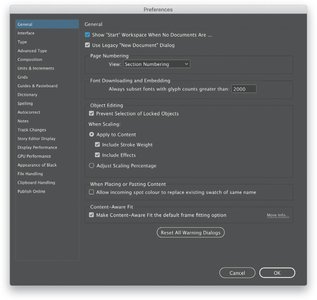
A commonly recommended solution involves reverting to the legacy New Document dialog. This can be done by navigating to:
// Navigate to Preferences > General
// Check the box labeled "Use Legacy New Document Dialog"
Using the legacy dialog bypasses many of the issues found in the new interface. Although this solution may not offer the same modern capabilities and design refinements, it provides a stable environment for creating new documents.
Updating Adobe InDesign
Adobe frequently releases updates aimed at resolving these types of issues. It is important for users to ensure they are running the latest version of InDesign as updates may include fixes for the dialog resetting, blank screens, and crashes. Regularly checking Adobe’s official channels and release notes can help users stay informed on the resolutions to these problems.
File Format Conversions
For users encountering compatibility issues with documents created in earlier versions of InDesign, converting files to the IDML (InDesign Markup Language) format can be an effective workaround. By saving an older file as an IDML file, users may be able to open it in newer versions without facing the dialog-related issues.
Comparative Overview of Issues and Solutions
The following table provides a comprehensive overview of the main issues with the new "New Document" dialog, along with potential workarounds and solutions:
| Issue | Description | Workaround/Solution |
|---|---|---|
| Dialog Resets | The dialog box resets or reverts parameters after input, causing frustration. | Switch to Legacy New Document Dialog via Preferences > General |
| Blank or Empty Dialog | The interface may display an empty or blank dialog, hindering template selection. | Check for updates or revert to the legacy interface which retains display elements |
| Unresponsiveness | Clicking "Create" does not generate a new document, rendering the interface non-functional. | Consider resetting preferences or using the legacy document creation mode |
| Crashes/Instability | Particularly on Apple Silicon under Rosetta2 and other system-specific scenarios. | Update InDesign to the latest version; check Adobe forums for OS-specific tips |
| Compatibility Issues | Problems opening or creating documents from older versions of InDesign. | Convert files to IDML format and keep an archive of legacy files |
Further Discussions on Interface and Compatibility
Template and Feature Set Compatibility
Users have also noted issues where the dialog does not adequately support all feature sets available in InDesign. For example, some language-specific features, such as those catering to Japanese or MENA regions, may be partially or completely unsupported in the new dialog framework. This has led some professionals to revert to older versions or rely on the legacy dialog until full support is implemented.
Performance Impact
Alongside the functionality issues, there are reports of overall performance degradation when using the new dialog. Users have observed delays including UI lags and increased load times, which result in additional "beach ball" delays (on macOS) or freezing of the work environment. These impacts underscore the importance of stability and optimization in user interface design.
Monitoring Updates and Community Feedback
Staying Informed Through Adobe Channels
Adobe continuously monitors user feedback regarding InDesign, and the company frequently rolls out patches and updates to resolve emerging issues. Visiting Adobe’s official help pages and community forums is recommended for staying abreast of the latest developments and fixes. This not only helps users manage current inconveniences but also informs decisions about upgrading or modifying workflows.
Moreover, Adobe's knowledge base and bug tracking systems provide detailed insights into the specific issues and the work being done to address them. This transparent approach enables users to plan accordingly and determine whether they need to adjust their operating procedures or wait for a software update.
Community-Driven Workarounds
Many InDesign users have turned to community forums and Adobe discussion groups to exchange workarounds for the problematic New Document dialog. Reported solutions such as resetting application preferences, switching to the legacy dialog, or even uninstalling and reinstalling the application have been successful for some. These community-driven insights are invaluable in situations where official updates may not yet fully resolve the issues.
Developer and Bug Reporting Insights
Adobe's Acknowledgment of the Issues
Adobe has acknowledged several of the problems associated with the new "New Document" dialog in their official release notes and support documentation. While many users have reported persistent issues, Adobe’s efforts to address these through incremental updates suggest that improvements are in progress. It is advisable for users facing these issues to report their specific problems using Adobe’s bug tracking channels, as this encourages quicker resolutions and more targeted updates.
Recommendations for Professional Users
For professionals who depend heavily on InDesign for daily tasks, it may be worthwhile to maintain a dual installation or a backup system using a confirmed stable version of InDesign. This approach not only mitigates the risks of workflow disruptions but also ensures that critical projects can be completed without being hindered by interface bugs. Additionally, exploring alternative workflows, like utilizing the IDML conversion for legacy documents, ensures greater continuity and compatibility.
Additional Resources and Community References
The following references are highly recommended for further insights into the known issues with InDesign's new "New Document" dialog and for accessing community discussions, official bug reports, and workarounds:
References
-
Known InDesign Issues - Adobe HelpX
- New Document Dialog Resets - Adobe Community
- Performance Issue: New Document Window - InDesign UserVoice
- Document Compatibility Issues - InDesign UserVoice
- Unable to Create New File on InDesign 2021 - Adobe Community
Recommended Further Reading
Last updated March 26, 2025