
Unlock Natural AI Voices: Integrating Kokoro TTS into Your Flutter Android App
Explore practical methods for bringing advanced text-to-speech capabilities to your Flutter projects on Android.
Integrating a specific, high-quality Text-to-Speech (TTS) model like Kokoro TTS into a Flutter application for Android presents unique challenges compared to using standard system TTS engines. Kokoro TTS is known for its lightweight nature (~82 million parameters) and ability to produce natural-sounding speech, often distributed as a machine learning model (e.g., in ONNX format).
This guide outlines the feasible approaches to achieve this integration, balancing complexity, performance, and features, based on current possibilities as of May 6, 2025.
Key Integration Insights
- Kokoro TTS isn't a standard Flutter package: Direct integration requires working with the underlying AI model, unlike typical plugins.
- Two main Kokoro integration paths: Calling a remote Kokoro TTS API (more practical) or attempting local inference via model conversion (complex).
flutter_ttspackage as a reliable alternative: Utilizes the device's native TTS engines, offering a simpler setup but without Kokoro's specific voice characteristics.
Approach 1: Calling a Kokoro TTS API (Recommended for Kokoro Voices)
Leverage a Hosted Kokoro Service
The most practical way to use Kokoro TTS voices in your Flutter app today is by interacting with a Kokoro TTS instance running on a server. Your app sends text to this server via an API call, receives the synthesized audio data (like WAV or MP3 bytes), and then plays it back.
Implementation Steps:
- Set up a Kokoro TTS API Endpoint: You need access to a server running Kokoro TTS. This could be a service you deploy yourself (e.g., using tools like Kokoro FastAPI) or potentially a community-hosted endpoint (use with caution regarding reliability and terms).
- Add Flutter Dependencies: Include packages for making HTTP requests and playing audio. Add these to your
pubspec.yaml:
Rundependencies: flutter: sdk: flutter http: ^0.13.6 # Or latest version for network calls audioplayers: ^5.2.1 # Or latest version for audio playbackflutter pub get. - Implement API Call and Playback in Dart: Create a function that sends text to your API, receives audio bytes, and plays them using the
audioplayerspackage.
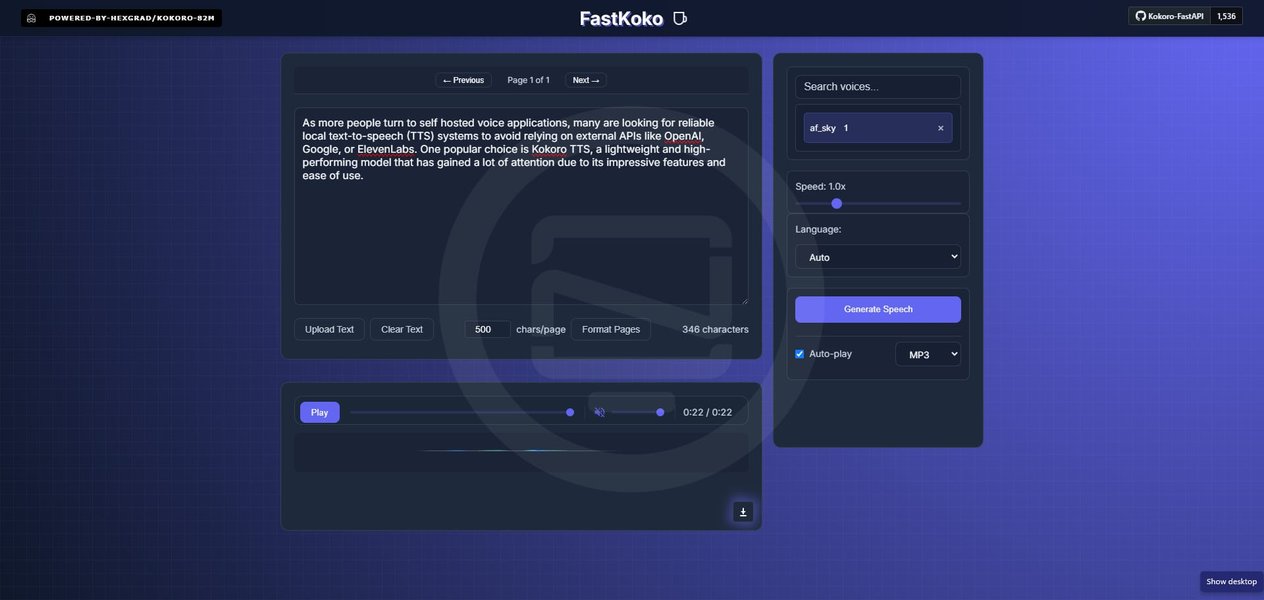
A self-hosted Kokoro TTS web interface, similar to what an API backend might use.
Example Flutter Code (API Approach):
import 'package:flutter/material.dart';
import 'package:http/http.dart' as http;
import 'package:audioplayers/audioplayers.dart';
import 'dart:typed_data'; // Required for BytesSource

class KokoroApiTTSWidget extends StatefulWidget {
  @override
  _KokoroApiTTSWidgetState createState() => _KokoroApiTTSWidgetState();
}

class _KokoroApiTTSWidgetState extends State<KokoroApiTTSWidget> {
  final TextEditingController _textController = TextEditingController();
  final AudioPlayer _audioPlayer = AudioPlayer();
  bool _isSynthesizing = false;

  // Replace with your actual Kokoro TTS API endpoint URL
  final String _kokoroApiUrl = 'https://your-kokoro-tts-api.example.com/synthesize';

  Future<void> synthesizeAndPlay(String text) async {
    if (_isSynthesizing) return; // Prevent multiple requests

    setState(() {
      _isSynthesizing = true;
    });

    final uri = Uri.parse(_kokoroApiUrl);
    try {
      // Send text input in POST body (adjust format if your API expects different JSON)
      final response = await http.post(
        uri,
        headers: {
          'Content-Type': 'application/json',
          // Add any necessary API keys or headers here
        },
        body: '{"text": "$text"}', // Example JSON body
      ).timeout(const Duration(seconds: 30)); // Add timeout

      if (response.statusCode == 200) {
        // Assuming API returns raw audio bytes (e.g., WAV/MP3)
        final Uint8List audioBytes = response.bodyBytes;

        if (audioBytes.isNotEmpty) {
          // Play audio bytes using audioplayers plugin
          await _audioPlayer.play(BytesSource(audioBytes));
          print('Audio playback started.');
        } else {
          print('Received empty audio data.');
        }

      } else {
        print('Failed to synthesize speech. Status code: ${response.statusCode}');
        print('Response body: ${response.body}'); // Log error details
        // Show error message to user
      }
    } catch (e) {
      print('Error during Kokoro TTS API call: $e');
      // Show error message to user
    } finally {
      setState(() {
        _isSynthesizing = false;
      });
    }
  }

  @override
  void dispose() {
    _textController.dispose();
    _audioPlayer.dispose(); // Release audio player resources
    super.dispose();
  }

  @override
  Widget build(BuildContext context) {
    return Padding(
      padding: const EdgeInsets.all(16.0),
      child: Column(
        mainAxisAlignment: MainAxisAlignment.center,
        children: [
          TextField(
            controller: _textController,
            decoration: InputDecoration(
              labelText: 'Enter text for Kokoro TTS',
              border: OutlineInputBorder(),
            ),
            minLines: 3,
            maxLines: 5,
          ),
          const SizedBox(height: 20),
          ElevatedButton.icon(
            icon: _isSynthesizing
                  ? CircularProgressIndicator(strokeWidth: 2, valueColor: AlwaysStoppedAnimation<Color>(Colors.white))
                  : Icon(Icons.volume_up),
            label: Text(_isSynthesizing ? 'Synthesizing...' : 'Speak with Kokoro'),
            onPressed: _isSynthesizing ? null : () { // Disable button while processing
              final text = _textController.text.trim();
              if (text.isNotEmpty) {
                synthesizeAndPlay(text);
              } else {
                ScaffoldMessenger.of(context).showSnackBar(
                  SnackBar(content: Text('Please enter some text.')),
                );
              }
            },
          ),
        ],
      ),
    );
  }
}

// Example usage in a Scaffold:
// Scaffold(
//   appBar: AppBar(title: const Text('Kokoro TTS API Demo')),
//   body: KokoroApiTTSWidget(),
// );
Pros and Cons:
- Pros: Access to high-quality Kokoro voices, relatively simpler Flutter implementation compared to local inference, backend can be optimized independently.
- Cons: Requires a running server/API endpoint, dependent on network connectivity, potential latency, potential costs for hosting/API usage.
Approach 2: Local Integration via TFLite (Advanced)
Running Kokoro TTS Directly on the Android Device
This approach involves running the Kokoro TTS model directly on the user's Android device. It requires converting the model to a mobile-friendly format like TensorFlow Lite (TFLite) and using Flutter's platform channels to communicate with native Android code that performs the inference.
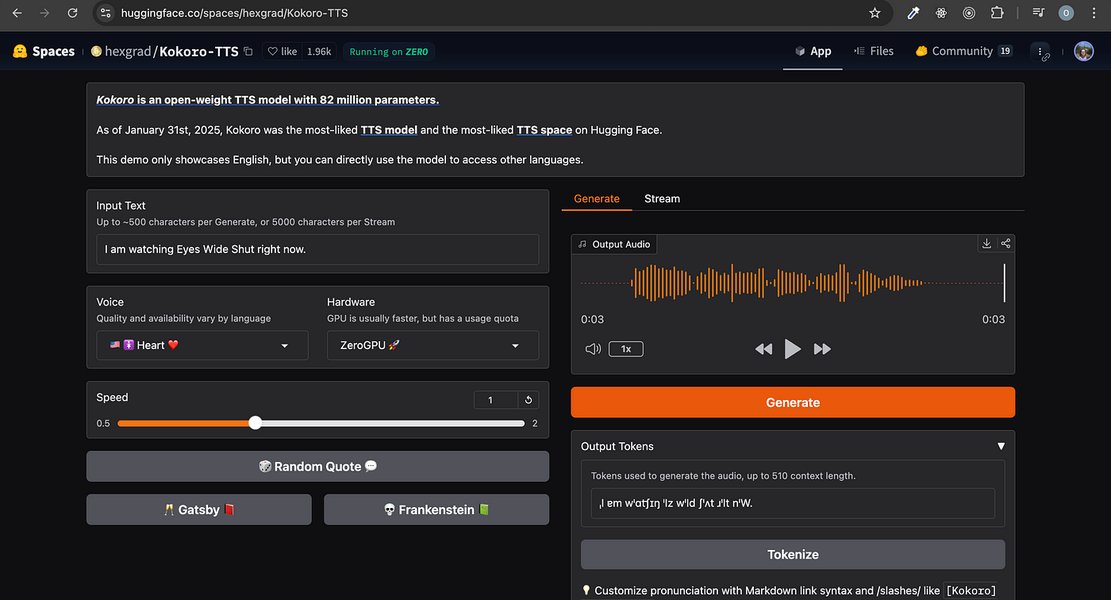
Conceptual image representing an advanced AI model like Kokoro TTS.
Key Steps for Local Integration:
- Obtain Kokoro Model: Download the model, typically in ONNX format, from sources like Hugging Face.
- Convert ONNX to TFLite: Use Python tools (
onnx,onnx-tf,tensorflow) to convert the model. This step can be complex and model-specific, potentially requiring adjustments for input/output shapes and operators supported by TFLite. - Integrate TFLite Model in Flutter:
- Add the TFLite model file (
.tflite) to your Flutter project's assets. - Use a package like
tflite_flutteror write custom platform channel code. - Implement native Android code (Kotlin/Java) to load the TFLite model and run inference using the TensorFlow Lite Android library.
- Create a Flutter MethodChannel to pass text from Dart to the native code and receive the resulting audio data (likely as raw bytes) back.
- Preprocess text input and postprocess audio output as required by the specific Kokoro model version.
- Use an audio playback package (
audioplayers,just_audio) to play the synthesized audio bytes.
- Add the TFLite model file (
Conceptual Workflow Mindmap:
This diagram illustrates the steps involved in the local TFLite integration approach:
(e.g., ONNX format)
from Hugging Face"] id2["2. Convert Model"] id2a["Setup Python Env
(onnx, onnx-tf, tensorflow)"] id2b["Run Conversion Script
ONNX -> TensorFlow SavedModel -> TFLite"] id2c["Verify TFLite Model"] id3["3. Flutter Project Setup"] id3a["Add Dependencies
(tflite_flutter, path_provider, audioplayers)"] id3b["Add TFLite model
to Flutter assets"] id4["4. Platform Channel Integration"] id4a["Dart Side (Flutter)"] id4a1["Create MethodChannel"] id4a2["Function to send text
via channel"] id4a3["Function to receive
audio bytes"] id4a4["Use audioplayers
to play bytes"] id4b["Native Side (Android - Kotlin/Java)"] id4b1["Implement MethodChannel handler"] id4b2["Load TFLite model
from assets"] id4b3["Preprocess input text"] id4b4["Run TFLite Interpreter"] id4b5["Postprocess output (audio)"] id4b6["Send audio bytes back
to Flutter"]
Pros and Cons:
- Pros: Works entirely offline, potentially lower latency after model load, greater control over the process, no server dependency or costs.
- Cons: Significantly more complex to implement, model conversion can be challenging, performance heavily depends on device capabilities, potential for larger app size due to the model, requires expertise in both Flutter and native Android TFLite integration.
Note: Due to the complexity and lack of readily available, verified examples specifically for Kokoro TTS TFLite integration in Flutter, providing robust code here is difficult. Referencing resources on ONNX to TFLite conversion and Flutter platform channels for TFLite is recommended if pursuing this path.
Approach 3: Using the flutter_tts Package (Standard Flutter TTS)
Utilizing Native Android TTS Engines
If the specific voice characteristics of Kokoro TTS are not a strict requirement, or if the complexity of the above methods is prohibitive, the standard approach is to use the flutter_tts package. This package acts as a wrapper around the native Text-to-Speech engines available on the Android operating system (like Google TTS).
While this won't use Kokoro TTS, it provides a reliable, well-supported, and much simpler way to add text-to-speech functionality to your Flutter app.
Setup and Configuration:
- Add Dependency: Add
flutter_ttsto yourpubspec.yaml:
Rundependencies: flutter: sdk: flutter flutter_tts: ^3.8.5 # Use the latest version from pub.devflutter pub get. - Android Configuration (
AndroidManifest.xml): For newer Android versions (API 30+), you need to declare your app's intent to query the TTS service. Add the following<queries>tag inside your<manifest>tag inandroid/app/src/main/AndroidManifest.xml:<manifest ...> <!-- Add this queries block --> <queries> <intent> <action android:name="android.intent.action.TTS_SERVICE" /> </intent> </queries> <application ...> ... </application> </manifest> - Android Build Configuration (
build.gradle): Ensure yourminSdkVersioninandroid/app/build.gradleis 21 or higher.android { // ... defaultConfig { // ... minSdkVersion 21 // ... } // ... } - Implement TTS in Dart: Instantiate
FlutterTtsand use its methods (speak,stop,setLanguage,setVoice, etc.).
Comprehensive Flutter Code (flutter_tts Example):
import 'package:flutter/material.dart'; import 'package:flutter_tts/flutter_tts.dart'; import 'dart:io' show Platform; // To check platform enum TtsState { playing, stopped, paused, continued } class StandardTtsWidget extends StatefulWidget { @override _StandardTtsWidgetState createState() => _StandardTtsWidgetState(); } class _StandardTtsWidgetState extends State<StandardTtsWidget> { late FlutterTts flutterTts; TtsState ttsState = TtsState.stopped; List<dynamic> _languages = []; List<dynamic> _voices = []; String? _selectedLanguage; String? _selectedVoice; double _volume = 1.0; double _pitch = 1.0; double _rate = 0.5; final TextEditingController _textController = TextEditingController(text: "Hello Flutter Text to Speech!"); get isPlaying => ttsState == TtsState.playing; get isStopped => ttsState == TtsState.stopped; @override void initState() { super.initState(); initTts(); } Future<void> initTts() async { flutterTts = FlutterTts(); // Get languages and voices _fetchLanguagesAndVoices(); // Set handlers flutterTts.setStartHandler(() { setState(() { ttsState = TtsState.playing; }); }); flutterTts.setCompletionHandler(() { setState(() { ttsState = TtsState.stopped; }); }); flutterTts.setCancelHandler(() { setState(() { ttsState = TtsState.stopped; }); }); flutterTts.setErrorHandler((msg) { setState(() { print("TTS Error: $msg"); ttsState = TtsState.stopped; }); }); // Set await options (optional, can help with timing on some devices) await flutterTts.awaitSpeakCompletion(true); } Future<void> _fetchLanguagesAndVoices() async { _languages = await flutterTts.getLanguages; _voices = await flutterTts.getVoices; // Optionally set default language/voice based on platform or locale if (Platform.isAndroid) { // On Android, you often set language, and the system picks a voice. // Setting a specific voice might require more nuanced handling. await flutterTts.setLanguage("en-US"); // Example default setState(() { _selectedLanguage = "en-US"; }); } setState(() {}); // Update UI } Future<void> _speak() async { await flutterTts.setVolume(_volume); await flutterTts.setSpeechRate(_rate); await flutterTts.setPitch(_pitch); if (_textController.text.isNotEmpty) { await flutterTts.speak(_textController.text); } } Future<void> _stop() async { await flutterTts.stop(); } @override void dispose() { flutterTts.stop(); _textController.dispose(); super.dispose(); } @override Widget build(BuildContext context) { return SingleChildScrollView( padding: const EdgeInsets.all(16.0), child: Column( children: [ TextField( controller: _textController, decoration: InputDecoration( labelText: 'Text to Speak (Native Engine)', border: OutlineInputBorder(), ), minLines: 3, maxLines: 5, ), SizedBox(height: 10), Row( mainAxisAlignment: MainAxisAlignment.spaceEvenly, children: [ ElevatedButton( child: Text('Speak'), onPressed: _speak, ), ElevatedButton( child: Text('Stop'), onPressed: _stop, style: ElevatedButton.styleFrom(backgroundColor: Colors.red), ), ], ), SizedBox(height: 20), _buildVoiceSelection(), _buildSliders(), ], ), ); } Widget _buildVoiceSelection() { // Voice selection UI might differ based on platform needs // Simple language dropdown for demonstration return DropdownButton<String>( value: _selectedLanguage, hint: Text('Select Language'), items: _languages.map((lang) => DropdownMenuItem( value: lang.toString(), child: Text(lang.toString()), )).toList(), onChanged: (String? newValue) async { if (newValue != null) { await flutterTts.setLanguage(newValue); setState(() { _selectedLanguage = newValue; }); } }, ); // Note: Selecting specific voices (<code>setVoice) might require mapping voice data correctly. // The structure ofgetVoicescan vary. Check package docs for details. } Widget _buildSliders() { return Column( children: [ Text("Volume: ${_volume.toStringAsFixed(2)}"), Slider( value: _volume, min: 0.0, max: 1.0, divisions: 10, onChanged: (value) { setState(() { _volume = value; }); }, ), Text("Pitch: ${_pitch.toStringAsFixed(2)}"), Slider( value: _pitch, min: 0.5, max: 2.0, divisions: 15, onChanged: (value) { setState(() { _pitch = value; }); }, ), Text("Rate: ${_rate.toStringAsFixed(2)}"), Slider( value: _rate, min: 0.0, max: 1.0, divisions: 10, onChanged: (value) { setState(() { _rate = value; }); }, ), ], ); } } // Example usage in a Scaffold: // Scaffold( // appBar: AppBar(title: const Text('Standard Flutter TTS Demo')), // body: StandardTtsWidget(), // );
Pros and Cons:
- Pros: Easy to implement, well-documented, stable, utilizes system resources efficiently, access to various installed languages/voices on the device.
- Cons: Does not use Kokoro TTS voices, quality depends entirely on the native engine installed on the user's device, limited customization beyond standard parameters (pitch, rate, volume).
Comparison of Approaches
Feature & Complexity Overview
The following chart provides a comparative overview of the three approaches based on key factors. Scores are relative estimations (1=Low/Bad, 5=High/Good):
This table summarizes the key characteristics of each approach:
| Feature | Kokoro TTS API | Kokoro TTS Local (TFLite) | flutter_tts (Native) |
|---|---|---|---|
| Voice Engine | Kokoro TTS (Server-side) | Kokoro TTS (On-Device) | Native Android TTS Engine |
| Voice Quality | High (Kokoro specific) | High (Kokoro specific) | Variable (Depends on device/engine) |
| Implementation Difficulty | Moderate (API integration) | Very High (Model conversion, TFLite, Platform Channels) | Low (Standard Flutter plugin) |
| Offline Capability | No | Yes | Yes |
| Network Dependency | Yes | No | No |
| Server Requirement | Yes (for Kokoro API) | No | No |
| Performance | Network latency dependent | Device CPU/GPU dependent | Generally good (optimized native code) |
| Maintenance | Requires API endpoint maintenance | Complex model updates/compatibility | Relatively simple (package updates) |
Video Tutorial: Standard Flutter TTS Implementation
Adding Text-to-Speech with flutter_tts
While not specific to Kokoro TTS, this video provides a helpful walkthrough of integrating the standard flutter_tts package, covering setup and basic usage, which corresponds to Approach 3 described above. Understanding this standard method is useful context even if aiming for Kokoro integration.
Video demonstrating how to add text-to-speech using the flutter_tts package in Flutter for iOS and Android.
Frequently Asked Questions (FAQ)
Why isn't there a direct Kokoro TTS package for Flutter?
Kokoro TTS is primarily released as an AI model (like ONNX). Integrating AI models into mobile apps typically requires more steps than using a pre-built SDK or plugin. It involves model conversion (like to TFLite), handling dependencies, and writing native code wrappers (via platform channels) to run the model efficiently on mobile hardware. Creating a simple, cross-platform Flutter package for a specific complex model like Kokoro TTS is a significant undertaking that hasn't been completed or widely adopted by the community yet.
Can I use Kokoro TTS offline in my Flutter app?
Yes, offline usage is possible but requires the complex "Local Integration via TFLite" approach (Approach 2). This involves converting the Kokoro model to TFLite format and running it directly on the Android device using native code accessed via Flutter's platform channels. The API approach (Approach 1) requires network connectivity, and the standard `flutter_tts` package (Approach 3) uses the device's native engine, which typically works offline.
What's the main difference between Kokoro TTS and the `flutter_tts` package?
The core difference lies in the underlying TTS engine:
- Kokoro TTS: Refers to a specific, lightweight AI model known for its high-quality, natural-sounding voice synthesis. Using it requires either interacting with a server running the model (API approach) or complex local integration (TFLite approach).
- `flutter_tts` package: Acts as a bridge to the native TTS engines already present on the user's device (e.g., Google TTS on Android). It doesn't contain its own TTS model. The voice quality and characteristics depend entirely on the system's installed engine. It's much simpler to integrate but doesn't guarantee Kokoro's specific voice quality.
Is the TFLite conversion process for Kokoro reliable?
Converting complex AI models like TTS from ONNX to TFLite can be challenging. Success depends on factors like the specific model architecture, operator support in TFLite, and potential need for modifications. While technically possible (as discussed in some online resources), it might require significant effort, debugging, and potentially model adjustments to achieve a working and performant TFLite version suitable for mobile deployment. It's considered an advanced task.
Recommended Next Steps & Further Reading
- Learn how to deploy Kokoro TTS as a FastAPI service for the API approach.
- Explore detailed guides on converting ONNX models to TensorFlow Lite.
- Discover advanced features of the `flutter_tts` package for customizing native TTS output.
- Find tutorials on using Flutter Platform Channels to bridge Dart with native Android/iOS code.
References
Last updated May 6, 2025