
Enhancing Project Integrity: Integrating NCRs, Client Communication, and EPC Oversight
Streamlining non-conformance reporting through system integration and proactive stakeholder notification.
Effectively managing Non-Conformance Reports (NCRs) is vital for maintaining quality and project timelines. This involves not only identifying deviations but also ensuring that these issues are tracked efficiently, communicated transparently, and resolved systematically. Integrating NCR tracking with document control systems, establishing clear client notification protocols, and leveraging oversight bodies like the EPC are key components of a robust quality management framework.
Key Considerations for Your Comment Sheet
- Integrated Tracking: Ensure Non-Conformance Report (NCR) tracking is seamlessly integrated within the broader document control system for unified management, traceability, and auditing.
- Client Communication Protocol: Implement a clear provision requiring prompt notification to the client whenever an NCR impacts project timelines or deliverables, fostering transparency.
- Stakeholder Notification Assurance: Note that the relevant governing body or council (referred to as EPC) will guarantee that all concerned parties receive timely and appropriate notification, particularly when project schedules are potentially affected by an NCR.
Deep Dive: Integrating NCR Tracking with Document Control Systems
Why Integration Matters
Integrating NCR tracking directly into your organization's main document control system is not merely an administrative convenience; it's a strategic necessity for robust quality management. Siloed NCR processes often lead to inefficiencies, lost information, delays in resolution, and difficulties during audits. Integration addresses these challenges by creating a single source of truth.
Benefits of Integration
- Centralized Management: All NCRs and related documentation (evidence, investigation reports, corrective action plans) are stored and managed in one secure, accessible location.
- Improved Traceability: Easily link NCRs to specific products, processes, projects, or documents under revision control. This allows for a clear audit trail from issue identification to resolution.
- Enhanced Workflow Automation: Document control systems can automate NCR workflows, including unique numbering, routing for review and approval, assigning actions, and tracking deadlines.
- Consistency and Standardization: Using integrated templates ensures NCRs are documented uniformly, capturing all necessary information consistently.
- Reduced Errors: Automation minimizes manual data entry and the risk of human error associated with managing separate systems.
- Compliance Support: Facilitates compliance with quality standards (like ISO 9001) which mandate controlled documentation and records management for non-conformances.
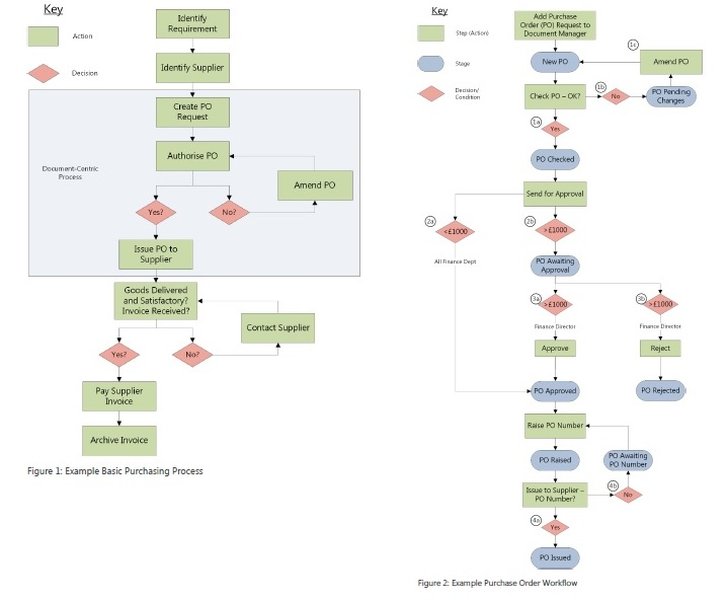
Visualizing automated workflows within a document management system.
Implementing Integrated NCR Tracking
Successful integration often involves leveraging Quality Management System (QMS) software or advanced Document Management System (DMS) capabilities. Key steps include:
- System Selection/Configuration: Choose a system that supports configurable workflows and integration with existing tools. Configure specific NCR forms, routing rules, and notification triggers.
- Process Mapping: Clearly define the NCR process flow within the integrated system, from initiation to closure and verification.
- Template Design: Develop standardized NCR templates within the system.
- Training: Ensure all relevant personnel are trained on how to raise, process, and manage NCRs within the new integrated system.
- Linkage: Establish connections between NCRs and other relevant records, such as CAPAs (Corrective and Preventive Actions), change controls, and product documentation.
Client Notification Protocols for NCR Impacts
The Importance of Transparency
When a non-conformance has the potential to affect project milestones, delivery schedules, or the final product/service quality, timely and transparent communication with the client is crucial. Failing to notify clients can damage trust, lead to contractual issues, and hinder collaborative problem-solving.
Establishing Notification Provisions
- Define Triggers: Clearly specify the criteria under which an NCR necessitates client notification (e.g., impact on critical path, delivery date slippage beyond a threshold, significant quality deviation).
- Establish Timelines: Set clear expectations for how quickly notifications must occur after an impactful NCR is identified and assessed.
- Determine Content: Standardize the information included in the notification (e.g., NCR identification, nature of the non-conformance, assessed impact on timelines/deliverables, initial mitigation steps, expected resolution timeline).
- Assign Responsibility: Designate specific roles (e.g., Project Manager, Quality Manager) responsible for initiating and delivering client notifications.
- Document Communication: Keep records of all client notifications related to NCRs within the project documentation or the NCR record itself.
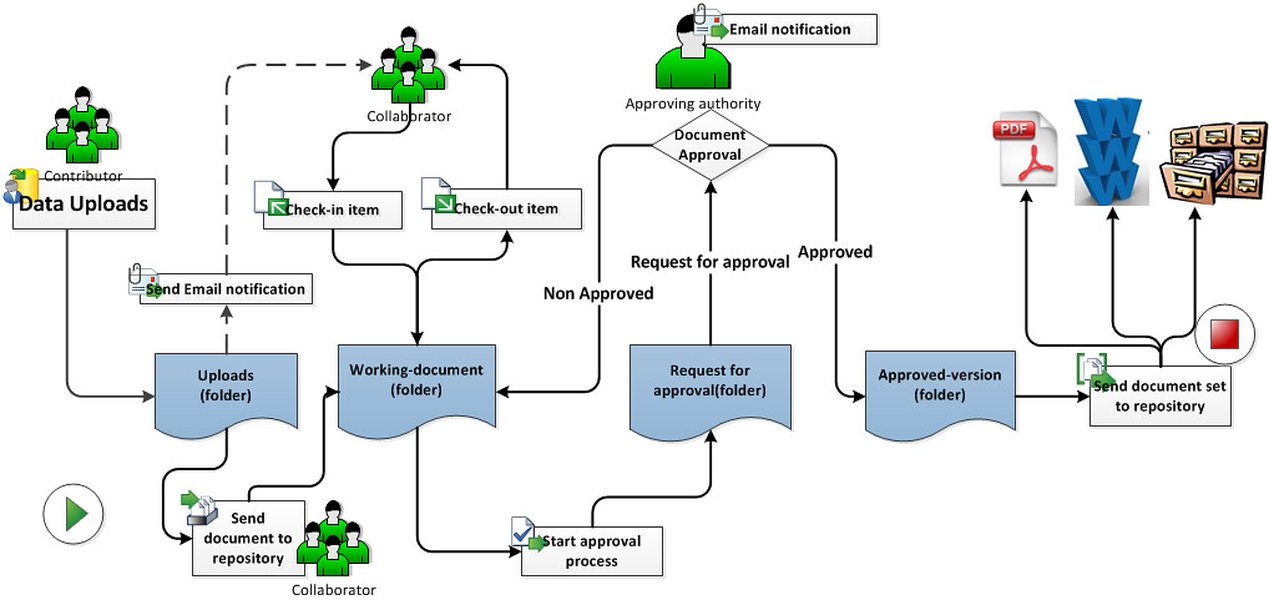
A typical document workflow, adaptable for NCR processing and notification steps.
Role of EPC in Ensuring Stakeholder Notification
Ensuring Accountability and Timeliness
The reference to "EPC" ensuring proper notification suggests an oversight or governing function responsible for enforcing communication protocols, particularly when NCRs impact project timelines. While the specific identity of "EPC" (e.g., European Patent Convention, Emergency Preparedness Council, or a project-specific entity) depends on the context, its role focuses on ensuring that communication procedures are followed diligently.
How EPC Oversight Functions
- Setting Standards: The EPC may define the minimum requirements for notification processes regarding NCRs within its purview.
- Auditing Compliance: It may periodically review projects or processes to ensure that notification protocols are being adhered to.
- Escalation Point: The EPC could serve as an escalation point if required notifications are missed or delayed.
- Mandating Channels: It might specify acceptable communication channels (e.g., formal letters, secure electronic systems) for official notifications.
- Guaranteeing Reach: Its oversight ensures that notifications reach *all* relevant parties, not just the primary client contact, potentially including regulatory bodies, subcontractors, or other key stakeholders impacted by timeline changes.
This oversight function adds a layer of accountability, reinforcing the importance of timely communication and ensuring that project disruptions caused by non-conformances are managed transparently across all involved parties.
Visualizing NCR Management Factors
Key Aspects of an Effective NCR System
An effective Non-Conformance Report system balances several critical factors. The radar chart below illustrates a hypothetical assessment of a well-integrated NCR system, rating key characteristics on a scale relevant to their performance level (where higher values indicate better performance). This visualization helps understand the multi-faceted nature of optimizing NCR management, focusing on efficiency, compliance, transparency, integration level, speed of resolution, and the effectiveness of preventative actions derived from NCR analysis.
Mapping the Integrated NCR Process
Key Stages and Connections
The mindmap below outlines the core components and flow of an integrated Non-Conformance Report process, emphasizing the connections between identification, documentation within the control system, assessment, notification triggers, resolution activities, and feedback into continuous improvement cycles. It visually represents how integration facilitates a structured approach to managing deviations.
Exploring NCR Mobile Applications
Leveraging Technology for On-Site Reporting
Modern approaches to NCR management often involve mobile applications, particularly useful in fields like construction or manufacturing where issues might be identified directly on-site. This video demonstrates the concept of building a mobile app specifically for handling Non-Conformance Reports. While focused on the creation process, it highlights how such tools can streamline the initial documentation step, allowing engineers or field personnel to quickly capture details, attach photos, and initiate the NCR process directly from their devices. This immediacy can feed directly into the integrated document control system, accelerating the entire workflow from identification to resolution and supporting the integration goals discussed earlier.
Comparative Overview: NCR Management Approaches
Integrated vs. Standalone Systems
Choosing how to manage NCRs involves trade-offs. An integrated system offers significant advantages in terms of efficiency and control, while standalone or manual methods might seem simpler initially but often introduce risks and inefficiencies. The table below compares key aspects of these approaches.
| Feature | Integrated NCR System (within DMS/QMS) | Standalone NCR Software | Manual System (Spreadsheets/Email) |
|---|---|---|---|
| Data Centralization | High (Single source of truth with other documents) | Medium (Centralized for NCRs, but separate from main DMS) | Low (Scattered data, difficult to consolidate) |
| Workflow Automation | High (Automated routing, approvals, notifications) | Medium-High (Often includes NCR-specific workflows) | Low/None (Relies on manual processes) |
| Document Control Linkage | Seamless (Direct links to specs, procedures, CAPAs) | Possible via integration, but may require setup | Manual and error-prone |
| Traceability & Audit Trail | Excellent (Complete history logged automatically) | Good (Specific to NCR process) | Poor (Difficult to reconstruct history reliably) |
| Notification Capability | High (System-generated alerts for clients/stakeholders) | Often Available (May need configuration) | Manual (Requires manual email/communication) |
| Reporting & Analytics | Potentially High (Leverages broader system data) | Good (Focused NCR metrics) | Limited (Requires manual data compilation) |
| Consistency | High (Enforced templates and processes) | High (Within the specific tool) | Low (Prone to variations) |
| Implementation Effort | Medium-High (Part of larger system implementation) | Medium (Focused software setup) | Low (Minimal setup, high ongoing effort) |
Frequently Asked Questions (FAQ)
What is a Non-Conformance Report (NCR)?
An NCR is a formal document used in quality management systems to record any deviation from specified requirements, standards, or procedures. This could relate to a product, process, or service that fails to meet the expected quality or specifications.
Why integrate NCR tracking with a Document Control System (DCS)?
Integration centralizes information, improves traceability, automates workflows (like approvals and notifications), ensures consistency through templates, reduces errors, and helps maintain compliance with quality standards by providing a clear audit trail within the main system used for managing controlled documents.
When should a client be notified about an NCR?
Clients should typically be notified when an NCR is assessed to have a potential or actual impact on key project aspects they care about, primarily project timelines (delivery dates, milestones) or significant deliverables (product quality, functionality, compliance). Clear internal guidelines should define these notification triggers.
What is the role of "EPC" in NCR notifications?
Based on the context provided, "EPC" refers to an entity responsible for ensuring that proper notification procedures are followed, especially when an NCR affects project timelines. This oversight role guarantees that all relevant parties (including clients and potentially other stakeholders or regulatory bodies) are informed promptly and adequately, ensuring accountability and adherence to communication protocols.
Recommended Further Reading
- Explore best practices for implementing an integrated NCR and document control system effectively.
- Learn how Quality Management System (QMS) software can automate your Non-Conformance Report workflows.
- Discover strategies for communicating effectively with clients when project issues like NCRs arise.
- Understand the critical link between Non-Conformance Reports and the Corrective and Preventive Action (CAPA) process.
References
Last updated April 29, 2025