
Navigating Document Conversion Challenges: Your Essential Interim Guide
Addressing CIMPA performance issues with clear, actionable solutions and expert support to maintain productivity.
We are addressing current performance challenges with the CIMPA system's document conversion capabilities. To ensure continued productivity and minimize disruption during this period, we have formulated interim recommendations and support mechanisms. This guide outlines these temporary measures, drawing upon best practices in document management and conversion.
Key Highlights: Your Quick Guide
- Established Workflow Prioritized: For consistency and reliability, we recommend using the familiar workflow involving RDSH, MS Word, PDF, AirbusSign, and ECM via Solveig & Sabine wherever feasible.
- Google Docs Flexibility: Independent use of Google Docs is supported for suitable documents, with Katharina providing guidance and a "Best Practice Guideline for Word to GDoc Conversion."
- Urgent Conversion Support: Katharina is available to manage the complete conversion process for highly urgent documents, ensuring timely and accurate results.
Understanding the Current Situation and Interim Solutions
The current suboptimal performance of the CIMPA document conversion tool necessitates a temporary adjustment to our standard procedures. Our goal is to provide robust alternatives that ensure workflow continuity and document integrity. The following strategies are designed to support your work effectively while we address the underlying system issues.
Interim Recommendations for Document Handling
To navigate the current limitations, we propose a multi-faceted approach. These recommendations are designed to offer flexibility while maintaining quality and efficiency in your document management tasks.
1. Adherence to the Established Workflow
When possible, we strongly advise continuing with the proven document workflow. This process involves:
- RDSH (Remote Desktop Session Host): For secure access to necessary applications.
- Microsoft Word: For initial document creation, editing, and leveraging features like styles that aid in cleaner conversions. Preparing documents with consistent formatting (e.g., using Heading 1, Heading 2 styles) is crucial for preserving structure.
- PDF: As the standard format for finalized documents, ensuring consistency across platforms.
- AirbusSign: For secure and auditable electronic signatures.
- ECM (Enterprise Content Management): Managed via Solveig and Sabine, ensuring documents are correctly archived and accessible according to our information governance policies.
This established workflow minimizes conversion errors and improves traceability, aligning with best practices for enterprise content management that emphasize defined processes and responsible personnel for document integrity.
2. Utilizing Google Docs with Guided Support
For documents where it is a suitable alternative, you are encouraged to use Google Docs independently. To facilitate this, Katharina has prepared a comprehensive "Best Practice Guideline Word to GDoc conversion," which is attached to this communication. This guideline offers practical advice on:
- Preparing Word documents for optimal conversion (e.g., simplifying complex layouts, using standard fonts).
- The conversion process itself within the Google Docs environment.
- Verifying the converted document for formatting and content accuracy.
Katharina is also available to provide assistance should you encounter any challenges while using Google Docs for conversion. This approach offers flexibility, particularly for collaborative documents, while ensuring support is readily available.
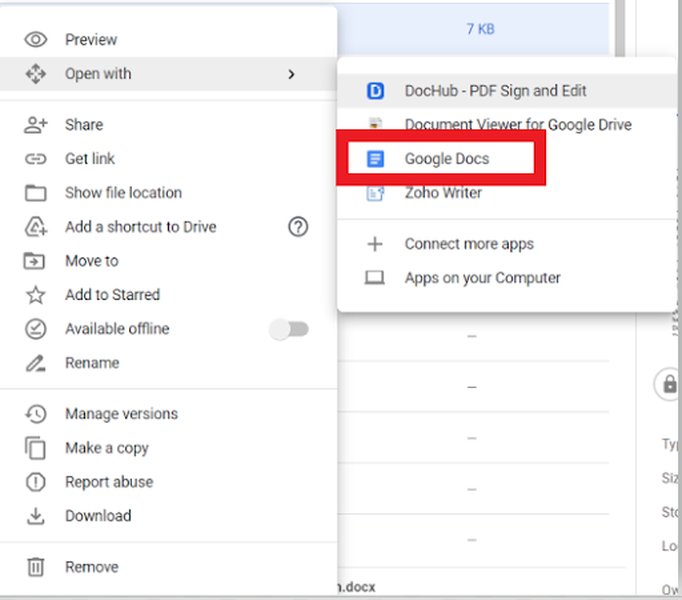
Step-by-step illustration for converting Word documents to Google Docs.
3. Dedicated Support for Urgent Document Conversions
We understand that some documents require immediate and flawless conversion due to their urgency or criticality. For such cases, Katharina is available to provide complete conversion support. This ensures that time-sensitive materials are processed efficiently and accurately, minimizing potential delays. Please reach out directly to Katharina for assistance with these urgent requirements. This aligns with the best practice of utilizing expert intervention for complex or critical conversion tasks to maintain quality and compliance.
Visualizing Your Document Conversion Options
To help you better understand the characteristics of each recommended approach, the following chart compares them across several key factors. This visual aid is intended to assist in selecting the most appropriate method based on your specific document needs and circumstances.
This radar chart evaluates each option based on factors like reliability, the speed perceived by the user (considering their effort), the accuracy of formatting post-conversion, ease of collaboration, and the level of specific expertise required from the user (where a lower score indicates less expertise needed).
Overview of Interim Document Conversion Strategy
The following mindmap provides a visual summary of the interim strategy to manage document conversions effectively, highlighting the problem, the proposed solutions, and the available support mechanisms. This illustrates how the different components of our temporary approach connect to ensure smooth operations.
This mindmap outlines the core challenge (CIMPA performance) and branches into the various solutions and support systems put in place, ultimately aiming to maintain productivity and document quality.
Practical Guidance: Converting Word to Google Docs
To further assist you with one of the recommended alternative workflows, the following video provides a helpful tutorial on converting Microsoft Word documents to Google Docs. This can be particularly useful when leveraging the Google Docs option.
This video demonstrates the process of converting Word documents to Google Docs, covering basic steps and interface navigation.
Watching this tutorial can supplement the attached "Best Practice Guideline" and help ensure a smoother transition when opting to use Google Docs for your document needs. Pay attention to tips on preserving formatting and handling different file types, which are often crucial for maintaining document quality post-conversion.
Summary of Document Conversion Options
The table below provides a quick reference summary of the interim document conversion options, their primary use cases, and key considerations to help you select the best approach for your needs.
| Option | Primary Use Case | Key Considerations | Support |
|---|---|---|---|
| Established Workflow (RDSH, MS Word, PDF, AirbusSign, ECM) | Standard documents, processes requiring high integrity and formal approval. | Familiar process, robust, good for final versions and archiving. May be slower for quick, collaborative edits compared to cloud tools. | Solveig & Sabine for ECM component. |
| Google Docs (Independent with Guideline) | Collaborative documents, drafts, documents benefiting from cloud features. | Flexible, good for real-time collaboration. Conversion fidelity can vary with complex Word formatting; adherence to best practices is key. | Katharina (Guideline and ad-hoc assistance). |
| Katharina's Full Conversion Support | Highly urgent or critical documents requiring immediate and accurate conversion. | Ensures highest accuracy and speed for critical items, offloads user effort. Reserved for truly urgent needs. | Katharina (Complete conversion service). |
Please remember that the attached "Best Practice Guideline Word to GDoc conversion" from Katharina contains detailed instructions and tips that are crucial for successful conversions, especially when using Google Docs. We encourage you to refer to it frequently.
Frequently Asked Questions (FAQ)
What if my document is very complex or has specific formatting that needs to be preserved? ▼
For complex documents with critical formatting, the established workflow (MS Word, PDF) is generally recommended as it offers more control over the final output. If conversion to Google Docs is attempted, ensure you follow Katharina's "Best Practice Guideline" closely, which includes tips for preparing Word files (e.g., using styles, simplifying tables) to maximize fidelity. For highly critical and complex urgent documents, consider requesting Katharina's full conversion support.
How do I access the "Best Practice Guideline Word to GDoc conversion"? ▼
The "Best Practice Guideline Word to GDoc conversion" prepared by Katharina is attached to the email or communication through which you received this notice. Please check your attachments. If you cannot locate it, please contact us, and we will ensure you receive a copy.
Who are Solveig & Sabine and what is their role in the ECM process? ▼
Solveig and Sabine are the designated personnel responsible for managing aspects of our Enterprise Content Management (ECM) system. When the established workflow directs documents to ECM, they ensure proper handling, archiving, and retrieval according to our organizational standards. Their involvement guarantees that documents are managed consistently within our official systems.
Why is the "old workflow" (RDSH, MS Word, PDF, etc.) still recommended if there are newer tools like Google Docs? ▼
The "old workflow" is recommended due to its proven reliability, established processes for quality control, security features (like RDSH), and direct integration with our formal approval (AirbusSign) and archival (ECM) systems. While tools like Google Docs offer excellent collaboration and flexibility, the established workflow provides greater assurance for official records, complex formatting, and compliance with specific organizational requirements, especially when the primary conversion tool (CIMPA) is underperforming.
Your understanding and cooperation in adopting these interim measures are greatly appreciated as we work diligently to resolve the CIMPA performance issues. Should you have any further questions or require clarification beyond the provided guideline and FAQs, please do not hesitate to contact us.
Recommended Further Exploration
- What are the best practices for preparing Word documents for any type of conversion?
- How can I ensure formatting consistency when converting documents between different software?
- What are the key benefits of using an Enterprise Content Management (ECM) system for document workflows?
- How do digital signature tools like AirbusSign integrate into document approval processes?
References
Last updated May 8, 2025