
Building a Competitive Intermittent Fasting App
A comprehensive roadmap from market research to MVP launch
Highlights
- Feature Prioritization: Core functions like fasting timers, progress tracking, notifications, and a clean user interface are essential.
- Tech Stack & Development: Flutter combined with Supabase is highly recommended for a quick, cross-platform MVP with cost efficiency.
- Cost & Timeline: With a Figma template, development can be accelerated within 2-4 months with moderate costs, while achieving an income target within 12-18 months based on strong marketing.
Market Analysis and Competitor Research
Overview of Leading Intermittent Fasting Apps
The current market shows a diverse array of intermittent fasting apps, each offering a unique blend of features aimed at tracking fasting periods, providing health insights, and enhancing user engagement. Apps such as Zero, Fastic, Simple, and DoFasting are among the most popular, with Zero standing out for its customizable fasting plans and broad user base of over 10 million downloads. Fastic distinguishes itself with comprehensive community support and an AI-based food scanner, while apps like Simple and Life Fasting Tracker attract users with their clean interfaces and straightforward functionality.
Key Features Across Competitor Apps
Despite variations, several features are consistently present across leading fasting apps:
Core Features
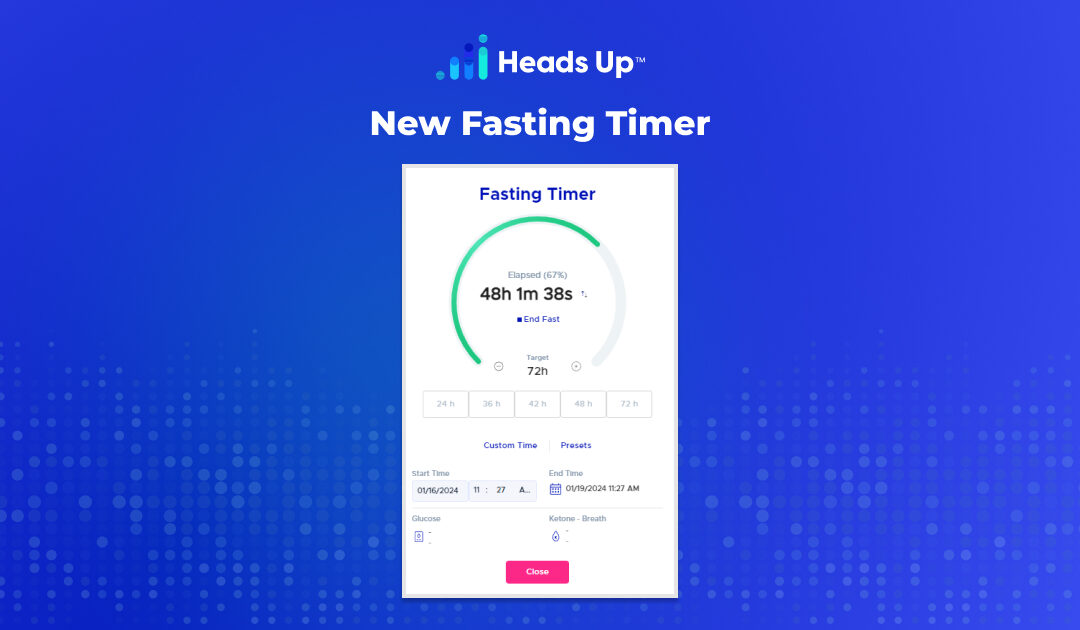
- Fasting Timer/Tracker: A visual timer that counts down fasting windows, offering various customizable schedules to accommodate different fasting methods such as 16:8, 18:6, 5:2, or even OMAD. This timer is fundamental in keeping users informed of their fasting progress.
- Push Notifications: Timely alerts are crucial for initiating or ending fasting periods, helping users adhere to their schedules. Reminders prevent users from deviating from their established plans.
- Weight and Progress Tracking: Many apps include features for logging weight changes, visual progress charts, and fasting statistics (e.g., longest fasting duration or streaks). This motivates users by providing a clear view of their health improvements.
Secondary and Premium Features
Secondary features such as hydration tracking, meal logging, and integration with health devices (e.g., Apple Health and Google Fit) enhance the user experience. Premium features often include AI food scanners for nutritional tracking, personalized plans, and even guided fasting with professional coaching.
Many users appreciate educational resources available in top apps, including articles on the benefits of intermittent fasting and practical tips for getting started. Social components, like community forums and support groups, have also become defining characteristics that drive engagement and retention.
User Grievances and Pain Points
Despite the popularity and innovative features of current apps, several user grievances persist:
- Cost: High subscription fees and expensive premium features discourage users from long-term engagement.
- Complexity: An overload of features can overwhelm beginners. Some apps try to pack too much functionality, which may hinder usability for users who prefer a streamlined experience.
- Limited Free Functionality: Many free versions offer only basic features, driving user frustration until they invest in premium plans.
- Interface Issues: Some competitors face issues such as unstable performance, synchronization glitches across devices, and battery drainage due to constant background tracking.
MVP Feature Set: Screen-by-Screen Implementation
Designing an MVP That Competes
To quickly enter the competitive market, your MVP should focus on delivering a smooth and simple user experience while incorporating just enough features to compete with established apps. Given the demands of the market and the lessons learned from user feedback, the following screen-by-screen breakdown provides a precise roadmap:
1. Onboarding and Setup Screen
- Purpose: Introduce users to intermittent fasting and quickly set up their profiles.
- Features:
- User sign-up and profile creation (age, weight, height, health goals).
- Brief introduction/tutorial on intermittent fasting principles.
- Customization options for selecting a preferred fasting method (e.g., 16:8, 5:2, OMAD).
2. Main Dashboard
- Purpose: Serve as the central control panel for daily fasting activities.
- Features:
- Display of current fasting status, elapsed time, and remaining time.
- Quick-access buttons for starting or stopping fasts.
- Immediate view of today’s scheduled fasting windows, meal times, and upcoming reminders.
3. Fasting Timer Screen
- Purpose: Provide a dedicated environment for time tracking.
- Features:
- Interactive countdown timer with visual cues indicating fasting and eating phases.
- Customizable settings for different fasting protocols.
- Option to pause or modify a fasting session if needed (with clear warnings and guidelines).
4. Progress and Analytics Screen
- Purpose: Keep users informed about their progress and inspire continued usage.
- Features:
- Graphical display of weight changes over time.
- Statistics on fasting streaks, average fasting duration, and best personal records.
- A summary of health metrics and tips on further optimization.
5. Notification and Reminder Screen
- Purpose: Empower users to remain adherent to their fasting schedule.
- Features:
- Configurable push notifications for fasting start/end reminders.
- Alerts that sync with phone calendars and optionally with Apple Health/Google Fit.
- Customizable snooze and escalation options if a fast is delayed or broken.
6. Settings and Account Management Screen
- Purpose: Provide a back-end for managing user preferences, app configurations, and subscription information.
- Features:
- User account details and profile editing features.
- Subscription management including free vs. premium toggling.
- Integration details for health devices, custom themes, and privacy settings.
7. Educational Content and Community Support Screen (Optional for MVP)
- Purpose: Though secondary for MVP, integrating educational articles and community support can drive long-term engagement.
- Features:
- Brief, science-backed articles on fasting benefits and nutritional tips.
- Links to community forums or curated social feeds (could be introduced later as the app scales).
Tech Stack Recommendations and Development Strategy
Choosing the Best Framework
With the goal of maintaining a single codebase for both Android and iOS, two prominent cross-platform frameworks come to the forefront: Flutter and React Native. Given your extensive experience in Java Spring Boot and object-oriented programming principles, Flutter is highly recommended. Its strengths include:
Flutter Advantages
- Performance: Flutter compiles directly to native ARM or x86 libraries, ensuring fast startup times and smooth UI transitions. This is crucial for a timing-sensitive app like intermittent fasting.
- Consistent UI: Flutter’s rich widget library guarantees a consistent look and feel across both platforms.
- Rapid Development: Features such as hot reload facilitate quick iterations, which is invaluable during the MVP phase.
- Integration: Strong support for Supabase for the backend, handling authentication, real-time database needs, and storage requirements. Integration with payment systems like Stripe and subscription management systems such as RevenueCat is straightforward with Flutter packages.
While React Native is a viable alternative with a mature JavaScript ecosystem and generally smaller app sizes, its reliance on the JavaScript bridge sometimes results in performance bottlenecks in apps requiring precise timing and high reliability. Thus, for your intermittent fasting app, Flutter combined with Supabase is the preferred option.
Backend and Payment Integration
- Backend: Supabase is a robust choice, providing a real-time data layer that is essential for syncing fasting stats, progress tracking, and user states. It also easily integrates with Flutter.
- Payments: For managing subscriptions and in-app purchases, integrating Stripe and RevenueCat offers a secure and scalable monetization framework. These services allow you to focus on the core app functionalities while ensuring a seamless payment process for your users.
Design Options and Cost Efficiency
As an experienced developer, you might consider leveraging pre-existing design assets to speed up the development cycle. Using a Figma template can significantly cut design costs and time:
- Template Purchase: A $50 Figma template is a cost-effective option for kick-starting your design. You can then customize it to suit the specific needs of your app, keeping a consistent and visually appealing user interface.
- Figma to Code Conversion: Platforms such as lovable.dev offer services to convert Figma designs into production-ready code. This approach is particularly attractive if you want to bypass the intricacies of coding the UI from scratch. Considering your background, you can opt to work partially with such platforms to save time and minimize hiring costs.
In contrast, writing the code entirely by yourself will allow for full control over the details but will significantly extend your development timeline. Hence, a blended approach—starting with a Figma template and using platforms like lovable.dev for UI conversion, while focusing your own efforts on backend logic and core integrations—is likely the most efficient and cost-effective method.
Cost and Timeline Estimates
The timeframe and financial outlay required to strike your target of an average revenue of $10,000 per month depend on both app development and subsequent user acquisition strategies:
Development Timeline
- MVP Development: With the combined approach of using a Figma template and Flutter, you can expect:
- Basic MVP with core features: 2-3 months
- Enhanced feature set with secondary screens: an additional 1 month
- Total initial development timeline: roughly 3-4 months
Monetization and Revenue Targets
Achieving a revenue target of $10,000 per month depends heavily on your monetization model:
- Freemium Model with In-App Purchases: Offer basic functionality for free while charging for premium features (e.g., personalized plans, advanced analytics, or ad-free experience). For instance, 2,000 paying subscribers at approximately $5 per month could reach the target.
- Subscription Model: Alternatively, if you target a higher subscription fee, a smaller subscriber base (e.g., 1,000 subscribers at $10 per month) might suffice.
- Revenue Projection: With a streamlined and market-responsive MVP, you could realistically approach the $10,000 per month revenue target within 12-18 months of the MVP launch, given effective ASO, content marketing, and social media engagement.
Overall Cost Estimate
- Using a $50 Figma template combined with platforms like lovable.dev for UI conversion may limit costs to approximately $300-500 for initial design expenditures.
- Self-development leveraging your expertise, along with modest costs for backend services and payment integration, may allow you to keep overall expenditures within a $500-1000 range for the MVP phase.
- If you opt to partially outsource design (e.g., professional UI/UX intervention), the costs might be higher but will reduce post-launch corrections and iterations.
Summary and Strategy for MVP Launch
Key Takeaways
Based on comprehensive market research and competitor analysis, the best strategy is to focus on a minimal yet effective feature set:
- Essential Features: Prioritize a robust fasting timer, customizable schedules, clear progress tracking, and alert mechanisms. These should form the foundation of the user experience.
- Secondary Enhancements: After the MVP launch, incorporate educational content, community features, and additional integration options with health devices to drive user retention and long-term engagement.
- Tech Stack Choice: Leverage Flutter with Supabase for the best performance and cost efficiency, integrating Stripe and RevenueCat for seamless payment and subscription management.
- Cost Efficiency: Utilize a $50 Figma template and consider partial automation of design through lovable.dev to significantly cut down on both time and development costs.
- Timeline and Milestones: Expect MVP development to take around 3-4 months, with the possibility of reaching your $10,000 monthly revenue target within 12-18 months provided you invest in strong marketing and user acquisition strategies.
Implementation Roadmap
| Phase | Duration | Key Activities |
|---|---|---|
| Concept & Design | 0.5 - 1 Month | Market research, Figma template customization, initial UX/UI design |
| MVP Development | 2 - 3 Months | Core features implementation (Onboarding, Dashboard, Fasting Timer, Progress Analytics, Notifications) |
| Beta Launch & Feedback | 1 Month | Release beta version, gather user feedback, fix issues |
| Full Launch & Marketing | 2 - 3 Months Post-MVP | Scale marketing efforts, implement advanced features, monitor subscriptions |
Conclusion
In summary, by analyzing the current market landscape and user feedback, your path to developing an intermittent fasting app involves a focused MVP that prioritizes core functionality, an intuitive user interface, and essential performance features. With Flutter and Supabase as your tech foundation, integration of payment solutions such as Stripe and RevenueCat, and a strategic design process leveraging a low-cost Figma template, you can streamline development while minimizing costs. Although the process may span over 3-4 months for an initial MVP, a targeted marketing and user acquisition strategy can realistically propel you towards achieving a sustainable revenue of $10,000 per month in 12 to 18 months. This approach not only ensures competitive positioning against established apps but also lays a solid groundwork for future enhancements and scalability.
References
- Top Intermittent Fasting Apps - 21 Day Hero
- Fasting Apps Overview - FastingApps
- Free Intermittent Fasting Apps - The Nine Hertz
- Free Intermittent Fasting Apps - A3 Logics
- Best Apps for Intermittent Fasting - Good Housekeeping
- Intermittent Fasting App Insights - Prevention
Recommended Further Queries
Last updated February 25, 2025