
Unlocking Efficiency: A Deep Dive into the Comprehensive Invoice Approval and Payment Workflow
Streamlining your financial operations from initial accrual to final vendor notification for optimal control and transparency.
Navigating the complexities of invoice processing requires a well-defined workflow to ensure accuracy, compliance, and timely payments. This detailed guide breaks down a 10-step process, integrating best practices for accrual management, internal approvals, financial verification, system integration, and vendor communication. Understanding each stage is crucial for maintaining healthy financial records and strong vendor relationships.
Essential Insights: Key Takeaways from the Workflow
- Crucial Controls: The workflow incorporates vital checkpoints like Product Head approval before invoice registration and a multi-faceted finance review (including tax portal comparison) to mitigate risks of errors and fraud.
- System Synergy: Effective integration between systems like CW (operational system) and JDE (ERP system) is paramount for seamless data flow, reducing manual entry and ensuring Accounts Payable accuracy.
- Accurate Accounting: The process emphasizes proper accrual management, including initial recording based on buying rates and subsequent reversal upon invoice processing, to ensure expenses are matched to the correct accounting period.
The Detailed 10-Step Invoice Management Journey
This section outlines the end-to-end process, from the initial file creation and accrual updates through to final payment and vendor notification. Each step is critical for maintaining financial integrity and operational efficiency.
Phase 1: Initiation and Procurement
Step 1: File Opening on CW with Accrual Updates
The workflow commences with the creation of a new file within the CW system (presumed to be an operational or procurement management tool). Simultaneously, accruals are meticulously updated. This involves recording an estimated expense based on current buying rates or exchange rates before the actual invoice is received. This practice aligns with accrual-based accounting, which aims to match expenses to the period in which they are incurred, rather than when they are paid. The Procurement Team is typically responsible for this initial step, ensuring that potential liabilities are recognized early.
- Action: Open file in CW; update accruals based on buying rates.
- Responsible: Procurement Team.
- System: CW.
- Outcome: File initiated; accruals provisionally recorded and adjusted in the system, reflecting anticipated costs.
Step 2: Placing Order to Vendor by Operations
Following the file opening and accrual setup, the Operations (Ops) team takes charge of placing the formal purchase order with the selected vendor. This step is crucial as it contractually binds the organization to the purchase of goods or services. The purchase order (PO) should detail quantities, specifications, agreed prices, and delivery terms, serving as a key reference document throughout the subsequent stages of the workflow. A clear and accurate PO minimizes discrepancies later in the process.
- Action: Operations team places order with the vendor.
- Responsible: Operations Team.
- Outcome: Order placed; vendor confirmation received, initiating the procurement cycle.
Phase 2: Invoice Registration and Preliminary Financial Adjustments
Step 3: Registering Vendor Invoice After Product Head Approval
Once the vendor submits their invoice for the goods or services rendered, it doesn't immediately enter the financial system. A critical internal control measure is implemented here: the invoice must first be reviewed and approved by the relevant Product Head. This approval confirms that the goods/services were received as expected and that the invoice aligns with the department's budget and the initial order. Only after obtaining this approval is the vendor invoice formally registered in the system (likely CW or a dedicated invoice management module).
- Action: Vendor invoice received, reviewed, and approved by Product Head, then registered.
- Responsible: Product Head (approval), relevant administrative staff (registration).
- Outcome: Vendor invoice officially entered into the system, ready for further processing.
Step 4: Reversing Accrual
With the actual vendor invoice now registered, the initial accrual made in Step 1 must be reversed. This is a vital accounting procedure to prevent the double-counting of expenses (once as an accrual and again as an actual invoice). The reversal nullifies the estimated expense, as the actual expense is now known and recorded via the vendor invoice. This step ensures that financial statements accurately reflect liabilities and expenses. Automated systems can often be configured to facilitate this reversal, or it may be a manual journal entry performed by the Procurement or Finance team.
- Action: Reverse the previously recorded accrual entry related to this specific order/invoice.
- Responsible: Procurement Team / Finance Team.
- System: CW or accounting system.
- Outcome: Original accrual eliminated; financial records updated to reflect actual invoice liability.
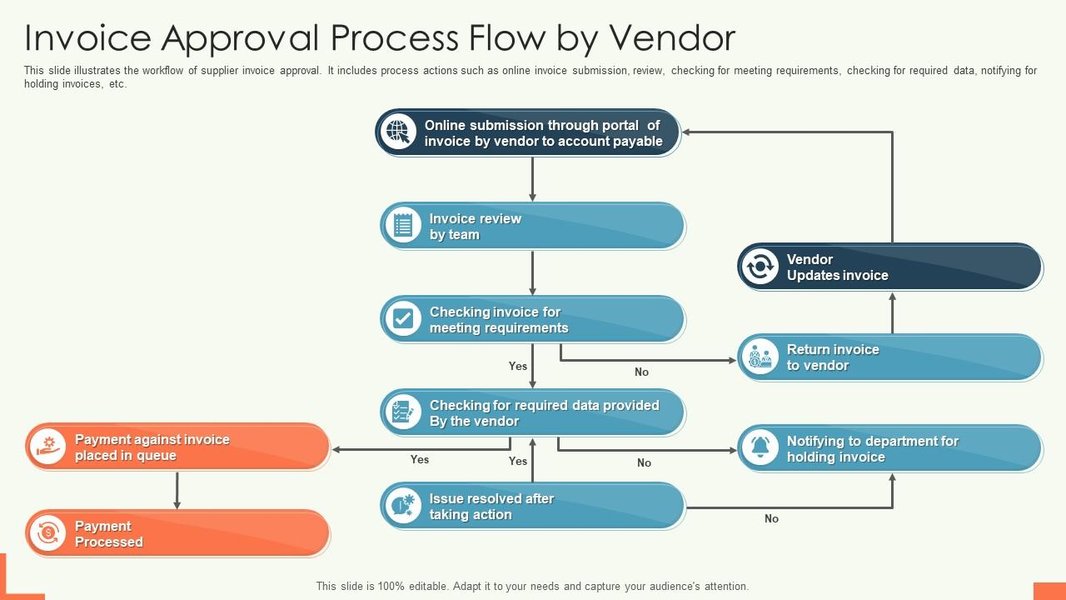
This image depicts a typical invoice approval workflow, highlighting stages from invoice receipt to payment, similar to the process being described.
Phase 3: Financial Scrutiny and System Integration
Step 5: Hand Original Invoice to Finance
After the preliminary steps of approval, registration, and accrual reversal, the physical or original electronic copy of the vendor invoice is formally handed over to the Finance department. This transfer ensures that the Finance team has the authoritative document for their detailed review and subsequent processing. A clear hand-off protocol is important to maintain an audit trail and prevent documents from being misplaced.
- Action: Original vendor invoice (physical or digital) is transferred to the Finance team.
- Responsible: Procurement Team or administrative staff handling invoices.
- Outcome: Finance department possesses the source document for verification and posting.
Step 6: Finance Review, Comparison, and Posting
This is a comprehensive verification stage undertaken by the Finance team. Their review encompasses several critical checks:
- Invoice Content Verification: Checking for accuracy of vendor details, invoice number, date, amounts, and calculations.
- Comparison with System Records: Matching the invoice against the purchase order (PO) and goods/services receipt notes (GRN) in the CW system (often referred to as two-way or three-way matching). This ensures that the company is billed only for what was ordered and received.
- Comparison with Electronic Invoice on Tax Portal: Verifying the invoice against data available on the official tax authority's portal (if applicable). This is a crucial step for compliance and to validate the authenticity of the invoice, especially for GST/VAT purposes.
Once the Finance team is satisfied that all details are in order and any discrepancies have been resolved, the cost is formally posted to the Accounts Payable (AP) ledger. This action recognizes the liability to the vendor.
- Action: Finance conducts detailed invoice review, system comparisons, tax portal verification, and posts cost to AP.
- Responsible: Finance Team.
- Systems: CW, Tax Portal, JDE (for AP posting).
- Outcome: Invoice thoroughly vetted and verified; cost officially recorded in the AP system.
Step 7: Data Interface from CW to JDE, AP Open Item
To ensure data consistency and streamline operations, information about the approved and posted invoice is transferred from the CW system to the JDE Edwards (JDE) Enterprise Resource Planning (ERP) system. This data interface populates the Accounts Payable module in JDE, creating an "AP Open Item." This open item signifies an unpaid invoice liability awaiting payment according to the agreed terms.
- Action: Invoice data is electronically transferred from CW to JDE.
- Responsible: IT Team / Finance Team (managing the interface).
- Systems: CW, JDE.
- Outcome: Vendor invoice data synchronized; AP open item created in JDE, reflecting the outstanding liability.
Phase 4: Payment Processing and Closure
Step 8: Vendor Invoice Appears as AP Capturing Vendor Payment Terms
Within the JDE system, the vendor invoice is now fully reflected as an Accounts Payable liability. Crucially, the system captures and associates the specific payment terms agreed upon with the vendor (e.g., Net 30 days, Net 60 days). These payment terms dictate the due date for the invoice and are essential for managing cash flow and scheduling payments.
- Action: Invoice is live in JDE's AP module with associated payment terms.
- Responsible: System (JDE automated process based on interfaced data).
- System: JDE.
- Outcome: Invoice integrated into AP system, payment terms dictating maturity date.
Step 9: Invoice to Be Paid During First Payment Run After Maturity
The invoice is scheduled for payment. The policy is to pay invoices during the first available payment run that occurs *after* the invoice's maturity date (as determined by the payment terms). The company conducts two scheduled payment runs per month. This systematic approach helps in managing outgoing cash flow efficiently and ensures vendors are paid within the agreed timelines, though not necessarily before the due date.
- Action: Invoice is included in a scheduled payment batch after its due date.
- Responsible: Finance Team (Accounts Payable).
- System: JDE (Payment Processing module).
- Outcome: Payment processed according to schedule and vendor terms.
Step 10: Proof of Payment Shared with Ops File Handler to Notify Vendor
Once the payment has been successfully processed and disbursed, the Finance team generates a proof of payment (e.g., bank transfer confirmation, remittance advice). This proof is then shared with the original Operations file handler (the person or team who initiated the order in Step 2). The Ops file handler is responsible for communicating this payment confirmation to the vendor. This final step closes the loop on the transaction, maintains good vendor relations by providing payment transparency, and helps in reconciling accounts on the vendor's side.
- Action: Proof of payment is provided to the Operations team, who then inform the vendor.
- Responsible: Finance Team (sharing proof), Operations Team (notifying vendor).
- Outcome: Vendor notified of payment; transaction cycle completed; positive vendor relationship maintained.
Visualizing the Workflow: A Mindmap Overview
The following mindmap illustrates the sequential flow of the 10-step invoice approval and payment process, providing a clear visual representation of the interconnected stages from initiation to completion. Each branch represents a key phase or action within the overall workflow.
Accrual Update"] id1_1["Procurement Team"] id1_2["Buying Rates"] id2["2. Place Order
to Vendor"] id2_1["Operations Team"] id3["3. Register Invoice
(Post Product Head Approval)"] id3_1["Product Head Approval"] id4["4. Reverse Accrual"] id4_1["Procurement/Finance"] id5["5. Hand Invoice
to Finance"] id5_1["Original Document"] id6["6. Finance Review & Post AP"] id6_1["Content Check"] id6_2["System Record Compare (CW)"] id6_3["Tax Portal Compare"] id7["7. Data Interface
CW to JDE (AP Open Item)"] id7_1["IT/Finance"] id8["8. Invoice in JDE AP
Captures Payment Terms"] id8_1["JDE System"] id9["9. Payment Processed
(Post Maturity, 2 Runs/Month)"] id9_1["Finance Team"] id10["10. Share Proof of Payment
Ops Notifies Vendor"] id10_1["Finance & Ops"]
Workflow Step Summary Table
This table provides a concise summary of each step in the invoice management workflow, highlighting the action, responsible party, primary system involved, and the key outcome of each stage.
| Step | Action | Responsible Party/Team | System(s) Involved | Outcome |
|---|---|---|---|---|
| 1 | File opening on CW with updating Accruals based on buying rates | Procurement Team | CW | Accruals adjusted; file initiated |
| 2 | Placing order to vendor | Operations (Ops) Team | CW (or procurement system) | Order confirmation received |
| 3 | Registering vendor invoice after Product Head approval | Product Head, Admin Staff | CW (or invoice system) | Vendor invoice registered |
| 4 | Reversing accrual | Procurement/Finance Team | CW (or accounting system) | Accruals updated/reversed |
| 5 | Hand original invoice to Finance | Procurement/Admin Staff | N/A (Physical/Digital Transfer) | Finance receives invoice |
| 6 | Finance review (content, system records, Tax portal), posting cost for AP | Finance Team | CW, Tax Portal, JDE | Invoice verified; costs posted to AP |
| 7 | Data interface from CW to JDE, AP Open Item | IT/Finance Team | CW, JDE | Vendor invoice data synchronized in JDE |
| 8 | Vendor invoice appears as AP capturing vendor payment terms | System (JDE) | JDE | Invoice integrated into AP with payment terms |
| 9 | Invoice paid during first payment run after maturity (2 payment runs/month) | Finance Team (AP) | JDE (Payment Module) | Payment processed |
| 10 | Proof of payment shared with Ops file handler to notify vendor | Finance Team, Ops Team | Email/Communication System | Vendor notified of payment |
Evaluating Key Aspects of the Invoice Workflow
The radar chart below offers an analytical perspective on several key attributes of the described invoice workflow. The scores (out of 10, where 10 is optimal) are based on a qualitative assessment of the process's inherent strengths and potential areas for further optimization. This visualization helps in understanding the balance between control, efficiency, and communication within the workflow.
This chart suggests strengths in accuracy, control, compliance, and vendor relations due to the multiple checks and notification steps. Efficiency and automation potential show room for improvement, which is common in multi-step manual approval processes. System integration is reasonably good with the CW-JDE link, but deeper automation could enhance this further.
Understanding Invoice Processing: Video Insight
The video below, "Invoice Processing Explained: Steps & Impact," provides a general overview of what invoice processing entails, its typical stages, and why it's a critical function for businesses. It covers concepts like receiving supplier invoices, approval processes, and optimizing cash flow, which are all relevant to the detailed 10-step workflow discussed here. Understanding these fundamentals can help appreciate the importance of each step in ensuring financial health and operational smoothness.
This video complements our detailed workflow by offering broader context on the invoice management landscape, highlighting the journey from invoice receipt to payment and its impact on business operations and financial management. It reinforces the significance of having a structured process, like the one outlined, to manage accounts payable effectively.
Frequently Asked Questions (FAQ)
What is the purpose of accrual and its subsequent reversal in this workflow?
Why is the comparison with an electronic invoice on a Tax Portal (Step 6) important?
What are the benefits of data interface between CW and JDE systems (Step 7)?
How do scheduled payment runs (Step 9) benefit the company?
Recommended Further Exploration
To deepen your understanding of related financial processes and best practices, consider exploring these topics:
- What are best practices for implementing three-way matching in accounts payable?
- How can businesses automate their invoice approval workflows to improve efficiency and reduce errors?
- What are the key financial controls to prevent fraud in the procure-to-pay cycle?
- Explore strategies for optimizing working capital through effective vendor payment term management.
References
Last updated May 19, 2025